



5 Best Appointment Scheduling Chatbots for Service Businesses in 2026
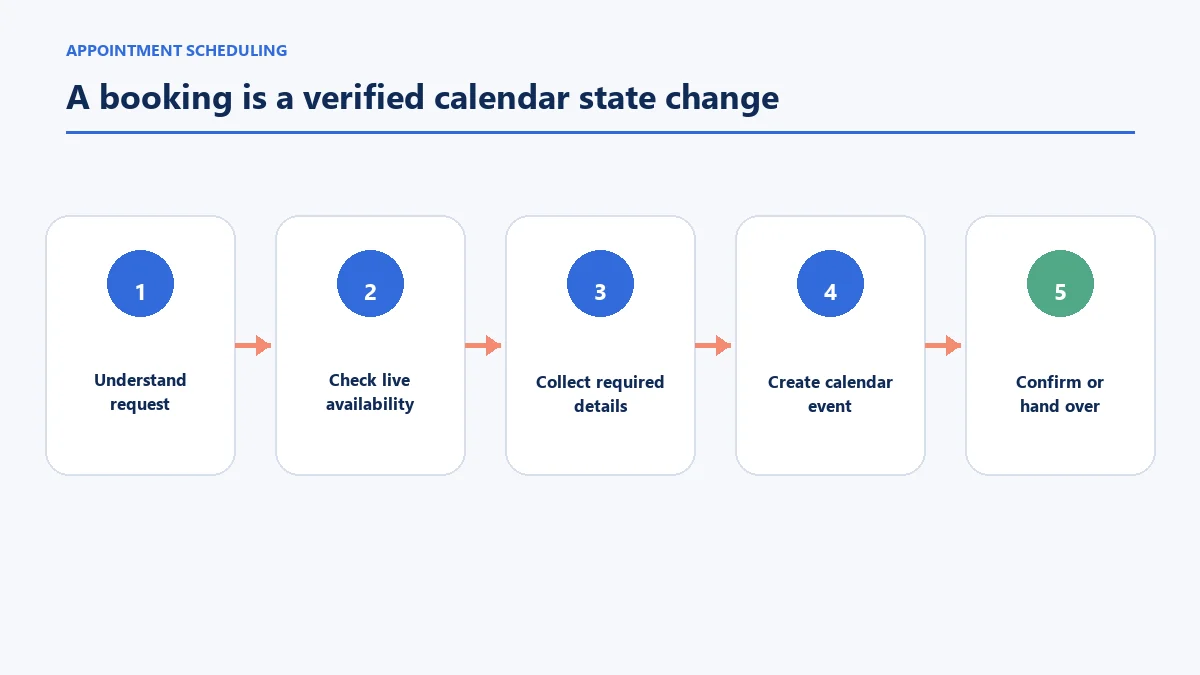
The best appointment scheduling chatbot must do more than display a calendar link. It should understand the requested service, check valid availability, collect the required details, create or update the booking and explain what happens next. If it cannot complete one of those actions, the customer needs an honest fallback rather than a confident but false confirmation.
This comparison covers five products with documented routes from a conversation to a real booking: OnceHub, Voiceflow, Botpress, Landbot and Manychat. They are not interchangeable. OnceHub combines conversational interfaces with its own scheduling engine; the others use calendar integrations, APIs or external scheduling systems to different degrees.
The assessment is based on official product documentation reviewed in July 2026, not undisclosed hands-on testing. Features and plan requirements can change, so verify the final workflow in the account you intend to buy.
Which appointment scheduling chatbot is best for each use case?
| Product | Best suited to | How the booking is completed | Main implementation consideration |
|---|---|---|---|
| OnceHub | Teams wanting scheduling, qualification and chat in one platform | OnceHub Booking Calendars and scheduling logic | Confirm which conversational and phone features are included in the chosen plan |
| Voiceflow | Teams building a tailored voice-and-chat booking agent | Calendar or CRM connected through an API | Requires conversation design, integration work and ongoing evaluation |
| Botpress | Technical teams building an AI agent around Calendly or Google Calendar | Official calendar integrations and workflow actions | Flexibility creates more build and test responsibility |
| Landbot | No-code teams wanting a guided website or WhatsApp booking flow | A Calendly integration within a visual bot flow | Best for structured journeys; verify channel-specific behaviour |
| Manychat | Social-first businesses collecting and converting enquiries in messaging | Data collection plus a scheduling link, API or external automation | A date picker alone does not reserve live calendar availability |
There is no universal winner. A clinic screening patients before a booking, a sales team routing leads and a salon converting Instagram messages have different rules, channels and consequences when a booking fails.
How we compared appointment booking chatbots
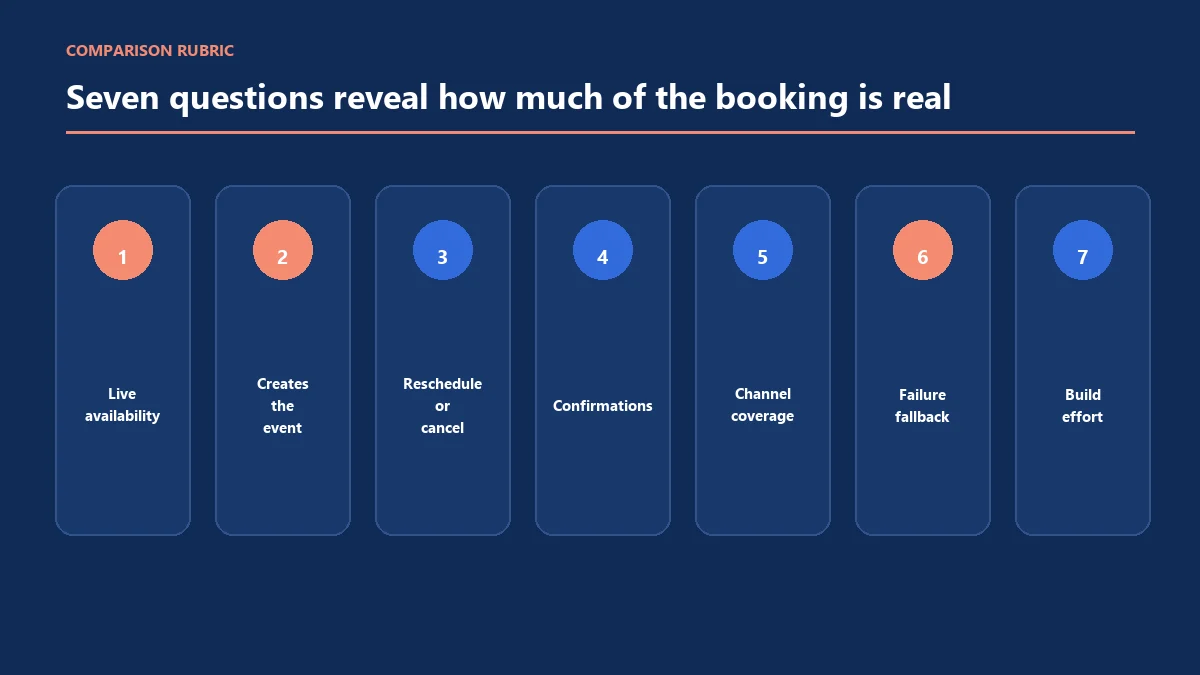
Every product was assessed against the same seven questions:
- Can the chatbot read live availability rather than invent a time?
- Can it create a booking, not merely collect a preferred date?
- Can a customer reschedule or cancel without starting again?
- Who sends confirmations and reminders?
- Which channels can use the same booking logic?
- What happens when the calendar, API or customer input fails?
- How much configuration, integration and maintenance does the workflow require?
The official documentation establishes what a product is designed to support. It does not prove that every business rule, calendar combination or plan has been tested in production.
1. OnceHub: best for an integrated scheduling system
OnceHub is the clearest fit when the business wants the conversational experience and scheduling engine from the same provider. Its chatbots can qualify a visitor, route the person to a suitable Booking Calendar and place the calendar inside the workflow. Its current product documentation also describes web and phone agents that use the organisation’s booking logic.
This reduces one source of integration ambiguity: availability, buffers, time zones and booking rules come from OnceHub’s scheduling configuration. The platform also supports routing forms and different meeting structures, which can help a team direct people to a service, host or location before showing times.
Best for: Sales, professional-service and multi-team organisations that want guided qualification and booking without assembling the core scheduling engine from separate products.
Documented booking route: OnceHub’s Booking Calendar action for chatbots lets a builder select a calendar inside the chatbot workflow.
Check before choosing: Required plan, web or phone channel, host-routing rules, rescheduling journey, calendar compatibility, data requirements and how an unresolved conversation reaches a person.
2. Voiceflow: best for a custom voice-and-chat booking agent
Voiceflow is an agent-building platform rather than a ready-made appointment book for one industry. Its scheduling material documents agents that can check live availability, book, confirm, reschedule and cancel across voice or web chat, with Google Calendar, Outlook, Calendly or a CRM connected through an API.
That makes Voiceflow suitable when the conversation must do more than ask for a name and time. A builder can add qualification questions, location or service routing and business-specific rules before the calendar action. The trade-off is ownership: the team or implementation partner must design the dialogue, integrations, error handling and evaluation process.
Best for: Businesses with technical or implementation support that need a tailored AI booking agent across phone and chat.
Documented booking route: Voiceflow describes AI appointment scheduling agents connected to calendars and CRMs through APIs.
Check before choosing: API behaviour, telephony and usage costs, required development skills, audit logs, fallback rules and whether rescheduling changes the correct event in every test case.
3. Botpress: best for technical flexibility around calendar actions
Botpress provides an AI-agent builder with official calendar integrations. Its Google Calendar integration documents actions to check availability and create, update or delete events. Its Calendly integration can share available options, receive booking events and support confirmation or follow-up workflows.
This is useful for teams that want to control the knowledge, conversation and calendar actions in one agent design. It can also support more specialised logic than a fixed appointment template. However, the builder must understand which integration is verified, how credentials are protected and what happens if an action succeeds but the confirmation message fails.
Best for: Technical teams that want an extensible appointment chatbot and can own integration, testing and monitoring.
Documented booking route: Botpress’s Google Calendar integration includes availability and event-management actions; its Calendly route has separate prerequisites.
Check before choosing: Integration ownership, account type limitations, attendee invitations, event IDs, duplicate prevention, error logs and the path for a human to correct a failed booking.
4. Landbot: best for a guided no-code booking flow
Landbot offers a visual flow builder and an appointment-booking template that connects to Calendly. The documented template can collect details, present the scheduling step and send meeting information. It is available for website and WhatsApp use cases, although channel components and API rules can differ.
The strength is a structured journey that a non-developer can understand: ask the service, collect the details, branch where necessary and introduce the booking interface. It is less suitable when a business expects an open-ended AI agent to infer complex operational rules without deliberate flow design.
Best for: Small and mid-sized teams wanting a controlled website or messaging booking journey with a visual builder.
Documented booking route: Landbot documents an appointment-booking template that uses a native Calendly integration.
Check before choosing: Calendly plan requirements, WhatsApp template and consent rules, rescheduling behaviour, localisation, handover and how data is retained across the bot and calendar provider.
5. Manychat: best for social messaging that leads to a booking
Manychat is strongest when the appointment journey begins on Instagram, Messenger or WhatsApp. Its automation builder can collect contact data and date or time input, send reminders through supported messaging formats and connect to external systems through APIs or automation services on eligible plans.
The important limitation is easy to miss: collecting a preferred date in a chat does not prove that the slot is free or create a calendar event. A complete Manychat booking workflow needs a scheduling link or an integration that reads availability and records the appointment. Time-zone settings must also agree between systems.
If Instagram DMs also carry product, policy or customer-service questions beyond appointment capture, the comparison of AI chatbots for Instagram customer conversations covers knowledge-based replies, comment handling and human takeover. The scheduling connection should still remain responsible for confirming the calendar event.
Best for: Social-first businesses that want to qualify enquiries in messaging and then move the person into a controlled booking process.
Documented booking route: Manychat documents date-and-time data collection and external requests, but the selected scheduling system must still confirm live availability.
Check before choosing: Channel restrictions, calendar integration, time-zone conversion, messaging consent, reminder templates, paid-plan requirements and what the customer sees if the external request fails.
The booking action matters more than the chatbot label
Some products market a “booking chatbot” that ends by displaying a standard calendar widget. Others can query available times, create the event and update it later. Both may be useful, but they solve different amounts of the journey.
| Capability level | What the customer can do | What the business must still provide |
|---|---|---|
| Scheduling link | Open a separate booking page | The scheduling service handles availability and confirmation |
| Embedded calendar | Choose a slot without leaving the page | The external calendar still owns booking rules |
| Conversational calendar action | Ask for a time and receive valid options in chat | Integrations, credentials and error handling must be maintained |
| End-to-end booking agent | Qualify, book, confirm, change and route exceptions | The business must define rules, monitor failures and provide human support |
Ask a vendor to demonstrate the complete state change. A friendly message saying “you are booked” is not evidence unless the event exists in the correct calendar with the correct service, location, time zone and customer details.
Test these seven booking situations before launch
Use a test calendar and non-customer contact details. Check the calendar record and every customer-facing message after each scenario.
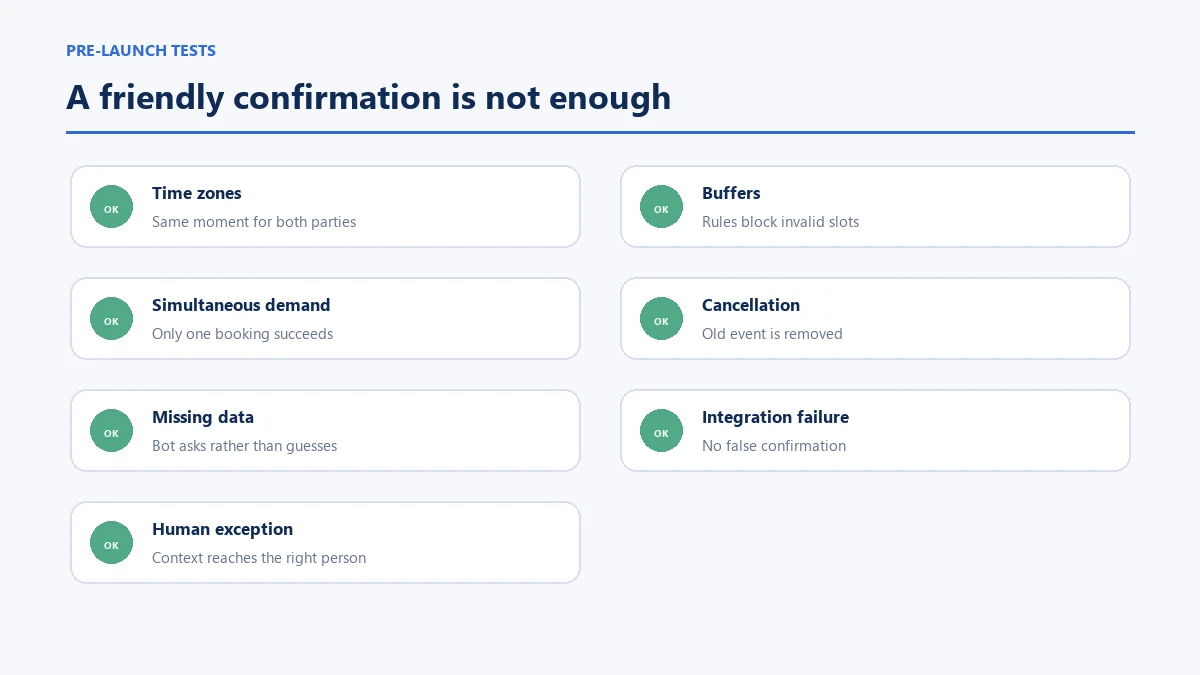
- Time-zone difference: Request a time from a device in another time zone and confirm both parties see the same moment.
- Buffer and travel time: Try to book immediately before or after an existing appointment.
- Simultaneous demand: Use two sessions to request the last available slot and check that only one can reserve it.
- Change and cancellation: Move an appointment, then confirm the old event is removed or updated rather than duplicated.
- Missing information: Withhold a required field and check that the bot asks clearly rather than inventing it.
- Integration failure: Disconnect or safely simulate an unavailable calendar and verify that no false confirmation is sent.
- Human exception: Ask for something outside the rules and confirm the conversation reaches the right person with useful context.
Healthcare providers need additional privacy, access and clinical-safety checks. The dedicated comparison of medical chatbots for appointment booking covers that narrower use case; a general scheduling tool should not be assumed suitable for health information.
How AeroChat supports appointment-based businesses around the booking
A scheduling chatbot is designed around availability and calendar actions. Customers may also ask about products, delivery, returns, service policies or an existing order before they decide whether an appointment is the right next step.
AeroChat is an AI agent platform that helps online businesses run customer service on autopilot. It can answer suitable questions from approved business knowledge across supported channels and transfer a conversation when a person needs to take over. A dedicated scheduling product should still own live calendar availability and booking records unless a specific integration has been verified.
This combination is useful when the service journey contains two separate jobs: answer the customer’s question, then book the right human interaction. AeroChat should not be placed in the scheduling list merely because it supports AI conversations.
| Customer need | Appointment scheduling products above | AeroChat |
|---|---|---|
| Read live calendar availability | Core capability when the required calendar connection is configured | Not a verified native scheduling capability |
| Create, reschedule or cancel a booking | Supported to different degrees by the selected product and integration | Should remain with the dedicated scheduling system |
| Answer service, product or policy questions | Varies by chatbot design and knowledge setup | Can answer suitable questions using approved business knowledge |
| Continue support across supported messaging channels | Channel coverage differs by product | Designed for connected customer-service conversations across supported channels |
| Handle an uncertain or sensitive request | Requires a deliberately configured fallback | Can transfer the conversation when human judgement is needed |
| Best role in the customer journey | Own the calendar action and booking record | Answer surrounding questions and route the person to the right next step |
For example, a customer may need to understand a service, delivery policy or product before an appointment is appropriate. AeroChat can support that information stage, while OnceHub, Voiceflow, Botpress, Landbot or Manychat with its scheduling connection completes the calendar action. This separation prevents a support answer from being mistaken for a confirmed appointment.
For social-first services, the existing article on Instagram chatbots for booking enquiries explains the channel-specific path. Property businesses have separate lead qualification and viewing requirements covered in the real estate chatbot workflow.
How to choose without paying for overlapping systems
Map the existing stack before selecting a chatbot:
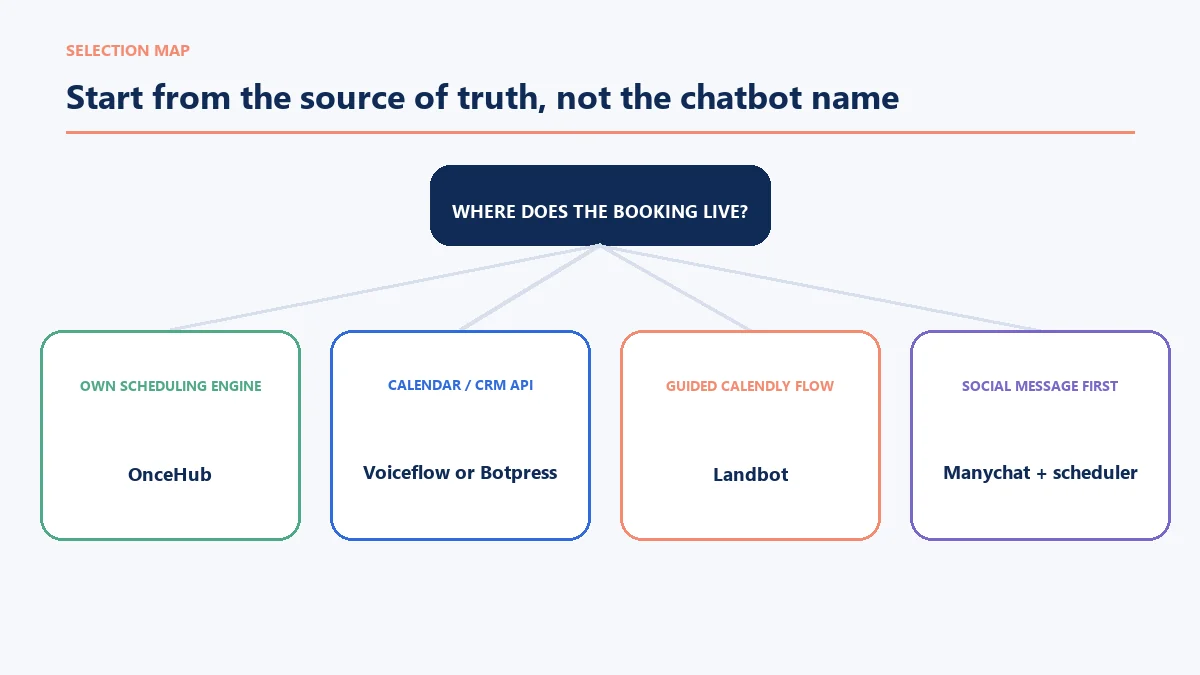
- Which calendar or practice-management system is the source of truth?
- Does it expose reliable availability and booking actions?
- Which channels generate appointment requests?
- Must the bot qualify a person before showing a calendar?
- Who owns reminders, cancellations and missed-appointment follow-up?
- What information is sensitive, and where may it be stored?
- Which exceptions require a human, and how quickly?
Then run the seven test situations above using the intended plan. A cheaper chatbot that needs several paid connectors and ongoing developer time may cost more than an integrated platform. Conversely, a comprehensive scheduling suite may be unnecessary when the business only needs to place a trusted booking link after a simple conversation.
Frequently asked questions
Can a chatbot book an appointment directly into a calendar?
Yes, if the chatbot has a configured action or integration that can read valid availability and create the calendar event. A bot that only collects a date or displays a link has not completed the booking itself.
Can an appointment chatbot reschedule or cancel bookings?
Some can, but the implementation must retain the correct event reference and update the source calendar. Test changes and cancellations separately; creating a new event without removing the old one can cause double bookings.
Is an AI scheduling chatbot suitable for healthcare?
Not automatically. The provider must assess privacy, security, access controls, patient identity, clinical boundaries and applicable law. A generic scheduling feature or vendor statement is not proof that a complete healthcare workflow is compliant.
Should reminders come from the chatbot or calendar system?
Choose one clear owner for each reminder so customers do not receive duplicates or contradictory details. Calendar or practice-management reminders are often easier to keep aligned with rescheduling, while messaging reminders may need separate consent and template rules.
What is the safest fallback when booking fails?
Tell the customer that the appointment has not been confirmed, preserve the details already supplied and provide a human or alternative booking route. Never present a provisional request as a confirmed appointment.
Appointment scheduling chatbots serve any service business where bookings are the primary conversion event. For dental and healthcare use cases, dental practice AI chatbots covers the specific requirements. For real estate, real estate AI chatbots covers the viewing and lead qualification flows. For restaurants, how restaurants manage customer messaging covers the reservation and order enquiry automation that overlaps with scheduling.



