Are Telegram AI Bots Safe?

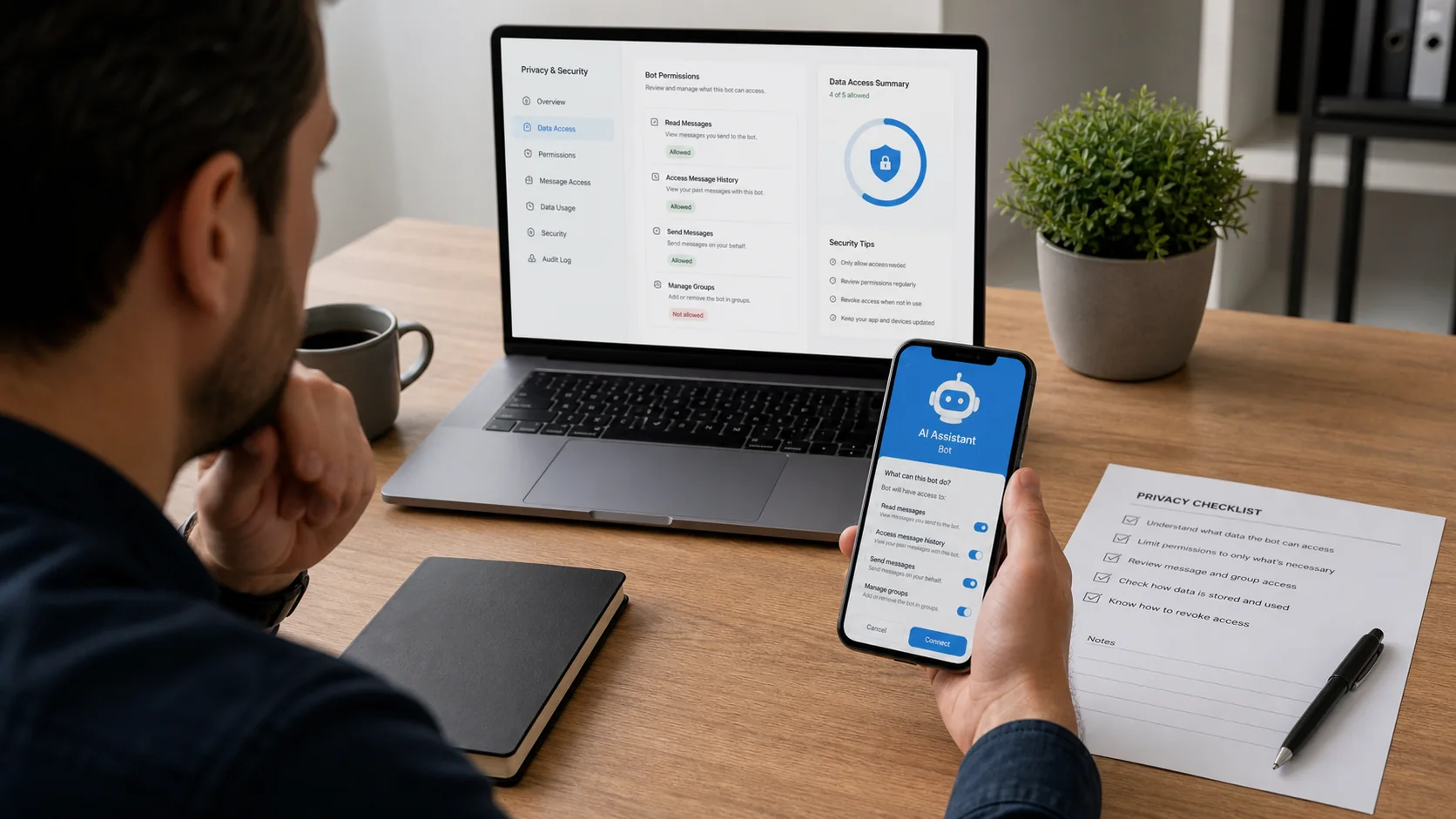
Telegram AI bots can be safe for low-risk tasks, but safety depends on the bot, its permissions and the information you send. An ordinary bot cannot automatically read every conversation in your account. It can, however, receive messages and files you send to it, and a group bot may see more when its Privacy Mode is disabled.
There is also a second risk outside Telegram: the company operating the bot may store or pass messages to an AI or cloud provider. Telegram controls what reaches the bot; the bot operator controls what happens after receiving it.
Treat an unfamiliar AI bot as you would an unfamiliar website. Check who runs it, what data it collects and whether the task justifies sharing that information.
What information can a Telegram bot see?
The answer depends on how the bot is being used.
| Information or activity | Can a bot receive it? | Important condition |
|---|---|---|
| Public name, username and profile pictures | Yes | These are part of the public profile information Telegram exposes to bots |
| A private message sent to the bot | Yes | The bot needs the message to respond |
| A photo, document or voice message sent to the bot | Yes | The bot and its linked services may process the attachment |
| Phone number | Only if shared | Telegram does not show it automatically, but a user can deliberately share a contact |
| Location | Only if shared | Some bots can request location through a Telegram button |
| Payment and shipping details | When entered into a bot payment flow | Telegram and the payment provider’s rules also apply |
| Messages in a group | It depends | Privacy Mode, administrator status and bot configuration affect access |
| Other private chats | Normally no | A standard bot cannot browse unrelated conversations |
| Chats allowed through Chat Automation | Yes, within the permission selected | The user chooses which chats the connected bot may access |
| Secret Chats | No for ordinary bots | Bots do not participate in Telegram Secret Chats |
Telegram’s own FAQ summarises the basic private-chat rule: bots can see public profile information and messages sent to them, but not a phone number unless the user chooses to provide it. Telegram bot safety guidance
Can a Telegram bot read every message in a group?
Not automatically. Telegram group bots can operate with different levels of access.
With Privacy Mode enabled, a group bot normally receives messages and commands intended for it. With Privacy Mode disabled, the bot can receive all messages sent in the group while it is present. Telegram displays whether a bot “has access to messages” in the group’s member list.
Bots added as administrators may also receive broader information needed for their role. For example, a moderation bot cannot screen messages it is not permitted to receive.
Telegram introduced Guest Mode in 2026 as a narrower alternative for supported bots. A guest bot mentioned by username receives the tagged message and replies to it without becoming a group member. Telegram says it does not receive the rest of the chat or the member list in that mode.
Before adding an AI bot to a sensitive group:
- Open the group’s member list.
- Check whether the bot has access to messages.
- Review whether it is an administrator.
- Remove permissions that are not required.
- Tell group members what the bot receives and why.
If the group contains confidential customer, employee, legal or financial discussions, do not add a bot simply for convenience.
What happens after a bot receives your message?
Telegram’s access controls are only the first layer.
Once a message reaches a third-party bot, the operator may:
- process it on its own server;
- send it to an external AI model;
- store the original message or a generated summary;
- associate it with your Telegram user ID;
- use it for service monitoring or improvement; or
- share it with subprocessors described in its privacy policy.
These practices are not identical for every bot. A recognisable model name does not establish who stores the data. Two bots can use the same underlying model and have completely different retention and security arrangements.
Look for a privacy notice that answers four questions:
- Who operates the bot?
- What information is collected?
- Which providers receive it?
- How long is it retained and how can deletion be requested?
No privacy policy is a strong reason not to send personal or business information.
For a broader framework covering more than Telegram specifically, the guide to AI chatbot privacy and what customer data it can see walks through the same nine questions across any channel.
Is Telegram’s native AI safer than a third-party bot?
Telegram’s native AI features and third-party AI bots follow different data paths.
Telegram says native features such as AI summaries, translation, custom tones and AI-powered sticker search run through Cocoon in an isolated encrypted environment without sending the request to a third party. A bot or mini app, by contrast, is a third-party service with its own operator and privacy terms. The separate guide to Telegram bot vs AI assistant explains that same distinction in more depth for businesses evaluating what sits behind their bot.
That does not make every use of native AI risk-free. Users should still review generated text and avoid treating a summary as a substitute for an important original document. It does mean the provider relationship is different from selecting an unknown public bot.
Are bot conversations end-to-end encrypted?
No. Regular Telegram cloud chats, including bot chats, are not Secret Chats.
Telegram encrypts cloud-chat data between the app and its servers and stores it in Telegram Cloud. Secret Chats use end-to-end encryption and are device-specific, but bots cannot participate in them. Telegram’s privacy policy explains how cloud chats and Secret Chats are handled.
This distinction matters because an AI bot must receive readable content to process it. Even if transport and storage are encrypted, the bot operator or its authorised processors may need access to the message while producing a response.
Do not send passwords, Telegram login codes, recovery phrases, full card details or other authentication secrets to a bot.
How can you check whether an AI bot is trustworthy?
Use evidence rather than follower counts or a persuasive welcome message.
| Check | Positive signal | Warning sign |
|---|---|---|
| Operator identity | A traceable company or developer with contact details | Anonymous ownership |
| Privacy notice | Explains data, providers, retention and deletion | Missing or vague policy |
| Official source | Username linked from the provider’s real website or documentation | Bot found only through search or forwarded messages |
| Permissions | Access is limited to what the task requires | Requests group administration without a clear reason |
| Sensitive requests | Keeps authentication and payments in appropriate secure flows | Requests passwords, login codes or recovery phrases |
| Data control | Provides a practical deletion or support route | No way to contact the operator |
| Files and links | Uses known domains and expected file types | Executables, shortened links or unexpected downloads |
| Behaviour | Gives clear limits and allows human support where relevant | Pressures the user to act quickly or send more data |
Telegram verification can help confirm identity, but the absence or presence of a badge is not a complete security assessment. A legitimate new service may be unverified, while a verified identity does not remove the need to evaluate its data practices.
What information should you avoid sharing?
Never send a bot:
- Telegram or email login codes;
- account passwords;
- cryptocurrency seed phrases or private keys;
- full payment-card or bank credentials in an ordinary message;
- identity documents unless the service has a verified need and secure process;
- confidential client, employee or patient records without an approved business process; or
- API tokens, including a BotFather token.
For ecommerce support, even an order number, email address and delivery details can be personal data. A business needs an appropriate purpose, notice and access control rather than assuming that ordinary order information is unregulated.
What should you do after sharing sensitive information?
Act according to what was exposed.
- Stop or block the bot so it cannot continue messaging you.
- Delete the Telegram conversation if you no longer need it.
- Contact the bot operator and request deletion of externally stored data.
- Change any password or token that was shared.
- Revoke exposed sessions or API credentials.
- Contact the relevant bank, platform or security team if payment or account access is at risk.
- Preserve evidence of suspected fraud before deleting messages.
Deleting a Telegram chat does not prove that a copy held by the bot operator or its processor has also been deleted. Use the operator’s privacy contact for that separate request.
What should a business check before deploying a Telegram bot?
A business has more responsibilities than an individual asking a public bot a low-risk question.
Before launch, document:
- which Telegram conversations and fields are collected;
- where messages are processed and stored;
- which AI, cloud and messaging providers act as subprocessors;
- the retention and deletion process;
- employee access permissions;
- how customers are told that automation is being used;
- which questions the bot must not answer; and
- when a person takes over.
Test with fictional customer data before using live information. Also confirm what happens when the bot cannot verify an order, the knowledge source conflicts with store policy or no human agent is available.
The Telegram AI chatbot setup guide covers the operational steps. Businesses deciding whether Telegram fits their audience can also review the Telegram chatbot for ecommerce guide.
How does AeroChat help businesses control Telegram chatbot risk?
AeroChat is an AI agent platform that helps online businesses run customer service on autopilot.
AeroChat gives a merchant a controlled business workflow for Telegram customer conversations instead of relying on an anonymous public bot. The business can define approved knowledge, decide when a human takes over and give its team a clear platform to manage the conversation. That does not make every deployment automatically compliant or remove the merchant’s responsibilities.
The current AeroChat privacy policy states that AeroChat processes merchant end-customer conversation data on the merchant’s behalf. It identifies Telegram, Amazon Web Services and OpenAI among the subprocessors used for channel connections, hosting and AI-powered responses. It also says conversation data is retained according to account settings and deleted after account termination, subject to a 30-day export window.
Merchants remain responsible for giving customers appropriate notice, establishing a lawful basis where required and deciding which information the AI may use. Through the Telegram chatbot integration, they can control approved sources with knowledge-base training and configure human handover for cases the AI should not resolve.
Best for: merchants who already use Telegram for customer service and want an accountable business workflow rather than an anonymous public bot.
Before deployment, review the current privacy policy and AeroChat terms against the business’s jurisdiction and data. Product documentation is evidence of stated practices, not a substitute for legal or security advice.
Frequently asked questions
Can a Telegram bot see my phone number?
Not automatically. Telegram says bots do not see a user’s phone number unless the user decides to give it to them, such as by sharing a contact.
Can a bot read messages sent before it joined a group?
A standard bot receives updates while it is present and according to its permissions. Do not assume it can retrieve the group’s entire earlier history. Check the specific bot, administrator rights and any connected service before adding it.
Does blocking a bot delete the data it already received?
No. Blocking stops further interaction in Telegram, but data already transferred to the operator may be subject to its separate retention policy. Contact the operator if you need an external copy deleted.
Are verified Telegram bots always safe?
Verification helps establish identity, but it does not guarantee that every request, link, file or data practice is suitable for your situation. Continue to limit what you share.
The safety of Telegram AI bots depends on the platform’s data handling and the specific bot or integration being used. For the practical setup side, how to enable AI features in Telegram covers what these tools do when they are active. The broader question of AI replacing personal assistance is covered in can AI replace a human personal assistant, and for WhatsApp users with similar safety questions, Meta AI in WhatsApp shows how the equivalent feature works on that platform. If a bot has stopped responding altogether rather than giving an uncertain answer, that is usually a connection problem rather than a safety question — see the separate guide to a Telegram AI bot that is not working.