Cloud vs Self-Hosted AI Chatbots: Does Your Bot Need a Computer?

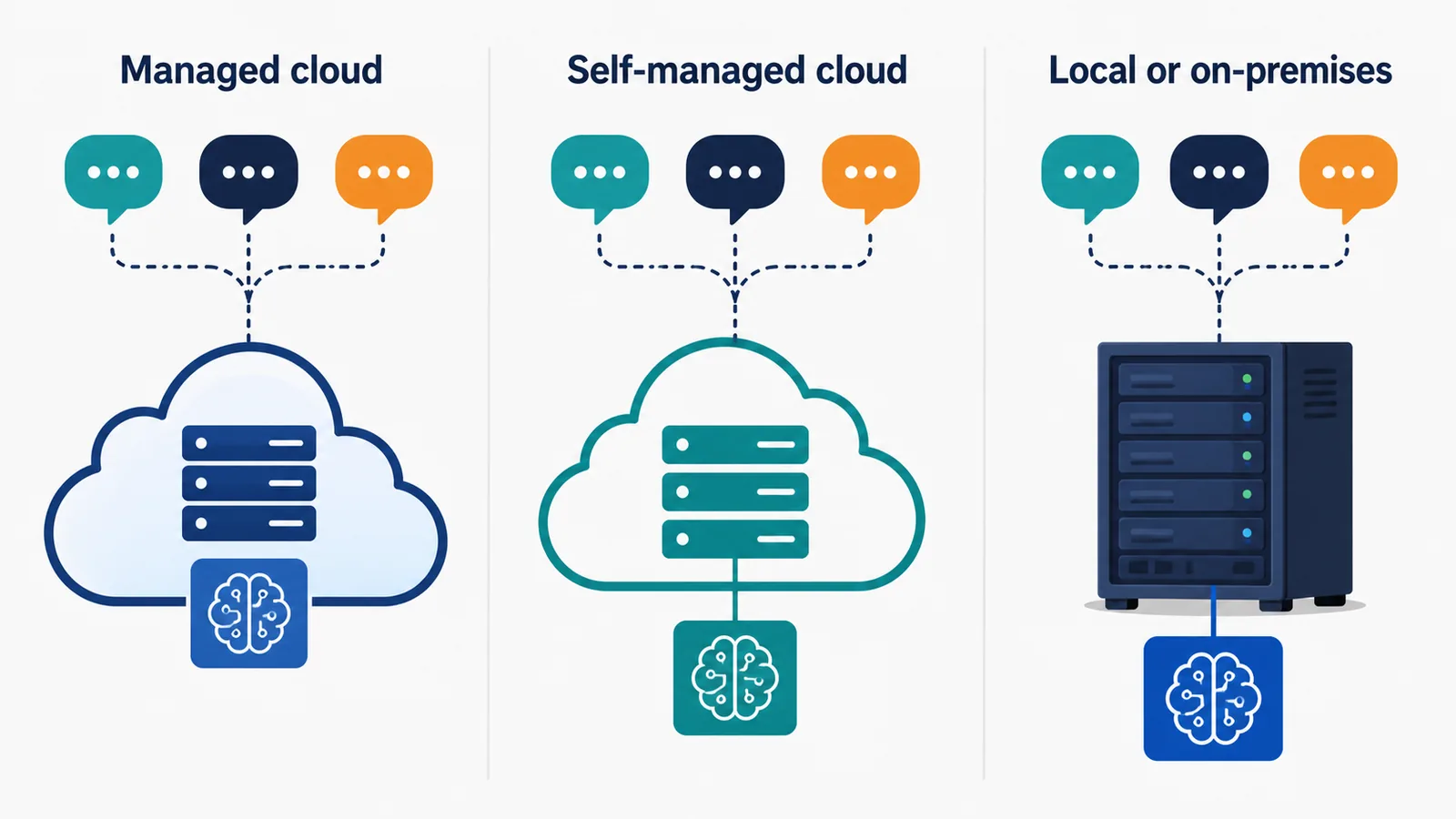
Most business AI chatbots do not need to run continuously on your own computer. A managed cloud chatbot runs on the provider’s infrastructure, so staff can close their laptops and customers can still receive replies. A self-hosted chatbot needs a server that your organisation operates, but that server could be in a data centre, a virtual private server or your premises rather than on an employee’s computer.
The best choice is not simply “cloud for convenience” or “self-hosted for privacy”. It depends on who will patch the system, protect credentials, monitor uptime, control data access and fix failures at 2 a.m. This guide compares the operating models so a business can choose the responsibility it can genuinely manage.
First, separate cloud, self-hosted and local chatbots
These labels are often mixed together, which leads to poor buying decisions.
| Model | Where it runs | Who operates the application | Does an office computer stay on? |
|---|---|---|---|
| Managed cloud or SaaS | Provider-managed cloud infrastructure | The vendor operates the platform; the customer configures it | No |
| Self-managed cloud or VPS | Cloud server rented by the business | The business or its technical partner | No, but the server must keep running |
| On-premises server | Hardware controlled at the business site or private facility | The business or its technical partner | Not a normal laptop, but dedicated hardware stays available |
| Local desktop experiment | An individual workstation | The user | Usually yes |
A self-hosted interface can still send requests to a third-party AI model API. In that case, you operate the chatbot application but some message content still leaves your server for model processing. Before treating any setup as “private”, draw the complete data path.
Nine trade-offs that matter in a real deployment
1. Setup speed
Managed services usually provide an account, connection screens, a knowledge setup process and a hosted chat interface. This can shorten the path from trial to working service because the infrastructure already exists.
Self-hosting adds server provisioning, domain and certificate setup, deployment, backups, monitoring and update procedures. Open-source software may be free to download, but installation time is still a cost.
2. Ongoing maintenance
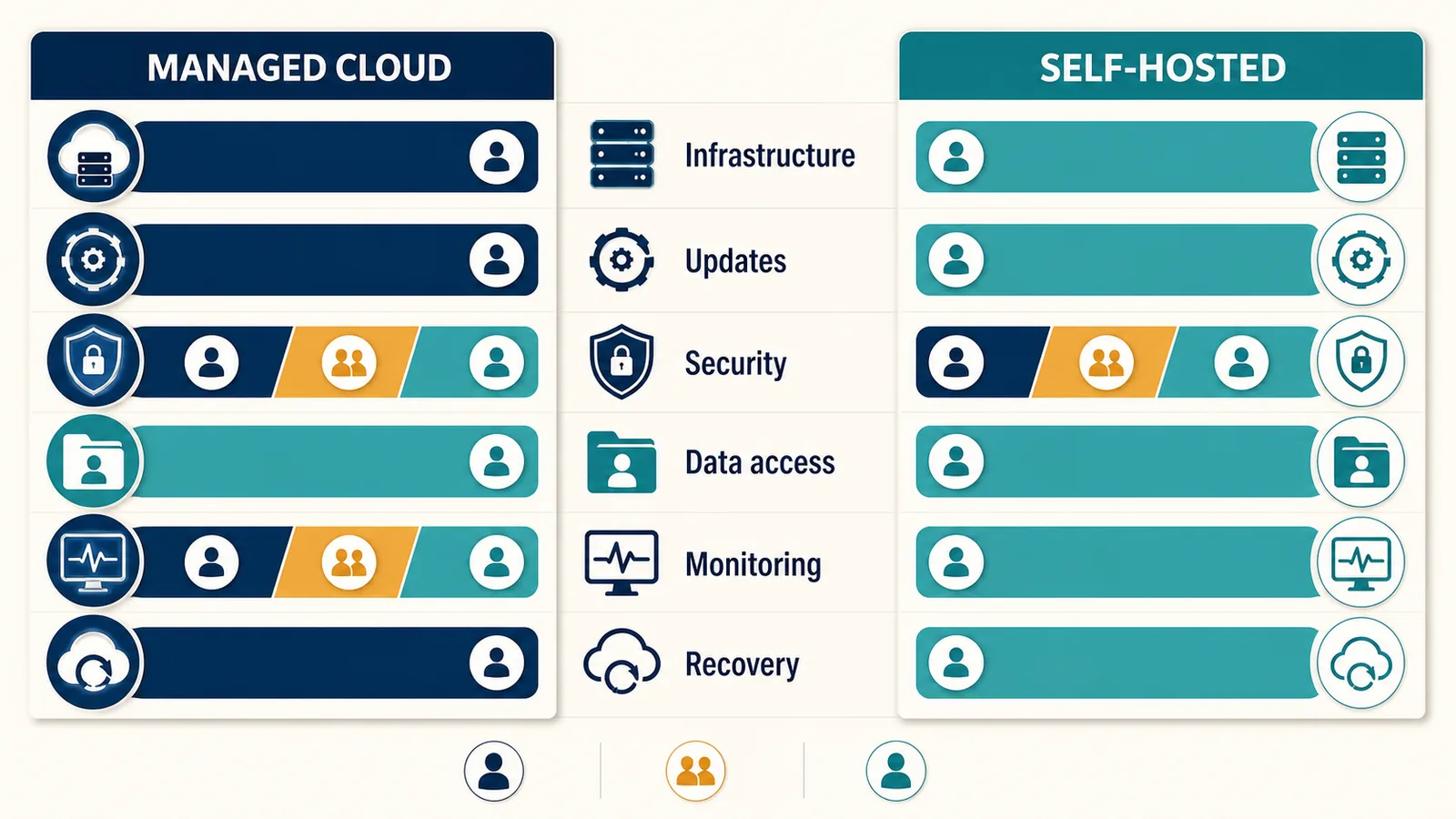
With a managed platform, the provider maintains the core service while the customer remains responsible for its content, users, access and configuration. With self-hosting, the business also owns application upgrades, dependency changes, operating-system patches, database health and incident response.
This is a shared-responsibility question, not an absence-of-responsibility question. Google Cloud’s guide to infrastructure as a service explains that a cloud provider can manage underlying infrastructure while the customer still controls applications, data and access.
3. Control and customisation
Self-hosting can offer deeper control when the software licence and architecture allow it. A technical team may alter retrieval logic, user interfaces, data pipelines or deployment locations.
Managed platforms trade some of that freedom for supported workflows and a consistent product. Before choosing, list the changes that are truly business-critical. “We may want to customise everything” is not a specification.
4. Privacy and data location
Self-hosting may help a business decide where some application data is stored, but it does not automatically keep every message on premises. Model APIs, messaging channels, analytics, email services and backups may still process data elsewhere.
Cloud products also differ. Review the provider’s privacy terms, subprocessors, retention, access controls and deletion process. For a store-specific review of roles, retention and customer rights, use the Shopify chatbot GDPR checklist before connecting production records.
5. Security ownership
Self-hosting gives control and creates work. Someone must harden the server, rotate secrets, restrict administrator access, monitor vulnerabilities, review logs and restore service safely.
A managed provider takes responsibility for parts of the stack, but the customer can still expose data through weak passwords, broad integrations or unsafe knowledge sources. Neither model is secure by label; security follows from the controls and the people maintaining them.
6. Reliability and support hours
A chatbot used for customer service needs more than a successful test message. Consider platform availability, channel outages, queue behaviour, monitoring, recovery and who receives an alert.
With self-hosting, your team designs and operates that response. With managed software, inspect the service terms and support process, including exclusions involving third-party platforms or the customer’s own configuration. Even a cloud chatbot depends on services outside one vendor’s control.
7. Total cost
Compare total operating cost rather than subscription fee against software licence alone.
| Cost area | Managed cloud | Self-hosted |
|---|---|---|
| Platform | Subscription or usage charge | Licence may be free, paid or mixed |
| Infrastructure | Usually included in the service | Compute, storage, database, networking and backups |
| Technical labour | Configuration and governance | Deployment, maintenance, security and incident response |
| AI model use | Included, limited or separately metered depending on provider | Often a separate model or GPU cost |
| Downtime | Vendor and customer responsibilities vary | Business owns recovery design and execution |
| Upgrades | Usually delivered by provider | Must be tested and deployed by the operator |
A low-traffic prototype on existing hardware may cost little. A reliable multi-channel support service with backups and on-call engineering is a different calculation. Model expected traffic, required availability and labour using your own rates.
8. Integration and channel work
Connecting a website widget is only one part of customer service. WhatsApp, Instagram, Messenger, Telegram and email each have permissions, message formats and platform rules.
A managed service that already connects these channels can reduce the amount of connector work. A self-hosted team may prefer direct control, especially if it already maintains integration infrastructure. Check the actual channels and workflows you need instead of comparing feature-count totals.
9. Exit and portability
Ask how you can export conversations, knowledge, contact data and configuration. For self-hosting, inspect the software licence and the portability of the database. For managed software, inspect export options, termination procedures and retention after closure.
Portability is not only a future migration issue. It affects incident recovery, legal requests and your ability to audit what the chatbot has learned.
Which model suits your business?
Choose managed cloud when
- you need customer conversations to continue without an office computer;
- your team wants to configure support workflows rather than operate servers;
- you need supported channel connections and a shared agent workspace;
- predictable platform management is worth the subscription cost;
- you accept the vendor’s verified data-processing arrangement.
Choose self-hosted when
- a material technical or governance requirement cannot be met by available managed services;
- you have people responsible for deployment, security, monitoring and upgrades;
- deeper code-level customisation justifies the operational burden;
- you can map and govern any external model or channel providers that remain in the data path.
Use a local computer for experiments when
- you are testing a small proof of concept;
- downtime when the device sleeps is acceptable;
- no production customer service depends on it;
- sensitive data is excluded or governed appropriately.
A desktop prototype should not quietly become production infrastructure. If customers depend on it, define an owner, recovery plan, monitored hosting environment and security process first.
A decision scorecard for non-technical teams
Rate each requirement as essential, useful or irrelevant. Then ask which operating model meets it without relying on work your team cannot perform.
| Decision question | Why it changes the choice |
|---|---|
| Must the bot be available outside staff hours? | Rules out an ordinary desktop unless it remains reliably online |
| Do we have an accountable infrastructure owner? | Self-hosting needs continuing operational ownership |
| Is a particular data location mandatory? | Requires a verified architecture, not a marketing label |
| Do we need code-level changes? | May favour self-hosting or a platform with a suitable API |
| How many channels must stay connected? | Connector maintenance can become a major workload |
| What can an outage cost us? | Determines monitoring, redundancy and support needs |
| Can we export our information? | Reduces migration and continuity risk |
Is AeroChat Cloud-Based or Self-Hosted?
AeroChat is chat infrastructure that runs your customer service and sales workflows. You describe the workflow you want, and AeroChat runs it, connected to your own systems. It is a managed, cloud-based service rather than a self-hosted product, so a merchant does not need to keep a personal or office computer running for customer conversations.
AeroChat takes care of the hard parts of running it: data protection, security, performance and integration. You define the workflows without having to operate the servers behind them. Merchant keys for connected services stay with AeroChat, and order lookups verify the customer’s email or phone first. Its relevant capabilities include knowledge-base training, customer-service automation and human handover. The broader AeroChat product overview explains the available tools, while how AeroChat works covers the setup journey.
That convenience is also the limitation for teams whose policy requires a self-hosted application. AeroChat’s current service terms identify it as cloud-based, and its service-level agreement describes availability commitments and exclusions. Review those current documents rather than assuming that “cloud” transfers every operational responsibility to the vendor.
Frequently asked questions
Can an AI chatbot run when my laptop is off?
Yes, if it is hosted on a managed cloud platform or an always-on server. A chatbot running only on that laptop normally becomes unavailable when the device sleeps, disconnects or shuts down.
Does self-hosted mean the AI model is local?
No. A self-hosted chatbot application may still send messages to a cloud AI model API. Confirm where the interface, database, retrieval system, model and backups each run.
Is a cloud chatbot cheaper than self-hosting?
It depends on traffic, subscription terms, infrastructure and labour. Managed cloud is often easier to budget, while self-hosting may be economical for a capable team with suitable infrastructure. Compare total operating cost over the expected service life.
Is self-hosting always more private?
No. It can offer more control, but privacy depends on data flows, permissions, providers, retention and maintenance. A poorly configured self-hosted service can expose more data than a well-governed managed one.
The practical answer
Your AI chatbot needs reliable computing, but that computer does not normally have to be yours. Choose managed cloud when you want a provider to operate the platform and your team can accept its verified terms. Choose self-hosting when you have a specific need for control and the people to operate it safely.
Whichever model you choose, make sure every responsibility, from data access to security updates and outage recovery, has a named, capable owner.
Start your 7-day free trial. No credit card needed. Try AeroChat’s managed cloud service with your own conversations. On Shopify? Install AeroChat from the Shopify App Store.