AI Chatbot Privacy: What Customer Data Can It See?

An AI chatbot can see only the customer data that your business, its integrations and the customer make available to it. That may be limited to the current message, or it may include conversation history, uploaded files, contact details, order information and data retrieved from connected systems.
The practical privacy question is therefore not “Does the chatbot use AI?” It is: what can this particular system access, for which purpose, for how long, and who else receives it? Answering those four points before launch is more useful than relying on a general promise that a tool is “secure”.
This guide gives business owners and support leaders a nine-question audit for mapping that access. It is operational guidance, not legal advice; applicable privacy duties depend on where you operate and whose data you process.
What customer data might an AI chatbot see?
A support chatbot may process several data layers. Not every bot needs every layer.
| Data layer | Examples | Why a bot might need it | Main control question |
|---|---|---|---|
| Current conversation | Message text, voice-note transcript, uploaded image | Understand and answer the request | Can the bot answer without collecting extra details? |
| Conversation history | Earlier messages, previous support outcome | Avoid making the customer repeat themselves | How much history is loaded and retained? |
| Identity and contact data | Name, email, phone number, account ID | Find the correct record or continue the conversation | Is identity verified before account details are revealed? |
| Commerce data | Product, order status, delivery address, return state | Answer order and delivery questions | Does the bot receive the whole record or only the fields required? |
| Knowledge sources | FAQs, policies, product pages, uploaded documents | Ground answers in business information | Do documents contain hidden personal or confidential data? |
| Technical data | IP address, device, timestamps, diagnostic logs | Security, reliability and abuse prevention | What is logged, by whom and for how long? |
| Connected-system data | CRM notes, helpdesk tickets, email or calendar records | Complete cross-system tasks | Are permissions narrow, revocable and role-based? |
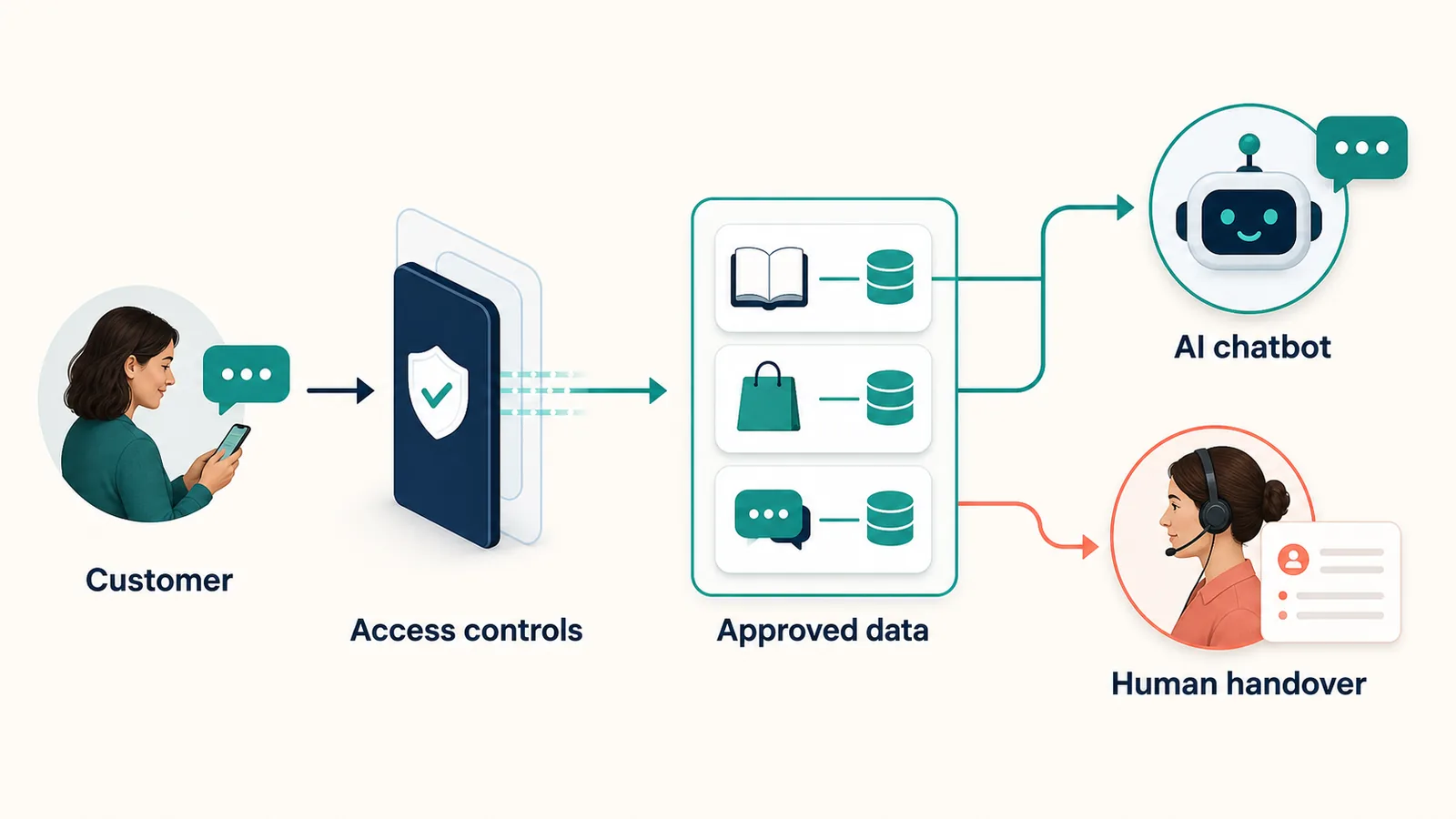
The distinction between available and used matters. An integration may technically expose a large customer record even when the answer requires only an order status. Good privacy design reduces the data available at the boundary instead of asking the model to ignore unnecessary fields after receiving them.
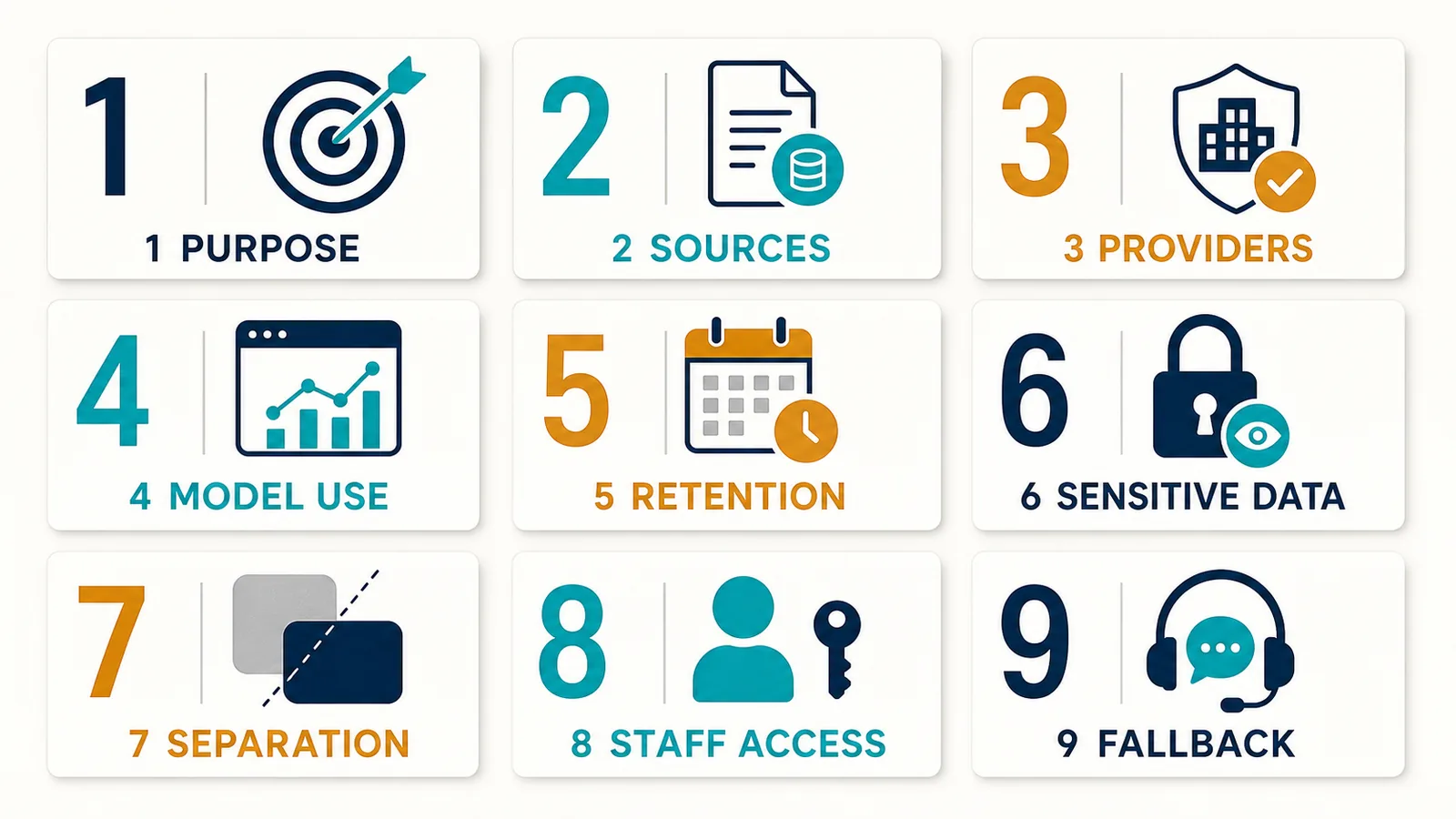
Use these nine questions before sharing customer data
1. What exact task is the chatbot meant to complete?
Start with a narrow purpose: answer product questions, explain a returns policy or report a delivery status. A vague objective such as “help with anything” makes it difficult to decide which data is necessary.
Write each approved task beside the minimum inputs it requires. A product-information bot may need public catalogue data but no customer identity. An order-status bot may need an order reference and a verification step, but not a complete CRM profile.
The UK Information Commissioner’s Office recommends purpose limitation and data minimisation when AI systems process personal information. Its guidance also cautions against granting data access merely because it may be useful later. The ICO’s current agentic AI privacy analysis is a useful starting point for a formal assessment.
2. Which sources can the chatbot read?
Make an inventory that names the source rather than using labels such as “company data”. Include:
- public website pages;
- product and policy documents;
- customer messages and attachments;
- ecommerce records;
- CRM or helpdesk fields;
- email, calendar or other connected applications;
- system logs and analytics.
Then check the contents, not just the filename. An employee may upload a support handbook that contains customer examples, private contact details or internal credentials. Before training or grounding a bot, clean the source and apply access rules. AeroChat’s approach to training a customer-service knowledge base explains the types of business material that may be used; the business still needs to choose appropriate source material.
3. Is the data sent to another provider?
Most production chatbots depend on more than one service. A channel may deliver the message, a chatbot platform may orchestrate it, an AI provider may process it, and a cloud host may store logs. Mapping this chain helps you understand where data travels and which contracts or settings matter.
Ask the vendor for its current privacy policy and subprocessor information. Check whether data is used only to deliver your service or for another purpose. Also establish where support staff can view conversations and how their access is controlled.
4. Is conversation data used to train a model?
“The chatbot learns” can describe several different processes:
- using the current conversation as context;
- storing unresolved questions for a business to review;
- adding approved answers to a private knowledge base;
- using data to improve a provider’s general model.
These are not interchangeable. Obtain a plain answer about each one. If a vendor offers controls or an opt-out, record who owns that setting and how it is verified after product changes.
5. How long is each data type retained?
One retention period rarely fits every record. Billing information, account information, support messages and diagnostic logs can have different operational or legal needs.
Create a small retention schedule showing the record, purpose, location, period and deletion owner. Confirm what happens when a customer requests deletion and when your business closes its account. Backups and export windows should be included rather than treated as invisible exceptions.
6. Can customers avoid sharing sensitive information?
The safest sensitive detail is often the one the chatbot never receives. Tell customers what not to enter and offer an alternative route when identity documents, payment information, health details or other high-risk data could be involved.
Do not depend only on a warning below the chat box. Design the conversation so the bot requests the minimum fields, masks details where possible and transfers cases that require careful verification. OWASP’s guidance on sensitive information disclosure in LLM applications notes that prompt restrictions alone may be bypassed; access controls and limited data sources are stronger safeguards.
7. What stops one customer seeing another customer’s data?
Authentication and authorisation are separate. Knowing who a person claims to be does not automatically establish which order, account or document they may access.
Test predictable misuse cases before launch:
- A customer enters somebody else’s order number.
- A signed-out visitor asks for an account address.
- A user changes identifiers midway through a conversation.
- A malicious instruction inside an uploaded file asks the bot to reveal hidden material.
- A staff account with limited duties attempts to open restricted conversations.
The correct response may be refusal, re-verification or human review. It should not be an improvised answer based on confidence alone.
8. Who inside the business can open or export conversations?
Internal access is part of chatbot privacy. Give staff the smallest role they need, remove access promptly when responsibilities change and protect exports as carefully as the live system.
If the platform offers a customer directory or segmentation, document who may use it and why. AeroChat’s contact-management features, for example, can help organise customer conversations, but the business remains responsible for sensible permissions and appropriate use.
9. What happens when the chatbot should stop?
Define cases the bot must not complete alone. Common examples include suspected account takeover, disputed payments, deletion requests, threats, safeguarding concerns and unusual refund situations.
A good escalation rule does three things: explains that a person is taking over, passes the useful context, and avoids exposing more information in the transfer. See the practical criteria for moving an AI conversation to a human when automation is no longer appropriate.
A simple customer-data map you can maintain
For each chatbot task, complete one row in a working register:
| Task | Minimum data | Source | Recipient or processor | Retention | Access owner | Fallback |
|---|---|---|---|---|---|---|
| Answer product question | Question and public catalogue | Website or catalogue | Chatbot services | Set by approved policy | Content owner | Human support |
| Check an order | Order reference plus verification input | Ecommerce system | Chatbot and connected services | Set by approved policy | Support lead | Verified agent |
| Explain a return | Request plus published policy | Conversation and policy | Chatbot services | Set by approved policy | Support lead | Human review for exceptions |
The register should reflect the deployed configuration, not the proposed sales demo. Review it when you add a channel, data source, automation or provider.
How AeroChat handles customer-service data
AeroChat is an AI agent platform that helps online businesses run customer service on autopilot. For privacy decisions, the relevant point is not the slogan but the processing relationship and the controls around connected channels and knowledge.
According to AeroChat’s current privacy policy, customer-conversation data is processed on the merchant’s behalf, while the merchant acts as controller for its end-customer data. The policy describes the categories of data processed, named subprocessors, security measures and different retention rules, including an export window after account termination. Businesses should read the current policy and assess it against their own obligations before launch.
AeroChat can use business documents, FAQs and product information to answer relevant questions, keep conversations connected across supported channels and pass a conversation to a person when needed. That makes source selection, channel permissions and handover rules important. It does not remove the business’s responsibility to give customers appropriate privacy information or minimise the data it connects.
For a legal and operational review specific to online stores, use the separate Shopify chatbot GDPR checklist. If Telegram is the main channel, the guide to Telegram AI bot safety covers channel-specific threats without duplicating this data-map audit.
What should customers be told?
A clear notice should help a customer understand:
- that they are interacting with an automated system;
- why their information is being used;
- which important data sources or recipients are involved;
- how long relevant information is kept;
- how they can exercise applicable privacy rights;
- how to reach a person when necessary.
Avoid claiming the chatbot is “100% private” or “fully compliant”. Privacy depends on the task, configuration, connected services, staff behaviour and applicable law. Specific, testable explanations build more trust than an absolute badge.
Final decision:
An AI chatbot does not automatically see an entire customer database. It sees what the system is designed and permitted to retrieve, plus what people submit during conversations. That makes access design a business decision.
Map each task, minimise its inputs, verify the processor chain, set retention and permissions, test cross-customer access, and create a safe human route. Those controls make the chatbot more useful as well as more privacy-conscious, because it works with relevant context instead of an uncontrolled pool of data.