



Best Chatbot for Squarespace Commerce: 7 Options Tested and Compared (2026)

Squarespace Commerce does not include a native AI chatbot. The closest it offers is a basic contact form and email notifications, neither of which handles real-time customer questions, automates support replies, or reduces the time your team spends answering the same questions repeatedly. To add genuine chat automation to a Squarespace store, you need a third-party tool installed via code injection.
The good news is that most capable chatbot platforms work on Squarespace through a JavaScript embed. The catch is that order data integration is more limited than it is on Shopify, which affects how much a chatbot can automate post-purchase queries. This guide covers the seven best options, what each one actually does on Squarespace, and the one integration limitation that most comparison articles get wrong.
The Order Data Problem Nobody Mentions
Before comparing specific tools, this is the one technical reality worth understanding upfront.
On Shopify, chatbot platforms can connect directly to your store’s order API and pull live order status, tracking links, and fulfillment data into automated replies. That is what makes full WISMO automation possible. A customer asks where their order is and the bot responds with the actual tracking information without a human touching it.
Squarespace Commerce does not offer the same open API access to third-party chat tools. Most chatbot platforms installed via code injection on Squarespace work as intelligent FAQ and conversation tools, but they cannot natively pull live order data the way Shopify-connected bots can. Post-purchase automation on Squarespace typically means the bot answers questions about your return policy, shipping timeframes, and general order process, not the specific status of a customer’s individual order.
This does not make chatbots useless on Squarespace. A well-trained bot still deflects a large share of incoming queries by answering policy questions, product questions, and pre-purchase concerns automatically. It just means the comparison between Squarespace chatbot options is primarily about FAQ and conversation quality rather than order-level automation depth.
With that understood, here are the seven best options.
Quick Comparison: 7 Best Squarespace Commerce Chatbots
|
Tool |
Integration Method |
AI Automation |
Order Data Access |
Channels |
Starting Price |
|---|---|---|---|---|---|
|
AeroChat |
Code injection |
Strong |
Limited on Squarespace |
Web, WhatsApp, Instagram, Messenger |
$49/mo |
|
Tidio |
Native + code |
Strong |
Basic |
Web, email, Messenger |
Free / $29/mo |
|
Intercom |
Code injection |
Strong |
Limited |
Web, email, social |
$39/mo |
|
Crisp |
Code injection |
Moderate |
None native |
Web, email, social |
Free / $25/mo |
|
Freshdesk Messaging |
Code injection |
Moderate |
None native |
Web, WhatsApp, email |
Free / $15/agent/mo |
|
LiveChat |
Code injection |
Moderate |
None native |
Web, email, social |
$20/agent/mo |
|
Tawk.to |
Code injection |
Basic |
None native |
Web only |
Free |
The 7 Best Chatbots for Squarespace Commerce
1. AeroChat: Best for Omnichannel Coverage on Squarespace
AeroChat is built primarily for Shopify, but it installs on any website including Squarespace Commerce through a JavaScript code snippet added to the site header via Squarespace’s code injection settings. On Squarespace, it functions as a fully capable AI chatbot trained on your store’s FAQ pages, product information, and policies, covering website chat, WhatsApp, Instagram DM, and Messenger from a single dashboard.
The honest difference from a Shopify setup is the order data access. On Squarespace, AeroChat cannot pull live order status through a native API integration the way it can on Shopify. It handles pre-purchase queries, policy questions, product questions, and returns guidance based on your documented processes, and routes post-purchase tracking queries to your support team with full conversation context attached.
Where AeroChat stands out clearly on Squarespace is the channel coverage. If your Squarespace store is generating customer inquiries through WhatsApp, Instagram DM, and website chat simultaneously, managing all three from one inbox changes the daily support workload significantly. Most tools in this comparison cover website chat only or add social channels as paid extras. AeroChat includes all four channels in the base platform.
For Squarespace stores that also run social-driven traffic through Instagram or WhatsApp marketing, an omnichannel support chatbot that covers all touchpoints without per-channel fees is a meaningful cost and operational advantage.
Installation on Squarespace: Settings, Advanced, Code Injection, paste the AeroChat script tag into the Header section. Available on Squarespace Business plan and above.
Key Features
-
AI trained on your FAQ, policies, and product content
-
Website, WhatsApp, Instagram, and Messenger from one inbox
-
Pre-purchase query automation across all channels
-
Auto-routing to human agents with full conversation context
-
No per-channel add-on fees
Pros
-
Best channel coverage in this comparison
-
Works on any Squarespace plan with code injection access
-
Strong AI for FAQ and product query automation
Cons
-
Full order-level automation requires Shopify integration
-
Pricing is higher than entry-level options for small stores
Pricing: From $49/month.
Best for: Squarespace Commerce stores with active Instagram or WhatsApp customer communication who want one tool covering all channels.
2. Tidio: Best for Beginners on Squarespace
Tidio is one of the easiest chatbots to add to Squarespace and one of the most beginner-friendly in terms of setup and daily use. It has a dedicated Squarespace integration guide and its visual chatbot builder lets non-technical store owners create automated conversation flows without writing code or configuring complex logic.
Lyro, Tidio’s AI conversation engine, handles repetitive FAQ queries with reasonable accuracy on a well-trained knowledge base. On Squarespace it manages product questions, policy queries, and basic pre-purchase support without human involvement. The interface for building conversation flows is one of the most accessible in the category, which matters for solo store owners who need to configure and manage the tool themselves.
The free plan covers basic live chat with limited AI conversations per month. Paid plans unlock Lyro’s full AI capability and higher conversation volumes. Channel coverage on Squarespace through Tidio includes website chat, email, and Messenger. WhatsApp requires additional setup.
The comparison between Tidio vs AeroChat shows the pricing divergence as query volume grows. For very small Squarespace stores with under 100 customer inquiries per month, Tidio’s free or entry plan is hard to beat. For stores with higher volume or social channel needs, the cost per conversation becomes a factor.
-
Easiest setup process in this comparison
-
Clean interface with no learning curve
-
Solid free plan for low-volume stores
-
AI conversation limits on lower paid tiers
-
WhatsApp requires extra setup and cost
-
Less capable for high-volume or multi-channel stores
Pricing: Free plan available. Paid from $29/month.
Best for: New Squarespace Commerce stores with basic FAQ automation needs and limited technical setup time.
3. Intercom: Best for Growing Squarespace Businesses
Intercom is a customer communications platform with AI chat, email automation, and product tours built into a single system. On Squarespace it installs via code injection and provides one of the most sophisticated conversation experiences in this comparison: Fin, Intercom’s AI agent, handles complex multi-turn conversations, pulls answers from your knowledge base, and escalates with full context when human help is needed.
The difference between Intercom and the other tools here is the depth of the customer data layer. Intercom tracks customer behavior across your site, segments visitors by what they have viewed, how many times they have visited, and what stage of the buying journey they are in. This behavioral context makes its automated replies more relevant than tools responding only to the immediate query.
For Squarespace stores growing past the startup phase and building a structured customer communication strategy, Intercom’s toolset covers the journey from first visit to post-purchase retention. The tradeoff is cost. Intercom’s pricing is higher than most tools in this comparison and scales with the number of people you are actively communicating with. The Intercom vs AeroChat comparison covers which positioning fits which store stage.
-
Sophisticated AI that handles complex multi-turn queries
-
Strong behavioral segmentation for targeted automation
-
Comprehensive platform covering chat, email, and product engagement
-
Higher starting price than most competitors
-
More complexity than a small store needs
-
Costs scale quickly as contact list grows
Pricing: From $39/month. Scales with active contacts.
Best for: Growing Squarespace businesses with a customer success focus and budget for a premium communications platform.
4. Crisp: Best Budget Squarespace Chatbot with Good Features
Crisp offers a genuinely competitive free plan and a well-featured paid tier that covers most small to mid-size Squarespace store needs at a price point significantly below Intercom or AeroChat. The free plan includes live chat, a shared inbox for two agents, and basic automated messages. Paid plans add AI chatbot flows, a knowledge base builder, and more automation capability.
The chat interface is clean and the knowledge base builder makes it straightforward to train the bot on your FAQ content without technical expertise. Crisp covers website chat, email, Instagram, Messenger, and Twitter in the paid tiers, which is broader channel coverage than most tools in this price range.
On Squarespace, Crisp installs via code injection in under ten minutes. The bot handles standard pre-purchase queries well. Post-purchase automation is limited to your documented processes since there is no native Squarespace order data integration.
The Crisp vs AeroChat comparison is most relevant for stores deciding between budget-friendly features and omnichannel depth. Crisp wins on entry price. AeroChat wins on channel automation and AI accuracy on ecommerce-specific queries.
-
Strong free plan with two-agent inbox
-
Broad channel coverage on paid tiers
-
Simple knowledge base builder for FAQ training
-
AI capability on free plan is limited
-
No Squarespace order data integration
-
Less capable for high-volume automation
Pricing: Free plan available. Paid from $25/month.
Best for: Small Squarespace Commerce stores that want more than basic live chat but are not ready for a higher-cost AI platform.
Crisp users specifically weighing AI options should see this review of AI chatbots for Crisp for a deeper comparison of extending versus replacing Crisp.
5. Freshdesk Messaging: Best for Freshworks Suite Users
Freshdesk Messaging, the chat component of the Freshworks suite, works on Squarespace via code injection and makes most sense for stores already using Freshdesk for email ticketing. Every chat conversation becomes a ticket in the same system the team uses for email, which reduces the number of tools support staff need to manage.
Freddy AI handles FAQ automation and intent-based routing. On Squarespace it covers pre-purchase questions, policy queries, and general product information from a trained knowledge base. WhatsApp and email channels are available on paid plans alongside website chat.
Setup takes around one working day when configuring all channels and building out the initial bot flows. The per-agent pricing model is predictable for established team sizes but more expensive than flat-rate tools as the team grows.
For Squarespace stores managing support through Freshdesk email already, adding Freshdesk Messaging brings chat into the same inbox without a platform change. The Freshchat vs AeroChat comparison shows where the two tools differ for ecommerce-specific use cases.
-
Unified inbox with Freshdesk email ticketing
-
Freddy AI handles standard FAQ and routing
-
WhatsApp included on paid plans
-
Per-agent pricing grows quickly with team size
-
No Squarespace order data integration
-
Setup takes longer than simpler tools
Pricing: Free plan available. Paid from $15 per agent per month.
Best for: Squarespace store owners already using Freshdesk for email support who want to bring chat and WhatsApp into the same workflow.
6. LiveChat: Best Premium Live Chat for Squarespace
LiveChat is one of the most established live chat platforms available and has been used by mid-size and enterprise businesses for over a decade. On Squarespace it installs via code injection and delivers a polished, reliable chat experience that reflects well on professional and premium brand aesthetics.
The AI layer in LiveChat handles basic automated replies and FAQ responses, but LiveChat positions itself primarily as a human-agent-first platform with AI assistance rather than an automation-first chatbot. Agents get typing preview, canned responses, and customer history in the conversation view. The tool is built around making human agents faster and more informed rather than replacing them.
LiveChat integrates with ChatBot.com, a separate product from the same company, for more sophisticated automation. On Squarespace the combined setup can handle automated FAQ flows alongside live agent escalation, but it requires managing two tools and two subscription costs.
-
Premium, polished chat interface that suits high-end brands
-
Reliable platform with strong uptime history
-
Good agent tooling for teams that handle chat manually
-
Primary focus is human agents, not AI automation
-
Per-agent pricing
-
Full AI automation requires adding ChatBot.com separately
Pricing: From $20 per agent per month.
Best for: Established Squarespace stores with a support team that wants a premium, professional live chat interface as the primary support channel.
7. Tawk.to: Best Completely Free Option
Tawk.to is fully free with no usage limits, no per-agent fees, and no conversation volume caps. It works on Squarespace via a straightforward code injection and provides live chat functionality, basic automated triggers, and a shared inbox for team management. Revenue comes from optional paid services like chat agents and custom branding removal.
For a Squarespace store with very low support volume where the owner responds personally to all queries, tawk.to is a practical starting point that costs nothing and works reliably. The interface is functional rather than polished and the AI automation capability is basic compared to every other tool in this comparison.
As query volume grows and the need for automated responses increases, tawk.to’s limitations become clear faster than the other tools here. The free website chatbot comparison covers what you actually give up at the free tier across different platforms.
-
Genuinely free with no hidden limits
-
Works reliably on Squarespace via code injection
-
Covers basic live chat needs for very small stores
-
Basic AI automation compared to paid alternatives
-
Branding cannot be removed without payment
-
Not built for high-volume or multi-channel stores
Pricing: Free.
Best for: Squarespace micro stores with under 20 support queries per month where cost is the primary constraint.
How to Add a Chatbot to Squarespace Commerce
Adding any of the tools above to a Squarespace store follows the same process. You need a Business plan or above for code injection access.
Step 1: Sign up for your chosen chatbot platform and get your JavaScript embed code from the platform dashboard. This is usually found under Settings, Installation, or Website Setup.
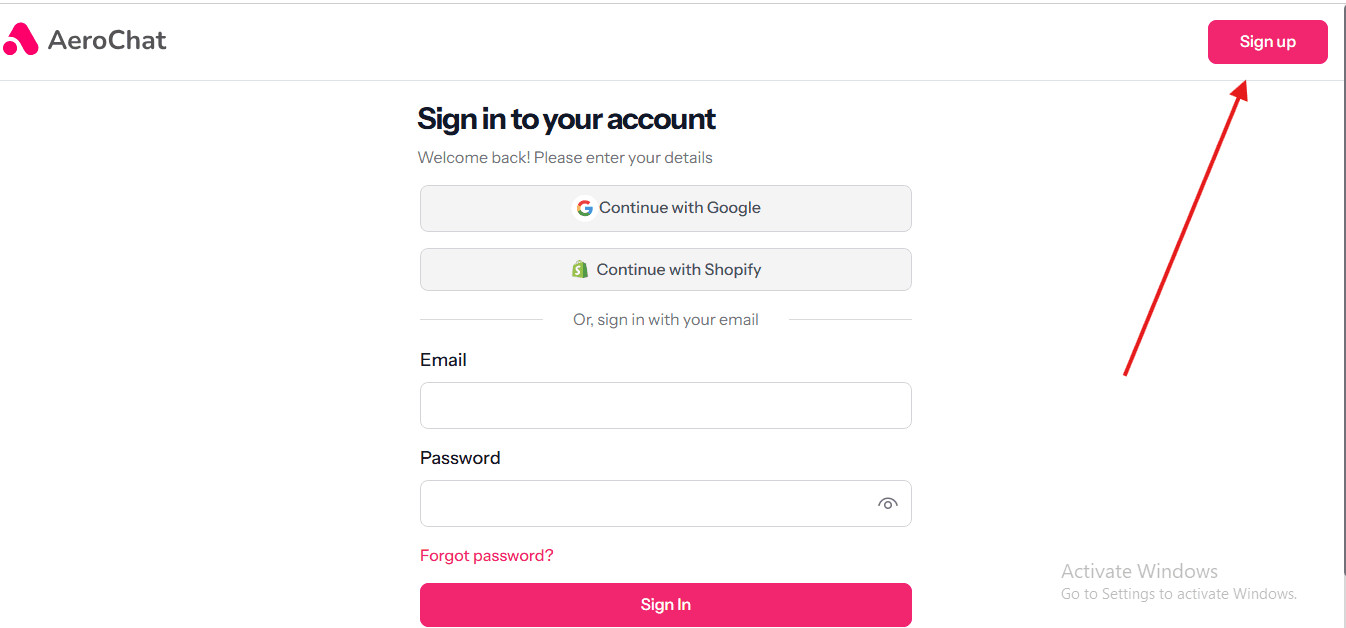
Step 2: Log into Squarespace and go to Settings in the left sidebar.
Step 3: Scroll to Advanced and click Code Injection.
Step 4: Paste your chatbot script into the Header section. This ensures the chat widget loads across every page of your store.
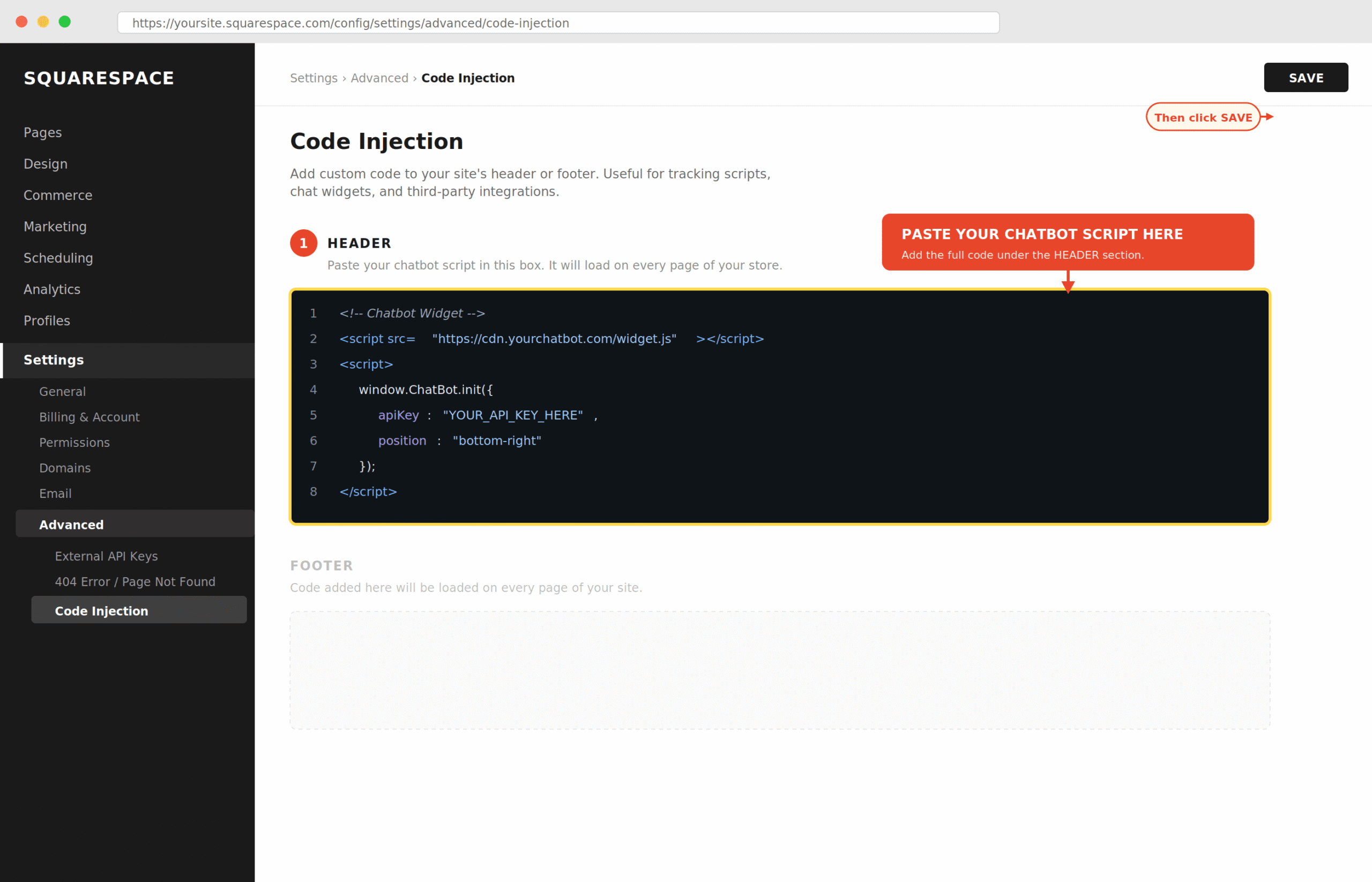
Step 5: Save changes and preview your store. The chat widget should appear in the corner of the page within a few seconds of the page loading.
Step 6: Return to your chatbot platform and train the bot on your FAQ content, product information, and store policies before going live. The bot’s accuracy depends directly on the quality of content you provide at this step.
Most platforms are live and handling real conversations within the same day of installation. For a full guide to the adding live chat website process across different platforms, the setup steps vary slightly by tool.
What to Look for When Choosing a Squarespace Commerce Chatbot
AI accuracy on ecommerce queries. Not all AI chatbots are trained on ecommerce contexts. A bot that handles generic FAQ questions well may still struggle with product-specific questions, return policy edge cases, or shipping queries. Test with your actual top ten support questions before committing to a platform.
Channel coverage for your actual customer behavior. If your customers are reaching out through Instagram DM as often as your website chat widget, a website-only chatbot leaves half your queries unattended. Check which channels are included at your chosen price tier, not just available on the platform at a higher tier.
Proactive chat capability. A bot that waits for customers to open the chat window is useful. A bot that triggers a message when a customer spends more than 90 seconds on a product page or shows abandonment intent is significantly more valuable for reduce cart abandonment. Check whether the platform includes this on your chosen plan.
Realistic pricing at your query volume. Per-conversation pricing models can look affordable at low volume and become expensive as traffic grows. Flat-rate plans are more predictable for growing stores. Calculate your expected monthly query count and price each tool at that volume, not at the entry price listed on the homepage.
Frequently Asked Questions
Does Squarespace have a built-in AI chatbot?
No. Squarespace Commerce does not include a native AI chatbot or automated customer service tool. Adding chat automation requires a third-party tool installed via code injection. This is available on Squarespace Business plan and above.
Can a chatbot access Squarespace order data automatically?
Not natively. Squarespace does not offer the same open API access to third-party chat tools that Shopify does. Most chatbots on Squarespace work as AI-powered FAQ and conversation tools but cannot pull live order tracking data automatically. Post-purchase query handling is based on your documented policies rather than real-time order data.
Which chatbot plan do I need for Squarespace code injection?
Code injection in Squarespace requires a Business plan ($23/month billed annually) or above. The Basic and Personal plans do not include code injection. You cannot add a third-party chat widget without this feature.
Is there a free chatbot that works on Squarespace?
Yes. Tawk.to is completely free and installs on Squarespace via code injection. Tidio, Crisp, and Freshdesk Messaging all offer free plans with limited features. For a small store starting out, these cover basic live chat needs without a monthly cost.
How long does it take to add a chatbot to Squarespace?
The technical installation takes under ten minutes for most platforms. Training the chatbot on your store’s content, FAQ pages, and policies takes longer and directly affects how accurately the bot responds to customer queries. Allow half a day to install, configure, and test properly before going live.
Can AeroChat work on Squarespace?
Yes. AeroChat installs on Squarespace via code injection in the site header and provides AI chat automation across website, WhatsApp, Instagram, and Messenger from one dashboard. The key difference from a Shopify setup is that native order data integration is not available on Squarespace, so post-purchase automation is limited to documented policy responses rather than live order tracking.
The Practical Decision
For most Squarespace Commerce stores, the choice comes down to three scenarios.
If you are just starting out and want chat on your store at minimal cost, Tidio’s free plan or tawk.to covers the basics. If you need proper AI automation that handles FAQ queries accurately and includes WhatsApp and Instagram alongside website chat, AeroChat gives you the broadest channel coverage at a realistic price point for a growing store. If you are already using Freshdesk or Intercom for email support and want to add chat to the same system, adding Freshdesk Messaging or Intercom makes operational sense over introducing a separate tool.
The order data limitation applies to all of these on Squarespace. If deep post-purchase automation with live order tracking is your primary requirement, migrating to Shopify and using a Shopify-native chatbot is worth evaluating seriously. For stores committed to Squarespace, the best strategy is combining a strong chatbot for pre-purchase and FAQ automation with a clear human escalation path for order-specific queries.



