Essential Shopify Apps for New Stores in 2026: What to Install and When

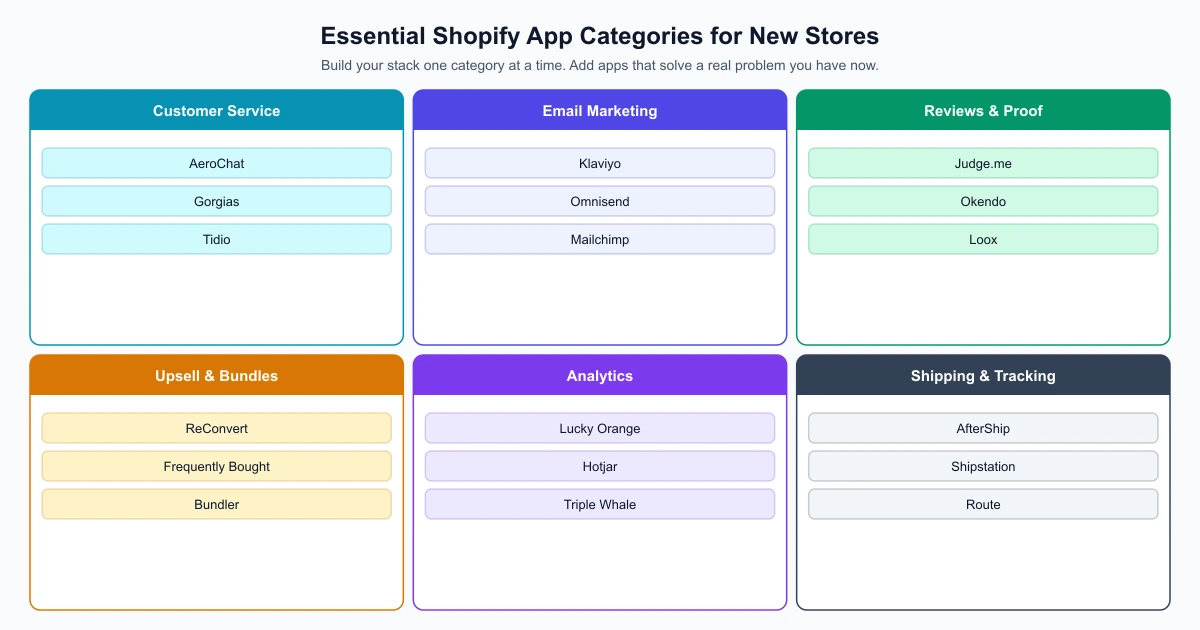
The essential Shopify apps for a new store fall into six categories: customer service, email marketing, product reviews, upsell tools, analytics and shipping tracking. You do not need all of them on day one. Installing too many apps before you have consistent traffic makes it impossible to tell what is working and slows your store down before it has earned the complexity.
This guide explains which categories to install first, which to add after your first 30 to 50 orders, and how to build a stack that grows with your store rather than against it. If you have not yet set up your store, start your free Shopify trial before working through this list.
What to install first (and what to wait on)
In the first weeks of a new Shopify store, before you have consistent traffic, the most valuable apps are ones that help you capture and communicate with the visitors you do get. In the first 30 to 45 days, prioritise:
- A customer service tool so you can respond to early enquiries professionally
- An email capture mechanism and basic welcome flow
- A way to collect and display product reviews from your first buyers
Upsell apps, loyalty programmes and advanced analytics become more useful once you have consistent order volume. Install them too early and you are configuring tools for behaviour your store has not yet generated. The guide to how Shopify works explains the Admin structure if you are navigating the platform for the first time.
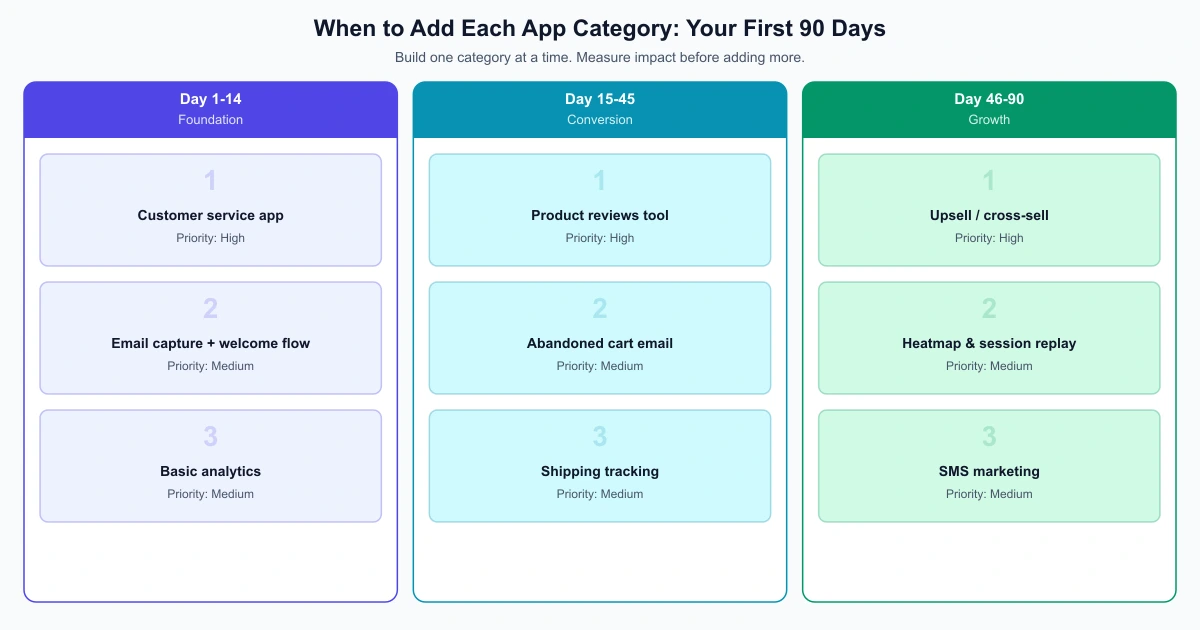
App categories by build phase
| Phase | Timeline | App categories to add | Why now |
|---|---|---|---|
| Foundation | Days 1-14 | Customer service, email capture, basic analytics | Captures early visitors and enables communication before first sales |
| Conversion | Days 15-45 | Product reviews, abandoned cart, shipping tracking | Builds social proof and recovers lost sales from your first traffic |
| Growth | Days 46-90 | Upsell tools, heatmaps, SMS marketing | Increases order value and identifies conversion blockers with real data |
Why AeroChat should be your first customer service app
AeroChat is an AI agent platform that helps Shopify merchants run customer service on autopilot. It is worth installing early for two reasons: first, customer questions arrive from the first day you have traffic, often before your first sale. Second, the earlier you install it, the more your AI knowledge base can grow from real customer interactions rather than being set up from scratch when enquiry volume is already high.
AeroChat connects to Shopify for live order data and handles conversations across WhatsApp, Instagram, Telegram, Facebook Messenger and website chat from a single inbox. It answers common product questions, provides order status updates, and passes to a human agent when a conversation needs personal attention. You can begin with a 7-day trial on Shopify before committing to a paid plan.
For a full comparison of customer service options before deciding, the Shopify AI chatbot comparison covers the main tools across categories including live chat, AI automation and helpdesk platforms. The broader AI chatbot guide is useful if you want to compare beyond Shopify-specific tools.
Email marketing
Email is the highest-ROI owned channel for most ecommerce stores. Setting up an email tool early means you start building a list from your first visitors, even before they convert to customers. The three automations to configure first:
- Welcome email triggered by signup or first purchase
- Abandoned cart recovery sent 1 to 4 hours after cart abandonment
- Post-purchase sequence requesting a review and suggesting a complementary product
Klaviyo is the most widely used email marketing app in the Shopify ecosystem with deep integration into Shopify’s customer and order data. Omnisend is a strong alternative that includes SMS and push notifications alongside email at a competitive price point. Both have free tiers up to a contact limit.
Once your email capture and automations are active, make sure you are collecting consent properly. If your store receives traffic from the EU or other regulated regions, cookie consent is a legal requirement – not a nice-to-have. Consentmo handles GDPR, CCPA and other regional privacy laws directly within Shopify, with geo-targeted consent banners that adapt to each visitor’s location. Install it alongside your email tool so compliance is in place before your list starts growing.
Reviews and social proof
Product reviews affect conversion rates more consistently than almost any other on-page element. Set up review collection on day one so your earliest orders start building social proof. Judge.me has a generous free plan and sends automated post-purchase review requests. Loox is a strong option if photo reviews are particularly important for your product category.
Upsell and cross-sell
Upsell apps increase average order value by offering relevant add-ons at the right moment. The most effective placements are:
- Product page: “Frequently bought together” recommendations
- Cart page: Add-on suggestions before checkout
- Post-purchase page: One-click add offers after the order is placed
ReConvert focuses on the post-purchase page. Frequently Bought Together replicates the product-page recommendation pattern. Install these after your first 30 to 50 orders so you have purchase data to inform the recommendations. The guide to increasing Shopify conversion rate and average order value covers the full picture of how order value grows beyond upsell apps alone.
Analytics
Shopify’s built-in analytics covers orders, revenue and basic traffic data, which is sufficient in the early months. Lucky Orange and Hotjar add session recordings and heatmaps that let you see where visitors are dropping off. Install one after your first 200 to 300 sessions when you have enough traffic to produce meaningful patterns.
Shipping and order tracking
Order tracking enquiries are typically the highest-volume support request for any physical product store. Setting up automated shipment notifications early eliminates a large proportion of “where is my order?” messages. AfterShip provides a branded tracking page and sends automated notifications at each shipping milestone. It is worth installing before your first order ships rather than after the first tracking enquiry arrives.
Building a lean, effective stack
The apps right for a store doing its first ten orders are not necessarily right for one doing a hundred orders a week. Review your app list every 90 days, remove anything not producing a measurable result, and add new tools only when you have a specific problem to solve. The ecommerce startup checklist and the Shopify pre-launch checklist both cover the store-level fundamentals that should be in place before you start relying on the app layer.