20 WhatsApp Business Message Templates for Customer Service and Ecommerce

WhatsApp Business message templates are reusable messages that a business submits for approval before using them to start certain conversations through the WhatsApp Business Platform. Ecommerce teams commonly use them for order confirmations, delivery updates, return notices, requested support updates and carefully controlled marketing messages.
They are not the same as every saved reply in the WhatsApp Business App. Nor does every response inside an active customer-service conversation need to be a template. The distinction matters because the wrong message type, category or wording can lead to reclassification, rejection or a poor customer experience.
This collection provides 20 starting points. Replace every placeholder with real data, remove any sentence your systems cannot support and confirm the current category in WhatsApp Manager before submitting a template.
When do you need a WhatsApp message template?
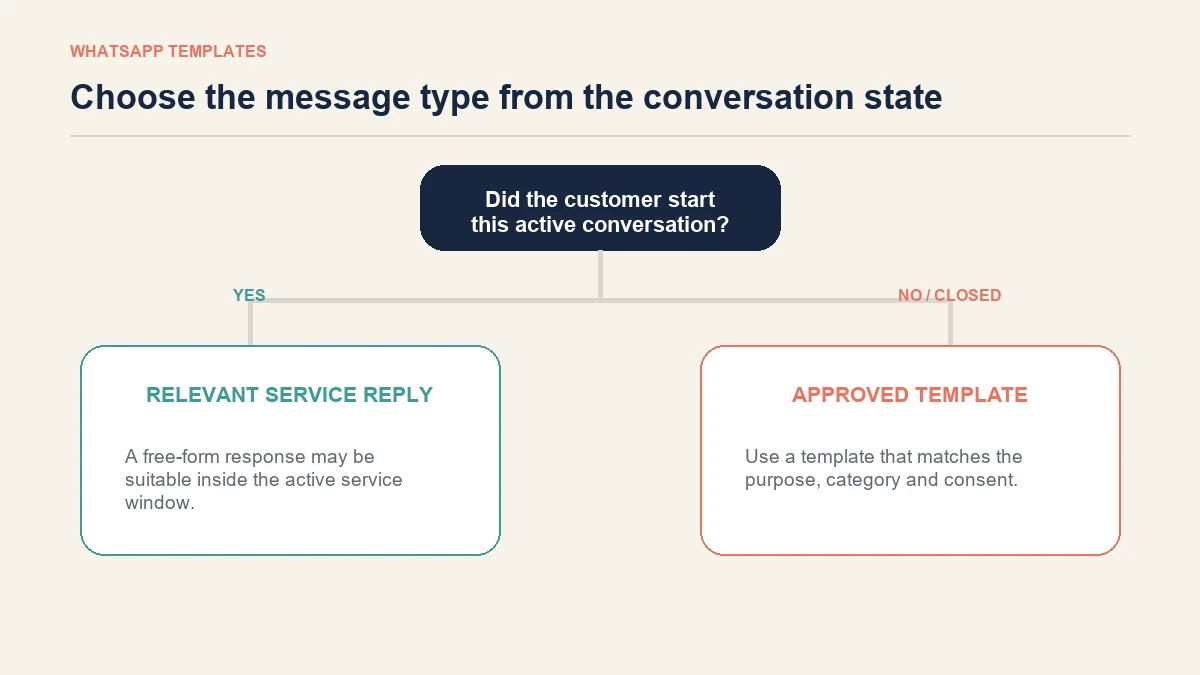
The practical question is who started the conversation and whether the active customer-service window is still open.
| Situation | Message approach |
|---|---|
| A customer has just messaged the business and the service window is active | The business can normally send relevant free-form replies within that conversation. |
| The business wants to initiate a Platform conversation | Use an approved message template. |
| The service window has closed and the business needs to contact the customer again | Use an approved template that fits the purpose. |
| A team member repeatedly types the same answer in the Business App | A saved quick reply may be enough; this is not automatically a Platform template. |
| The business wants to send the same campaign to an opted-in segment | Use an approved template and follow the separate rules for a WhatsApp broadcast message. |
Meta currently groups Platform templates into marketing, utility and authentication categories. Its official WhatsApp message-template documentation should be treated as the final reference because a transactional message can still be treated as marketing if promotional wording is added. Classification and pricing can change, so treat the category notes below as drafting guidance rather than an approval promise.
What belongs in a useful ecommerce template?
A template should tell the recipient why the business is contacting them, identify the relevant order or request, give the necessary update and make the next action clear.
Use variables only for information that your system can reliably supply. A message such as Your order {{1}} will arrive on {{2}} fails customers when the second variable contains an estimate the carrier has not confirmed.
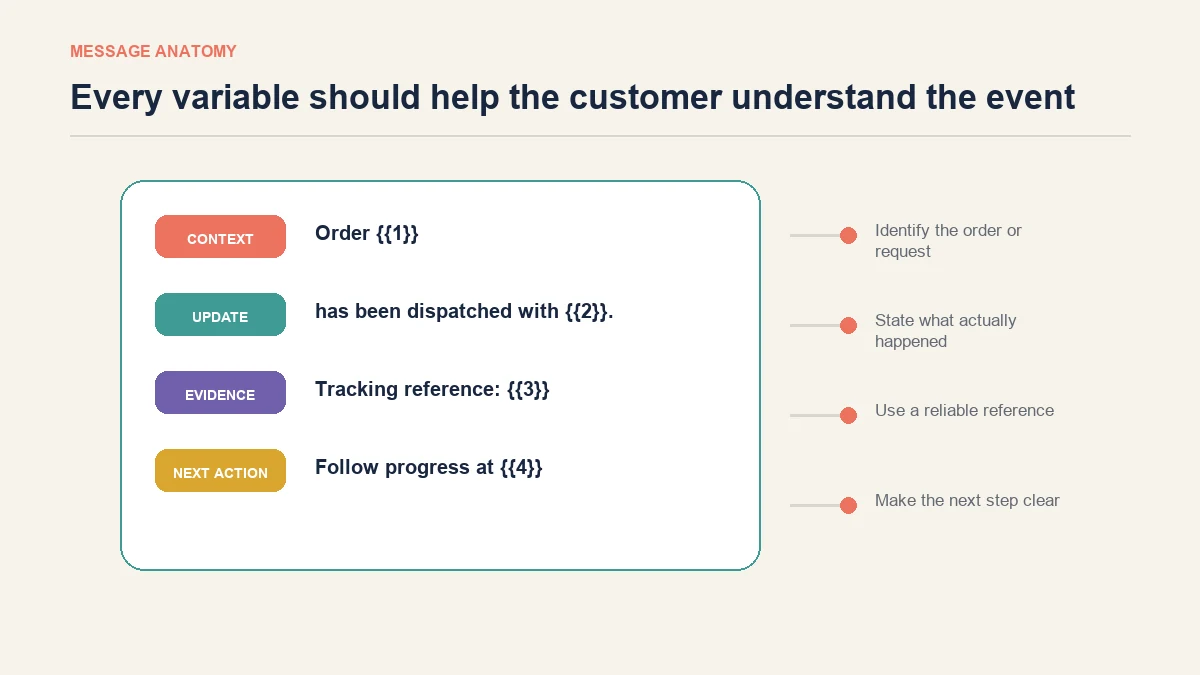
A sound structure is:
- Context: identify the order, return, appointment or support request.
- Update: state what has happened in plain language.
- Evidence: include a valid reference, date or tracking link where appropriate.
- Next action: explain whether the customer needs to do anything.
- Support route: offer a relevant reply option without adding unnecessary promotion.
Order and payment message templates
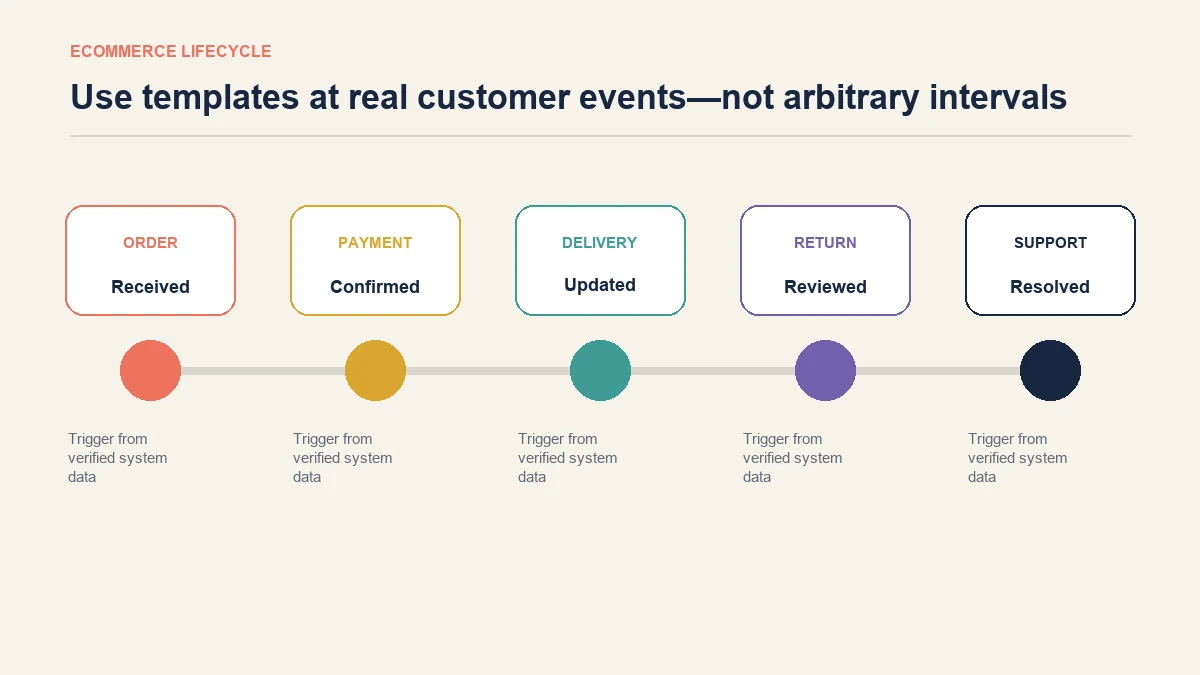
1. Order received
Likely category: Utility
Hello {{1}}, we have received order {{2}}. We will send another update when it has been prepared for dispatch. You can review the order here: {{3}}.
Use the customer name, order reference and a secure order-status link. Do not promise a dispatch date unless the fulfilment system provides one.
2. Payment confirmed
Likely category: Utility
Payment for order {{1}} has been confirmed. The amount received was {{2}}. No further action is required. We will contact you when the order is ready to move.
Only include payment details that are appropriate to display in a message. Never place full card information in a template.
3. Payment could not be completed
Likely category: Utility
We could not confirm payment for order {{1}}. Your order has not moved to fulfilment. Please use the secure payment page {{2}} or reply if you need help.
The link should lead to the merchant’s verified domain. Avoid wording that creates false urgency or resembles a phishing message.
4. Order change confirmed
Likely category: Utility
The requested change to order {{1}} is complete. The updated item is {{2}} and the current order total is {{3}}. Review the updated order here: {{4}}.
Send this only after the change is recorded. If the request is still being reviewed, use the case-update template instead.
Shipping, collection and delivery templates
5. Order dispatched
Likely category: Utility
Order {{1}} has been dispatched with {{2}}. The tracking reference is {{3}}. Follow its progress here: {{4}}.
Check that tracking links are active before the trigger runs. A dispatch message with a dead link creates another support request.
6. Delivery date updated
Likely category: Utility
The expected delivery date for order {{1}} has changed from {{2}} to {{3}}. We are sorry for the change. You can follow the latest carrier update here: {{4}}.
This explains both the previous and current expectation, which makes the change easier to understand.
7. Out for delivery
Likely category: Utility
Order {{1}} is out for delivery today with {{2}}. The latest tracking information is available at {{3}}. No reply is needed unless the delivery details are incorrect.
Only use “today” when the carrier status was updated in the customer’s local date.
8. Ready for collection
Likely category: Utility
Order {{1}} is ready to collect from {{2}}. Collection is available during {{3}}. Please bring {{4}} so the team can verify the order.
Specify what the customer needs to bring without requesting sensitive information in the reply.
9. Delivery attempt unsuccessful
Likely category: Utility
The carrier could not complete delivery for order {{1}} on {{2}}. Choose the next available delivery option here: {{3}}. Reply if the address shown on your order is incorrect.
Do not blame the customer or claim a reason that the carrier data does not provide.
10. Delivery confirmed
Likely category: Utility
The carrier has marked order {{1}} as delivered on {{2}}. If you cannot locate it, reply to this message and we will explain the next investigation step.
This is more useful than asking for a review immediately. Give the customer a route to report a genuine delivery problem first.
Return, exchange and refund templates
11. Return request received
Likely category: Utility
We have received your return request {{1}} for order {{2}}. The next step is {{3}}. The return instructions are available here: {{4}}.
The next-step variable should contain a complete instruction, not an internal status code.
12. Return approved
Likely category: Utility
Return {{1}} has been approved. Please send the item by {{2}} using the instructions at {{3}}. Keep the postage receipt until the return is complete.
Adapt this to the merchant’s actual policy. Do not introduce a deadline that is absent from the published returns terms.
13. Returned item received
Likely category: Utility
We received the item for return {{1}} on {{2}}. It is now being checked. We expect to provide the next update by {{3}}.
Use an honest review time based on the operation’s capacity rather than an ideal target.
14. Refund processed
Likely category: Utility
The refund for order {{1}} was processed on {{2}} for {{3}}. It was sent to the original payment method. Your payment provider may take additional time to display it.
If the likely bank-processing range is included, confirm it with the payment provider and market before publishing the template.
15. Exchange ready to dispatch
Likely category: Utility
The replacement for exchange {{1}} is ready to dispatch. The replacement item is {{2}}. We will send tracking information once the carrier has collected it.
This avoids claiming that an item has shipped before the carrier event exists.
Customer-service update templates
16. Support request acknowledged
Likely category: Utility when tied to a customer’s request
We have opened support request {{1}} about {{2}}. The team is reviewing it and expects to update you by {{3}}. Reply if important information is missing from the request.
17. More information required
Likely category: Utility when continuing a requested service process
We need one more detail to continue support request {{1}}: {{2}}. Please reply with the information, but do not send passwords or complete payment-card details.
18. Support request resolved
Likely category: Utility
Support request {{1}} has been marked resolved because {{2}}. If the issue remains, reply and tell us what is still happening so a person can review it.
Do not use a vague variable such as “completed”. The reason should make sense to the customer.
Marketing templates that need extra care
19. Back-in-stock notification
Likely category: Marketing
Hello {{1}}, {{2}} is available again. You asked to be notified about this item. View the current product details and availability here: {{3}}.
The message should be sent only to people who requested the alert or otherwise gave appropriate consent. Stock should be checked at send time.
20. Basket reminder
Likely category: Marketing
Hello {{1}}, you left {{2}} in your basket at {{3}}. If you still want it, you can return to your basket here: {{4}}. Availability and price may change before checkout.
Avoid invented scarcity, unverified discounts and repeated reminders. Promotional wording can affect both classification and customer response.
For broader cross-channel wording, use the separate collection of ecommerce chatbot response templates. Those examples are designed for conversations, not automatically for approval as outbound WhatsApp templates.
How to reduce preventable template rejection
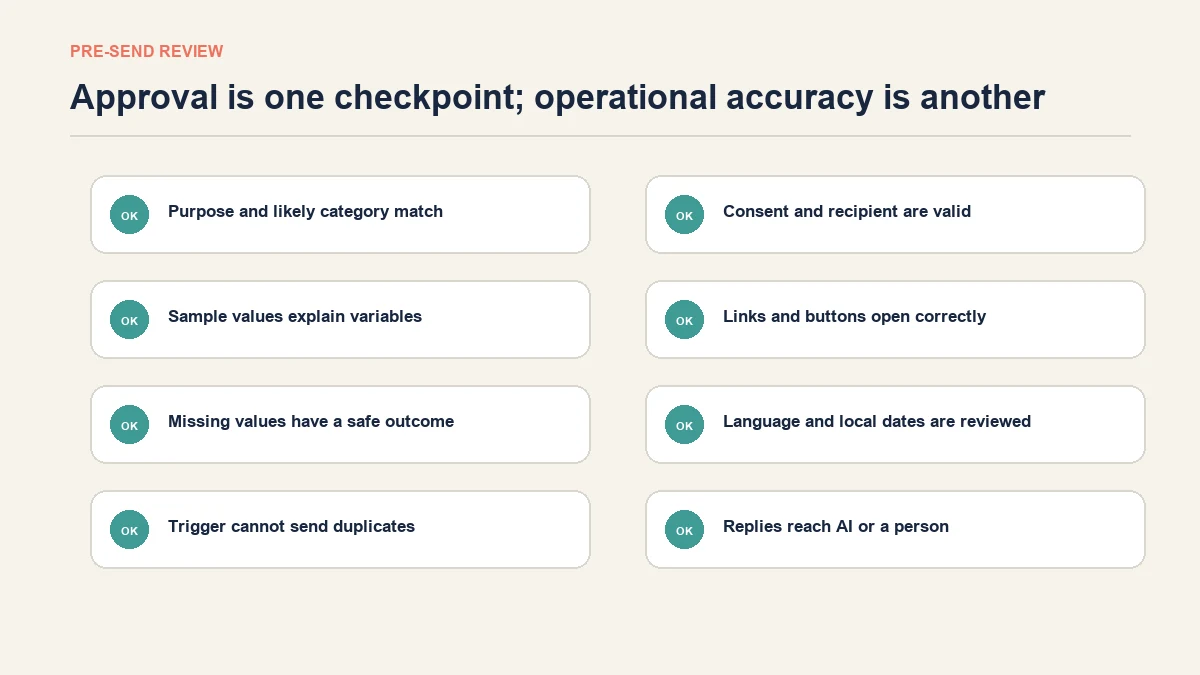
Meta makes the approval decision, and approval does not guarantee that a template will remain usable indefinitely. Still, teams can remove common sources of ambiguity before submission.
- Select the category that matches the actual purpose.
- Keep utility messages tied to a specific transaction or customer request.
- Remove sales language from a genuinely transactional update.
- Provide sample values that show reviewers how each variable will appear.
- Do not start or end a message with an unexplained variable.
- Use clear language rather than internal codes.
- Check buttons and destination domains.
- Avoid requests for passwords or sensitive payment details.
- Submit language versions that have been reviewed by a fluent speaker.
- Keep proof of consent and a functioning opt-out process where applicable.
How to create and test a template
The exact interface depends on whether the business manages templates in WhatsApp Manager or through a provider. The operating sequence is usually consistent:
- Define the event that should trigger the message.
- Choose the likely category and language.
- Write the fixed text and numbered variables.
- Add representative sample values.
- Add only necessary media, quick replies or action buttons.
- Submit the template and review the resulting status and category.
- Map each variable to a reliable source field.
- Test with controlled records, including missing and unusually long values.
- Confirm links, local dates, currency and customer identity.
- Monitor delivery failures, replies, blocks and opt-outs after release.
One approved template can still fail operationally if a variable is empty or the trigger fires twice. Approval testing and automation testing are separate jobs.
Where AeroChat fits into the template workflow
AeroChat’s WhatsApp integration supports customer-service conversations, approved templates and broadcasts as part of an omnichannel AI customer-service platform. For an ecommerce team, the value begins after the template is connected to a real workflow rather than sitting as approved copy in a library.
For example, an order update can bring a customer back into conversation. AeroChat can then answer suitable product, delivery or policy questions using the business’s information. Teams can use customer segments where a relevant opted-in audience is required, while human handover gives a person control when the reply involves an exception, dispute or judgement.
This does not remove the merchant’s responsibility for consent, category selection, template accuracy or current policy information. It makes the approved message part of a wider service process.
Maintain a template library instead of copying old messages forever
Give each template an owner and record its trigger, category, language, variables, approval status and last review date. Review a template when a policy changes, a carrier field changes, a product workflow moves or customers repeatedly misunderstand the message.
Useful measures include delivery status, reply rate, opt-outs, blocks, support contacts caused by the message and the percentage of sends with missing or fallback variables. A high send volume is not evidence of a good template. The message is doing its job when the right customer receives an accurate update and knows what to do next.
Frequently asked questions
Can I copy these templates directly into WhatsApp Manager?
Use them as starting points, not guaranteed approval-ready submissions. Replace variables, remove unsupported promises, choose the current category and ensure the message reflects a real business process.
Are WhatsApp message templates required for customer replies?
Not for every reply. Relevant free-form replies can normally be sent during an active customer-service window. An approved template is used when the Platform requires one, including many business-initiated messages and contacts after the window closes.
Is an order update always a utility template?
Not necessarily. The wording and purpose matter. Adding a discount, product recommendation or other promotional content can cause a message to be treated as marketing.
Can one template contain several languages?
Language versions are managed separately. Do not place several translations into one message body. Review each version for meaning, variable order and natural local wording.
What happens when a customer replies to a template?
The reply starts or continues a customer conversation that needs an operating plan. Route it to suitable automation or a person, preserve the original message context and make sure the customer is not asked to repeat information already supplied.
Build templates around real customer events
The best WhatsApp Business message templates are not the cleverest sentences. They are accurate parts of a dependable workflow: the trigger is real, the variables are complete, the category matches the purpose and the customer can understand the next step.
Start with the events that currently create the most uncertainty—payment confirmation, delivery changes, returns or unresolved support requests. Build and test those templates before expanding the library.
Message templates are the foundation of WhatsApp Business automation. For the setup context, WhatsApp Business profile optimisation covers the account configuration that templates depend on. For merchants sending order updates and tracking notifications specifically, WhatsApp order tracking automation covers how templates fit into a post-purchase flow. The WhatsApp conversation pricing guide explains the cost implications of sending template messages at scale.