



WhatsApp Business Profile Optimization for Shopify Stores: 2026 Guide
A fully optimized WhatsApp Business profile increases trust before a single message is exchanged. For Shopify stores, the profile acts as a storefront inside WhatsApp: your business name, description, catalog, hours, and verification status all influence whether a shopper decides to message you or closes the chat. Most stores fill in the minimum and leave it there. This guide covers every field that matters and what to put in each one.
Key Takeaways
-
Your WhatsApp Business description is searchable inside the app. Treat it like a 160-character meta description for your store
-
The product catalog inside WhatsApp Business is a direct sales channel, not just a reference list
-
A confirmed green tick badge increases message open rates because customers trust the account is legitimate
-
Labels inside WhatsApp Business mirror the function of Shopify customer tags, and can be used to segment post-purchase sequences
-
Business API accounts can send proactive messages (order updates, restock alerts). The standard app cannot
-
Greeting and away messages are the first automated touchpoints most customers experience. Generic defaults underperform custom ones
Why Your WhatsApp Profile Is a Sales Asset, Not a Setup Screen
Most Shopify owners connect WhatsApp to their store, add their business name, and move on. The profile itself gets treated as a one-time admin task.
That approach misses something. When a shopper receives a message from your number, taps your name, and looks at your profile, they are making a trust decision. They are deciding whether this is a real business they want to engage with or a spam account they should ignore. Every incomplete or generic field works against you at that moment.
Your WhatsApp Business profile is also not static. It should update when your store changes: new catalog items, updated hours during a sale, seasonal description changes. Stores that treat the profile as a live asset consistently see higher reply rates than stores that set it up once.
What follows is a field-by-field breakdown of what to optimize, why each element matters, and what Shopify-specific details belong in each section.
Field-by-Field Optimization
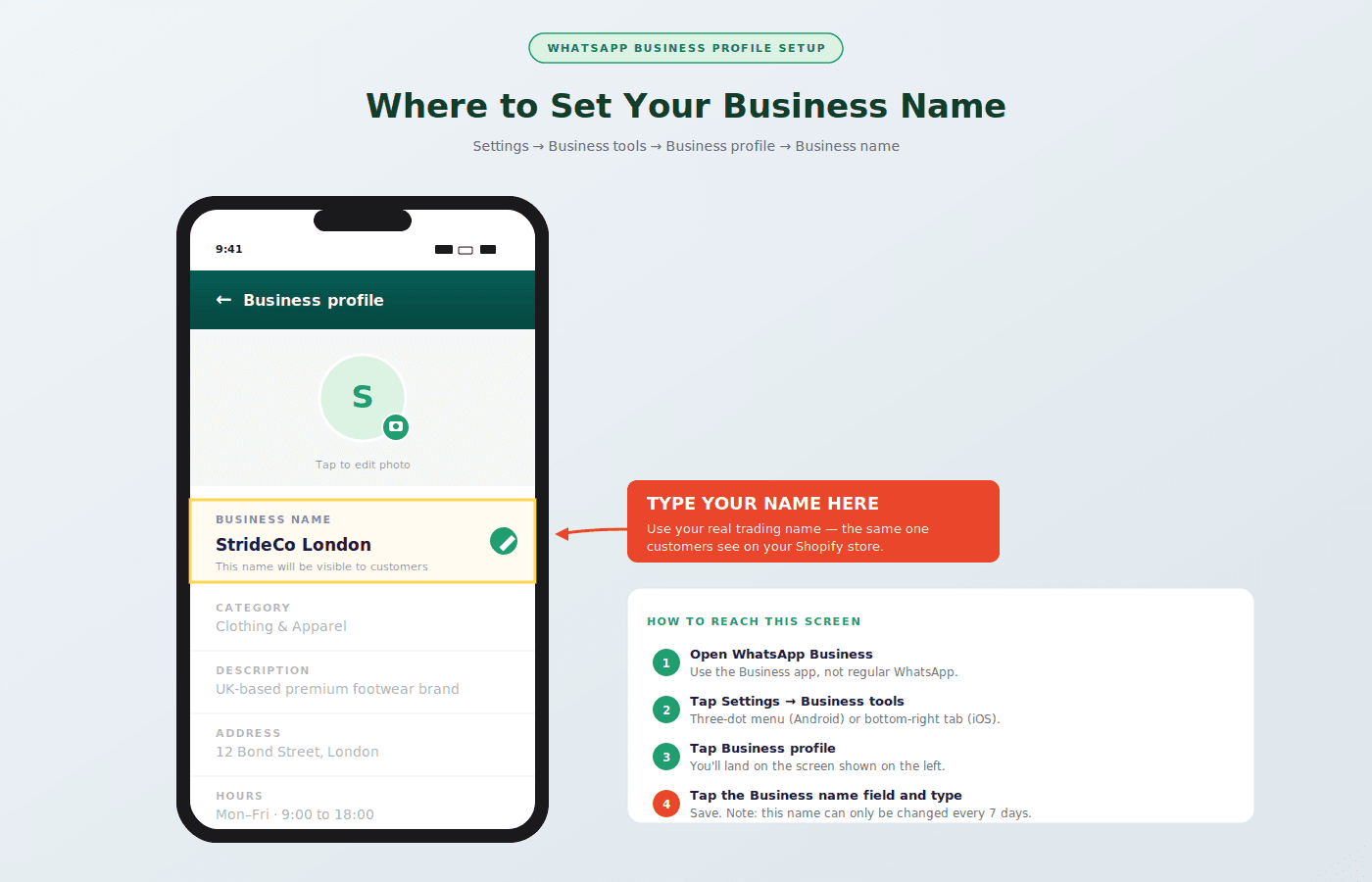
Business Name
Your WhatsApp Business name appears in every conversation header, every notification, and in WhatsApp’s in-app business directory search. Use your exact brand name as it appears on your Shopify store.
Do not keyword-stuff the name field. “Best Shopify Clothing Store UK” in the name field looks unprofessional and WhatsApp can restrict accounts that use keyword-heavy names rather than actual business names. Your SEO work belongs in the description, not the name.
If your store name is different from your trading name, use the name your customers already recognize. Consistency with your Shopify store, Instagram, and other channels matters because customers who find you through multiple touchpoints expect to recognize the same name.
Business Category
WhatsApp Business offers around 20 category options. Shopify stores typically fall under Shopping and Retail, but some will fit better under Beauty, Spa and Salon, Food and Grocery, or Health and Wellness depending on what you sell.
Choose the most specific category available. It affects how your business appears in WhatsApp’s directory and how Meta classifies your account for advertising eligibility if you run WhatsApp click-to-chat ads.
Profile Photo
Use your store logo, not a personal photo or a product image. The profile photo appears at roughly 40×40 pixels in most views, so anything other than a bold, simple logo will be illegible. A transparent background with your wordmark or icon on a solid brand color works well at small sizes.
Stores that use product images as their WhatsApp profile photo frequently look like personal accounts selling items, not established brands. That distinction affects trust at the moment a shopper is deciding whether to engage.
Business Description
This is the most underused field on most WhatsApp Business profiles. You have 256 characters. Use them.
The description appears when someone taps your profile and also surfaces in WhatsApp’s business search results. Write it the same way you would write a meta description: lead with what you sell, include a distinguishing detail, and add a call to action.
Weak description:
“We sell clothing and accessories online.”
Optimized description for a Shopify store:
“Premium streetwear shipped same-day from London. Shop hoodies, cargo trousers, and accessories. Message us for sizing or DM to place an order.”
The optimized version tells a potential buyer what you sell, who you serve, what action to take, and signals that messaging the account actually gets a response. That last signal matters more than it seems. Many shoppers hesitate to message a business because they assume no one is monitoring it.
Website Field
Put your Shopify store URL here, not your Instagram page or a Linktree. WhatsApp shows this as a tappable link. Customers who tap it land directly on your store, which is where purchases happen.
If you run multiple storefronts, use the primary one. You can add a second URL in the description text if needed.
Business Hours
Set accurate hours, including whether you are open on weekends. WhatsApp uses your hours setting to show customers whether you are currently open when they view your profile. An account showing “closed” when a customer is ready to buy creates unnecessary doubt.
If you use automation to handle after-hours messages, set your hours to reflect when a human agent is available rather than when the bot is active. Showing 24/7 hours implies a person is always available. If that is not the case, be accurate and let your greeting message explain that automated replies run outside business hours.
Catalog Setup for Shopify Stores
The WhatsApp Business catalog is a product showcase directly inside your profile. Customers can browse it, share items, and send you enquiries about specific products without leaving WhatsApp.
For Shopify stores, the catalog works best when it mirrors your hero products rather than trying to replicate your full inventory. Practical limits: you can list up to 30 items per catalog with image, name, description, price, and a link. Use the link field to point to the exact Shopify product page for each item.
What to include in your catalog:
-
Your best-selling products
-
New arrivals you are actively promoting
-
Any product that frequently comes up in customer enquiries
What to skip:
-
Products with complex variants that need a full product page to explain
-
Items currently out of stock
Update the catalog when you run a sale. A customer who taps your catalog and sees normal pricing after receiving a promotional WhatsApp message will lose trust in the promotion.
The catalog also connects directly to WhatsApp automation flows. When a customer enquires about a catalog item, an integrated chatbot can pull the product details and guide them through to purchase without manual intervention.
Greeting Message and Away Message
Greeting Message
The greeting message fires when someone messages you for the first time or after 14 days of inactivity. Most stores use the default: “Hi, thanks for contacting us. How can we help?” That message says nothing specific about who you are or what to expect.
A better greeting for a Shopify store:
“Hey, thanks for reaching out to [Store Name]. We usually reply within a few minutes. Looking for a specific product, need help with an order, or something else?”
This version sets a response expectation, reminds the customer of the brand name, and offers a light triage that helps route the conversation. If you have AeroChat’s WhatsApp chatbot automation connected, the greeting flows directly into a structured response tree rather than waiting for a manual reply.
Away Message
Away messages fire outside your business hours. The default “We are away” message does not serve your customer or your store.
An effective away message for Shopify:
“We’re currently closed but will reply as soon as we’re back. If your question is about an existing order, you can track it here: [tracking page link]. For everything else, we’ll be with you shortly.”
Giving customers a self-serve path for the most common after-hours query (order tracking) reduces the message queue your team faces in the morning.
Quick Replies: Your Time-Saving Shortcut
Quick replies are pre-saved responses triggered by typing a short slash command. They are available on both the standard app and the Business API.
Every Shopify store should have quick replies set up for:
|
Keyword |
Reply Content |
|---|---|
|
/ship |
Shipping times, carriers, international policy |
|
/return |
Returns policy and process link |
|
/track |
Order tracking link and instructions |
|
/size |
Sizing guide link or key measurements |
|
/discount |
Current active promotions or loyalty program link |
|
/hours |
Business hours and response time expectations |
These save several seconds per conversation and, more importantly, ensure accuracy. When a team member types /return, the policy is correct every time regardless of who is answering.
If you use a full automation platform rather than just the WhatsApp Business app, these quick replies extend into full conversational flows rather than static text responses. The omnichannel automation setup at AeroChat handles this across WhatsApp, Instagram, and web chat from one place.
Labels: Your Customer Segmentation Tool
Labels in WhatsApp Business are the equivalent of customer tags in Shopify. You can apply them to conversations, not contacts, and use them to organize your message queue and trigger follow-up sequences.
Useful label categories for Shopify stores:
-
New customer for first-time enquiries
-
VIP for repeat buyers or high-spend customers (connected to VIP chat routing)
-
Pending payment for carts that were discussed but not completed
-
Awaiting restock for customers waiting on out-of-stock items
-
Escalated for issues that need senior review
Labels do not sync automatically with Shopify customer data unless you use an integration platform. But even as a manual system, they reduce the time spent searching through conversation history during a busy period.
WhatsApp Business App vs Business API: Which One for Shopify?
|
Feature |
WhatsApp Business App |
WhatsApp Business API |
|---|---|---|
|
Number of users |
1 device, 1 agent |
Multiple agents simultaneously |
|
Proactive message sends |
No |
Yes (with approved templates) |
|
CRM/Shopify integration |
No |
Yes |
|
Automation flows |
Basic |
Advanced |
|
Green tick eligibility |
No |
Yes |
|
Back-in-stock notifications |
No |
Yes |
|
Cost |
Free |
Per-conversation pricing |
The standard WhatsApp Business app works for early-stage stores handling a low message volume. Once you are running promotions, sending back-in-stock WhatsApp alerts, or managing post-purchase sequences, the API is necessary.
The API also unlocks the green tick verification that signals to customers your account is a confirmed business. Verified accounts consistently see higher engagement than unverified ones in the same category.
WhatsApp Profile Optimization Checklist
|
Element |
Status to Aim For |
|---|---|
|
Business name matches Shopify store name |
Consistent across channels |
|
Profile photo is logo, not product or personal photo |
Clear at 40x40px |
|
Business description uses 200 of 256 characters minimum |
Specific, includes CTA |
|
Category is the most specific available match |
Not left as default |
|
Website field points to Shopify store URL |
Direct product or homepage link |
|
Business hours are accurate |
Updated for sales and holidays |
|
Catalog includes 5 to 10 hero products |
Links point to live Shopify pages |
|
Greeting message is brand-specific |
Includes response time expectation |
|
Away message includes self-serve option |
Tracking link or FAQ link |
|
Quick replies cover 6 common query types |
All tested and accurate |
|
Labels created for key customer segments |
Consistent with Shopify tag naming |
FAQs
Does WhatsApp Business profile optimization affect your search ranking?
Not directly. WhatsApp profiles are not indexed by Google. The optimization affects conversion within WhatsApp: whether a customer who lands on your profile decides to message you, and whether their first automated response keeps them engaged.
Can I have different profile settings for different products or campaigns?
No. Your WhatsApp Business profile is a single entity. You can adjust messaging flows and quick replies per campaign, but the core profile elements (name, photo, description, hours) are account-wide.
How long does WhatsApp take to approve catalog listings?
Individual product listings are usually reviewed within a few hours. The catalog itself activates immediately after setup. Products that violate WhatsApp’s commerce policy (alcohol, adult products, certain financial services) will be rejected regardless of how the listing is written.
Is the WhatsApp Business App profile the same as the API profile?
The profile elements are the same but the API profile is managed through a Business Manager account rather than the app itself. Some API-connected platforms like AeroChat provide a profile management interface within their dashboard.
What happens to my catalog when a Shopify product sells out?
WhatsApp catalog does not sync automatically with Shopify inventory unless your integration platform connects them. Update catalog manually when key products sell out, or use a platform with a live Shopify inventory connection to keep the catalog accurate.
Should my WhatsApp number be different from my customer service phone number?
Most Shopify stores use a dedicated number for WhatsApp Business to keep the channel clean. If you route WhatsApp to the same number as phone support, you risk call and chat interactions crossing over. A dedicated WhatsApp number also makes it easier to manage the API connection and track channel-specific metrics.
How does the VIP customer routing work with WhatsApp Business?
On the API, you can tag contacts by purchase history, order value, or customer segment. High-value customers can be routed to a priority queue or a specific team member. The VIP customer detection guide covers how to set up the segmentation logic that feeds into WhatsApp routing rules.
A well-configured WhatsApp Business profile is the foundation all other WhatsApp automation builds on. For the verification step that adds a green tick to the profile, WhatsApp green tick verification covers the application process. For merchants building automation on top of the profile, WhatsApp message templates covers the structured messages that automation uses, and setting up a WhatsApp catalog covers the product discovery layer.



