



WordPress Chatbot with Auto Responses: Setup Guide (2026)

A WordPress chatbot with auto responses replies to visitor questions instantly, around the clock, without anyone on your team typing a word. The good ones handle the repetitive 70 to 80 percent of questions — hours, pricing, shipping, returns, “do you ship to my country” — and route the rest to a human. Setting one up takes under an hour with most modern tools. The hard part isn’t the setup. It’s deciding what to automate, what to route to a person, and how to write responses that don’t sound robotic. This guide covers what to auto-respond to, how to set it up, real response templates, and the top 5 WordPress chatbot tools that do auto-responses well.
Most articles on this topic are “best plugins” listicles that mention auto-response as one feature among twenty. This guide is about the auto-response itself — the thing that actually saves you time.
What “Auto Responses” Actually Means for WordPress
There are two different things people mean by “WordPress chatbot with auto responses.” Get the distinction right before you buy anything.
Visitor auto-response (what this guide covers). A chat widget on your site automatically answers questions from visitors. Someone asks “what are your hours?” and gets an instant reply. This is the main use case and what AeroChat, WPBot, and Tidio do.
Comment auto-reply (a different tool). A plugin that automatically replies to comments on your blog posts. Tools like ReplyPilot do this. It’s a separate category, useful for content sites but not for customer support.
This guide is about visitor auto-response — the chat widget that handles customer questions automatically. If you want to auto-reply to blog comments, that’s a different plugin entirely.
What to Auto-Respond To (and What Not To)
This is the part most guides skip. Auto-responding to the wrong things frustrates visitors. Here’s the line.
|
Auto-respond to this |
Route to a human |
|---|---|
|
Business hours and location |
Complaints or angry messages |
|
Pricing and plan questions |
Custom quotes or negotiations |
|
Shipping and delivery policy |
Specific order problems |
|
Return and refund policy |
Refund disputes |
|
Product specs and availability |
Detailed technical troubleshooting |
|
“Do you ship to my country?” |
Legal, medical, or financial advice |
|
FAQ-style repetitive questions |
Anything emotionally sensitive |
|
After-hours lead capture |
High-value sales conversations |
The rule: auto-respond to anything with a single, factual, unchanging answer. Route anything that needs judgment, empathy, or negotiation to a person. A chatbot that tries to auto-respond to a complaint makes the customer angrier. A chatbot that auto-responds to “what’s your return window” saves everyone time.
Rule-Based vs AI Auto-Responses
Two ways to power auto-responses. They behave very differently.
Rule-based auto-response. You write specific triggers and answers. “If the message contains ‘shipping,’ reply with the shipping policy.” Predictable, controllable, but brittle. The moment a visitor phrases something unexpectedly, it breaks. Good for simple, fixed FAQs.
AI auto-response. A language model reads the question, understands intent, and generates an answer from your business content. Handles unscripted questions, paraphrasing, and follow-ups. This is what modern tools use in 2026. Better experience, less maintenance, but requires good training data.
For most WordPress sites in 2026, AI auto-response is the right choice. Rule-based is a dying approach — it can’t keep up with how people actually type. The best tools let you combine both: AI for general questions, rules for critical answers you want to control exactly (like pricing or legal disclaimers).
Top 5 WordPress Chatbots with Auto Responses
Each tool below wins a specific category. Pick by how your site operates and where your visitors come from.
1. AeroChat — Best for Omnichannel Auto-Responses
Starting price: $39 per month Best for: WordPress sites that also get customer messages on WhatsApp, Instagram, and Messenger.
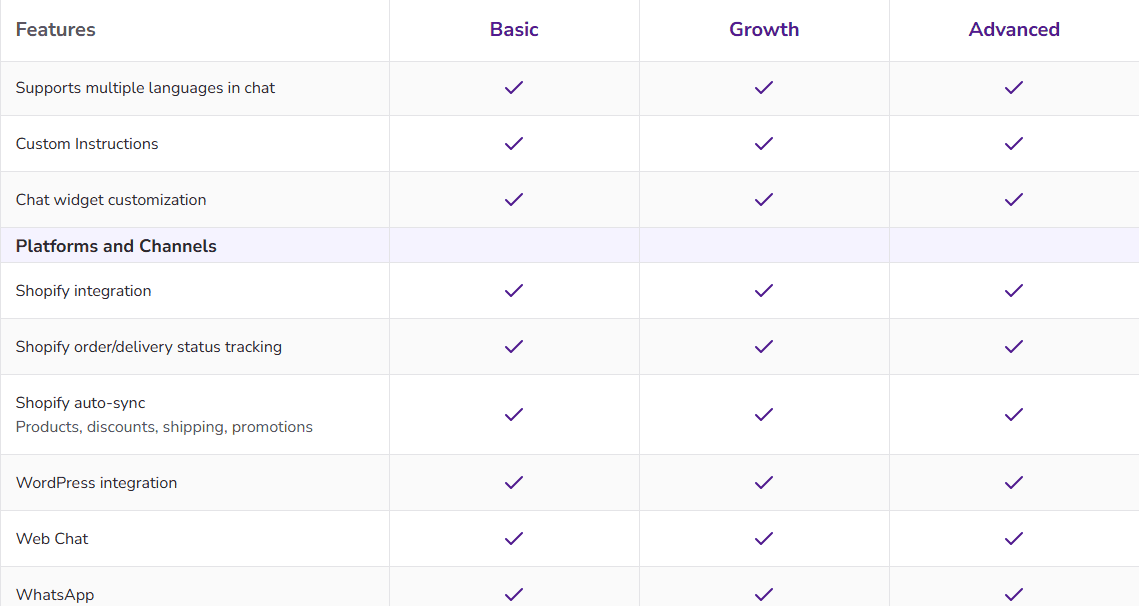
AeroChat auto-responds to visitor questions on your WordPress site and brings WhatsApp, Instagram DMs, Messenger, Telegram, and email into the same inbox. For businesses whose customers don’t only message through the website, this is the cleanest setup — one auto-response system across every channel.
Why it wins omnichannel auto-response:
-
Auto-responds across website plus WhatsApp plus Instagram plus Messenger from one place
-
AI understands unscripted questions, not just keyword triggers
-
Auto-detects visitor language and replies in kind (Spanish, French, Arabic, and more)
-
Trains itself on your content in minutes, so the auto-responses reflect your actual policies
-
Switches from auto-response to a live human cleanly when needed
Where it’s not the right pick:
-
It’s not a native WordPress plugin that lives inside your WP dashboard. It installs via a widget snippet. If you want everything managed inside WordPress itself, WPBot fits better.
Best fit: WordPress businesses that handle customer conversations across multiple channels, not just the website. To understand the broader approach, see our guide on omnichannel customer support.
2. WPBot — Best Native WordPress Plugin
Starting price: Free tier, Pro from around $79 one-time per site Best for: WordPress purists who want the chatbot managed entirely inside the WP dashboard.
WPBot is a native WordPress plugin that runs auto-responses directly inside your WordPress install. It can be powered by OpenAI, Gemini, or its built-in features, and supports WooCommerce, lead capture, and omnichannel connections.
Strengths:
-
Lives inside the WordPress dashboard, no external platform
-
Works with or without an AI model connected
-
Strong WooCommerce integration
-
One-time pricing options (no monthly fee on some plans)
Weaknesses:
-
Setup is more technical than hosted tools
-
UX feels dated compared to newer platforms
-
Advanced AI features require Pro licenses and API keys
Best fit: Technical WordPress users who want full control inside their own dashboard.
3. Tidio — Best for Small Sites with a Free Tier
Starting price: Free tier, paid from around $24 per month Best for: Small WordPress sites testing auto-responses without upfront cost.
Tidio’s Lyro AI auto-responds to visitor questions by learning from your FAQ. One-click WordPress plugin, clean interface, and a genuine free tier make it a popular starting point for small sites.
-
Real free tier with Lyro AI auto-responses (50 free conversations a month)
-
One-click WordPress plugin install
-
Clean, beginner-friendly interface
-
Strong WooCommerce templates
-
Lyro conversation limits trigger overage charges as you grow
-
WhatsApp and Instagram are paid add-ons
-
Less omnichannel depth than AeroChat
Best fit: Small WordPress sites and stores starting with auto-responses on a budget.
4. Zoho SalesIQ — Best for Businesses Already on Zoho
Starting price: Free plan for 2 operators, paid from around $7 per operator per month Best for: Companies already using the Zoho suite.
Zoho SalesIQ’s Zobot builder handles auto-responses with rule-based bots, scripted bots, and a GenAI Answer Bot that pulls from your knowledge base. If you already run Zoho CRM, the integration is the selling point.
-
Tight integration with the Zoho ecosystem
-
Flexible bot builder (rules plus GenAI)
-
Affordable per-operator pricing
-
Visitor tracking and routing
-
Most valuable only if you’re already on Zoho
-
Bot building has a learning curve
-
Less polished standalone than dedicated chat tools
Best fit: Businesses already invested in Zoho CRM and apps.
5. WPChat — Best for WhatsApp-First Auto-Reply
Starting price: Free plan, paid tiers available Best for: WordPress sites that route most conversations to WhatsApp.
WPChat links your WordPress site to WhatsApp Business and sets up auto-reply conversations through a point-and-click interface. Good for businesses where WhatsApp is the primary channel and the website is just the entry point.
-
Easy WhatsApp Business connection from WordPress
-
Point-and-click auto-reply builder, no coding
-
Connects to Telegram, Instagram, and Messenger too
-
More of a routing tool than a true AI auto-response engine
-
Less sophisticated AI than AeroChat or Tidio
-
Best for simple auto-replies, not complex support
Best fit: WordPress sites that funnel customers to WhatsApp for support.
For the WhatsApp-specific setup steps — greeting messages, away messages, and when to upgrade to full sales automation — see how to set automatic reply in WhatsApp.
Quick Comparison
|
Tool |
Starting Price |
Best For |
Native WP Plugin |
|---|---|---|---|
|
AeroChat |
$49/month |
Omnichannel auto-response |
No (widget) |
|
WPBot |
Free / ~$79 one-time |
Native WP control |
Yes |
|
Tidio |
Free / $24/month |
Small sites, free tier |
Yes (plugin) |
|
Zoho SalesIQ |
Free / $7/operator |
Zoho users |
Yes (plugin) |
|
WPChat |
Free / paid tiers |
WhatsApp-first |
Yes |
How to Set Up Auto Responses (Step by Step)
The process is similar across tools. Here’s the general flow.
Step 1: Install the tool. For native plugins (WPBot, Tidio), install from the WordPress plugin directory. For AeroChat, paste the widget snippet into your site footer or use the WordPress integration.
For the full walkthrough of all three installation methods, see how to add an AI chatbot to WordPress.
Step 2: Upload your content. Add your FAQ, policies, product info, hours, and shipping rules. AI tools train on this. Rule-based tools use it to build triggers.
Step 3: Set your auto-response scope. Decide what the bot auto-answers and what it routes to a human. Use the table earlier in this guide as your starting list.
Step 4: Write your fallback and handoff. Configure what happens when the bot doesn’t know an answer. It should apologize briefly and offer to connect a human or capture an email. Never leave a visitor in a dead end.
Step 5: Test with real questions. Send 10 to 15 real customer questions through the bot before going live. Fix the weak answers.
Step 6: Review weekly. Check the conversation log every week. Find questions the bot fumbled, and update the responses. This is the step most people skip, and it’s why most auto-response setups slowly get worse. For more on this, see our guide on training a chatbot with your own data.
Auto-Response Templates That Work
Real examples beat abstract advice. Adapt these to your business.
Greeting (proactive auto-response):
“Hi! I can help with orders, shipping, returns, or product questions. What can I help you find?”
Hours question:
“We’re open Monday to Saturday, 9 AM to 6 PM ET. Closed Sundays. Need anything else while I’m here?”
Shipping question:
“We ship across the US in 3 to 5 business days, and internationally in 7 to 14 days. Want me to check shipping to a specific country?”
After-hours capture:
“Our team is offline right now, but I can still help with most questions. If you’d like a person to follow up, drop your email and we’ll reply first thing tomorrow.”
Handoff to human:
“That one’s better handled by a teammate. I’ve flagged your message and someone will reply shortly. Want to leave your email so we can reach you?”
Notice the pattern: short, specific, always offering a next step. Long robotic paragraphs kill the experience.
Common Auto-Response Mistakes
These kill auto-response performance. Avoid all five.
1. Auto-responding to everything. Some messages need a human. A bot that auto-replies to a complaint makes it worse. Set clear boundaries.
2. Robotic, long responses. Visitors want short, scannable answers. Break information into short messages, not walls of text.
See AI chatbot response length limits for the detail on getting this balance right.
3. No human handoff. A bot that traps a confused visitor with no way to reach a person is worse than no bot. Always include an exit.
4. Set and forget. Auto-responses decay. Products change, policies change, the bot doesn’t unless you update it. Review weekly.
5. Training on marketing copy. “World-class service” answers no question. Train the bot on facts: hours, prices, policies, specs.
These five overlap with the broader list of common mistakes businesses make with AI chatbots, which covers setup and ongoing-review failures beyond auto-response specifically.
Frequently Asked Questions
What is a WordPress chatbot with auto responses?
It’s a chat widget on your WordPress site that automatically answers visitor questions without a human typing the reply. Modern versions use AI to understand questions and respond from your business content, handling repetitive questions like hours, pricing, and shipping around the clock.
Do I need a plugin for auto responses on WordPress?
Not always. Native tools like WPBot and Tidio install as WordPress plugins. Others like AeroChat install via a widget snippet or WordPress integration without being a traditional plugin. Both approaches work — the difference is whether the tool is managed inside your WordPress dashboard or on an external platform.
Can a WordPress chatbot auto-respond 24/7?
Yes. That’s the main value. The chatbot answers visitor questions at 3 AM the same way it does at 3 PM. For questions it can’t handle, it captures the visitor’s email so your team can follow up during business hours.
What’s the difference between rule-based and AI auto-responses?
Rule-based auto-responses use fixed triggers (“if message contains ‘shipping,’ reply with policy”). They break when visitors phrase things unexpectedly. AI auto-responses use a language model to understand intent and generate answers from your content, handling unscripted questions. AI is the better choice for most WordPress sites in 2026.
How long does it take to set up auto responses?
For tools like AeroChat or Tidio, under an hour. Install, upload your FAQ and policies, set your auto-response scope, configure handoff, and test. Plan for two to four weeks of weekly review to tune the responses to your actual visitor questions.
Will auto responses slow down my WordPress site?
Modern chatbot widgets load asynchronously, so they shouldn’t noticeably affect page speed. If you notice a slowdown, check whether the tool offers lazy loading and confirm you don’t have conflicting plugins.
Should I auto-respond to blog comments too?
That’s a different tool. Visitor auto-response (the chat widget) and comment auto-reply (plugins like ReplyPilot) are separate products. This guide covers visitor auto-response. If you want to auto-reply to blog comments, you’ll need a dedicated comment plugin.
Can auto responses handle multiple languages?
The better AI tools can. AeroChat auto-detects the visitor’s language and replies in kind without separate setup. This matters if your WordPress site serves an international or multilingual audience.
The Bottom Line
A WordPress chatbot with auto responses saves your team from answering the same questions all day and captures visitors who arrive when no one’s online. The setup is fast. The real work is deciding what to automate, writing responses that sound human, and reviewing weekly so the bot stays accurate.
For WordPress sites that handle customer conversations across the website plus WhatsApp, Instagram, and Messenger, AeroChat runs auto-responses across all of them from one inbox, starting at $49 per month. For WordPress purists who want everything inside the dashboard, WPBot is the native pick. For small sites testing the waters, Tidio’s free tier is a clean start.
If your customers reach you on more than just the website, start with AeroChat’s 7-day free trial, connect your channels, and see how many questions it auto-handles in the first week.
WordPress chatbots with auto-responses are useful for any WordPress site that receives repetitive inbound queries. The WordPress ticketing system guide covers the complementary support infrastructure that auto-response chatbots plug into. For businesses on WooCommerce specifically, AeroChat vs Tidio for WooCommerce covers the chatbot comparison in that context. The free helpdesk and ticketing options guide covers the support layer that WordPress chatbots typically work alongside.



