



Shopify vs BigCommerce: Which Platform Is Right for Your Store?

Shopify is generally the easier choice for a new direct-to-consumer store, a small team that wants predictable day-to-day management, or a retailer that needs a mature point-of-sale ecosystem. BigCommerce deserves closer consideration when the business has complex catalogue requirements, multiple storefronts, wholesale workflows or an existing technical team.
Cost is no longer a simple tie. In 2026, BigCommerce introduced Core, Growth, Scale and Performance plans, new gross merchandise value rules and fees for orders processed through some payment providers. That makes the choice dependent on annual sales, payment provider and required features—not just the advertised monthly subscription.
This comparison uses current public documentation rather than claiming that either platform is best for every merchant.
If you have not yet decided whether Shopify itself is the right fit, our separate look at whether Shopify is still worth it in 2026 is a useful starting point before comparing it against alternatives.
Shopify vs BigCommerce at a glance
| Decision factor | Shopify | BigCommerce |
|---|---|---|
| Typical fit | New and growing DTC stores, social commerce and physical retail | Operationally complex, multi-storefront, catalogue-heavy and B2B businesses |
| Hosting | Included | Included |
| Entry annual-billing price in USD | Basic from $29/month | Core from $29/month |
| Revenue-based plan rules | Standard plans are not automatically upgraded solely because revenue crosses a published threshold | Core and Growth use trailing-12-month GMV thresholds; Scale uses monthly GMV and overage rules |
| Additional payment-provider fee | Applies when eligible orders use a third-party provider instead of Shopify Payments; rate depends on plan | $0 with listed Embedded Payment Providers; Open Payment Provider fee depends on plan |
| Storefront ecosystem | Large app and theme ecosystem | More commerce functions included natively in some plans |
| B2B | Shopify B2B is associated with Shopify Plus | B2B and wholesale capabilities are available, but exact features and B2B Edition costs must be checked |
| Multiple storefronts | Possible through additional stores and enterprise arrangements | Multi-Storefront add-ons are documented by plan |
| POS | Mature Shopify POS hardware and software ecosystem | POS integrations are available through partners |
| Best reason to shortlist | Easier merchant experience and broad ecosystem | Greater native flexibility for complex operations |
The table is a shortlist, not a substitute for checking the exact plan. Features such as price lists, product filtering, inventory locations and phone support vary between BigCommerce tiers.
If the business requirements are not yet clear, use this ecommerce startup checklist before comparing subscriptions.
How Shopify and BigCommerce pricing differ in 2026
Both platforms display familiar entry prices when paid annually, but their billing models now diverge in important ways.
Shopify subscription and payment-provider costs
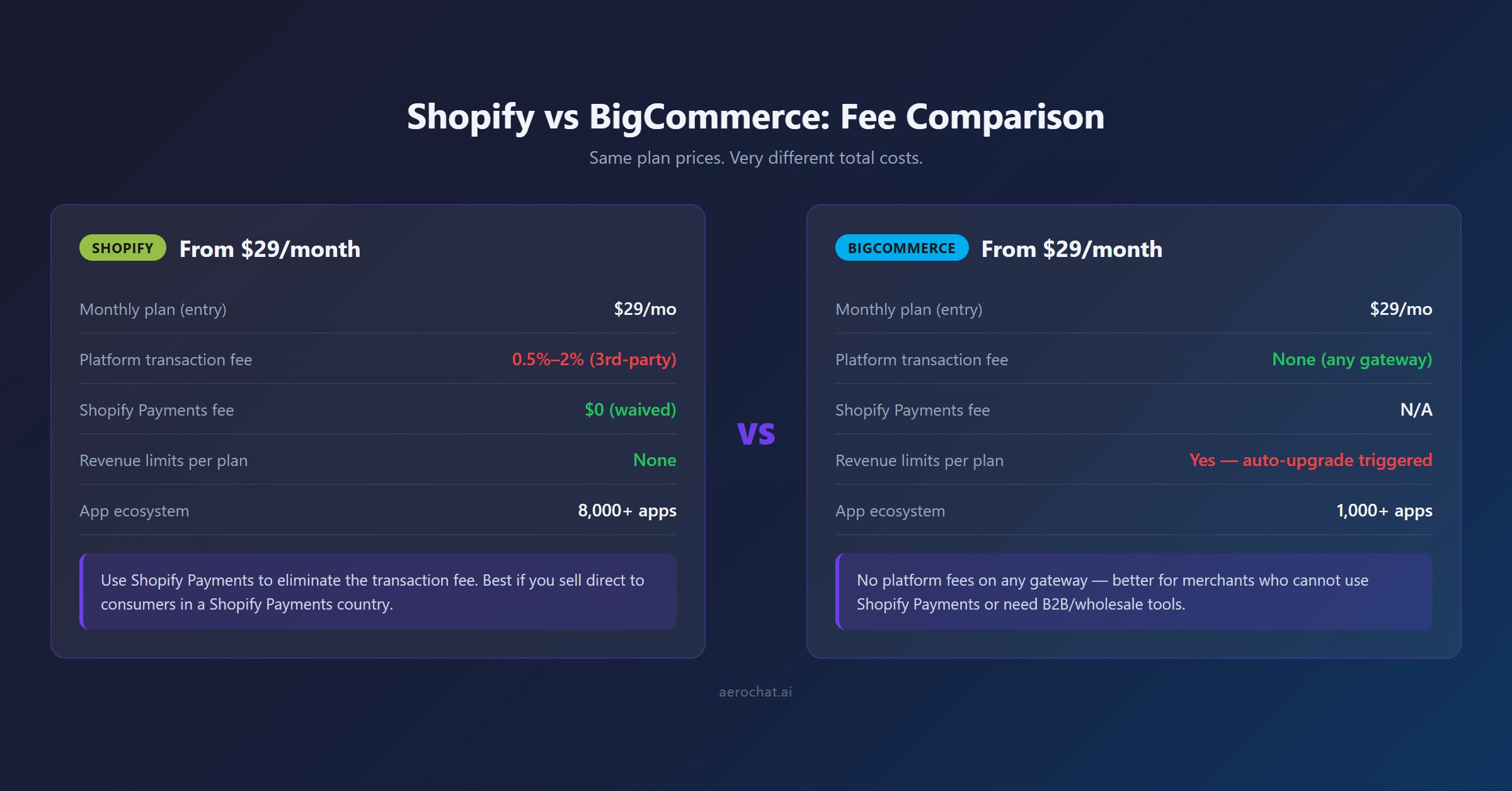
Shopify's main plans are Basic, Grow and Advanced, with Shopify Plus for enterprise requirements. Prices vary by country, billing term and local currency. For example, US annual-billing prices displayed in 2026 start at $29, $79 and $299 per month for the three main plans.
Shopify Payments is available only in supported countries and for eligible businesses. When an order uses Shopify Payments, Shopify's additional third-party transaction fee is normally waived. When another card-payment provider processes the order, Shopify can charge an additional fee based on the merchant's plan, on top of the provider's processing charges.
Shopify Plus pricing also needs precise wording. In July 2026, Shopify lists different prices by currency and contract term; the US figure of $2,300 per month is attached to a three-year term, while the one-year USD rate is higher. A comparison should not describe $2,300 as an unconditional starting price.
BigCommerce Core, Growth, Scale and Performance
The current BigCommerce pricing page lists:
| BigCommerce plan | Annual-billing price in USD | Current sales rule |
|---|---|---|
| Core | $29/month | Up to $30,000 trailing-12-month GMV, then auto-upgrade to Growth |
| Growth | $79/month | Up to $100,000 trailing-12-month GMV, then auto-upgrade to Scale |
| Scale | $299/month | Includes up to $33,333 monthly GMV, with a 0.9% overage above that level |
| Performance | From $1,499/month billed annually | Contract and custom terms for high-volume businesses |
BigCommerce defines plan GMV using its published calculation rather than necessarily matching the gross-sales figure in a merchant's accounts. Scale accounts move to Performance once trailing-12-month GMV reaches the documented threshold.
These terms are new enough that older BigCommerce reviews can materially understate cost. Verify them again before signing a contract.
Embedded and Open Payment Providers
The statement “BigCommerce never charges a platform transaction fee” is no longer accurate without a condition.
BigCommerce currently lists a group of Embedded Payment Providers, including providers such as Stripe and selected PayPal products. Orders processed through a listed embedded provider have a $0 BigCommerce provider fee.
An Open Payment Provider is a provider outside that current programme. BigCommerce documents additional fees on eligible order GMV:
- Core: 2%
- Growth: 1%
- Scale: 0.6%
- Performance: subject to contracted terms, currently shown as no fee
Those charges are separate from the payment processor's own fees. The provider list can change, so a merchant should verify that its exact regional provider and product are included—not assume that a familiar brand name is enough.
A better way to compare total cost
Do not compare only $29 with $29. Calculate:
- Subscription for the appropriate sales volume
- Card-processing costs in the merchant's country
- Shopify third-party-provider fee or BigCommerce Open Payment Provider fee
- Apps, storefront add-ons and themes
- POS, B2B or wholesale requirements
- Development and migration work
- Currency conversion and international-selling costs
Consider a store using a provider that sits outside BigCommerce's embedded list. The same payment choice could create a 2% BigCommerce fee on Core, while a different embedded provider could reduce that platform fee to zero. The cheapest platform therefore changes with the payment stack.
For a global article, one £20,000 or $20,000 example is not enough. US, UK, Canadian and Australian merchants face different local processing rates, taxes, currencies and provider availability.
Which platform is easier to set up and manage?
Shopify usually gives a first-time merchant the shorter learning path. Its onboarding, theme editor and app-installation model are designed around non-technical store owners. Common work such as adding products, configuring delivery, creating discounts and processing orders stays inside a relatively consistent admin experience.
BigCommerce is also hosted and does not require merchants to manage servers or core software updates. Its admin exposes more commerce settings because several features that Shopify merchants obtain through apps are part of the platform. That can reduce app dependence, but it gives a new user more decisions to understand.
The useful distinction is not “easy” versus “hard”:
- Shopify suits teams that want a guided merchant experience and expect to extend the store through apps.
- BigCommerce suits teams willing to configure more native functionality and manage a more complex operating model.
Neither platform removes the work of planning product data, tax, shipping, policies, analytics and fulfilment.
Store design and checkout control
Shopify has a large theme market and a section-based editor that makes routine layout changes accessible without code. The result is often faster for a small team, although a premium theme and paid apps can add to launch cost.
BigCommerce provides themes and visual storefront tools, along with APIs and headless options for more customised builds. Its current ecosystem also includes Makeswift and Catalyst-related workflows. This flexibility becomes more relevant to teams with design and development resources than to a merchant choosing a logo and homepage layout for the first time.
Before buying either platform, test these tasks in a trial:
- Build a representative product page with real variants
- Change navigation and collection/category pages
- Add delivery and returns information near checkout
- Test mobile editing and preview
- Confirm what can be changed without editing code
- Price the theme, apps and development required to reproduce the intended design
Products, variants and complex catalogues
Both platforms handle ordinary products, images, stock, categories and CSV imports. Differences become important when products have many combinations, customer-specific prices or advanced filtering.
BigCommerce documents support for substantially more variant SKUs per product than Shopify's longstanding lower limit, while current Shopify documentation has also expanded variant capacity for eligible stores. Limits, APIs and app compatibility are evolving, so verify them against a real catalogue rather than relying on an old “100 variants” comparison.
BigCommerce also places features such as product filtering and price lists on particular plans. A catalogue-heavy store should map each requirement to the current tier instead of assuming that everything described as “native BigCommerce” is included on Core.
Use a sample containing the most complicated real product. If that product needs colour, size, material, regional price, trade price and conditional availability, it will reveal more than a generic feature checklist.
B2B and wholesale
BigCommerce is worth shortlisting for businesses that combine B2C and B2B operations. Its platform and B2B Edition document capabilities such as company accounts, customer-specific catalogues, quoting, invoicing, price lists and buyer portals.
That does not mean every B2B feature is included in every self-service plan. Current pricing places some functions on higher tiers, and B2B Edition can have separate commercial terms. Request a written feature and price schedule for the intended workflow.
Shopify's native B2B suite is associated with Shopify Plus. It supports company profiles, catalogues, payment terms and other wholesale workflows within Shopify's enterprise offering. For a smaller wholesale business, apps or a separate operational process may still be considered, but their total cost and maintenance should be counted.
The decision is less about which platform has a “B2B” label and more about whether it supports:
- Account hierarchies and buyer permissions
- Contract or customer-specific pricing
- Quotes and purchase orders
- Tax-exempt and payment-term workflows
- B2B and DTC inventory in one operation
- ERP, CRM and accounting connections
Multiple storefronts and international selling
BigCommerce's Multi-Storefront model lets eligible merchants manage additional storefronts from one backend. Current plans show different add-on prices and maximum storefront counts, so this is not an unlimited inclusion.
Shopify can operate multiple stores, markets and expansion arrangements, but separate storefronts may require additional subscriptions or an enterprise agreement. Shopify Markets helps one store localise countries, currencies and domains, while a true multi-brand architecture is a different requirement.
Ask whether the business needs:
- One brand translated for several countries
- Separate brands sharing a catalogue
- Different B2B and DTC experiences
- Region-specific inventory and fulfilment
- Independent teams, analytics and permissions
The answer determines whether “multi-storefront” is genuinely valuable or unnecessary overhead.
Physical retail and POS
Shopify POS is a strong reason to choose Shopify when the same business sells in shops, at events and online. Shopify provides its own POS software and hardware ecosystem in supported countries, with central product, customer and inventory information.
BigCommerce connects with POS providers rather than centring its offer on a single native retail system. This can suit merchants with an existing POS relationship, but the integration depth must be checked: product creation, stock by location, returns, gift cards and customer records do not always sync equally.
Test the difficult retail cases, not only a simple sale. Process an online return in store, sell the last unit at a till, redeem a gift card across channels and confirm how tax and reporting are handled.
SEO, content and migration
Both platforms provide editable metadata, sitemaps, redirects and core ecommerce structured data. Neither platform ranks a store simply because it was selected.
BigCommerce offers useful URL and technical controls. Shopify has fixed conventions in parts of its URL structure but a large ecosystem of themes and SEO tooling. In practice, weak category architecture, thin product information, duplicated supplier copy and poor internal linking can limit either platform.
Migration creates greater SEO risk than the choice between two clean new stores. Before moving:
- Export every indexable URL and its current performance
- Map old pages to their closest new equivalents
- Preserve important titles, copy and internal links
- Implement individual permanent redirects
- Retain product, category and informational intent
- Test canonicals, robots directives and structured data
- Monitor Search Console after launch
Themes, app configurations and checkout customisations do not transfer as simple catalogue data. Treat migration as a rebuild with data transfer, not a one-click copy.
Apps, APIs and operational complexity
Shopify has the broader public app ecosystem. This increases the chance of finding a ready-made tool, but it can also create overlapping subscriptions, scripts and data dependencies.
BigCommerce advertises over 1,200 apps and includes more functions natively in parts of its platform. It also targets complex integrations through APIs and enterprise partners. A smaller marketplace is not automatically a disadvantage if the required ERP, payments, tax, shipping and service systems are supported well.
Build an integration list before selecting a platform. For each tool, confirm:
- Native app or custom middleware
- Data read and write permissions
- Sync frequency
- Regional availability
- Plan requirement
- Implementation and support owner
- Exit and data-export process
Where AeroChat fits in the decision
Platform choice solves hosting, catalogue, checkout and order management. It does not automatically solve the repeated conversations that arrive through website chat, WhatsApp, Instagram, Messenger and email.
For merchants choosing Shopify, AeroChat's Shopify integration syncs products, collections, orders, discounts and store pages. This lets the AI answer product and policy questions, make relevant recommendations and provide verified live order-status updates across connected channels.
When a missing parcel, payment dispute or unusual return requires judgement, human handover passes the conversation to an available team member with its context intact.
AeroChat should not determine whether a business chooses Shopify or BigCommerce. It becomes relevant after the commerce architecture is suitable and support volume justifies automation. This article has not verified an equivalent direct BigCommerce integration, so no such claim should be made.
Best for: Shopify merchants who want to automate and scale customer service without extra manpower and costs.
Merchants can compare AeroChat with other documented options in the Shopify AI chatbot guide.
Which platform should you choose?
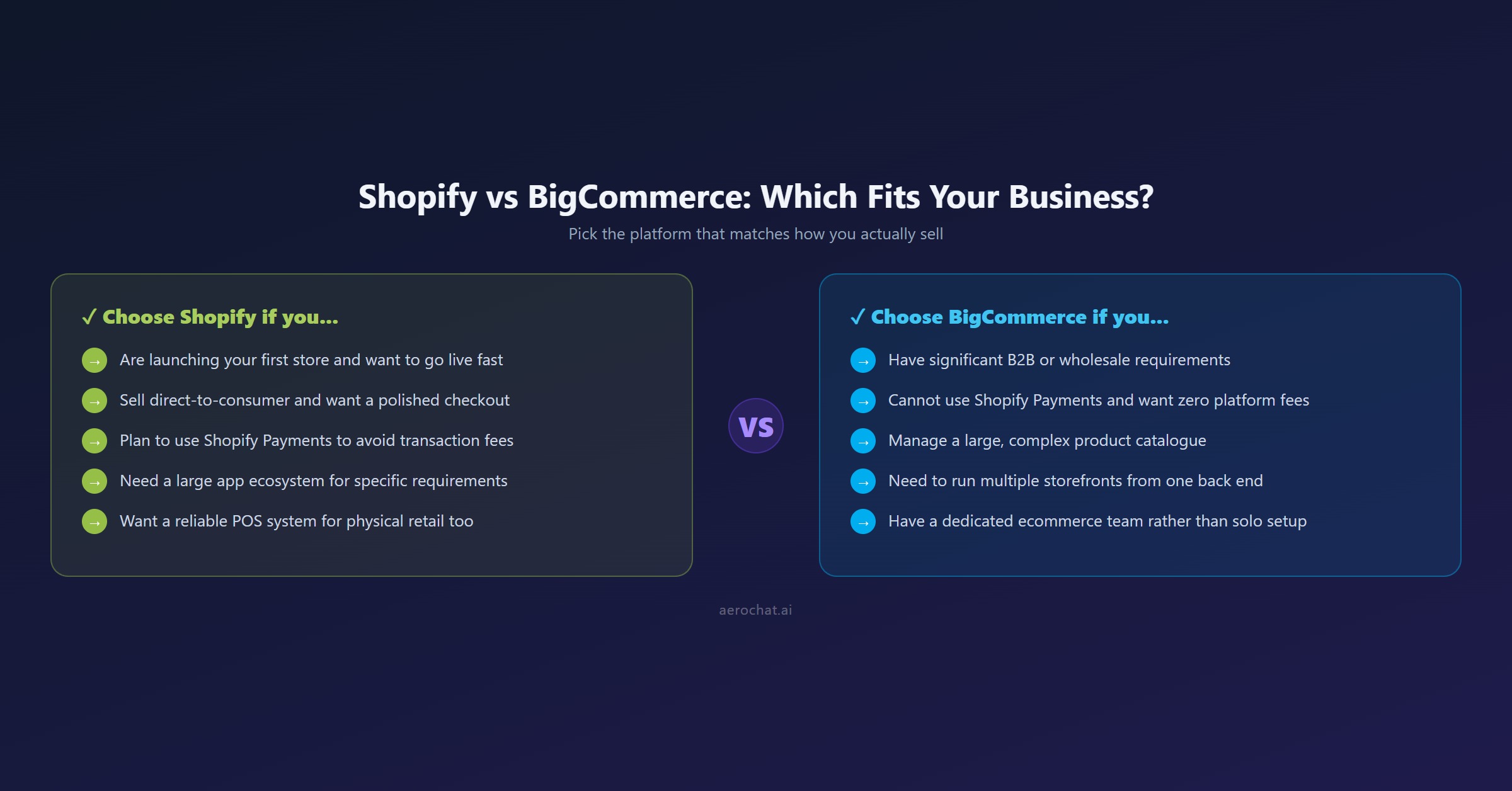
Choose Shopify if:
- This is the team's first ecommerce platform
- A guided merchant interface matters more than deep native configuration
- The business is primarily DTC or social-commerce led
- Shopify Payments is suitable for the business and country
- Physical retail and Shopify POS are important
- The required apps have been priced and tested
- A direct Shopify support-automation ecosystem is valuable
Choose BigCommerce if:
- The catalogue has complex variants or filtering requirements
- B2B, wholesale or customer-specific purchasing is central
- Multiple brands or storefronts need central management
- The business has an experienced ecommerce or technical team
- Required features are included on a cost-effective current plan
- The chosen payment provider is embedded, or Open Provider fees have been budgeted
- The platform's APIs and enterprise integrations match the operating stack
Run a proof of concept before committing if:
- Annual GMV is close to a BigCommerce threshold
- Several storefronts or markets are required
- The store has a difficult ERP, POS or payment integration
- B2B and DTC must share inventory and customer data
- A large catalogue needs migration without losing organic traffic
Build the hardest product, connect the intended payment provider and complete a real operational workflow during each trial. The platform that handles the difficult 20% of the business is usually more suitable than the one with the longest feature list.



