



Wrong Shipping Address on a Shopify Order? Here’s What to Do Before It Ships

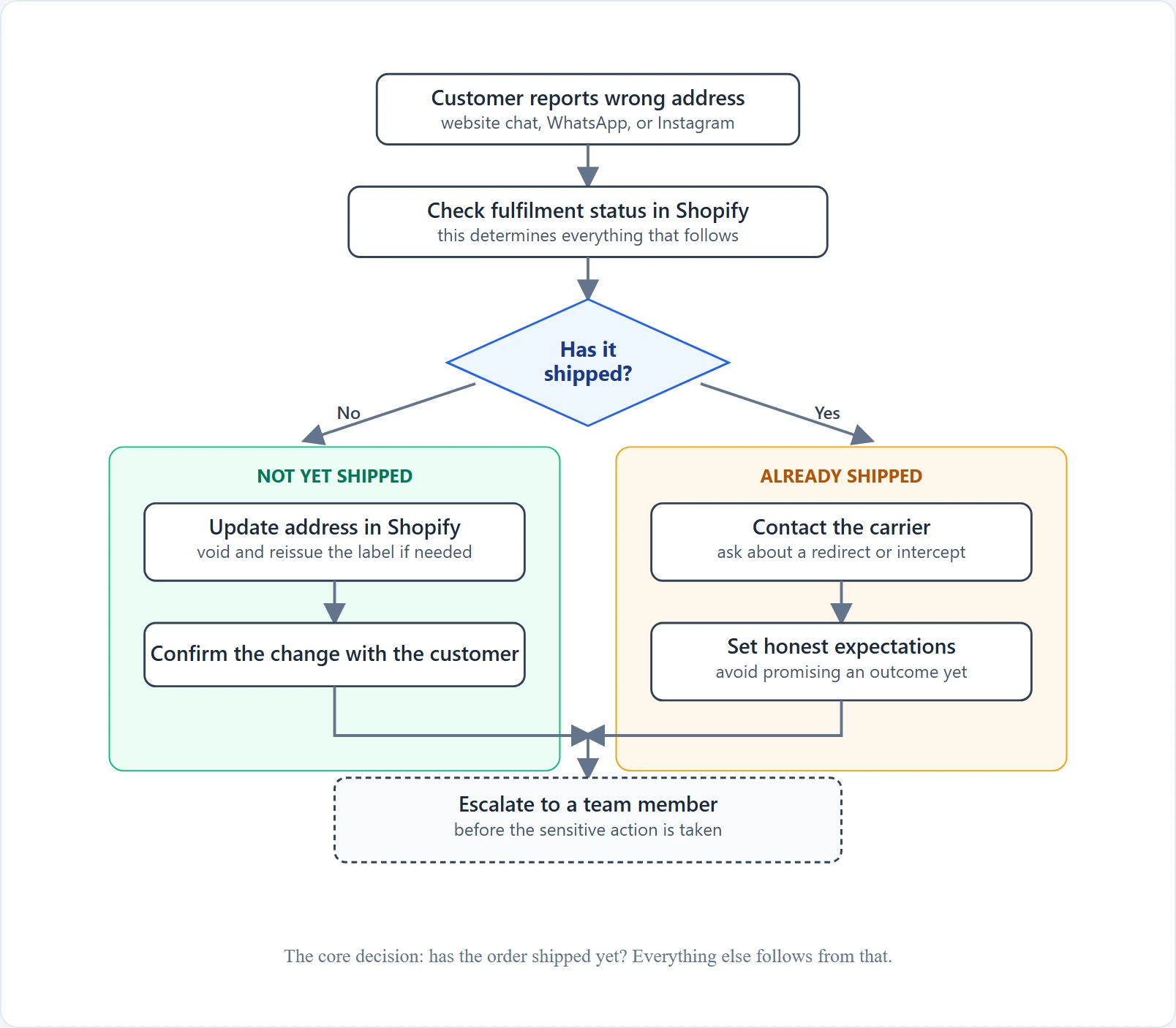
A customer messages you minutes after placing an order to say they used their old address, mistyped the zip code, or forgot to update their details after moving. Whether you can still change a shipping address on a Shopify order depends on one thing above all else: has the order shipped yet. Here’s the decision path support teams should follow, and where an AI chatbot like AeroChat genuinely helps versus where a person needs to take over.
First, check whether the order has shipped
Before promising the customer anything, look up the order’s current state. Shopify itself doesn’t offer a single-click “change delivery address” button once fulfilment is underway, so what’s realistic depends on exactly where the order is:
| Order state | Can the Shopify address still be changed? | What support should do |
|---|---|---|
| Unfulfilled, no shipping label yet | Yes — editable directly in Shopify admin | Open the order, use Edit shipping details in the Customer section, verify the new address, save |
| Unfulfilled, but a shipping label has already been generated | The address field can be edited, but the existing label won’t update to match | Void the old label, generate a new one with the corrected address, and confirm with whoever is packing the order before it ships |
| Being packed by a warehouse or 3PL | Depends entirely on how quickly you can reach the team handling it | Contact the fulfilment team immediately — if they haven’t shipped it yet, they may be able to hold it or update the label; if they have, treat it as shipped |
| Already shipped (carrier has the package) | No — Shopify’s own order record no longer controls where the package physically goes | Check carrier-side redirect or intercept options (see below); don’t promise a Shopify-side fix |
A typical example
Customer: “I accidentally used my old address on this order.”
If the order is still unfulfilled: pull it up, confirm no label has been generated yet, update the address via Edit shipping details, and let the customer know it’s corrected. Done in a couple of minutes.
If the order has already shipped: don’t tell the customer the address has been “fixed,” because it hasn’t been — the package is already moving under the original address. Instead, explain that you’ll check with the carrier about a redirect, set a realistic timeframe for finding out, and follow your store’s policy if a redirect isn’t possible.
If the order hasn’t shipped: update it in Shopify
When you catch it early, editing the shipping address is usually the easy case:
- Open the order in Shopify admin.
- In the Customer section, select Edit shipping details and enter the corrected address.
- Save the change. Changing the shipping address can affect taxes, shipping or fulfilment details depending on the destination and your Shopify setup. Review the updated order before confirming the change to the customer.
- If a shipping label has already been created for this order, changing the address here will not update that label. Void it and create a new one with the corrected address before the order ships.
- If you use a warehouse or third-party fulfilment provider, confirm the updated address has actually synced to their system before they pack and ship — don’t assume it happens automatically.
- Send the customer a short confirmation once it’s done.
This is a manual action your team takes in Shopify admin — not something a chatbot performs on its own unless you’ve built a specifically verified, permissioned integration for it.
If it’s already shipped: this becomes a carrier question
Once a package is in a carrier’s hands, Shopify’s own address field no longer determines where it’s delivered. What’s actually available next varies quite a bit — by carrier, service level, destination, the sender’s account setup, how far the shipment has already progressed, and the country involved — so avoid telling a customer “we can redirect that” before checking:
- Ask the carrier about an in-transit redirect or intercept. Major carriers generally offer some form of this, but eligibility and fees depend on the specifics above — confirm with the carrier for this specific shipment rather than assuming based on a past case.
- If a redirect isn’t available or the package has already been delivered, you’re into replacement, refund, or working with the customer on next steps — a judgment call based on order value and your store’s policy.
- Set expectations honestly. Once a package has left the warehouse, don’t promise an outcome you can’t guarantee. Tell the customer what you’re checking and when you’ll follow up.
What not to promise
A few things worth keeping support teams aligned on, since overpromising here creates a second, worse conversation later:
- Don’t guarantee an address change once fulfilment has started. Say you’ll check, not that it’s done.
- Don’t promise a carrier redirect before confirming it with the carrier. Availability isn’t consistent enough to assume.
- Don’t promise a replacement or refund before checking your store’s own policy. That’s a decision, not a default.
- Don’t tell the customer the address has been changed until it’s actually been confirmed — by your team in Shopify, or by the carrier for an in-transit shipment. A premature “all set” is worse than a short delay with an honest update.
Where an AI chatbot fits into this workflow
This is exactly the kind of repetitive, structured request AeroChat is built to help with — without overstating what it does. A realistic division of labour:
- Receiving the request: AeroChat can pick up the initial “I need to change my shipping address” message on website chat, WhatsApp, or Instagram, at any hour, instead of it sitting in a queue.
- Retrieving order information: Connected to your live Shopify data, AeroChat can pull up the order and its current fulfilment status, so the conversation starts with the right facts already in hand.
- Collecting the corrected address: AeroChat can ask the customer for the correct address and capture it accurately, ready for your team to apply.
- Explaining the next step: based on fulfilment status, AeroChat can tell the customer honestly whether the change is likely straightforward, uncertain, or no longer possible through Shopify — rather than leaving them guessing.
- Escalating before fulfilment: if the order hasn’t shipped, AeroChat hands the conversation to a team member to actually make the Shopify edit, rather than attempting it directly.
What AeroChat should not be positioned as doing: directly editing the Shopify shipping address itself. That’s a deliberate, permissioned action your team takes — the chatbot’s value here is handling the surrounding conversation quickly and accurately so your team can act on a clean, complete request instead of a back-and-forth.
This is a different problem from tracking an order that’s already on its way — if what you’re dealing with is “where is my package” rather than “the address is wrong,” the Shopify shipping status chatbot guide covers that separately. And if you’d rather reduce these tickets in the first place by keeping customers informed at each stage, see automating shipping notifications on Shopify.
Frequently Asked Questions
Can you change a shipping address after placing a Shopify order?
Yes, if the order hasn’t been fulfilled and no shipping label has been generated yet — open the order in Shopify admin, use Edit shipping details in the Customer section, and save the corrected address. Once fulfilment has started or a label exists, it gets more complicated, and once the order has shipped, Shopify’s own address field no longer controls delivery.
Can you change the shipping address after the order has already shipped?
Not through Shopify itself. At that point it’s a carrier-side request — contact the carrier to ask about an in-transit redirect or intercept. Whether that’s possible depends on the carrier, service level, destination, and how far the shipment has already progressed, so confirm for that specific shipment rather than assuming.
Does changing the shipping address affect tax or shipping cost?
Changing the shipping address can affect taxes, shipping or fulfilment details depending on the destination and your Shopify setup. Review the updated order before confirming the change to the customer.
Can an AI chatbot change a customer’s shipping address automatically?
Not directly on its own. Editing the address in Shopify is a manual admin action your team performs. What a chatbot like AeroChat can do is take in the request, pull up the order and its fulfilment status, collect the corrected address, explain what’s realistically possible, and hand the conversation to your team to make the actual change before the order ships.
Who pays for a carrier redirect fee?
This varies by store policy. Some stores absorb it as a customer-service cost for a first-time mistake; others pass the carrier’s fee on to the customer, especially for repeated errors. Decide this in advance so your team isn’t improvising an answer mid-conversation.



