



How Do I Connect My Chatbot to HubSpot?

Through a webhook, not a native app. AeroChat doesn’t have a pre-built HubSpot integration you toggle on. On the Growth plan and above, it sends conversation events out through a webhook, and a tool like Zapier or Make takes that data and creates or updates the matching record in HubSpot using HubSpot’s own API. It’s a short setup, and it’s the same pattern AeroChat uses to connect to any tool without a dedicated integration.
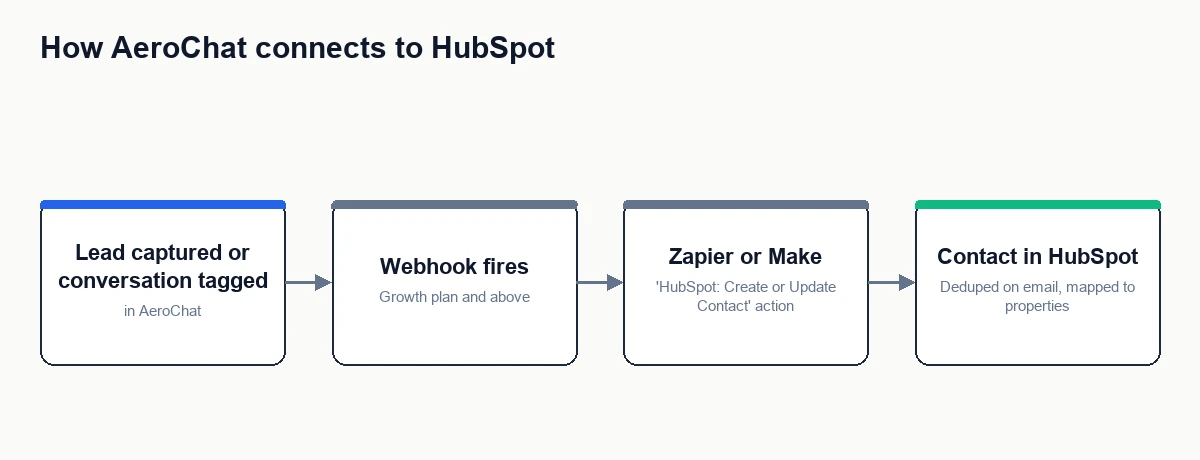
The connection path, step by step
- In Zapier or Make, create an automation with “Webhooks” as the trigger. It gives you a unique URL.
- In AeroChat’s integrations settings, add that URL as the webhook destination for the event you want sent to HubSpot, typically a lead being captured or a conversation being tagged a certain way.
- Trigger a real or test event so the automation tool captures the data structure AeroChat sends: name, email, phone, channel, conversation summary.
- Add a “HubSpot: Create or Update Contact” action. Connect your HubSpot account and authorise it.
- Map each field from AeroChat’s webhook data to the matching HubSpot contact property.
- Turn the automation on and confirm with a genuine test that the contact appears correctly in HubSpot.
Which HubSpot object are you writing to?
HubSpot has several record types, and picking the right one up front saves rework.
| HubSpot object | Use it when |
|---|---|
| Contact | The default. A person shared their details in a conversation and should exist in your CRM. |
| Deal | The conversation represents a genuine sales opportunity you want to track through a pipeline, usually created alongside the contact, not instead of it. |
| Ticket | You run support through HubSpot Service Hub and want the conversation to become a support ticket. This is closer to creating a support ticket than to lead capture. |
Most stores start with Contact only and add Deal creation later once the lead flow is proven.
Field mapping that holds up
HubSpot’s contact record uses internal property names (email, firstname, phone, hs_lead_status, and any custom properties you’ve created). In the mapping step, match AeroChat’s fields to these deliberately rather than dumping everything into a note field:
- Email is HubSpot’s default unique identifier. Map it carefully, since it’s what HubSpot uses to decide create-versus-update.
- Conversation summary is more useful as a short factual line plus a link back to the AeroChat conversation than as a full transcript pasted into a property.
- Lead source or a custom “captured via” property lets your sales team filter chatbot-sourced contacts, worth setting up before you have hundreds of them.
Deduplication and consent
The “Create or Update Contact” action handles the basic case: if a contact with that email already exists, HubSpot updates it instead of making a duplicate. Where it gets less clean is shared inboxes, changed email addresses, or a returning customer who submits with a different address, so decide how those should behave rather than assuming the default is right for your data.
Consent matters too. A person who shared their email to ask a question hasn’t necessarily agreed to marketing. If you’re syncing to HubSpot’s marketing tools, store what they actually consented to as a property, and keep service follow-up separate from marketing subscription. This is the same discipline covered in more depth in can a chatbot add new leads to my CRM automatically.
Where this fits in the bigger picture
Connecting to HubSpot is one specific instance of the general pattern in how can I connect my chatbot to my existing business software. The same webhook approach connects AeroChat to Google Sheets, Slack, or any other tool with a Zapier or Make action. HubSpot is just a common enough destination to be worth its own walkthrough.
Your next step
Decide the one event that should create a HubSpot contact, usually a captured lead or a specific conversation tag, and which HubSpot properties it maps to. Build that single connection, test it with a real contact, and confirm the dedupe behaviour is what you want before adding deal creation or any second event.
Frequently asked questions
Do I need a paid HubSpot plan for this?
HubSpot’s free CRM supports contact creation via its API and Zapier action, so a basic contact sync works on the free tier. Deal pipelines, ticket automation, and marketing tools depend on which HubSpot Hubs and tiers you have.
Can HubSpot send data back to AeroChat?
Not through this setup. The webhook pushes one direction, from AeroChat outward. Enriching an AeroChat conversation with data already in HubSpot would be a separate integration built from the HubSpot side.
Is this different from just connecting to Zapier?
Zapier (or Make) is the middle layer that makes this work. “Connecting to HubSpot” and “connecting to Zapier” aren’t two separate things here, the webhook goes to Zapier, and Zapier talks to HubSpot. See what can I automate with a chatbot and Zapier for the broader picture.



