Can an AI Chatbot Update Customer Information Automatically?

Yes, within AeroChat’s own contact records automatically, and out to an external CRM or spreadsheet if you connect a webhook. These are two different levels of “updating,” and it’s worth being clear about which one you actually need before assuming either happens on its own.
Level 1: what updates automatically inside AeroChat
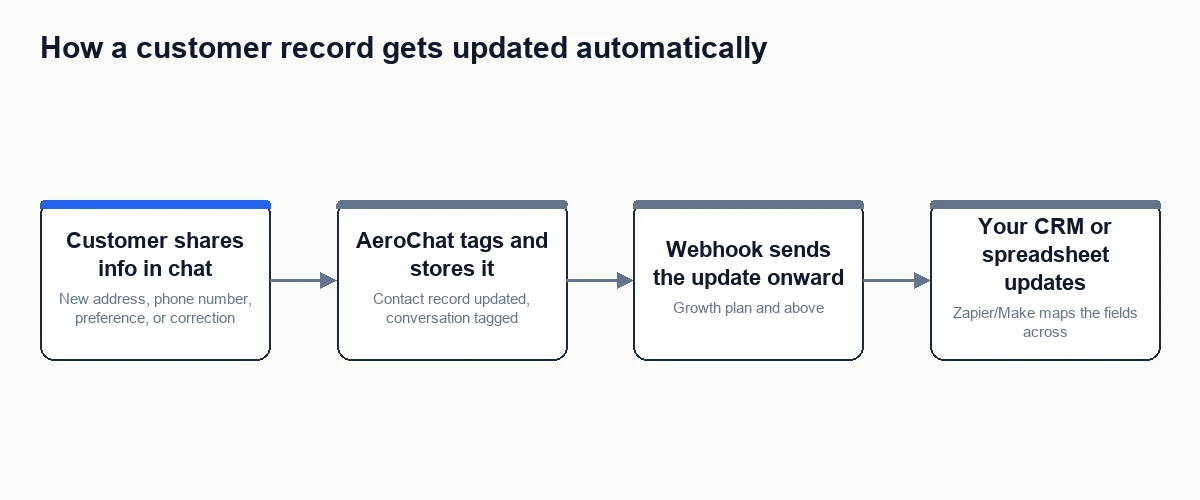
As a conversation happens, AeroChat collects and organises the customer information that comes up naturally: contact details, conversation tags, and how a customer has been segmented. If a returning customer messages in and mentions a new phone number or shipping address, that can be captured and reflected in their contact record without anyone manually re-entering it. Conversations can also be tagged as they’re identified, such as flagging a VIP customer or an escalation, which updates how that contact is organised and grouped going forward.
This part happens natively. No webhook or third-party tool is required for AeroChat’s own contact database to reflect what’s been said in a conversation.
Level 2: getting that update into your own CRM or spreadsheet
AeroChat doesn’t natively write into an external CRM. If the customer record that actually matters to your team lives in a separate system, such as a dedicated CRM or an internal spreadsheet, getting the update there requires the same webhook mechanism used elsewhere in AeroChat’s automations. Growth plan and above, AeroChat can send an event, such as a contact’s details being captured or updated, out to a webhook, which Zapier or Make can then use to update a matching record in your CRM or add a row to a sheet.
A worked example
A customer messages in about a delayed order and mentions, in passing, that they’ve moved and their delivery address on file is outdated. During the conversation, AeroChat captures the new address as part of the contact’s details. That update is reflected in AeroChat’s own contact record immediately. If a webhook is configured for contact updates, the same event also fires out to Zapier, which updates the matching customer record in the store’s CRM, so the next person to pull up that customer sees the correct address without anyone manually syncing the two systems.
What this doesn’t do
It’s worth being precise about the limits here, since “update customer information automatically” can sound broader than what’s actually happening. AeroChat isn’t independently going out and verifying or correcting customer data on its own. It’s reflecting what comes up in an actual conversation. If a customer never mentions a change, nothing gets updated. And the webhook side only pushes data one direction, from AeroChat outward. It’s not pulling updates back in from your CRM to enrich AeroChat’s own records; that would require a separate integration built from your CRM’s side.
How this fits with a chatbot taking other actions
Updating a contact record is one specific example of a chatbot doing something rather than just answering a question. It sits on the lower-risk end of that spectrum, since correcting a phone number or address carries less downside than, say, issuing a refund. For the broader framework of what kinds of actions a chatbot can safely be given access to, and how the risk changes by action type, see how can I make my chatbot perform actions instead of just answering questions.
Your next step
- Contact and tag updates inside AeroChat itself work by default as conversations happen, no separate setup required.
- To push those updates into an external CRM or spreadsheet, add a webhook under AeroChat’s integrations settings (Growth plan and above), pointed at a Zapier or Make automation.
- Map the specific fields you actually want kept in sync, name, contact detail, tag, or note, rather than trying to sync everything by default.
- Test with a real update before relying on it, to confirm the field mapping is landing in the right place on the CRM side.
If your team doesn’t run a separate CRM yet, stop after step one. AeroChat’s own contact list, kept current automatically, is enough on its own for a lot of stores.
Frequently asked questions
Does this work without setting up a webhook?
Updates to AeroChat’s own contact records happen automatically either way. A webhook is only needed if you want that update reflected in a separate CRM or spreadsheet outside AeroChat.
Can it overwrite existing, correct data by mistake?
It updates based on what’s said in the conversation, so accuracy depends on the customer providing correct information. As with any automated update, it’s worth periodically spot-checking synced records, particularly early on, rather than assuming the mapping is perfect from day one.
Does this work across WhatsApp and Instagram conversations too, not just website chat?
Yes. Contact updates and tagging aren’t limited to one channel. A customer detail mentioned over WhatsApp gets captured the same way as one mentioned in a website chat, since it’s the same underlying contact record either way.