How to Automate Customer-Service Emails With an AI Chatbot

To automate customer-service email safely, connect a dedicated support mailbox to an AI customer-service platform, give it current business knowledge, classify incoming messages and decide which categories may be answered automatically. Start with low-risk enquiries, keep sensitive cases under human control and test the whole email thread before allowing the AI to send replies.
The quickest technical setup is not necessarily the safest launch. A customer email can contain several questions, an attachment and a request that changes an order. Successful automation depends on routing and boundaries as much as writing a friendly response.
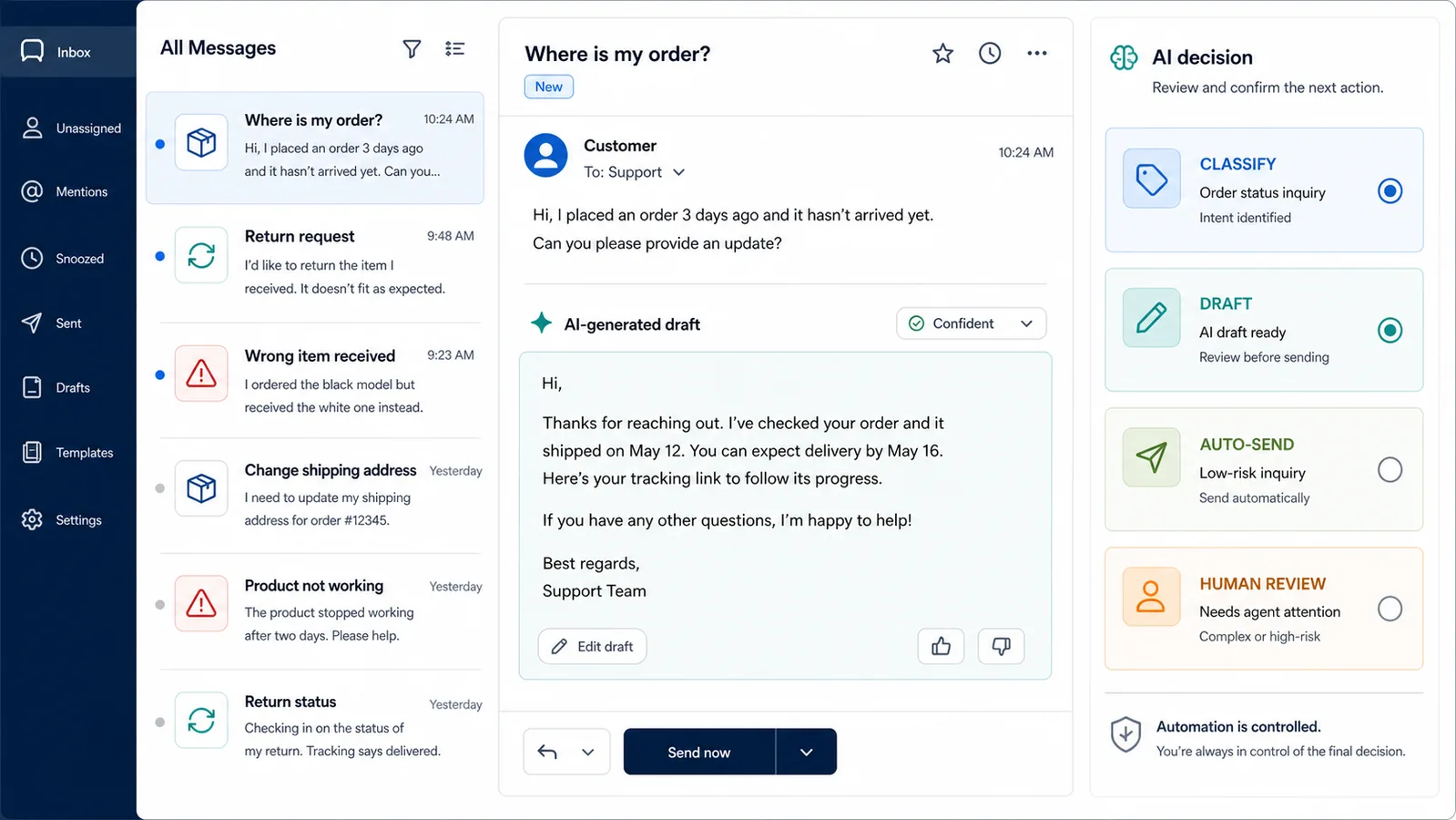
What can an AI chatbot do with customer-service email?
An email AI agent can contribute at several levels. You do not have to switch directly from manual handling to fully automatic replies.
| Level | AI role | Human role | Suitable starting use |
|---|---|---|---|
| 1. Acknowledge | Confirms receipt and sets expectations | Handles the case | Any support inbox that needs reliable receipt messages |
| 2. Classify | Identifies intent, urgency, language or department | Reviews and replies | Mixed mailboxes with routing delays |
| 3. Suggest | Retrieves knowledge and drafts a response | Checks, edits and sends | Teams learning where AI is reliable |
| 4. Auto-answer selected categories | Sends a grounded reply for approved low-risk requests | Monitors exceptions | Repetitive policy and product questions |
| 5. Complete connected actions | Uses permitted systems and confirms the result | Handles high-risk or failed actions | Mature workflows with verified integrations and controls |
Most businesses should move through these levels deliberately. Draft assistance reveals knowledge gaps and weak classifications before a mistake reaches a customer.
Keep personal inbox management separate from support automation
“Email assistant” can mean two very different products.
A personal inbox assistant may summarise the owner’s mail, suggest a reply, find a meeting or organise tasks. A customer-service email agent handles messages sent to addresses such as support@, help@ or orders@ according to the business’s policies and service process.
This guide covers the second use case. Customer-service automation needs shared ownership, business knowledge, escalation, conversation history and an audit trail. It should not depend on one employee’s private mailbox or personal preferences.
What should be ready before you connect the inbox?
Automation exposes weak support operations quickly. Resolve these basics first.
A dedicated customer-service address
Use a mailbox that receives a defined class of customer messages. If supplier invoices, job applications, legal notices and customer returns all arrive together, classification and permissions become harder.
A current source of truth
Collect the approved product information, delivery terms, return policy, warranty process and contact rules the AI may use. Remove old promotions and internal drafts. Assign an owner to each policy.
Clear case ownership
Decide who handles billing disputes, account access, complaints, suspected fraud and legal requests. The AI needs a destination for cases it should not resolve.
A sender and tone policy
Customers should understand that the reply comes from the business. Define the sender name, signature, greeting, language and circumstances that require an explicit automation disclosure in your market or process.
A rollback route
Know how to stop automatic replies without disconnecting the whole support operation. The team should still be able to see and answer incoming mail if the AI is paused.
Step 1: audit the emails customers actually send
Review a recent, representative set of messages and group them by the work required. Do not begin with categories copied from another company.
Useful categories might include:
- product information;
- delivery policy;
- order-status request;
- return eligibility;
- damaged or incorrect item;
- address or account change;
- billing or payment dispute;
- partnership, press or supplier message;
- spam and automated notifications; and
- unclear or uncategorised.
The catch-all category matters. Microsoft’s current email-classification guidance warns that an AI classifier assigns one of the configured categories even when the content is unclear, and recommends an uncategorised option for ambiguous messages.
For each category, record the evidence needed, the allowed action and the owner when automation stops.
Step 2: decide what the AI may send, draft or route
Use risk rather than volume alone.
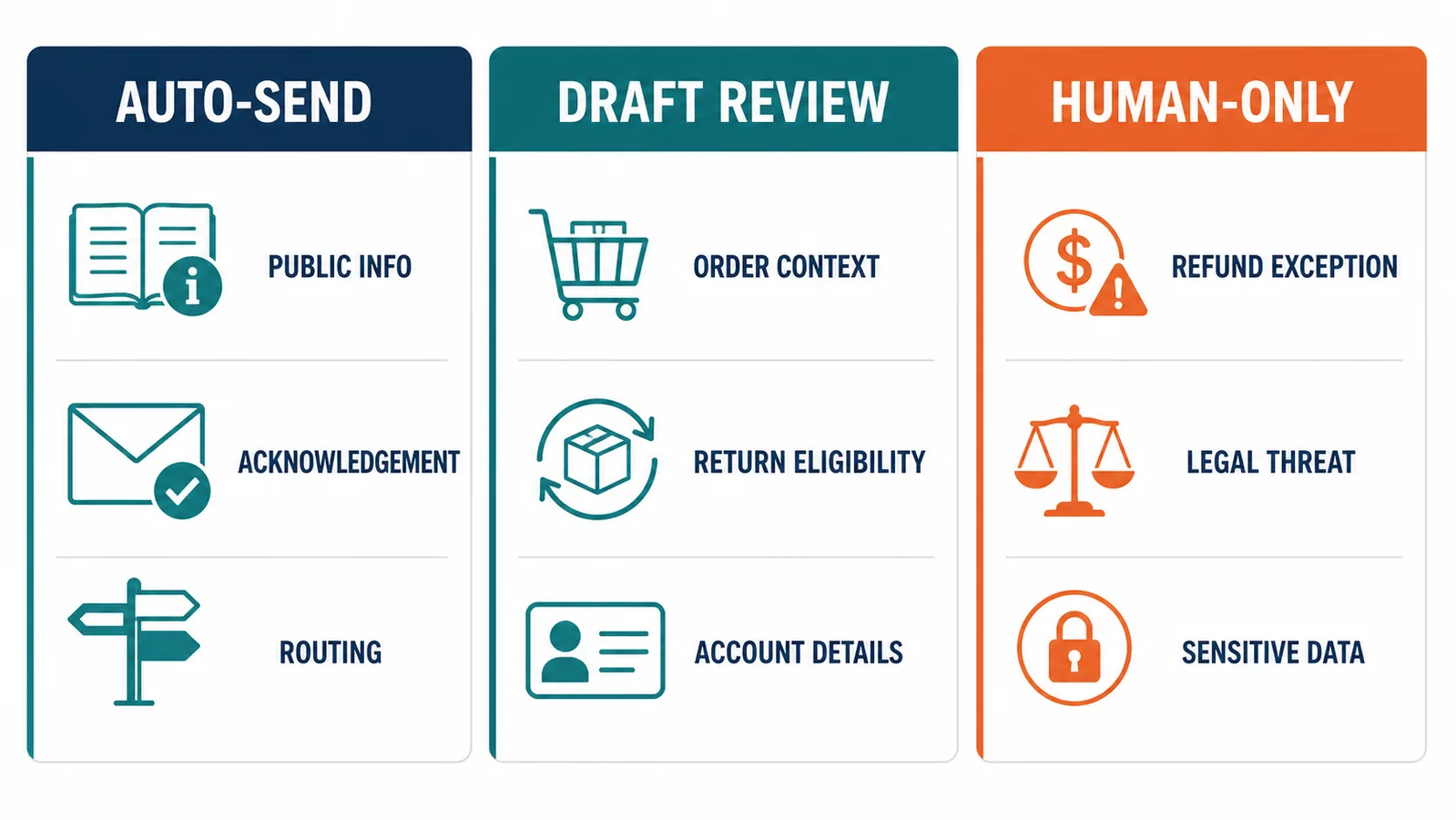
| Email type | Recommended starting mode | Why |
|---|---|---|
| Opening hours or published delivery areas | Auto-send after successful testing | Answer comes from stable, public information |
| Product specifications | Draft or auto-send when the source is current | Wrong details can affect a purchase, so source quality matters |
| General return-policy explanation | Draft first | Exceptions and market differences are easy to miss |
| Order status | Automate only with verified order access and identity rules | Static knowledge cannot reveal a live order state |
| Address change or cancellation | Human or controlled workflow | The request changes an existing transaction |
| Refund, chargeback or payment dispute | Human review | Money, evidence and policy judgement are involved |
| Threat, safety complaint or legal notice | Human-only priority route | Requires accountable handling and may have deadlines |
| Spam or system notification | Classify and exclude | Should not consume support or trigger a customer reply |
This matrix is a starting framework, not legal advice. The business must adapt it to its products, obligations and systems.
Step 3: build the knowledge the AI is allowed to use
An AI email agent should answer from approved business information rather than general model memory.
Start small. Include the policies and product material needed for the first categories you plan to automate. Use descriptive headings, explicit conditions and current dates. If a rule differs by country, product or customer type, state that distinction in the source.
The AeroChat knowledge-base workflow supports website content and owner-added documents. Whatever platform you choose, verify that sources can be included, excluded and updated without rebuilding the whole email system.
Create an answer policy alongside the documents:
- use only supported facts;
- do not invent an order status;
- ask one useful clarifying question when necessary;
- do not request passwords or full card details;
- preserve approved policy wording where required; and
- hand over when the request exceeds the permitted scope.
Step 4: connect the mailbox with the least access required
Use the provider’s supported sign-in or integration path. Avoid sharing a mailbox password with an unverified tool.
Check:
- which mailboxes and folders the platform can access;
- whether it reads historical messages;
- whether it can send, delete, label or move mail;
- which staff can see the connected conversations;
- how the connection is revoked;
- where messages and attachments are processed; and
- what happens when an employee or vendor account is removed.
Connection alone should not turn on automatic sending. Treat access, classification and response automation as separate controls.
Official product setups illustrate why. Zendesk’s email-agent documentation separates connecting the environment from creating the automation trigger and enabling the engine. The exact controls differ by provider, but the design principle is useful: integration and activation should not be one irreversible step.
Step 5: design the full email thread, not one reply
Email conversations unfold over time. The customer may reply beneath quoted text, change the subject, add a second issue or include another recipient.
Test whether the system can:
- distinguish the newest message from quoted history;
- keep the correct customer and order context;
- notice when the customer corrects an earlier detail;
- avoid repeating the same answer;
- split two unrelated requests;
- stop automatic replies after a person takes over;
- handle
CCrecipients appropriately; and - preserve the business signature and subject line.
A good first response can still lead to a poor journey if the AI loses context on the next email.
Step 6: decide how attachments are handled
Attachments should not silently flow into an AI system without a policy.
A product photo, receipt and executable file are not equivalent. Define permitted types, size limits, malware controls, retention and whether the AI is allowed to interpret the content.
If attachment analysis is not verified, the AI can acknowledge the file and route the case. It should not claim to have inspected an image or document it could not process.
For sensitive material, use a secure upload or account process rather than inviting personal information through ordinary email. The mailbox is a communication channel, not automatically an identity-verification system.
Step 7: build a realistic test pack
Use fictional customers and non-production accounts. Include expected classifications, sources, actions and handover outcomes.
A useful pack covers:
- A clear question answered by one policy.
- A question whose answer differs by country.
- A product name with a spelling mistake.
- An email containing two separate questions.
- A reply that corrects the original order number.
- A message with a long quoted thread.
- A request that requires live order data.
- A refund dispute that must reach a person.
- An ambiguous message that belongs in the catch-all category.
- Spam, a delivery failure and an automated vendor notification.
- A customer who asks for a human.
- An attachment the AI cannot safely interpret.
- A source conflict between an old document and the current website.
- A request written in another supported language.
- A failed connection to the order or knowledge system.
For each message, inspect more than grammar. Was the category correct? Was the right source used? Was every question addressed? Did the system avoid an unsupported action? Did the agent receive enough context?
Step 8: launch one safe category first
Begin with a narrow category that has reliable source material and a low cost of correction. Monitor every automated reply during the pilot.
Expand only when the error pattern is understood. If the AI repeatedly fails because the delivery policy is vague, improve the policy. If it fails to distinguish billing from spam, improve the categories and examples. Do not solve every problem by adding a longer prompt.
The broader guide to automating customer service with AI helps place email inside the rest of the support operation. Email should not become a separate experiment with different policies from web chat or messaging.
How should you measure AI email support?
Choose metrics that reveal quality and workload rather than chasing a generic automation percentage.
Track:
- classification accuracy by category;
- percentage of AI drafts sent without material edits;
- automatic replies later corrected by a person;
- unresolved or reopened conversations;
- time until a human receives an escalated case;
- repeated customer messages caused by an incomplete reply;
- source gaps discovered through real questions; and
- customer outcomes for automated versus human-handled categories.
Review the mistakes behind the number. A low error rate can still hide one unacceptable payment or account-change failure.
How does AeroChat handle customer-service email?
AeroChat is an AI agent platform that helps online businesses run customer service on autopilot.
Through the AeroChat email channel, a business can connect Gmail or Outlook using the provider’s sign-in, connect multiple mailboxes and bring email into the same inbox as other supported customer channels. The AI can answer suitable messages from the business knowledge base, while an agent can take over a thread that needs personal attention.
This is most useful for repetitive customer questions that currently sit in a separate mailbox: product details, delivery information, published policies and other enquiries with an approved answer. The business still needs to decide which categories can be automated and which require a person.
For conversations spanning several channels, the guide to email, WhatsApp and chat in one support operation explains why contact history and ownership matter. A customer may begin with an email and follow up through messaging; the team should not treat those as unrelated people.
When the AI lacks confidence or the request needs judgement, AeroChat human handover allows the team to step into the conversation. This boundary is central to safe email automation, not a sign that the automation failed.
Best for: online businesses with repeated support emails and current business documentation that want email managed alongside other customer-service channels.
Plan for failure and maintenance
An email automation system needs an operating routine after launch.
When a source changes
Update or exclude the old document, retest affected questions and review recent replies that may have used the outdated information.
When the integration fails
Pause automatic sending, preserve incoming messages and alert the responsible team. Never send a success confirmation for an order action that the source system did not confirm.
When the AI gets the same question wrong
Treat repeated failure as a knowledge, classification or workflow problem. The guide to chatbot fallback strategies covers clarification, retrieval, escalation and a defined next step. For the broader set of setup and operating mistakes that cause these failures, see common mistakes businesses make with AI chatbots.
On a regular review cycle
Inspect new categories, corrected replies, unresolved cases, permissions and inactive staff access. Review automation after a major product launch, policy change or new market entry rather than waiting for the next calendar date.
Frequently asked questions
Can AI automatically reply to customer emails?
Yes, when the email platform supports automatic replies and the category has approved knowledge and rules. Start with low-risk requests and retain human review for sensitive or uncertain cases.
Should AI send every email automatically?
No. Payment disputes, account changes, legal notices, safety complaints and ambiguous multi-issue messages normally need controlled workflows or a person.
Can AI manage Gmail and Outlook support mailboxes?
Several customer-service platforms support these providers. AeroChat’s current email documentation lists Gmail and Outlook connections through their sign-in processes. Verify the permissions and exact account type before launch.
Does an AI email agent need a knowledge base?
It needs an approved source for business-specific answers. Without one, it may write polished but generic or unsupported replies.
How do you stop an email chatbot from answering incorrectly?
You cannot remove all possibility of error. Reduce it with controlled sources, narrow automation categories, a catch-all route, realistic testing, monitoring and human handover.