7 Best WordPress Ticketing Systems for Customer Support

A WordPress ticketing system turns a customer request into a trackable record with an owner, status, priority and history. It is useful when an enquiry must be assigned, investigated and formally closed. The seven options below keep the support workflow inside WordPress, although their included features and paid extensions differ.
This comparison covers customer-support helpdesks, not plugins for selling event tickets. It is based on current WordPress.org listings and official product documentation reviewed in July 2026. We have not claimed hands-on testing where none was performed, and licences, add-ons and compatibility should be checked before installation.
Traditional WordPress Ticketing vs AI Customer Support
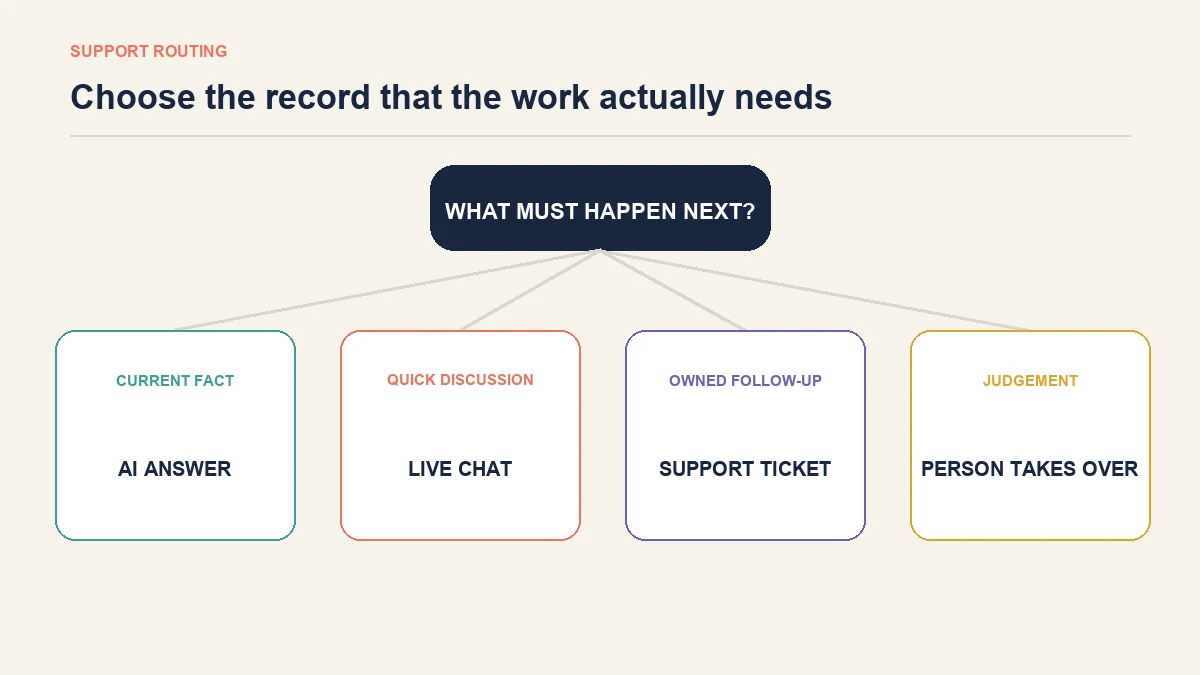
A traditional ticketing system manages work that remains open over time. It gives a request a number, owner and status so a team can investigate it and return later. AI customer support is designed to answer suitable questions during the conversation and transfer exceptions when a person is needed.
AeroChat for WordPress belongs in the AI customer-support category. It is an AI agent platform that helps WordPress users run customer service on autopilot. It can answer suitable product, delivery, return and policy questions using approved business information, then use human handover when an enquiry needs judgement.
This does not make AeroChat a traditional ticketing plugin. A business may still need formal ticket records for engineering assignments, service-level clocks, audited case states or a customer portal. The useful comparison is therefore based on the work each enquiry creates.
| Support requirement | AeroChat | Traditional ticketing system | Combined workflow |
|---|---|---|---|
| Answer a routine product or policy question immediately | Strong fit | Usually slower than necessary | AI answers first |
| Continue conversations across supported messaging channels | Strong fit | Depends on the ticketing setup | Conversations remain available while exceptions become owned work |
| Assign a complex case to a named specialist | Human handover supports transfer | Strong fit | AI identifies the need; the ticket records ownership |
| Maintain formal ticket numbers and case states | Not its primary role | Strong fit | Ticketing system remains the system of record |
| Track an engineering defect or contractual complaint | Not a substitute for case management | Strong fit | AI collects initial context before formal review |
| Help shoppers before a purchase | Strong fit | A ticket can introduce unnecessary delay | AI handles questions; a person takes over when needed |
The simplest decision question is: does the customer need an answer, or does the business need to manage a piece of work? An answer may be handled through AI or live chat. Owned work usually needs a ticket.
7 Traditional WordPress Ticketing Systems Compared
These tools are listed as traditional ticketing options because their primary role is recording, assigning and tracking support cases. The order is not a universal ranking: the most suitable option depends on the required workflow, extensions, maintenance capacity and ecommerce context.
| WordPress ticketing system | Documented strength | Check before choosing |
|---|---|---|
| SupportCandy | Established front-end ticket workflow with an extension ecosystem | Which integrations and productivity features require paid packages |
| Fluent Support | WordPress-based helpdesk with business inboxes and automation options | Which reporting, routing and workflow functions require Pro |
| Awesome Support | Detailed ticket controls and a broad extension catalogue | Total extension cost and maintenance of the chosen stack |
| JS Help Desk | Customer ticket portal with configurable fields and add-ons | Which agent, email and service-level features are included |
| WSDesk | Self-hosted helpdesk with email and automation features | Current licence, email piping and WooCommerce requirements |
| WP Ticket | Straightforward front-end ticket submission and management | Suitability for complex routing and larger teams |
| Smart Support | Self-hosted customer portal and agent workflow | Current compatibility, support activity and advanced feature depth |
1. SupportCandy
SupportCandy is built around a front-end support portal where customers can create and follow tickets while agents manage work inside WordPress. Its current listing documents custom fields, email notifications, agent controls and an extension ecosystem.
For ecommerce teams, the attraction is the ability to keep support close to the WordPress site and add store-related functionality where required. That flexibility also means buyers should establish which capabilities are part of the core plugin and which require separate extensions.
Best for: Businesses that want a configurable WordPress-native ticket workflow and are comfortable assembling the required extension set.
Check before choosing: Customer access, email delivery, agent permissions, WooCommerce context and the complete cost of the extensions needed for the intended workflow.
2. Fluent Support
Fluent Support presents support inside WordPress through business inboxes, ticket management and productivity features. Its documented capabilities make it relevant to teams that want agents to work from the WordPress dashboard rather than send every request to a separate SaaS helpdesk.
The practical question is not whether an automation feature exists somewhere in the product family, but whether the required trigger, report, integration and mailbox behaviour is included in the selected licence.
Best for: WordPress businesses seeking a polished internal helpdesk workflow with room for automation.
Check before choosing: Email piping, reporting, saved replies, automation conditions, agent access and current Pro inclusions.
3. Awesome Support
Awesome Support provides a detailed ticket-management foundation with configurable fields and a catalogue of extensions. This modular approach can suit organisations with specific workflow requirements, but it requires more planning than installing a simple contact form.
Map the required workflow before selecting add-ons. Paying for overlapping extensions or installing functions that agents never use adds maintenance without improving the customer experience.
Best for: Teams that need granular ticket configuration and can manage a modular WordPress support stack.
Check before choosing: Required extensions, compatibility between them, ongoing support, agent experience and the total operational cost.
4. JS Help Desk
JS Help Desk offers a front-end ticket experience with configurable forms, priorities and add-on capabilities. It is relevant when customers need a recognisable support portal and administrators want the workflow managed from WordPress.
Feature depth varies across editions and add-ons, so evaluate the exact customer and agent journey rather than the combined marketing list. A portal is only useful when customers can sign in, submit evidence and understand the status without unnecessary friction.
Best for: Businesses that prioritise a configurable customer-facing ticket portal.
Check before choosing: Registration flow, attachments, departments, email handling, agent permissions and service-level features at the intended tier.
5. WSDesk
WSDesk is a self-hosted helpdesk focused on managing tickets within WordPress, with documented email and automation capabilities. It may appeal to WooCommerce businesses that want customer-service data close to their store rather than in a separate hosted helpdesk.
Self-hosted does not mean maintenance-free. Mail processing, scheduled tasks, database growth and site resources all affect whether the support operation remains reliable as volume increases.
Best for: WooCommerce-oriented teams that want a self-hosted ticket desk with email-based workflows.
Check before choosing: Current licensing, email piping, automation limits, WooCommerce context, hosting resources and backup requirements.
6. WP Ticket
WP Ticket takes a more direct approach to front-end ticket submission and management in WordPress. A simpler workflow can be useful for a small operation that needs persistent support records but does not require complex departments, routing rules or extensive reporting.
Simplicity becomes a limitation when a growing team needs collision protection, internal notes, escalations or detailed permissions. Test the real agent workflow rather than judging only the customer submission form.
Best for: Smaller WordPress sites with straightforward ticket-submission and follow-up requirements.
Check before choosing: Agent collaboration, notification reliability, attachment handling, reporting and the path for future workflow growth.
7. Smart Support
Smart Support provides a self-hosted ticket portal and agent-management approach within WordPress. It can be considered by businesses that want customer requests stored and handled on their own site.
For any support plugin, current maintenance and compatibility matter as much as the feature description. Review recent release activity, support responses and compatibility with the site’s WordPress and PHP versions before committing customer-service operations to it.
Best for: Site owners comparing self-hosted ticket portals with direct WordPress administration.
Check before choosing: Current maintenance, mobile usability, email delivery, permissions and whether its workflow can support the expected ticket volume.
Need Real-Time Assistance Beyond Traditional Ticketing?
Traditional ticketing is strongest when the business needs a durable record of work. It is less suitable when a shopper needs an immediate answer before buying or wants a quick update without opening a case.
This is where AeroChat is the better fit. It can answer suitable product, delivery, return and policy questions using approved business knowledge across supported conversation channels. A person can take over when the enquiry involves an exception, uncertainty or judgement.
Customers asking routine questions usually want an answer, not a ticket number. AeroChat can reduce the repetitive conversational workload, while a traditional ticketing system remains available for cases that require ownership, evidence and follow-up.
The wider comparison of WordPress chatbot capabilities explains where conversational automation differs from a helpdesk. WooCommerce stores can also review how a WooCommerce AI chatbot uses product and order context.
Best for: WordPress and WooCommerce store owners who want to automate and scale customer service without extra manpower and costs.
What does a WordPress ticketing system actually do?
A ticketing system provides structure after a request arrives. A useful workflow should make five facts clear:
- What is the request? The subject and description should contain enough context to act.
- Who owns it? One person or team must be responsible for the next action.
- What is its current state? New, assigned, waiting, in progress and resolved should have agreed meanings.
- What must happen next? Internal notes and customer replies should not be confused.
- When is it complete? Resolution should be recorded rather than assumed because the conversation stopped.
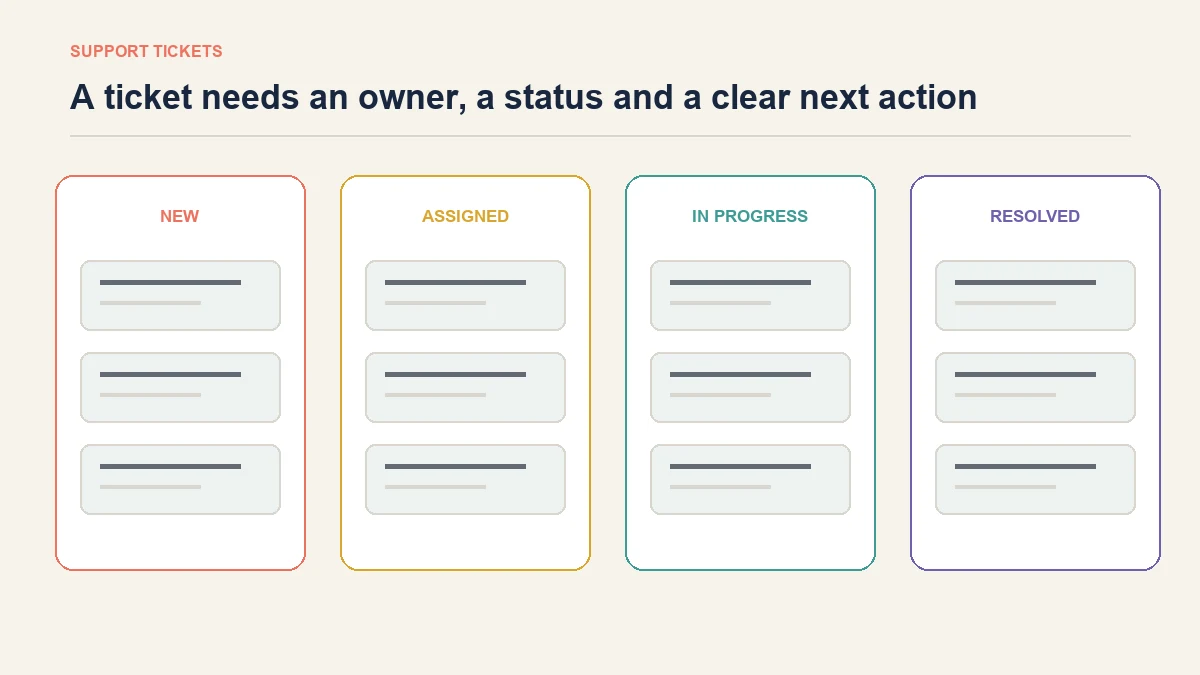
Without these basics, installing a ticketing tool merely creates another inbox. The software cannot compensate for unclear ownership, inconsistent priorities or unanswered notifications.
When a formal ticket is necessary
Choose a ticketing workflow when the request must remain visible until a defined action is complete. This is especially important when:
- several teams may contribute to the resolution;
- a specialist must investigate before anyone can answer;
- the business promises response or resolution targets;
- documents, approvals or evidence must remain attached to the case;
- customers need a portal showing their request history;
- managers need backlog, ownership and resolution reporting;
- the outcome may be reviewed later for legal, contractual or quality reasons.
A ticket is also appropriate when the customer conversation is only the beginning. For example, “My order arrived damaged” may require photographs, stock checks, carrier evidence, approval and a replacement shipment. The initial reply can be immediate, but the work needs a durable record.
How to combine AI support with ticket management
A combined workflow should not force the customer to repeat the same story. Design the transfer before enabling automation.
1. Answer known questions first
Use current business information to resolve suitable questions at the conversation stage. Review unanswered questions regularly because they often expose missing or unclear website content.
2. Detect the need for owned work
Define the signals that require a person or ticket. These might include a damaged order, payment dispute, account access problem, repeated failed answer or an explicit request for a human.
3. Carry useful context into the handover
The receiving person should see the customer’s question and relevant conversation context. Asking the customer to start again weakens trust and wastes the time saved by automation.
4. Create a ticket only when a case must persist
Not every human conversation needs a formal case. A quick clarification can remain in live chat. Create a ticket when the work requires ownership, follow-up, evidence or a durable state.
5. Close the loop with the customer
Resolving the internal task is not the same as informing the customer. The workflow should specify who sends the final update and how the resolution is recorded.
What should you check before choosing a WordPress ticketing setup?
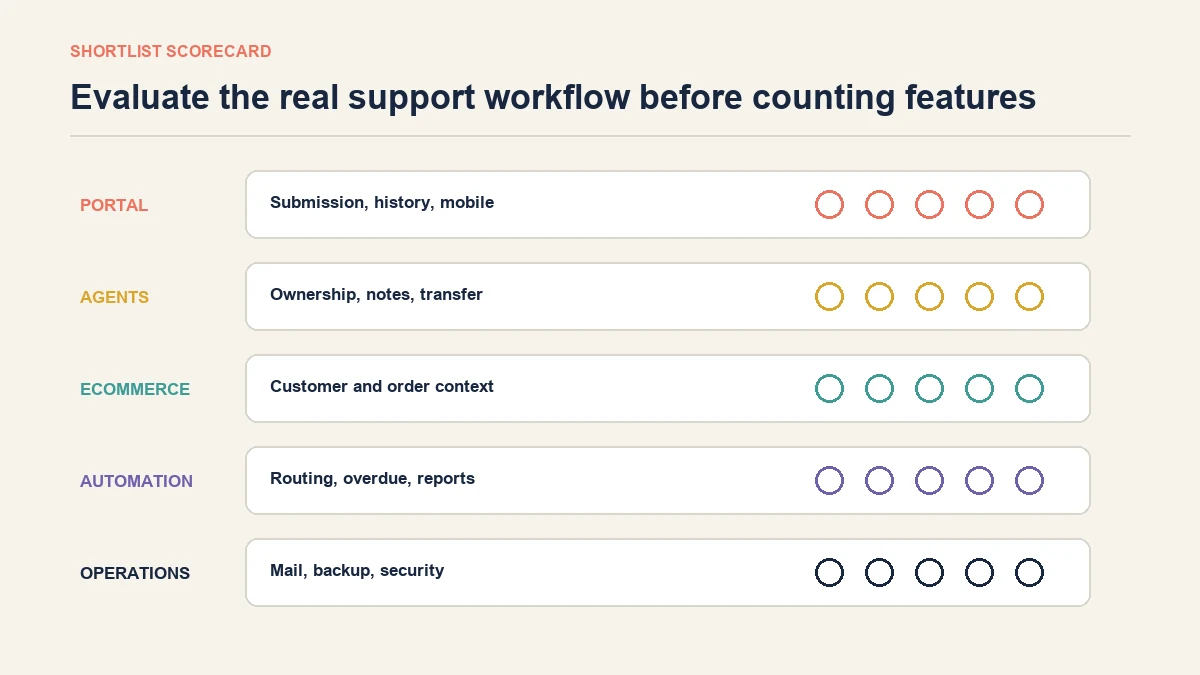
Start with the support process, then evaluate software against it.
Customer experience
Check how customers submit a request, receive updates, add information and view previous cases. Test the portal on a phone and confirm that account creation does not become an unnecessary barrier.
Agent workflow
Agents need clear ownership, internal notes, collision protection and a reliable way to transfer work. More statuses are not automatically better; every status should change what someone does next.
WooCommerce context
An ecommerce support team may need customer, order and product information. Decide which information agents can view, what remains in WooCommerce and whether copying sensitive data into a ticket is justified.
Email delivery
Ticket notifications depend on reliable outbound and inbound email. Test new-ticket alerts, replies, failed delivery and spam handling rather than assuming that normal WordPress email is sufficient.
Reporting
Choose measurements that expose operational problems: unassigned work, ageing tickets, repeated contact and cases waiting on the business. A low average response time can hide a small group of customers who have waited far too long.
Maintenance and security
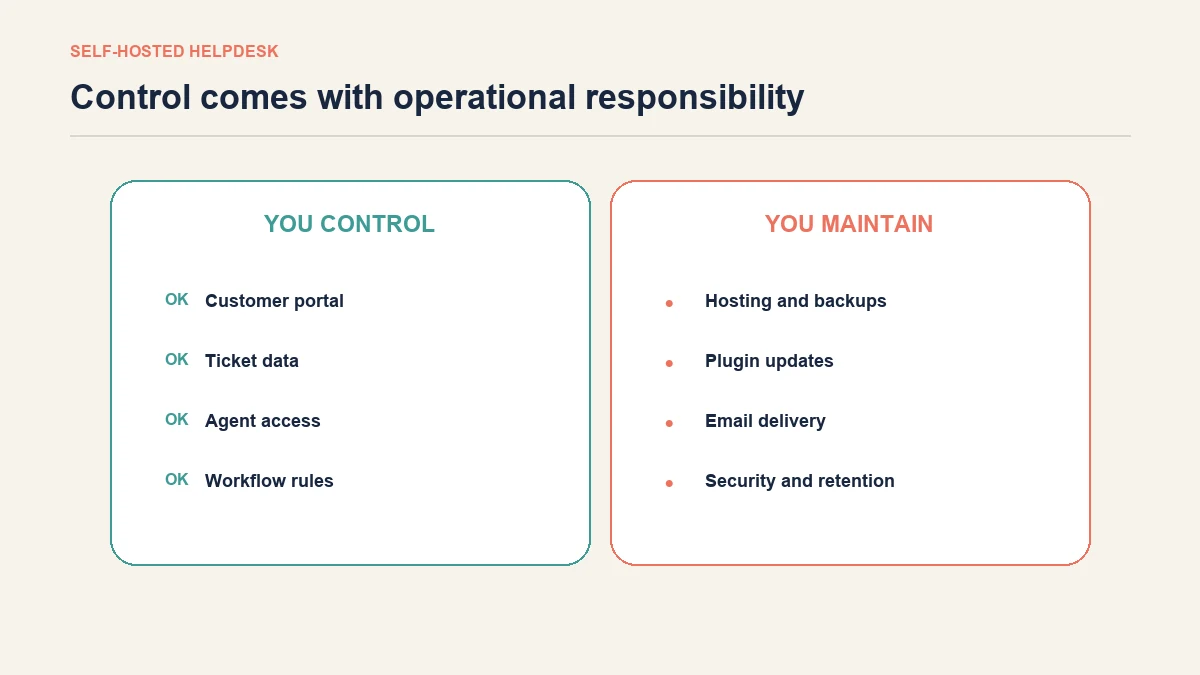
A self-hosted support system puts more operational responsibility on the site owner. Hosting capacity, backups, updates, access control, attachment handling, retention and privacy all require active decisions.
Should support stay inside WordPress?
Keeping support inside WordPress can reduce platform sprawl and give the business direct control over its data and workflow. It can also place customer-service activity on the same infrastructure responsible for the storefront.
Consider a WordPress-based setup when the team can maintain it, the expected volume suits the hosting environment and the required workflow is available without an unstable collection of extensions.
Consider a separate support platform when the organisation needs advanced routing, several departments, complex reporting or operational independence from the website. The location of the helpdesk matters less than whether messages are delivered reliably and work remains owned.
Live chat is not the same as ticketing
Live chat is designed for an immediate conversation. Ticketing is designed for work that may continue after the conversation ends. A business may use live chat for product questions and create a ticket only when investigation is required.
The comparison of live chat for WordPress is more relevant when customers mainly need real-time assistance. The key is to avoid running disconnected channels where nobody knows which inbox owns the customer’s problem.
Implementation checklist
Before opening the workflow to customers:
- List the ten most common support requests.
- Mark which need an immediate answer and which need owned work.
- Define the conditions for human handover and ticket creation.
- Assign an owner to every queue and notification.
- Test customer submission, email delivery and agent replies.
- Test access permissions with a non-administrator account.
- Confirm how attachments and personal data are retained.
- Submit an unknown question and confirm it does not receive an invented answer.
- Run a complete handover from first message to final customer update.
- Review the workflow after real enquiries reveal missing cases.
Frequently asked questions
Is AeroChat a WordPress ticketing system?
No. AeroChat is an AI agent platform for customer conversations, not a traditional ticketing plugin. It can answer suitable questions and transfer conversations to a person, while a separate ticketing workflow remains appropriate for formal case numbers, assigned investigations and persistent case states.
Can AI replace a WordPress helpdesk?
AI can reduce repetitive questions when reliable answers exist, but it should not replace formal case management where requests need ownership, evidence, deadlines or specialist investigation. Many growing businesses benefit from using AI for the first response and tickets for exceptions.
Does every customer complaint need a ticket?
No. A person may resolve a simple issue during the conversation. Create a ticket when the complaint requires follow-up, evidence, approval, cross-team work or a record that must remain open after the chat ends.
Can a WordPress ticketing system slow down a website?
Any plugin that processes requests, sends mail, stores attachments or runs reports uses site resources. The effect depends on implementation, workload and hosting. Test performance and background processing with realistic data before relying on the setup.
Build the workflow around the work
Do not choose between AeroChat and a WordPress ticketing system by counting features. Start with the outcome each enquiry requires.
Use AeroChat when customers primarily need timely, consistent answers across supported conversation channels. Use formal ticketing when the business must own and track a case over time. Combine them when AI can resolve routine enquiries while people and ticket records protect the complex work that should never disappear inside an inbox.