Shopify Chatbot for Flash Sale Crowd Control: Setup Guide 2026
A Shopify chatbot handles flash sale crowd control by automatically answering the same five questions your entire support queue generates during a live sale. Set up trigger phrases for discount codes, stock availability, shipping cutoffs, and order confirmation before the sale goes live, and the chatbot deflects 70 to 80 percent of incoming tickets without a single human agent involved.
Key Takeaways
-
Five questions generate most flash sale support volume: “Does the code work?”, “Is this still in stock?”, “When does this end?”, “Did my order go through?”, and “When will it ship?”
-
Chatbot flows built 48 hours before the sale perform better than flows built the morning of
-
Live handoff thresholds matter: set the bot to escalate after two failed responses, not three
-
Post-sale WISMO volume typically exceeds live-sale volume by 2 to 3 times
-
Mobile visitors dominate flash sale traffic. Keep chatbot opening messages under 12 words
-
Discount code bots need an expiry branch, not just a validation branch
Why Flash Sales Break Normal Support Systems
A typical Shopify store might handle 15 to 30 support conversations on a slow Tuesday. During a flash sale, that number hits 300 to 500 in a 4-hour window. The questions are not complex. They are the same five questions, asked by different people, every 30 seconds.
The problem is not the volume. The problem is that most stores still route all of those questions to a human agent who has to type the same answer hundreds of times while also monitoring inventory, handling escalations, and trying to process their own orders.
A chatbot does not solve this by being smarter. It solves it by being faster and tireless on the predictable stuff, so your team can focus on the edge cases that actually need a human.
The stores that struggle during flash sales are the ones that built their chatbot for normal traffic and assumed it would hold up under pressure. It usually does not, because the trigger phrases and flows were never designed for spike behavior.
What follows is a phase-based setup that treats flash sale support as its own operating mode, not an extension of everyday chat.
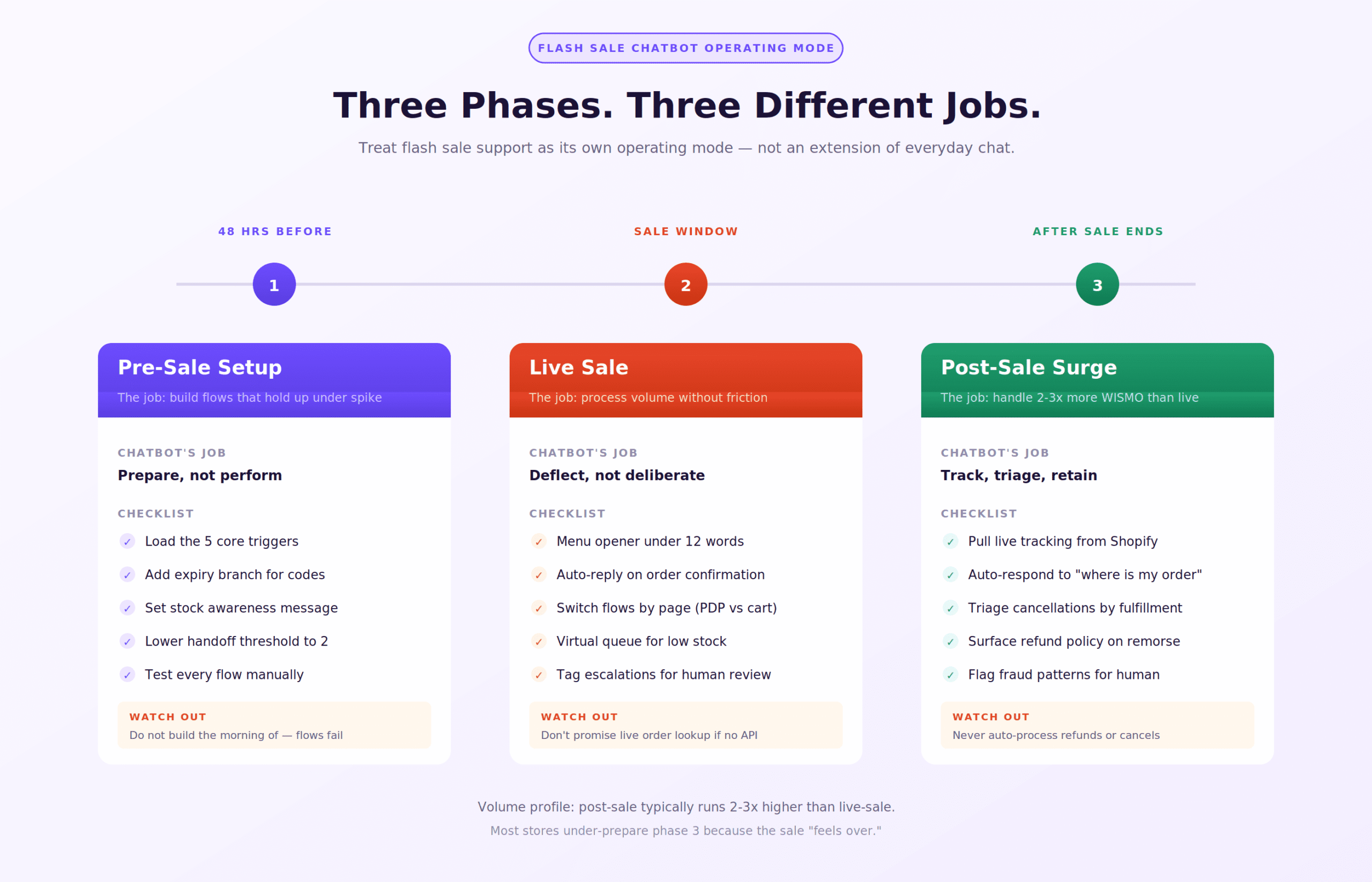
Phase 1: Pre-Sale Setup (48 Hours Before)
The worst time to build your flash sale chatbot flows is the morning of the sale. Build them 48 hours out. Here is what needs to be in place.
Load Your Five Core Triggers
Create dedicated trigger phrases for:
-
Discount code questions (“code not working”, “discount invalid”, “promo code”, “coupon”)
-
Stock questions (“still available”, “in stock”, “sold out”, “can I still get”)
-
Sale timing questions (“when does this end”, “how long”, “sale over”, “still running”)
-
Order confirmation (“did my order go through”, “confirm my order”, “not sure if it worked”)
-
Shipping and delivery (“when will I get it”, “how long to ship”, “delivery time”)
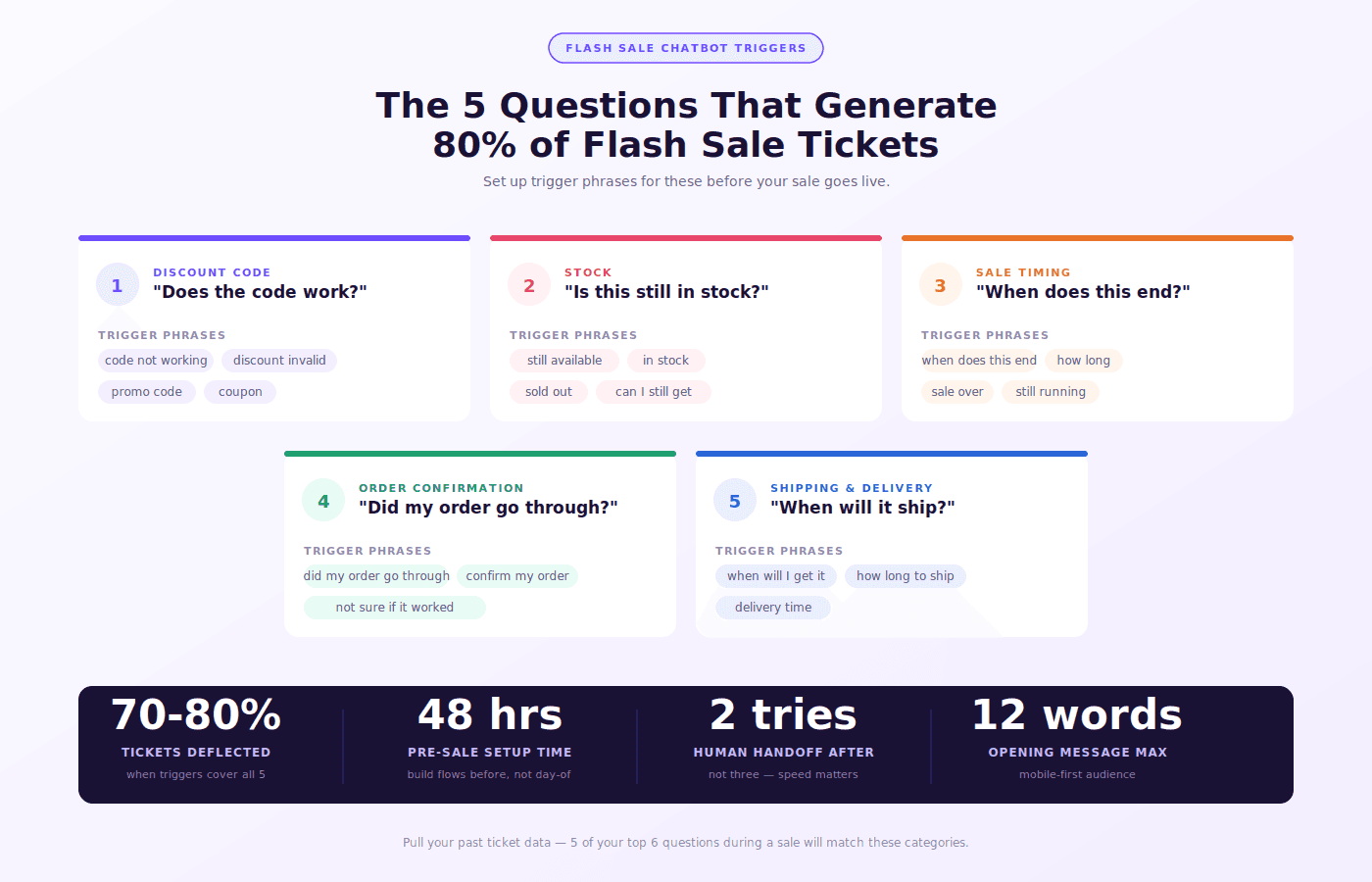
These five categories cover the bulk of flash sale tickets most Shopify stores see. If you have run previous sales, pull your ticket data and check your top 10 questions. You will almost always find these five in the top six.
You can set up these flows inside AeroChat’s flow builder with branching logic so each trigger has two or three sub-paths depending on the follow-up question.
Build an Expiry Branch for Discount Codes
Most chatbots have a “code is valid” response and a “code is invalid” response. That is not enough for flash sales.
You need a third branch: the code expired. Customers who arrive late to a flash sale will enter an expired code, get a generic invalid message, and open a ticket asking why. Add a specific response for the expiry scenario:
“This code was part of our flash sale which ended at [TIME]. The sale has now closed, but you can [subscribe to our list / check our upcoming sales page] to be first for the next one.”
This one branch alone reduces post-sale code complaint tickets significantly.
Set a Stock Awareness Message
Your chatbot probably cannot query live Shopify inventory in real time unless you have a platform with a direct inventory API connection. AeroChat connects to Shopify’s product and inventory endpoints, which lets the bot pull live stock counts and respond accurately.
If your chatbot cannot pull live inventory, set a holding response:
“Stock is moving fast right now. I’d suggest adding to cart immediately, as we can’t guarantee availability while you browse. Anything else I can help with?”
This is honest, it creates urgency that is already real, and it stops the customer from waiting for an answer that the bot cannot give accurately.
Set Your Human Handoff Threshold
For normal traffic, you might allow the bot three attempts before escalating to a human. During a flash sale, change that to two. Customers in a live sale are in a time-pressured state. A third failed bot response sends them to a competitor. Set escalation to trigger after one failed match on discount code and stock questions specifically, since those carry the highest abandon risk.
Phase 2: Managing the Live Sale Window
Once the sale goes live, your chatbot’s job shifts from answering questions to processing volume without creating friction.
Opening Message Matters More Than Usual
Flash sale visitors are mobile-first and moving fast. The chatbot’s opening bubble message should not be a greeting. It should be a menu of the top reasons they are probably here:
“Flash sale is live! Quick help: [Discount code issue] [Stock question] [Order status] [Other]”
This gets to utility in two seconds. A 30-word welcome message with the store name and a smiley face is not appropriate here. You can use the same omnichannel chatbot setup to push different opening messages based on which page the customer is on, so product pages get a different opener than the cart page.
Handling “Did My Order Go Through” Volume
This is the question that spikes hardest during the live sale window. Shopify’s confirmation emails sometimes land in spam during high-volume periods. Customers refresh, are not sure, and panic-open the chat.
Your flow should:
-
Ask for the email address used at checkout
-
Respond with: “If your order was placed, a confirmation email was sent to [email]. Check your spam folder. If it’s not there within 5 minutes, reply here and we’ll verify manually.”
-
Tag that conversation for a human to verify if the customer comes back
Do not promise to look up orders in real time unless your bot has an actual order lookup integration. The Shopify order tracking integration in AeroChat allows the bot to pull order status by email, which removes the need for the human fallback entirely.
Virtual Queue Messaging for High-Demand Items
If you are running a flash sale on limited-quantity items, you can use the chatbot to manage expectation rather than create frustration. When a customer asks about a specific item that is nearly sold out:
“That item has fewer than [X] units left and carts are moving. I’d recommend securing yours now. If it sells out while you’re deciding, I can add you to the restock waitlist.”
The restock waitlist angle connects directly to back-in-stock WhatsApp alerts, which close the loop on lost sales from stock-out moments during the sale itself.
Phase 3: Post-Sale Surge Management
Post-sale support volume typically runs two to three times higher than live-sale volume. The questions shift from “can I buy?” to “where is my order?”
WISMO Automation After a Flash Sale
WISMO (Where Is My Order) accounts for 40 to 60 percent of post-purchase support tickets in normal conditions. After a flash sale, that percentage climbs because:
-
Customers ordered during high emotion and are now anxious about delivery
-
Shipping carriers slow down during volume spikes
-
Customers do not remember the delivery estimate they were shown at checkout
Your bot needs a WISMO flow that pulls live tracking data from Shopify’s fulfillment records and presents it clearly. The response should include:
-
Current order status
-
Estimated delivery date
-
Carrier name and tracking number as a clickable link
-
An option to escalate if the information does not match expectations
If you connected your chatbot to Shopify order status tracking, this entire flow runs without any human involvement. A store that does 500 post-sale WISMO queries on a Monday morning can handle all of them automatically.
Cancellation and Refund Requests
Post-sale remorse is real. Some customers will cancel within hours. Set a cancellation flow that:
-
Checks whether the order has already been fulfilled
-
If not fulfilled: routes to a simple cancellation confirmation
-
If fulfilled: routes to the return/refund policy with a link
-
Tags all cancellation conversations for review
Do not automate the actual cancellation processing unless your chatbot has verified order management permissions. Automate the triage and qualification, hand the action to a human or to a verified integration.
Flash Sale Chatbot: Platform Comparison
|
Feature |
AeroChat |
Tidio |
Gorgias |
Richpanel |
|---|---|---|---|---|
|
Live Shopify inventory pull |
Yes |
No |
No |
No |
|
Order lookup by email |
Yes |
Partial |
Yes |
Yes |
|
Flow switching by page |
Yes |
Yes |
No |
No |
|
WhatsApp + Instagram unified |
Yes |
No |
No |
No |
|
Pre-sale flow scheduling |
Yes |
No |
No |
No |
|
WISMO automation built-in |
Yes |
No |
Yes |
Yes |
|
Mobile chat widget size |
Compact |
Standard |
Standard |
Standard |
What Not to Automate During a Flash Sale
This is the part most guides skip. Some things should stay human even during high volume:
Do not auto-approve partial refunds or price adjustments. Flash sale pricing is complex. A bot that approves a refund because a customer says “the price was wrong” creates a revenue leak that is hard to trace.
Do not automate responses to suspected fraud patterns. Multiple orders from the same IP, multiple discount code attempts, orders shipping to freight forwarders. Flag these for human review, not automatic fulfillment.
Do not replace the post-sale thank-you message with a bot. A personal follow-up from the store owner after a major flash sale builds more loyalty than any automation sequence. Use the chatbot to handle the operational load so your team has time to send that message.
FAQs
Can a Shopify chatbot handle 500 conversations at once during a flash sale?
Yes. A cloud-based chatbot like AeroChat handles concurrent conversations without degradation. The limit is not the bot, it is whether your flow logic covers the incoming questions. A well-built flash sale flow handles 500 or 5,000 sessions equally.
How far in advance should I set up flash sale chatbot flows?
At minimum 48 hours. Ideally 72 hours, so you have time to run through each flow manually, test edge cases, and adjust trigger phrases based on any questions you missed.
What happens if the chatbot gives wrong stock information?
If your chatbot does not have a live inventory integration, it will give generic responses. This is why a real-time Shopify inventory connection matters for flash sales specifically. Without it, use a holding message that acknowledges uncertainty rather than stating incorrect availability.
Should I disable the chatbot if it cannot keep up?
No. Even a partially configured chatbot deflects more volume than no chatbot. If specific flows are failing, disable those branches and route them directly to human, but keep the other flows running.
Does AeroChat support WhatsApp for flash sale notifications?
Yes. AeroChat supports WhatsApp Business API for outbound messages, which means you can send pre-sale announcement messages and post-sale shipping updates through the same platform managing your chat.
Can I use the chatbot to build a pre-sale waitlist?
Yes. A simple opt-in flow can collect email or WhatsApp number, tag the contact as pre-sale interested, and trigger a notification when the sale goes live. This is one of the higher-ROI uses of chatbot automation outside of the sale window itself.
What is the best chatbot for Shopify flash sales specifically?
AeroChat is built for Shopify omnichannel use cases including flash sale surges, with live inventory connections, WhatsApp and Instagram unified inbox, and pre-sale flow scheduling. For a broader comparison of options, see the best Shopify AI chatbot guide.