



15 Live Chat Best Practices for Better Customer Support
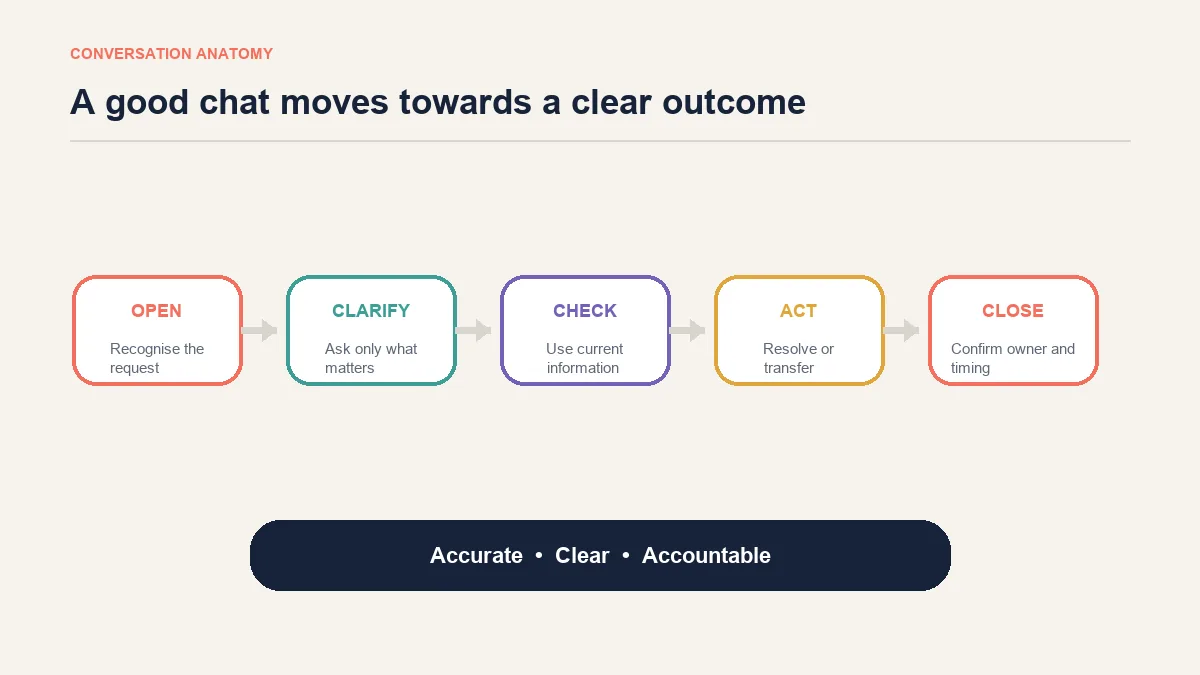
Good live chat support is accurate, clear and accountable. Speed matters, but a quick reply is not useful when it answers the wrong question, misstates a policy or leaves the customer unsure what happens next.
The best live chat practices therefore cover the whole conversation: understand the request, set an honest expectation, use the right information, explain the next step and close only when the customer knows the outcome. The following rules apply to human agents and to teams using AI for suitable routine enquiries.
What does a well-handled live chat look like?
A strong conversation feels simple to the customer even when the work behind it is not. The agent does not make the customer repeat information, disappear without explanation or rush towards a scripted closing.
Three standards matter throughout the chat:
- Accuracy: the answer comes from current product, order or policy information.
- Clarity: the customer can understand the answer and the next step without decoding internal language.
- Ownership: the agent either resolves the request or explains who will take it forward and when.
15 live chat best practices for agents and support teams
1. Answer the question before adding extra information
Start with what the customer actually asked. If someone wants to know whether an item can arrive by Friday, a paragraph about normal shipping options delays the useful answer.
A better response might begin: “Standard delivery is unlikely to arrive by Friday, but express delivery is currently shown for Thursday.” The explanation can follow after the direct answer.
2. Acknowledge the customer when research takes time
Silence feels like abandonment. If an order lookup or policy check will take more than a moment, say what you are checking and give a realistic expectation.
Avoid false precision. “I’m checking the carrier scan now; this may take a couple of minutes” is more credible than promising an exact response time the agent cannot control. Teams can measure average response time separately from the quality of the eventual answer.
3. Verify identity before sharing account or order details
Live chat feels informal, but customer information still needs careful handling. Follow the business’s approved verification process before disclosing addresses, order history, payment status or account changes.
Never ask for a complete card number, password or another secret the support team does not need. If the customer posts sensitive information unnecessarily, follow the company’s security and redaction procedure rather than repeating it in the reply.
4. Keep messages short without making them abrupt
Several focused messages are usually easier to read than one dense block. That does not mean every sentence should be sent separately. Too many fragments create constant notifications and make the conversation harder to follow.
Group one complete thought together. Use a short list when the customer must complete several steps, and use full sentences when explaining a sensitive decision.
5. Use the customer’s name and context only when helpful
Personalisation is not inserting a first name into every reply. It is recognising the product, order or problem already under discussion.
“I can see you mean the blue 500 ml bottle” is useful context. “Great question, Sam!” repeated throughout a delayed-order complaint can feel mechanical.
6. Match the level of formality, not the customer’s frustration
An agent can be warm with a casual customer and more formal when discussing a dispute. The boundary is professionalism: do not copy slang you do not understand, mirror aggression or use humour when the customer is worried about money or a missing parcel.
Tone should make the answer easier to receive. It should never change the underlying policy or facts.
7. Ask one clear question at a time
When several details are missing, a long questionnaire can overwhelm the customer. Ask first for the information that determines the next branch of the conversation.
For a delivery problem, the order number may be the starting point. After reviewing the order, the agent can ask about the address or carrier event only if it remains relevant.
8. Confirm what the customer needs before proposing a solution
Customers sometimes describe symptoms rather than the desired outcome. “The size is wrong” could mean an exchange, a return or help choosing another size.
A concise clarification prevents wasted work: “Would you like to exchange it for another size, or return it?” Once the goal is clear, explain the applicable route.
9. Treat saved replies as drafts, not finished answers
Approved replies save time and improve consistency, but the agent still needs to check the customer’s country, product, order stage and stated concern.
Remove irrelevant sentences and fill every placeholder. A template containing the wrong delivery window is worse than a slower, correct response.
10. Manage concurrent chats according to complexity
There is no universal number of conversations every agent should handle. Two simple availability questions are different from two payment disputes.
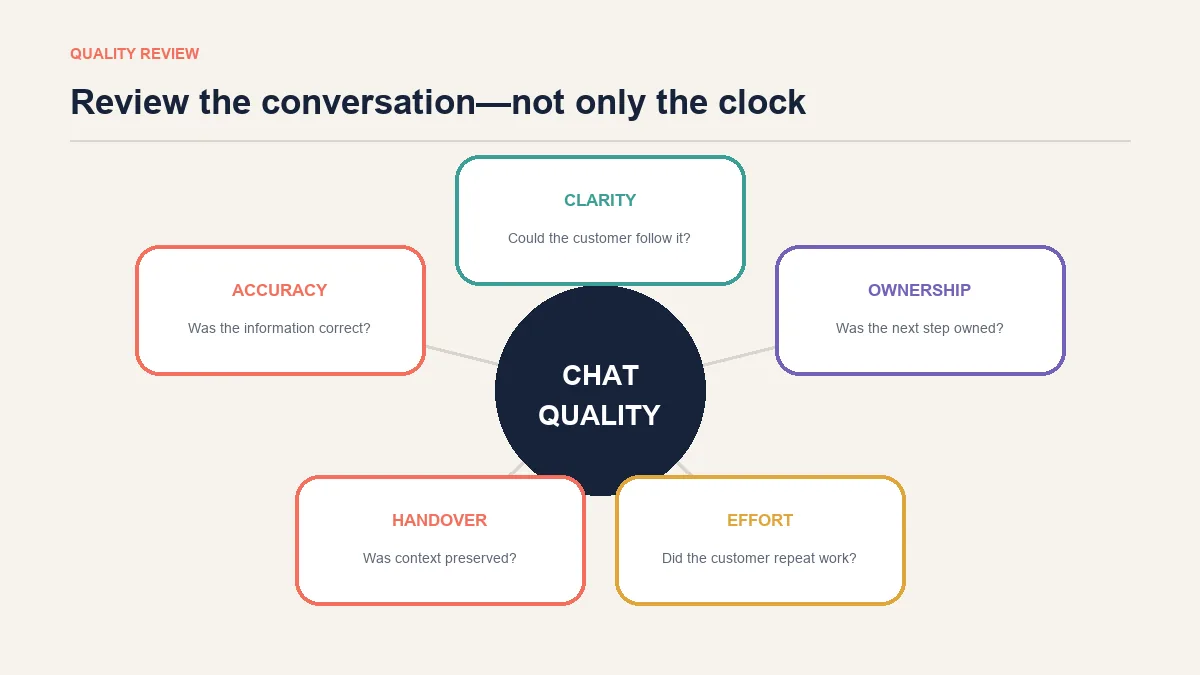
Set concurrency limits using the work actually arriving. Watch for longer pauses, missed details, reopened cases and unnecessary transfers. If quality falls, reducing simultaneous chats may be more useful than asking agents to type faster. The live chat typing test can measure keyboard accuracy, but it does not measure judgement or comprehension.
11. Make holds and handovers explicit
Tell the customer before transferring the chat. Explain why another person is needed, what information will accompany the conversation and whether the customer should expect a wait.
The receiving agent should read the history before asking the customer to repeat it. If a transfer cannot happen immediately, state the follow-up channel and timeframe the team can genuinely meet.
12. Respond to frustration with recognition and action
Empathy works when it is specific. “I can see why a second failed delivery is frustrating” recognises the actual problem. A generic apology followed by the same failed step does not.
For ready-to-adapt language when a genuine apology is needed, see how to apologize to a customer for bad service.
After acknowledging the impact, move to the action available. If the customer becomes abusive, agents should follow a clear boundary and termination policy rather than improvising under pressure.
13. Summarise the resolution before closing
Do not finish with “Anything else?” before stating what was decided. Summarise the action, owner and timing:
“I have arranged a replacement for the damaged item. The warehouse will dispatch it within two working days, and tracking will be emailed after collection.”
Then ask whether the customer needs clarification. This creates a useful record for the customer and the next agent.
14. Write for mobile screens and accessibility
Many customers read chat on a narrow screen. Keep paragraphs focused, put the decision before supporting detail and avoid sending essential information only as an unexplained image.
Chat controls need clear labels, visible keyboard focus and status updates that assistive technology can recognise. Accessibility is part of the service experience, not a cosmetic widget setting.
15. Review conversations for learning, not only scoring
Transcript review should identify unclear policies, missing knowledge, difficult handovers and questions that the website should answer earlier. Do not use it only to find agent mistakes.
Choose a small, varied sample: resolved and reopened chats, routine and complex enquiries, human and automated conversations. Turn recurring gaps into a named improvement with an owner.
Live chat etiquette examples for ecommerce support
The difference between a weak and strong reply is often small. The better version answers the concern, avoids inventing facts and makes the next step visible.
| Situation | Weak response | Better response |
|---|---|---|
| Delayed order | “It should arrive soon. Please wait.” | “The latest carrier scan was on Tuesday and the parcel is now beyond the published delivery window. I can open a carrier investigation or explain the replacement process. Which would you prefer?” |
| Return request | “Returns are allowed within 30 days.” | “I can check whether this item is eligible. What was the delivery date, and has the item been used or opened?” |
| Product availability | “Yes, it is available.” | “The black medium is currently shown as available. Stock can change during checkout, so the order is confirmed only after payment is accepted.” |
| Damaged parcel | “Send a photo.” | “I’m sorry the parcel arrived damaged. Please send one photo of the outer packaging and one of the product so we can confirm the correct next step.” |
| Unverified order | “I cannot help without the email.” | “I cannot share the order details until verification is complete. If you no longer have access to that email, I can explain the alternative verification route.” |
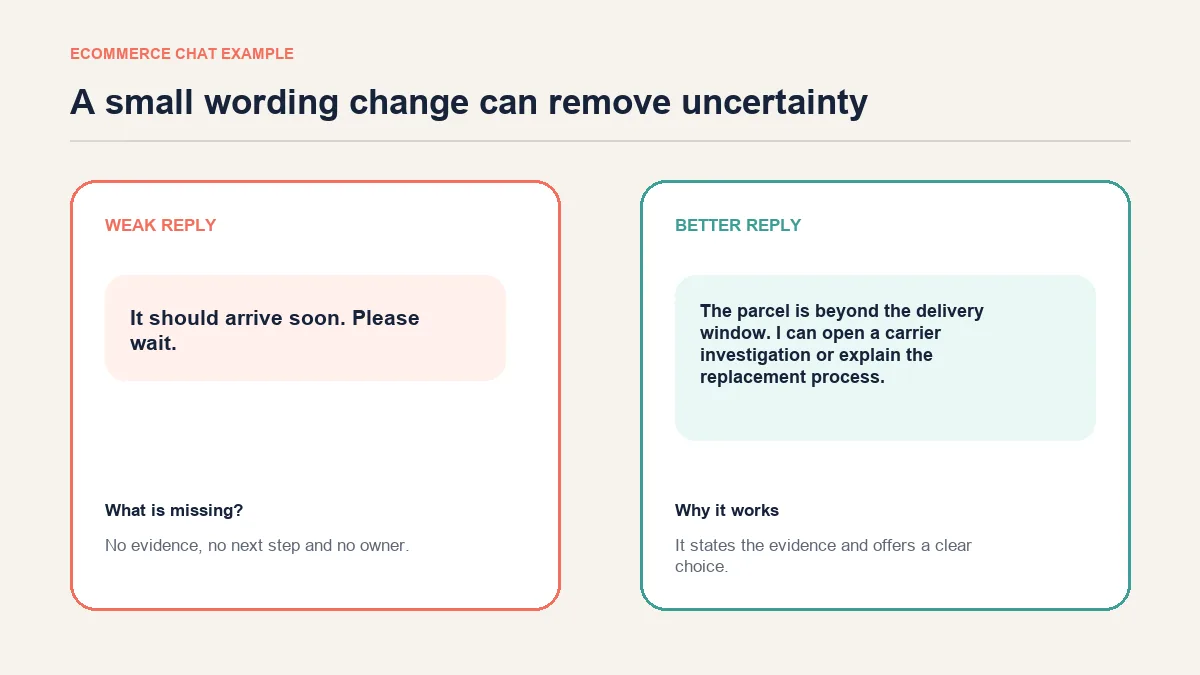
These are structures, not universal scripts. Delivery promises, return conditions and verification steps must match the business’s current information.
For a broader look at how these failures compound into lost customers, see these poor customer service examples and their specific fixes.
Keep business-initiated chat on its own page
Starting a conversation before the customer asks for help involves different questions: timing, behavioural triggers, consent, frequency and interruption. Expanding those tactics here would blur the intent of this article and duplicate AeroChat’s separate explanation of proactive customer support.
For this page, the relevant rule is simple: an invitation should be easy to dismiss and related to what the visitor is doing. Once the customer responds, the same standards of accuracy, clarity and ownership apply.
How AeroChat supports consistent live chat as demand grows
Automation can be useful for routine product, delivery, return-policy and order questions when it has access to approved, current information. It should not guess through an account-security issue, policy exception, payment dispute or emotionally sensitive complaint.
AeroChat is an omnichannel AI customer-service platform that helps online businesses run customer service on autopilot. In a live chat workflow, it can use approved business knowledge to answer suitable product, delivery, return and order-related questions. This is most useful when enquiry volume has grown beyond what the team can answer consistently, rather than as an essential expense for every new business.
The same customer may move between website chat, WhatsApp, Instagram or another supported channel. AeroChat helps keep those conversations together instead of treating every message as an unrelated ticket. When a question needs investigation, judgement or empathy, human handover can pass the conversation and its context to a team member, reducing the need for the customer to repeat the issue.
Automation still needs editorial ownership. Teams should keep policies and product information current, review unanswered questions and check whether automated replies remain accurate after important business changes.
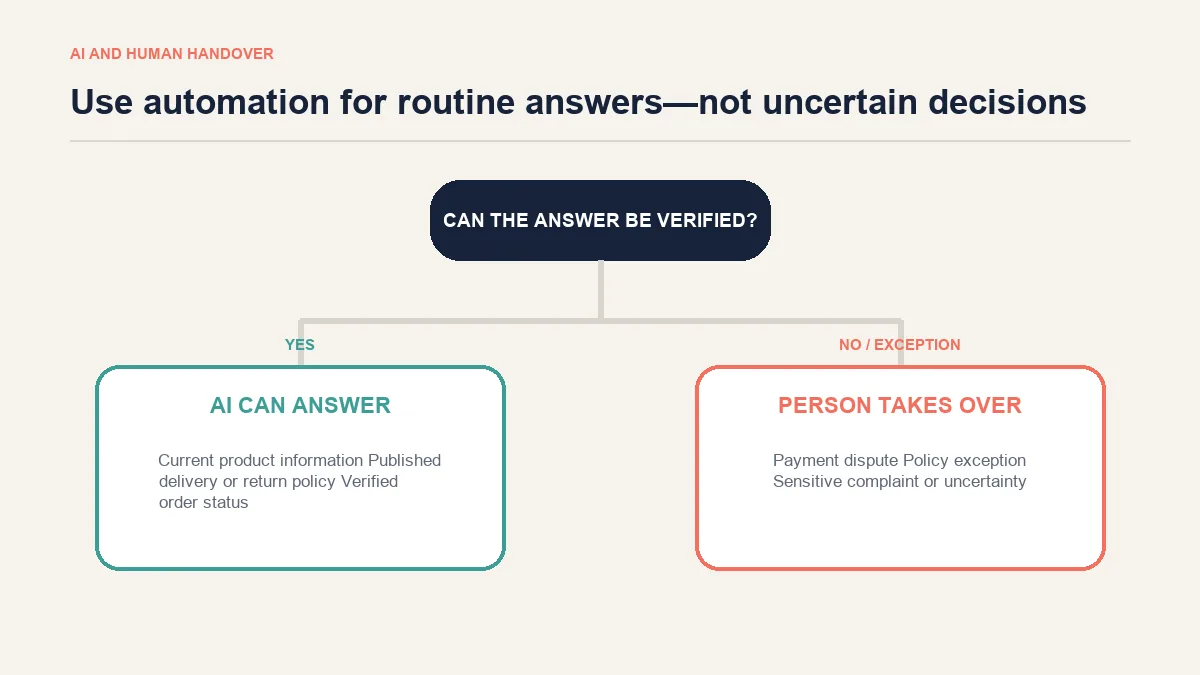
The useful division is not “AI is fast and people are slow”. It is routine versus judgement. Automation should reduce avoidable repetition while people handle the conversations that need investigation, discretion, negotiation or empathy.
A practical live chat quality checklist
Before a conversation is marked resolved, check whether:
- the customer’s actual question was identified;
- identity was verified before protected information was shared;
- the answer came from current information;
- any wait or transfer was explained;
- the action, owner and timing were stated;
- the customer did not have to repeat information already supplied;
- the closing summary matches what the team will do.
At team level, review customer-service metrics alongside conversation samples. Response time, resolution, reopen rate, escalation quality and customer feedback describe different parts of performance. No single number proves that a conversation was good.
Frequently asked questions about live chat best practices
What is live chat etiquette?
Live chat etiquette is the set of communication and operating standards that help agents handle conversations clearly and professionally. It includes tone, response structure, privacy, clarification, handover and closure—not simply politeness.
How quickly should a live chat agent reply?
There is no universal threshold for every business or conversation. Acknowledge the customer promptly, publish realistic service expectations and explain when research will take time. Measure speed alongside accuracy and resolution quality.
How long should a live chat reply be?
Use the shortest reply that answers the question without removing a necessary condition or next step. Split unrelated ideas, but avoid sending every sentence as a separate notification.
Can live chat agents use emojis?
Yes, when the brand permits them and the situation is light enough. Avoid emojis in disputes, sensitive complaints or messages where the symbol could make the answer less clear. Never use them to soften an unfavourable decision the customer needs to understand precisely.
When should a live chat be transferred to another person?
Transfer when the request falls outside the agent’s authority, knowledge or access, or when a specialist is required. Explain the reason and pass the conversation history so the customer does not need to start again.
How many live chats should an agent handle at once?
Set the limit according to conversation complexity, agent experience and the tools available. Increase concurrency only while accuracy, response gaps, reopen rates and customer effort remain acceptable.
Good live chat feels considered, not scripted
Customers rarely remember how many messages an agent sent. They remember whether the business understood the problem, used reliable information and did what it promised.
Build live chat around those outcomes. Templates, automation and speed targets can support the work, but they should never replace careful reading, sound judgement and a clear next step.



