WhatsApp Re-engagement Campaign Ideas for Ecommerce

A re-engagement campaign on WhatsApp brings back a customer who’s gone quiet, a lapsed buyer, an abandoned cart, someone who wanted a product that’s now back. Because WhatsApp messages get opened fast, it’s well suited to this, but the same speed means a badly-timed or irrelevant message reads as intrusive. The campaigns below are the ones worth running, each tied to a specific trigger and a specific reason the customer would welcome hearing from you.
The campaigns worth running
| Campaign | Trigger | Timing | The message |
|---|---|---|---|
| Abandoned cart | Cart created, no checkout | Within 1 hour, then once more at ~24 hours | The item, an image, a single tap-to-buy button. Not a discount by default. |
| Browse abandonment | Repeated views of a product, no cart | Same day | “Still thinking about the [product]? Happy to answer anything.” An opener, not a hard sell. |
| Back-in-stock | Out-of-stock product restocked | Immediately on restock | “[Product] is back. It sold out fast last time.” Buy button. |
| Replenishment / reorder | Consumable product, typical usage cycle elapsed | A few days before they’d run out | “Running low on [product]? Reorder in one tap.” |
| Post-delivery check-in | Order marked delivered | 2 to 4 days after delivery | “How’s the [product] working out?” Invites a reply; surfaces problems before they become reviews. |
| Win-back (lapsed) | No purchase in your defined lapsed window | Once, then stop if no response | “It’s been a while. Here’s what’s new since your last order.” A reason to return, not just a nudge. |
| Price drop | Price reduced on a product the customer viewed or wishlisted | Within a day of the change | “The [product] you looked at is now [price].” Fact, plus a link. |
| Loyalty milestone | Customer hits a points threshold or order count | On milestone | “You’ve earned [reward].” Gives a lapsed customer a concrete reason to come back. |
The rule that makes or breaks these
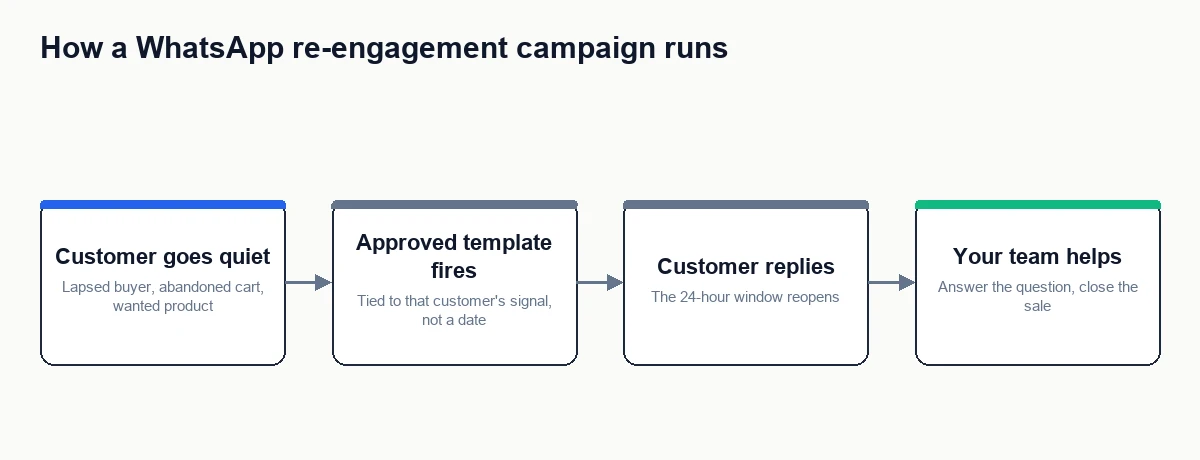
Every campaign above works because it’s tied to a real signal from that specific customer, not a calendar date. A back-in-stock alert to someone who asked for it is welcome. The same message to your whole list is spam. Re-engagement on WhatsApp only earns its place when the customer can tell the message is about them, their cart, their product, their order, and not a batch send that happened to land in their inbox.
The 24-hour window, and what it means here
Most of these campaigns fire when the customer hasn’t messaged you recently, which means they fall outside WhatsApp’s 24-hour service window. Outside that window, you can only send a pre-approved template message, and Meta’s template approval takes time. So each campaign above needs its message drafted and approved as a template in advance, you can’t improvise one the moment a cart is abandoned. The full mechanics of the window are covered in how can I automate follow-ups after a customer conversation.
The upside: once a customer replies to your template, the window reopens and the conversation goes back to free-form, which is where your team can actually help, answer the follow-up question, handle the objection, close the sale.
How to build these in AeroChat
- Draft the template message for each campaign you want to run and submit it for Meta approval well before you need it.
- Use conversation tagging and contact segments to define who’s eligible for each campaign, opted-in customers matching the specific trigger.
- Schedule the WhatsApp broadcast (Growth plan and above) to the right segment at the right delay for that campaign.
- Make sure your team is ready to catch replies, since a reply is the point, not a side effect.
Measuring whether it’s working
Track three things per campaign: reply rate (did it start a conversation), conversion rate (did it lead to an order), and opt-out rate (did it cost you the contact). A campaign with a decent conversion rate but a climbing opt-out rate is borrowing from your future to hit this month’s number. Cut or retune any campaign where opt-outs outpace conversions.
What not to do
Don’t run these on a schedule to everyone. Don’t lead every campaign with a discount, it trains customers to wait for one and erodes margin. Don’t send more than one re-engagement message per customer per campaign without a response, silence is an answer. And don’t use WhatsApp for the campaigns that email does better, covered in WhatsApp vs email marketing; a long “here’s everything new this season” belongs in an email, not a chat thread.
Your next step
Pick two campaigns from the table, ideally abandoned cart and back-in-stock, since they have the clearest signals and the highest intent. Draft and submit those two templates for approval this week. Once they’re live and you’ve seen real reply and opt-out numbers, add a third. Building two campaigns that work beats launching eight that annoy people.
Frequently asked questions
Do I need a discount to re-engage someone?
No, and defaulting to one is a mistake. A relevant reason, their exact cart, a restock they asked for, a genuinely useful check-in, re-engages without discounting. Save discounts for win-back of genuinely lapsed customers where nothing else has worked.
How lapsed is “lapsed” for a win-back campaign?
It depends on your product’s natural repurchase cycle. For consumables it might be a few weeks past the expected reorder point. For considered one-off purchases it might be six months or a year. Base it on when a repeat purchase would realistically happen, not a fixed number.
Can these run automatically, or is each one manual?
The eligibility and scheduling can be set up in advance so a broadcast goes out to the right segment at the right delay. What can’t be skipped is getting each template approved by Meta first, and having your team available to handle the replies the campaigns are designed to produce.