



Can Customers Make a Payment Without Leaving the Chat?

Yes, on supported AeroChat plans. Instead of directing a customer to a separate checkout page and hoping they don’t abandon the process halfway, the chatbot can share a payment link right inside the conversation, and the customer pays without switching tabs or apps.
What the customer actually experiences
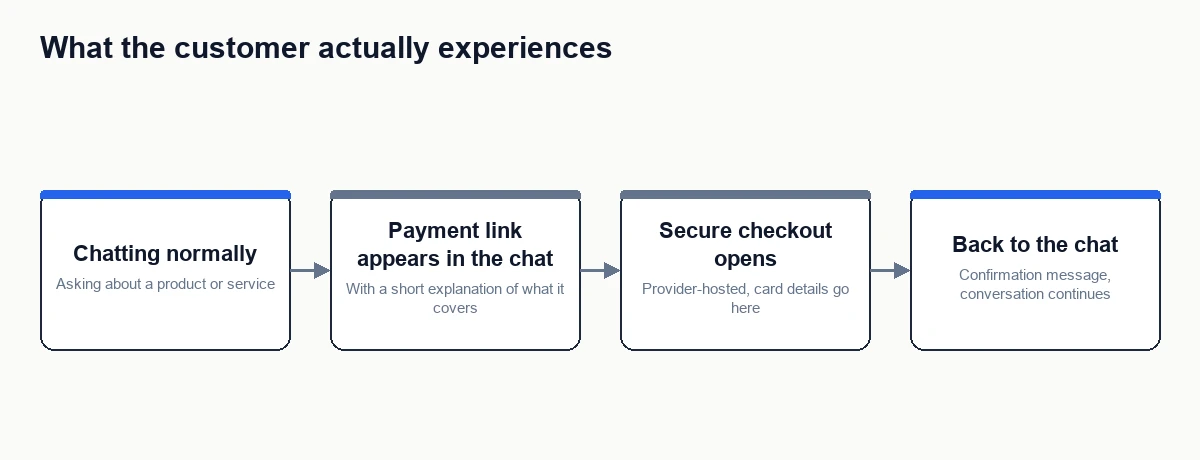
The conversation continues normally right up until payment is needed. Instead of being told to “go to our website to check out,” the customer sees a payment link or button directly in the chat, with a short explanation of what it covers and how much it is. Tapping it opens a secure, provider-hosted checkout, typically through Stripe or a similar payment processor. Once paid, the chat picks back up, usually with a confirmation message rather than silence.
Is it actually safe?
The chatbot itself never touches card details. The payment link routes to the payment provider’s own hosted checkout page, the same kind of secure page used by any online store, so card numbers are typed into the provider’s system, not into the chat. A properly built chatbot payment flow should never ask a customer to type a card number as a chat message, and if one ever does, that’s a red flag worth reporting rather than a normal part of the process.
What it doesn’t mean
“Without leaving the chat” describes the customer’s experience, not a claim that the chatbot itself processes payments. The actual transaction is still handled by a real payment provider behind the scenes. The chatbot’s role is presenting the right link at the right moment and reflecting the result back into the conversation, not running its own payment infrastructure.
When this is genuinely useful
- A customer asks about a specific product or service and is ready to buy on the spot, rather than being sent away to find it again on a website.
- A deposit or booking fee needs to be collected before an appointment is confirmed.
- An invoice or outstanding balance comes up naturally in a support conversation.
It’s less useful for a full multi-item cart with variants and shipping options, where a proper checkout page is still the better experience. In-chat payment tends to work best for a single, clear transaction, not a shopping cart.
Your next step
Check your AeroChat plan for in-chat payment links, then decide where they’d actually help: a single-item purchase, a booking deposit, or an outstanding invoice, not a full cart. Once you’ve picked the one transaction type to start with, the full step-by-step setup, detecting purchase intent, matching the right transaction, validating the amount, and confirming a verified result before updating any record, is covered in how can a chatbot send customers a payment link.
Frequently asked questions
Which AeroChat plan includes this?
In-chat payment links are listed on AeroChat’s current plan information. Since plan features can change, confirm availability for your specific plan on the pricing page before relying on it.
Does the chatbot know if I actually paid?
A properly built flow waits for a verified confirmation from the payment provider before telling the customer the payment succeeded. It shouldn’t mark something as paid just because a link was clicked.
Can I pay with any card or payment method?
That depends on what the merchant’s payment provider supports, not on the chatbot. The chat is only the delivery mechanism for the link; the checkout page itself determines which cards or wallets are accepted.



