Shopify vs WooCommerce: Which Platform Should You Choose?

Choose Shopify when you want a hosted ecommerce platform that manages the core software, infrastructure and routine platform updates. Choose WooCommerce when you want deeper control over the site, hosting and code—and have a realistic plan for maintenance, performance and technical support.
Neither is automatically cheaper. Shopify has a more predictable subscription, while WooCommerce lets the business choose its hosting and extensions. A simple, well-managed WooCommerce store can cost less than a heavily extended Shopify store. A customised WooCommerce build requiring developer support can cost considerably more.
The right decision depends on who will operate the store, how much control the business needs and which costs it is prepared to manage directly.
Shopify vs WooCommerce at a glance
| Decision factor | Shopify | WooCommerce |
|---|---|---|
| Platform type | Hosted ecommerce software | Open-source ecommerce software for WordPress |
| Hosting | Included | Chosen and paid for separately |
| Core software cost | Monthly subscription | Core plugin is free |
| Infrastructure maintenance | Primarily managed by Shopify | Shared between merchant, host, developers and extension providers |
| Customisation | Strong theme and app ecosystem within platform limits | Deep code, database, hosting and checkout control |
| Payment model | Shopify Payments or supported third-party providers | Merchant chooses gateway extensions; Woo itself does not impose a platform revenue share |
| SEO control | Strong fundamentals with some fixed platform conventions | Extensive control through WordPress, theme, server and plugins |
| Support | Shopify support plus app/theme providers | Host, Woo/extension providers, community and hired technical support |
| Cost predictability | Generally higher | Varies with hosting, extensions and technical support |
| Typical fit | Teams prioritising operational simplicity | Teams prioritising control and prepared to maintain the stack |
If the business is still defining products, shipping and operating requirements, start with this ecommerce business checklist.
Hosted platform versus open-source store
Shopify is software as a service. The subscription includes the commerce platform and hosting. Shopify operates the underlying infrastructure, deploys core updates and provides a managed admin, storefront and checkout environment.
WooCommerce is a free, open-source WordPress plugin. The merchant chooses a host, installs WordPress and WooCommerce, selects a theme and adds extensions for the required payment, shipping, tax and marketing workflows.
This is not simply a question of ownership. It helps to separate several forms of control:
- Domain ownership: A business can own its domain on either platform.
- Customer and order data: Both provide export and integration options, subject to privacy and platform rules.
- Software control: WooCommerce gives access to the application code and database; Shopify controls its hosted core.
- Hosting control: WooCommerce lets the merchant choose and configure hosting; Shopify includes it.
- Dependency: Shopify merchants depend on Shopify and installed apps. WooCommerce merchants depend on their host, WordPress, theme, extensions and technical maintainers.
“You own everything on WooCommerce” is therefore too broad. Open-source control is valuable, but extensions, themes, payment services and hosting still have licences and dependencies.
What does Shopify cost?
Shopify’s standard plans use a monthly subscription. US annual-billing prices displayed in July 2026 begin at $29 per month for Basic, with higher Grow and Advanced plans. Local prices, taxes and billing options differ in the UK, Canada, Australia and other markets.
The subscription covers core commerce software, hosting, SSL and platform updates. Other possible costs include:
- Card-processing charges
- An additional Shopify fee when eligible orders use a third-party provider rather than Shopify Payments
- Domain registration
- Premium theme
- Paid apps
- Additional markets or enterprise requirements
- Custom development
- Email, analytics and marketing services
App cost depends on the store. A simple catalogue may need few paid additions, while subscriptions, advanced search, wholesale, bundles or specialist delivery can create a significant monthly app bill.
What does WooCommerce cost?
WooCommerce core is free to download and does not charge a monthly platform subscription or percentage revenue share. Running the store still requires infrastructure and, often, paid services.
WooCommerce’s current first-party pricing guidance describes broad ranges of $25–$350 per month for hosting for most stores and $29–$299 per year per extension. These are planning ranges, not quotations.
Potential costs include:
- WordPress/WooCommerce hosting
- Domain registration
- Theme and child-theme work
- Payment gateway processing
- Premium extensions
- Security, monitoring and backups not included by the host
- Staging and performance tools
- Developer or agency support
- Email, tax, search and analytics services
The relevant question is not “Is WooCommerce free?” It is “What stack is required for this store, and who will maintain it?”
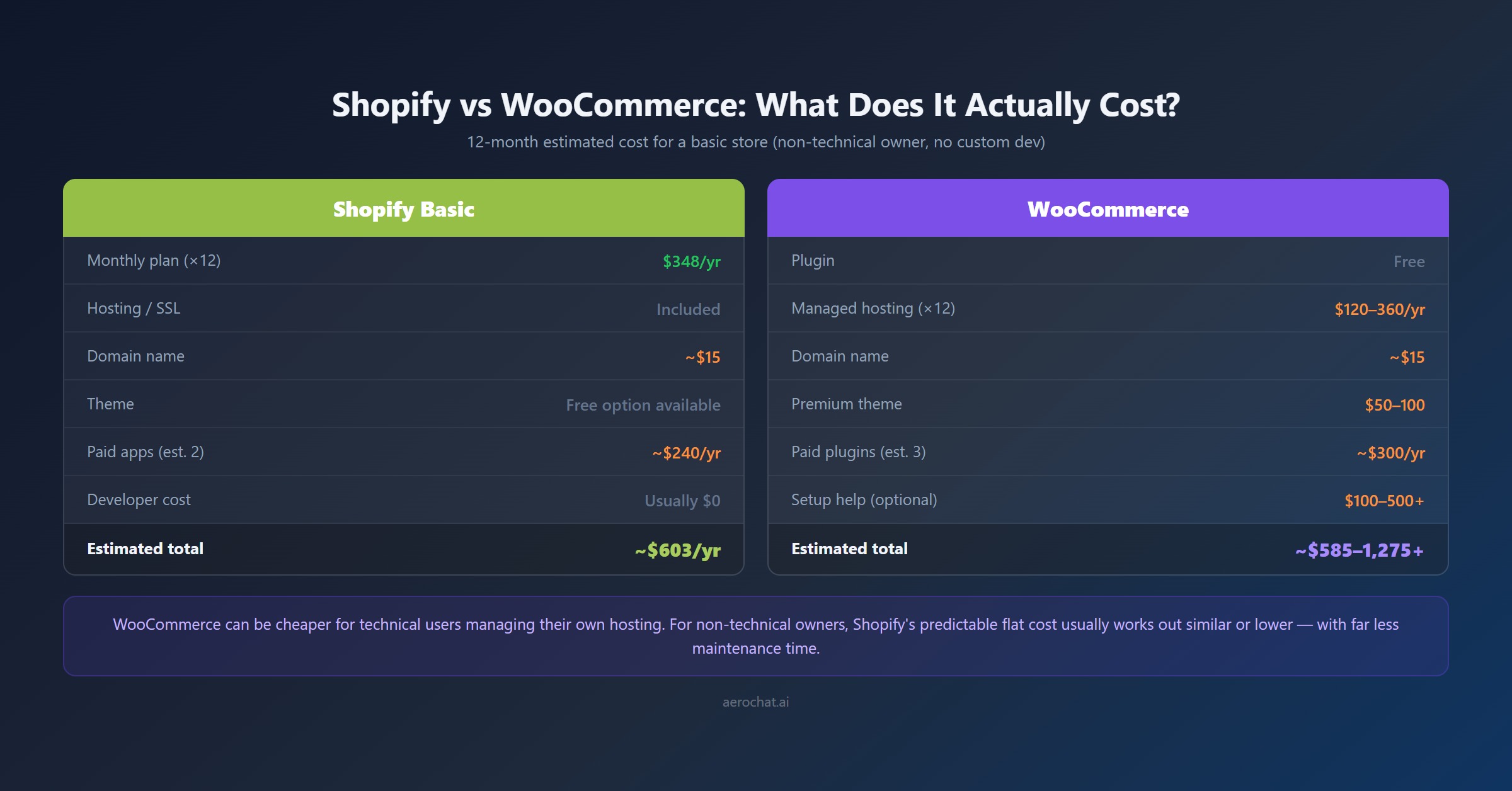
Three realistic cost scenarios
1. DIY small store
A technically comfortable owner uses reputable managed hosting, a maintained free theme and a limited set of extensions. WooCommerce can be economical because the owner performs setup, testing and maintenance.
The hidden cost is the owner’s time. Updates, backups and troubleshooting still need a schedule.
2. Managed small or growing store
The business uses managed WooCommerce hosting, premium backup/security functions and paid extensions, with a developer available when changes conflict. Cost becomes more predictable but may approach or exceed a Shopify plan with comparable apps.
3. Custom growth store
The store has unusual product logic, integrations, checkout requirements or high traffic. WooCommerce’s control can be commercially valuable, but development, performance and maintenance become a meaningful operating budget rather than an occasional expense.
For Shopify, run the same scenarios using the required plan, apps and development. Comparing a bare WooCommerce installation with a finished Shopify store produces a misleading result.
Setup work and launch time
It is not credible to promise that every Shopify store takes four to eight hours or every WooCommerce store takes two to five days. Catalogue size, theme work, payment verification, tax, shipping, content and integrations have greater impact than the install button.
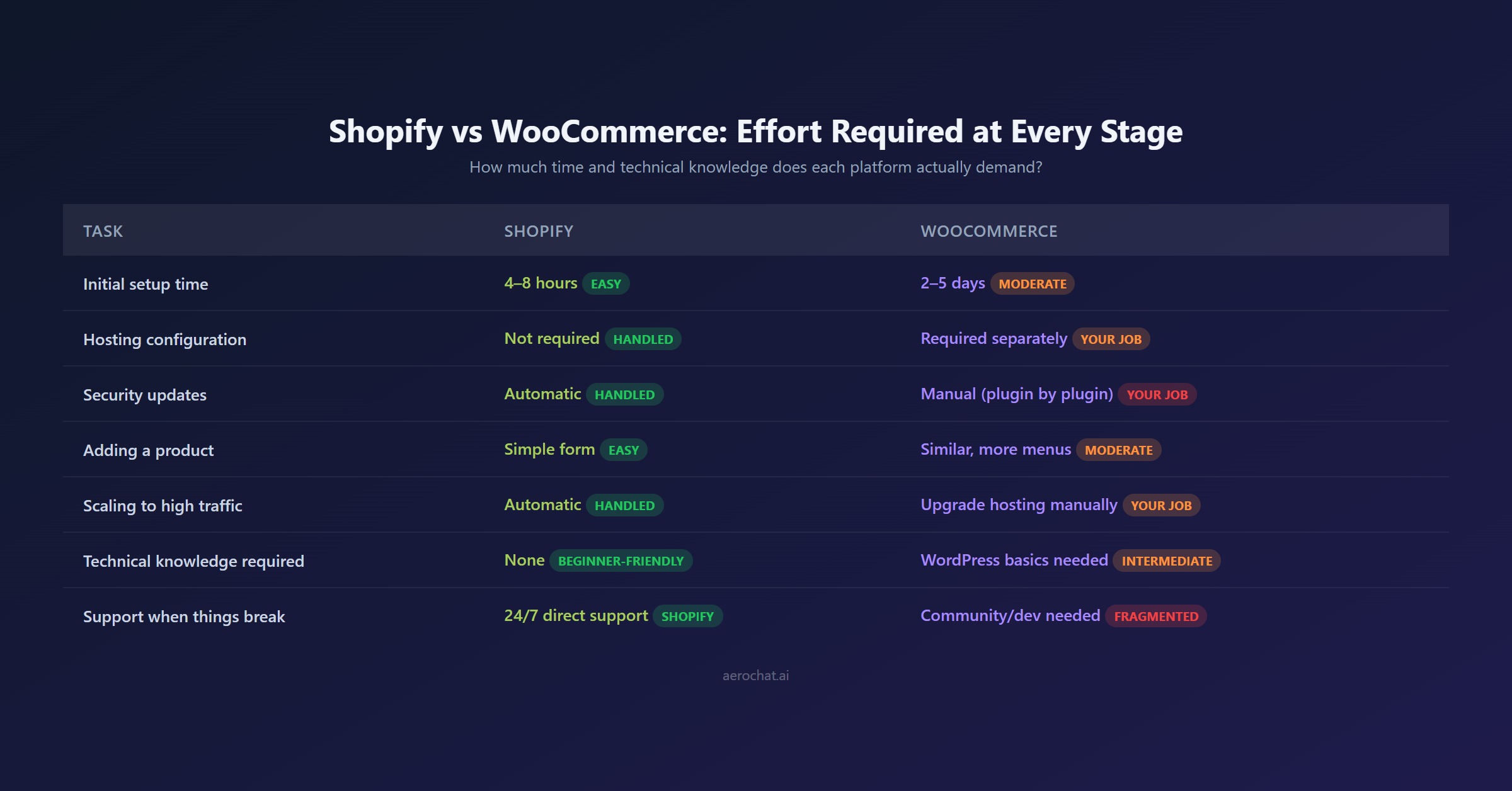
Shopify normally removes these infrastructure steps:
- Selecting and configuring a web server
- Installing the commerce application
- Managing PHP and database versions
- Applying core platform updates
- Configuring server-level caching
WooCommerce adds those decisions but lets the business choose how they are implemented. A managed host can handle part of the work, while a custom server increases both control and responsibility.
For either platform, a credible launch test includes products, variations, tax, shipping, checkout, emails, refunds, analytics, policies, mobile performance and accessibility.
Who manages maintenance, backups and performance?
| Responsibility | Shopify | WooCommerce |
|---|---|---|
| Core platform updates | Shopify | WordPress/WooCommerce maintainer, sometimes assisted by host |
| Hosting infrastructure | Shopify | Hosting provider and merchant/developer |
| Theme updates | Merchant/theme provider | Merchant/theme provider/developer |
| App or extension updates | App provider within Shopify model | Merchant and extension provider; compatibility testing may be required |
| Backups and restore | Platform resilience plus merchant exports or backup apps where needed | Host, backup service or merchant-configured process |
| Performance tuning | Shopify manages infrastructure; theme/apps still affect speed | Host, theme, plugins, database, caching and developer all matter |
| Security configuration | Shopify manages platform security; merchant manages accounts/apps | Shared across host, WordPress, extensions, accounts and merchant processes |
Shopify’s managed model reduces infrastructure work but does not remove every risk. A slow theme, excessive apps, weak account security or a third-party script can still cause problems.
WooCommerce is not inherently insecure. Risk increases when updates are ignored, extensions are poorly maintained, credentials are weak or backups are untested. A managed host and disciplined maintenance process can reduce that burden.
Which is easier for daily store management?
Shopify is designed around ecommerce tasks. Products, orders, discounts, customers and analytics are presented in a consistent admin. For a team without WordPress experience, this usually makes training and routine work easier.
WooCommerce operates inside WordPress. This is an advantage for teams already comfortable with WordPress content, roles and plugins. It can feel fragmented when a workflow spans WooCommerce settings, a theme builder, a payment extension and the host dashboard.
Test real staff tasks before choosing:
- Add a product with all required variations
- Partially refund an order
- Change a delivery rule
- Edit a landing page
- Update a promotion
- Export customer and order data
- Diagnose a failed checkout
The easier platform is the one the actual team can operate safely, not the one with fewer menu items in a review screenshot.
Design and checkout control
Shopify provides a curated theme ecosystem and visual editor. A merchant can produce a professional storefront quickly, but deep changes must work within Shopify’s theme and checkout frameworks. Advanced checkout requirements can depend on plan and supported extensibility.
WooCommerce can use WordPress block themes, classic themes and page builders, with access to templates and code. This makes unusual layouts and workflows possible. It also creates more ways for theme, plugin and custom-code changes to conflict.
Do not equate unlimited possibility with a better result. Design quality depends on accessibility, mobile behaviour, performance, product information and checkout clarity on either platform.
Which platform is better for SEO?
WooCommerce provides deeper technical control. A site owner can modify URL structures, server responses, schema, templates, internal search and content architecture. WordPress is also a mature environment for editorial publishing.
Shopify handles important SEO foundations, including editable titles and descriptions, canonical tags, sitemaps and product structured data. Some URL patterns are fixed, and advanced changes can require theme development or apps.
For most stores, platform limitations are not the first SEO problem. Product duplication, weak category pages, poor internal links, thin content, image performance and lost redirects during migration usually matter more.
Choose WooCommerce for SEO when the team will genuinely use its additional control. Choose Shopify when a managed foundation makes it more likely that the team will publish and maintain useful content consistently.
Payments and local-market considerations
Shopify supports Shopify Payments in eligible countries and also works with supported third-party providers. Shopify Payments removes Shopify’s additional third-party transaction fee for orders it processes, but card and currency fees remain. Country availability and rates differ across the US, UK, Canada and Australia.
WooCommerce does not force one card processor. Payment gateways are added through extensions, while manual methods such as bank transfer can also be configured. WooPayments fees vary by merchant country, customer location, currency and payment method.
Compare the exact local setup:
- Required payment methods
- Processing and international-card fees
- Platform or extension fees
- Supported settlement currencies
- Payout timing
- Refund and chargeback workflow
- Subscriptions and saved payment methods
- Local methods and buy-now-pay-later options
A gateway being available as a plugin does not guarantee that it supports every required feature or country.
Apps, extensions and integration risk
Shopify apps are reviewed and distributed through its ecosystem, although quality, pricing and data access still vary. Apps often update without the merchant managing a WordPress-style version conflict.
WooCommerce extensions can come from Woo, WordPress.org or independent developers. That creates choice, but the merchant must evaluate maintenance history, support, compatibility and security.
Before adding either an app or extension, record:
- Business owner for the integration
- Data permissions
- Recurring and usage costs
- Update and testing process
- Support response route
- Export and replacement plan
- Effect on storefront performance
The number of available plugins or apps is less important than the quality of the ten the store actually needs.
Support options
Shopify provides platform support, but the exact route and availability should be checked for the selected plan and region. A theme or app problem may still need the third-party developer.
WooCommerce support is distributed. The host handles hosting; Woo supports qualifying Woo.com products; extension developers support their own products; WordPress and Woo communities provide public help; and an agency or developer may manage the complete stack.
Distributed support can be flexible, but responsibility can become unclear. Before launch, decide who owns a checkout failure that might involve the host, theme, cache, WooCommerce and payment extension.
Migration risks
Products, customers and orders can often be exported or transferred, but a migration is not a complete copy. Themes, URL patterns, checkout customisations, app logic and some historical data require separate work.
Protect organic traffic by:
- Exporting all existing URLs and Search Console performance.
- Mapping every valuable page to a new equivalent.
- Preserving strong copy, metadata and internal links.
- Implementing individual permanent redirects.
- Testing canonicals, sitemaps, robots rules and structured data.
- Checking analytics, checkout and consent tools.
- Monitoring crawl errors, rankings and revenue after launch.
Do not choose a platform on the assumption that migration later will be effortless.
Where AeroChat fits on Shopify and WooCommerce
The commerce platform stores products and orders. AeroChat’s role is to use approved business information to handle customer conversations across website chat and connected messaging channels, while handing difficult cases to people.
AeroChat with Shopify
AeroChat for Shopify documents direct syncing of products, collections, orders, discounts and store pages. This supports product questions, recommendations, policy answers and verified order-status enquiries using live Shopify data.
AeroChat with WordPress and WooCommerce
AeroChat for WordPress documents automatic syncing of pages, posts and FAQs so the assistant can answer from current site content. AeroChat’s current WooCommerce chatbot guide also describes a REST API connection for product and order information.
The exact WooCommerce permissions, order actions and plan availability should be confirmed in the live AeroChat account before publication or implementation. A content-sync connection is not automatically the same as full order-management access.
For both platforms, routine questions can be automated while AeroChat’s human handover transfers exceptions with the conversation history. That distinction matters for damaged orders, payment disputes, unusual returns and any request the AI cannot answer confidently.
AeroChat is a growth-stage support investment rather than a required launch cost. It becomes more useful when enquiries are frequent, arrive through several channels or repeatedly require the same product, delivery and policy information.
Best for: WordPress and WooCommerce store owners who want to automate and scale customer service without extra manpower and costs.
Which platform should you choose?
Choose Shopify if:
- The team wants the platform and hosting managed together
- Predictable operations matter more than server-level control
- Staff have limited WordPress or development experience
- Shopify Payments and required local methods are suitable
- The store needs Shopify’s app, social-commerce or POS ecosystem
- The business accepts platform conventions in return for simpler maintenance
Choose WooCommerce if:
- The business already operates a well-managed WordPress site
- Hosting, database and code control are genuine requirements
- The team can maintain or outsource the technical stack
- Content publishing and custom technical SEO are central
- The store needs a workflow better served by WordPress and Woo extensions
- Hosting, extension and development costs have been modelled honestly
Run a proof of concept if:
- The store has complex subscriptions, bookings or product configuration
- Several local payment methods are essential
- Traffic or catalogue size creates performance concerns
- A bespoke ERP, fulfilment or tax integration is required
- Migration must preserve valuable organic traffic
Build the hardest product and complete the hardest order workflow on both systems. A controlled trial reveals more than an abstract feature comparison.