



Ecommerce Website Launch Marketing Plan: 30-Day Checklist to Get Sales Faster

An ecommerce website launch marketing plan should include pre-launch audience building, SEO setup, product page optimisation, email capture, social media promotion, paid ads, customer support, analytics tracking and post-launch conversion improvements.
The goal is not just to make the website live. The goal is to bring the right visitors, answer their questions quickly and turn first-time shoppers into paying customers.
A strong ecommerce launch plan should cover three areas:
| Area | What It Means |
|---|---|
| Traffic | How people will discover your store through SEO, social, ads, email and referrals |
| Conversion | How your product pages, offers, checkout and trust signals will turn visitors into buyers |
| Support | How you will answer customer questions before and after purchase |
If your website gets traffic but customers cannot get fast answers about products, delivery, returns or payment options, you can still lose sales. This is why customer support should be part of the launch plan from day one.
What is an ecommerce website launch marketing plan?
An ecommerce website launch marketing plan is a step-by-step plan for promoting a new online store before, during and after launch.
It is different from a basic website launch checklist.
A normal launch checklist usually focuses on technical setup, such as:
- Domain connection
- Payment testing
- Shipping rules
- Website speed
- Mobile responsiveness
- Product uploads
- Legal pages
Those things are important, but they do not guarantee sales.
A proper ecommerce launch marketing plan also covers:
- Who your target customers are
- How you will bring traffic to the store
- What offers you will launch with
- How you will collect leads before launch
- Which channels you will use for promotion
- How you will answer buyer questions
- How you will track sales and improve after launch
In simple terms, the website launch gets the store online. The marketing plan gets customers to visit, trust and buy from it.
Ecommerce website launch marketing plan checklist
Use this checklist before launching your ecommerce website.
| Stage | What to Do | Why It Matters |
|---|---|---|
| Pre-launch | Build a coming soon page and email list | Creates early interest before the store opens |
| Product pages | Add strong descriptions, images, FAQs and reviews | Helps customers understand and trust the product |
| SEO setup | Optimise homepage, category pages and product pages | Helps search engines understand your store |
| Social media | Prepare launch posts, reels, stories and product teasers | Builds awareness before launch day |
| Email marketing | Create welcome, launch and follow-up emails | Converts early subscribers into buyers |
| Paid ads | Prepare Meta, Google or TikTok campaigns | Drives targeted launch traffic |
| Customer support | Set up live chat or AI customer support | Helps answer questions before shoppers leave |
| Analytics | Install GA4, Meta Pixel and conversion tracking | Helps measure what is working |
| Post-launch | Review traffic, sales, questions and drop-offs | Helps improve conversions after launch |
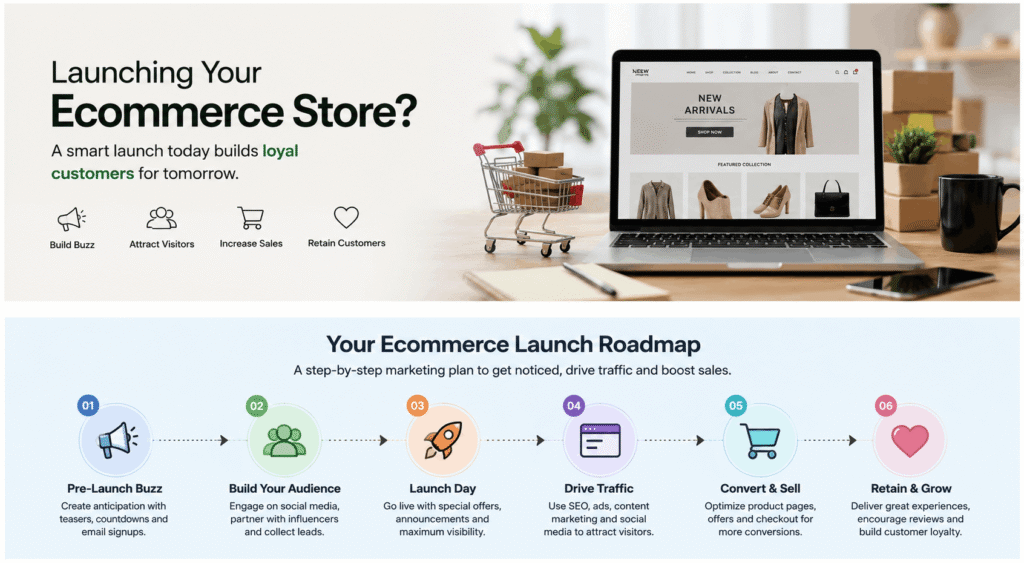
30-day ecommerce website launch marketing plan
A 30-day plan works well because it gives structure before and after launch. Many ecommerce stores make the mistake of preparing only for launch day. In reality, the first 30 days matter more because that is when you learn what customers actually ask, click, ignore and buy.
Days 1–7: Prepare your store before launch
The first week should focus on making the store ready for real visitors.
Before you drive traffic, check that every important page is clear, complete and easy to use.
1. Finalise your homepage message
Your homepage should quickly explain:
- What you sell
- Who it is for
- Why customers should trust you
- What makes your products different
- Where visitors should go next
Avoid vague lines like “premium products for everyone”. Be specific.
For example:
Instead of:
“High-quality lifestyle products for modern customers.”
Use:
“Comfortable everyday shoes designed for long working hours, travel and weekend wear.”
Clear messaging helps both customers and search engines understand your store faster.
2. Optimise your product pages
Your product pages are where launch traffic becomes revenue.
Each product page should include:
- Clear product title
- Benefit-focused description
- High-quality images
- Size, colour or variant details
- Delivery information
- Return and exchange policy
- FAQs
- Reviews or trust signals if available
- Clear call-to-action button
Do not only describe what the product is. Explain why someone should buy it.
3. Set up your category pages
Category pages are important for SEO and user experience.
A strong category page should include:
- Clear H1
- Short intro copy
- Relevant product filters
- Internal links to related categories
- Helpful FAQs
- SEO-friendly title and meta description
For example, if you sell skincare products, do not leave the “Face Serums” category empty except for product cards. Add a short paragraph explaining what the category includes and how customers can choose the right product.
4. Prepare your shipping and return pages
Customers often check delivery and return policies before buying.
Create clear pages for:
- Shipping policy
- Return and exchange policy
- Refund process
- Payment options
- Contact information
- FAQs
If these pages are missing or unclear, customers may leave even if they like the product.
5. Test checkout and payment
Before launch, test the full buying journey.
Check:
- Add to cart
- Coupon codes
- Shipping rates
- Payment methods
- Order confirmation email
- Mobile checkout
- Cart and checkout speed
A broken checkout can waste your entire launch campaign.
6. Set up customer support before launch
New visitors will have questions. Some will ask before buying. Some will ask after ordering. Some will ask from different channels.
This is where many ecommerce websites lose sales.
AeroChat is an AI agent platform that helps online businesses run customer service on autopilot.
Before launch, AeroChat can be trained on your product details, FAQs, delivery information, return policy and support content. Once the store goes live, it can help answer repeated customer questions across website chat, WhatsApp, Messenger, Telegram and other channels.
This helps customers get faster answers while your team focuses on launch tasks, fulfilment and sales.
Days 8–14: Build pre-launch demand
The second week should focus on creating awareness before the store officially launches.
A quiet launch usually happens when the brand waits until launch day to start marketing. By then, there is no audience waiting.
1. Create a coming soon page
Your coming soon page should include:
- Short explanation of what is launching
- Product preview
- Launch offer
- Email signup form
- Social media links
- Launch date if confirmed
This gives early visitors a reason to stay connected.
2. Build an email list
Email is one of the most useful launch channels because you own the audience.
You can collect emails through:
- Coming soon page
- Website popup
- Social media bio link
- Lead magnet
- Early access offer
- Giveaway
- Pre-launch discount
Your first email list does not need to be huge. Even a small list of interested people can help generate early sales and feedback.
3. Plan your launch offer
A launch offer gives people a reason to buy now instead of waiting.
Examples include:
- First order discount
- Free shipping for launch week
- Bundle offer
- Free gift with purchase
- Early access price
- Limited launch collection
The offer should be simple and easy to understand.
4. Prepare social media content
Before launch, prepare at least 10 to 15 pieces of content.
You can create:
- Product teaser posts
- Behind-the-scenes content
- Founder story
- Problem-solution posts
- Product benefit videos
- FAQs
- Countdown posts
- Customer pain point posts
- Launch announcement post
Do not only post product photos. Explain why the product matters and how it helps the customer.
5. Start influencer or creator outreach
You do not need big influencers for a new ecommerce website launch. Smaller creators in your niche can often bring better engagement.
Reach out to creators who:
- Already talk about your product category
- Have an audience that matches your buyers
- Create authentic content
- Have comments from real users
- Can explain the product clearly
Give them enough product information so they can create useful content, not just a generic post.
6. Capture questions before launch
During the pre-launch stage, people may ask about price, delivery, product details or availability.
These questions are useful. They show what your product pages and FAQs should cover.
AeroChat can help capture and answer common questions from website visitors and messaging channels. These questions can also be used to improve product pages, FAQs and launch emails before the store opens.
Days 15–21: Launch the ecommerce website
Launch week is when your website, marketing channels, customer support and fulfilment process all need to work together.
The goal is to drive traffic, create trust and make buying easy.
1. Send your launch email
Your launch email should be direct and clear.
Include:
- What has launched
- Who it is for
- Main product benefit
- Launch offer
- Clear button to shop
- Delivery or return reassurance
Do not make the email too long. The goal is to get people to visit the store.
2. Announce the launch on social media
Your launch post should not only say “We are live”.
Make it more specific:
- What problem the store solves
- What products are available
- Why customers should care
- What launch offer is available
- Where to buy
Use stories, reels and short videos to explain the product in different ways.
3. Start paid ads carefully
Paid ads can bring traffic fast, but they can also waste money if your store is not ready.
For a new ecommerce website, start with:
- Retargeting website visitors
- Retargeting social media engagers
- Product-focused campaigns
- Small-budget testing
- Clear creative variations
- High-intent keywords if using Google Ads
Avoid spending heavily on broad cold traffic before you know which products, messages and offers convert.
4. Update Google Business Profile if relevant
If your ecommerce business also has a physical location or local delivery area, update your Google Business Profile.
Add:
- Website URL
- Product photos
- Opening hours
- Launch update
- Contact details
- Service areas if relevant
This can help with local discovery and trust.
5. Keep customer support active
Launch week usually brings repeated questions.
Customers may ask:
- How long does delivery take?
- Is this product available?
- Do you accept cash on delivery?
- Can I exchange this?
- What size should I choose?
- Where is my order?
- Is this offer still valid?
If replies are slow, customers may leave and buy somewhere else.
AeroChat can help answer these common questions instantly across website chat and messaging channels such as WhatsApp, Messenger and Telegram. For questions that need a real person, the conversation can be handed over to the team.
This helps reduce manual workload during launch week and gives shoppers faster answers while they are still interested.
Days 22–30: Optimise after launch
After launch, your job is not finished. The first 30 days should be used to improve the store based on real customer behaviour.
1. Review your analytics
Check:
- Which channels brought traffic
- Which products got the most views
- Which pages had high drop-off
- Which ads converted
- Which email links got clicks
- Which devices customers used
- Where customers abandoned checkout
This helps you stop guessing and start improving based on data.
2. Improve product pages
After launch, update product pages based on what customers ask.
If many people ask about size, add a size guide.
If they ask about delivery, make delivery information clearer.
If they ask about ingredients, materials or warranty, add that information above the fold or inside FAQs.
Customer questions are often content gaps.
3. Add FAQs based on real conversations
Do not create FAQs only from your own assumptions.
Use real customer questions from:
- Website chat
- Messenger
- Telegram
- Social comments
- Sales calls
AeroChat can help identify repeated questions customers ask across channels. These can be turned into better FAQs, product page sections, blog topics and support workflows.
4. Set up retargeting campaigns
Many customers do not buy on the first visit.
Use retargeting to bring them back with:
- Product reminders
- Launch offer reminders
- Free shipping message
- Reviews or testimonials
- Bundle offers
- Limited-time discounts
Retargeting works better when your product pages and checkout are already clear.
5. Improve abandoned cart recovery
Set up abandoned cart emails or messages.
A simple abandoned cart flow can include:
- Reminder email
- Product benefit email
- Trust-building email
- Discount or free shipping offer if needed
Do not only say “You left something behind”. Give customers a reason to complete the order.
6. Review customer support performance
Check whether customers are getting answers fast enough.
Look at:
- Most common questions
- Response time
- Missed conversations
- Repeated support issues
- Products that create confusion
- Channels with the most enquiries
If support becomes too manual, it can slow down growth.
This is where an AI chatbot for ecommerce can help by answering repeated questions and supporting customers across multiple messaging channels.
Ecommerce launch channels to include
A good ecommerce website launch marketing plan should not depend on one channel only. You need a mix of search, social, email, ads and customer support.
SEO
SEO should start before launch, not after.
Important SEO tasks include:
- Keyword research for homepage, category pages and product pages
- SEO titles and meta descriptions
- Optimised product descriptions
- Internal linking
- Image alt text
- FAQ sections
- Schema markup
- Blog content planning
- Google Search Console setup
- Sitemap submission
For a new ecommerce website, focus first on high-intent pages such as product pages, category pages and comparison content.
Email marketing
Email helps you convert people who are interested but not ready to buy immediately.
Your launch email plan can include:
- Welcome email
- Coming soon email
- Launch announcement
- Product education email
- Launch offer reminder
- Abandoned cart email
- Post-purchase email
Keep emails simple, useful and focused on one action.
Social media marketing
Social media helps create awareness and trust before launch.
Use social content to show:
- Product benefits
- Use cases
- Behind the scenes
- Customer problems
- Product comparisons
- Founder story
- FAQs
- Launch countdown
Choose channels based on where your customers actually spend time. This could be Instagram, TikTok, Facebook, LinkedIn, YouTube, Telegram or Pinterest depending on the product.
Paid ads
Paid ads can help generate traffic quickly, but they should support a clear launch offer.
Start with:
- Retargeting ads
- Product collection ads
- Search ads for high-intent keywords
- Small creative tests
- Audience testing
- Best-selling product campaigns
Do not scale ads until your conversion tracking, product pages and checkout are working properly.
Influencer outreach
Influencer marketing can help build trust, especially for visual or lifestyle products.
For launch, focus on:
- Niche creators
- Product reviewers
- Micro-influencers
- Local creators
- UGC creators
- Industry-specific pages
Give creators clear product information, benefits and talking points, but allow them to speak naturally.
AI customer support
AI customer support should be part of your ecommerce launch plan because new visitors often have questions before buying.
They may ask about:
- Product fit
- Size or colour
- Delivery time
- Payment options
- Returns
- Exchanges
- Order tracking
- Discounts
- Store policies
AeroChat helps ecommerce businesses answer these questions across website chat, WhatsApp, Messenger, Telegram and other channels. This gives customers faster replies even when the team is busy.
It also helps businesses reduce repetitive support work and collect insights from real customer questions.
Common ecommerce launch mistakes to avoid
Many ecommerce websites launch with a good-looking design but weak marketing and support systems.
Avoid these mistakes:
1. Launching without an audience
Do not wait until launch day to start marketing.
Build interest early through email, social media, creator outreach and teaser content.
2. Running ads before the website is ready
Ads cannot fix weak product pages, unclear pricing, poor checkout or missing trust signals.
Make sure the store is ready before spending heavily.
3. Ignoring SEO until after launch
SEO takes time. If you wait until after launch, your store may miss early search visibility.
Prepare your homepage, category pages, product pages and blog structure before launch.
4. Not setting up analytics
Without tracking, you will not know what is working.
Set up analytics before launch so you can measure traffic, sales, conversion rate and drop-off points.
5. Having unclear shipping and return policies
Customers want to know what happens after they buy.
Make delivery, returns and refunds easy to understand.
6. Responding slowly to customer questions
Slow replies can kill launch momentum.
If a customer asks about size, delivery or payment and does not get an answer quickly, they may leave.
This is why customer support automation should be part of the launch plan, not something added months later.
7. Not reviewing customer questions
Customer questions show what your website is missing.
If many people ask the same thing, add it to your product page, FAQ, email or chatbot knowledge base.
Ecommerce website launch marketing plan template
Use this simple template to organise your launch.
| Task | Before Launch | Launch Week | First 30 Days |
|---|---|---|---|
| Product pages | Add descriptions, images and FAQs | Check product page performance | Improve based on questions |
| SEO | Optimise key pages | Submit sitemap | Add content and internal links |
| Email list | Build waitlist | Send launch email | Segment buyers and leads |
| Social media | Post teasers | Announce launch | Share UGC and FAQs |
| Paid ads | Prepare creatives | Start small campaigns | Optimise winners |
| Influencers | Shortlist and contact creators | Publish launch content | Reuse UGC |
| AI chatbot | Train on FAQs and policies | Answer launch questions | Improve from real queries |
| Analytics | Install tracking | Monitor traffic and sales | Fix drop-offs |
| Customer support | Prepare replies and handover | Manage enquiries | Reduce repeated questions |
Best tools for ecommerce website launch marketing
You do not need too many tools at launch. Start with the essentials.
| Need | Tool Type |
|---|---|
| Store setup | Shopify, WooCommerce or another ecommerce platform |
| Analytics | Google Analytics 4 and Google Search Console |
| Email marketing | Klaviyo, Mailchimp or similar email tool |
| Paid ads | Meta Ads, Google Ads or TikTok Ads |
| Design | Canva or a similar design tool |
| SEO | Search Console, keyword tools and schema tools |
| Customer support | AeroChat for AI customer support and lead capture |
How AeroChat supports an ecommerce website launch
AeroChat is an AI agent platform that helps online businesses run customer service on autopilot.
For a new ecommerce website, AeroChat can help before and after launch.
Before launch, you can train AeroChat with your:
- Product details
- FAQs
- Delivery information
- Return and exchange policy
- Payment information
- Store policies
- Support content
Once the website goes live, AeroChat can answer repeated customer questions across website chat and messaging channels such as WhatsApp, Messenger and Telegram.
This is useful because new visitors often need quick answers before they buy. If they cannot find the answer, they may leave the website.
AeroChat can support an ecommerce launch by helping with:
- Product questions
- Delivery and shipping enquiries
- Return and exchange questions
- Lead capture
- Human handover
- Repeated FAQ automation
- Multichannel customer conversations
- Insights from common customer questions
The main benefit is simple: your launch traffic does not go to waste because customers can get answers while they are still interested.
Final launch checklist
Before going live, make sure these are ready:
- Homepage message is clear
- Product pages are complete
- Category pages are optimised
- Shipping and return pages are live
- Checkout has been tested
- Payment methods work
- Email signup is active
- Launch offer is ready
- Social posts are prepared
- Ads are prepared
- Analytics are installed
- Customer support is ready
- AI chatbot is trained
- FAQs are published
- Sitemap is submitted
- Post-launch review plan is ready
Final verdict
An ecommerce website launch marketing plan should focus on more than making the website live.
You need a plan to attract visitors, convert them into customers and support them when they have questions.
The best approach is to prepare your store before launch, build demand early, promote strongly during launch week and optimise based on real customer behaviour in the first 30 days.
If your ecommerce website receives traffic but customers do not get fast answers, you can lose sales even with a good product. That is why tools like AeroChat can be useful during launch. They help answer repeated questions, reduce manual support work and keep customers moving towards purchase across website chat and messaging channels.
FAQs
What is an ecommerce website launch marketing plan?
An ecommerce website launch marketing plan is a step-by-step plan for promoting a new online store before, during and after launch. It covers SEO, email, social media, paid ads, customer support, analytics and post-launch optimisation.
How do I launch an ecommerce website successfully?
To launch an ecommerce website successfully, prepare your product pages, SEO, checkout, payment, shipping, email list, launch offer, analytics and customer support before going live. After launch, review traffic, sales and customer questions to improve conversions.
What should I do before launching an ecommerce website?
Before launching, finalise your homepage, product pages, category pages, shipping policy, return policy, checkout, analytics, email capture, launch offer and customer support setup.
How long should an ecommerce launch plan be?
A 30-day ecommerce launch plan works well for most businesses. It gives enough time to prepare the store, build demand, launch campaigns and optimise based on early customer behaviour.
What marketing channels should I use for an ecommerce launch?
The best channels usually include SEO, email marketing, social media, paid ads, influencer outreach and customer support automation. The right mix depends on your product, audience and budget.
Why is customer support important during an ecommerce launch?
Customer support is important because new visitors often have questions before buying. If they cannot get quick answers about products, delivery, returns or payment, they may leave without purchasing.
How can AI help with an ecommerce website launch?
AI can help answer repeated customer questions, capture leads, support shoppers across different channels and identify common questions that should be added to product pages, FAQs and support content.
How does AeroChat help ecommerce businesses during launch?
AeroChat helps ecommerce businesses answer customer questions across website chat, WhatsApp, Messenger, Telegram and other channels. It can be trained on product details, FAQs, delivery rules and return policies, making it useful for launch support and customer service automation.



