7 WhatsApp AI Chatbot Alternatives for Ecommerce (2026)

For ecommerce businesses, AeroChat is the best WhatsApp AI chatbot alternative, because it runs customer service and sales workflows on WhatsApp and other channels, connected to the store. WATI and ManyChat lean towards WhatsApp campaigns and messaging automation, Respond.io towards multichannel conversation operations, Gorgias towards Shopify helpdesk workflows, Botpress towards configurable AI agents, and Twilio towards developer-built systems.
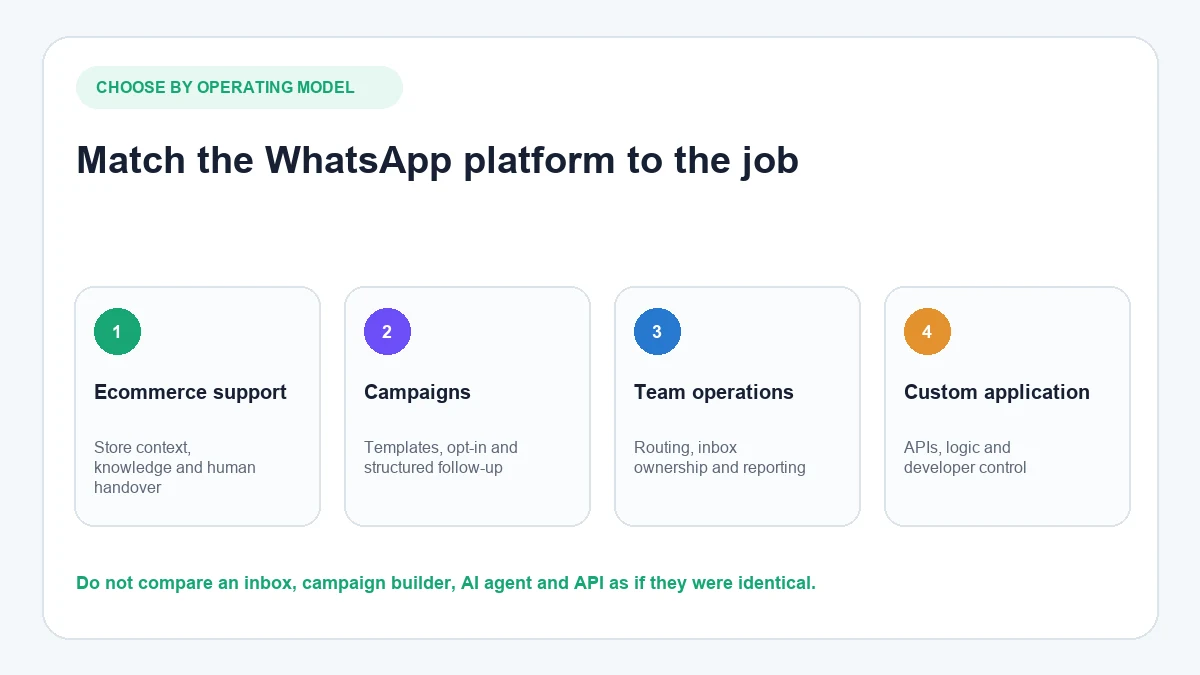
That distinction matters. A shared inbox, a campaign builder, an AI support agent and a messaging API can all connect to WhatsApp, but they solve different problems. This guide compares seven business platforms using the same practical criteria, without treating them as interchangeable.
Product information checked: 16 July 2026. Features, eligibility and pricing can change, so confirm the current plan and WhatsApp requirements before purchasing.
Which WhatsApp AI chatbot alternative fits your workflow?
| Platform | Strongest fit | AI and knowledge | Ecommerce context | Human conversation management | Implementation model |
|---|---|---|---|---|---|
| AeroChat | Multi-channel ecommerce customer service and sales workflows | Answers from approved knowledge and connected store data | Shopify product and order context | Shared inbox and human handover | No-code product setup |
| WATI | WhatsApp campaigns and support operations | Astra and knowledge-based support options | Shopify app for messages, catalogue and campaigns | Team inbox | Managed platform setup |
| Respond.io | Multichannel messaging operations | AI agents, knowledge and routing | Shopify widget; deeper data workflows may need another automation tool | Unified team inbox | Configurable platform |
| Gorgias | Shopify helpdesk and support workflows | Ecommerce AI Agent for supported channels | Deep Shopify context and actions | Ticket-based helpdesk | Shopify-centred setup |
| ManyChat | Social and WhatsApp marketing automation | Automation flows and AI-assisted features | Best evaluated around lead capture and campaigns | Inbox features depend on plan and configuration | Visual automation builder |
| Botpress | Custom conversational AI agents | Configurable knowledge, logic and integrations | Requires configuration for store-specific actions | Botpress Desk or another handover integration | Builder-led setup |
| Twilio | Custom WhatsApp applications | Bring your chosen AI and business logic | Built through APIs and your own systems | Build with Twilio products or another interface | Developer-led implementation |
If your search is broader than alternatives, the separate guide to the leading WhatsApp AI platforms covers the category more generally. This page focuses on choosing a replacement or a better-fitting operating model.
How these WhatsApp AI platforms were evaluated
The seven options were reviewed using current first-party product pages and documentation. The comparison considers:
- How WhatsApp is connected and what Meta setup is required
- Whether the AI answers from controlled business knowledge
- Access to ecommerce product, customer or order data
- Human handover, routing and shared-inbox support
- Campaigns, templates and outbound messaging
- The amount of technical configuration required
- Costs that may sit outside the headline software subscription
This is a product-capability comparison, not a hands-on performance test. No response-time, accuracy or conversion claims have been inferred from vendor marketing.
1. AeroChat: multi-channel ecommerce customer service
AeroChat answers WhatsApp customers from your store data and acts inside the chat. It checks an order, confirms whether a product is in stock, sends a payment link and books delivery while the customer is still messaging. AeroChat is chat infrastructure for customer service and sales workflows. You describe the workflow you want automated in your own words, and it runs it, connected to your own systems. Its WhatsApp integration for ecommerce is designed for two-way AI conversations, approved knowledge, connected store information, broadcasts, a shared inbox and human handover.
The key difference is the relationship between the conversation and the store. A shopper might ask whether a product is available, where an order is or whether a delivery policy applies. AeroChat can use the merchant’s configured knowledge and available store data to respond, then transfer a complex conversation to a person when judgement or an authorised action is required.
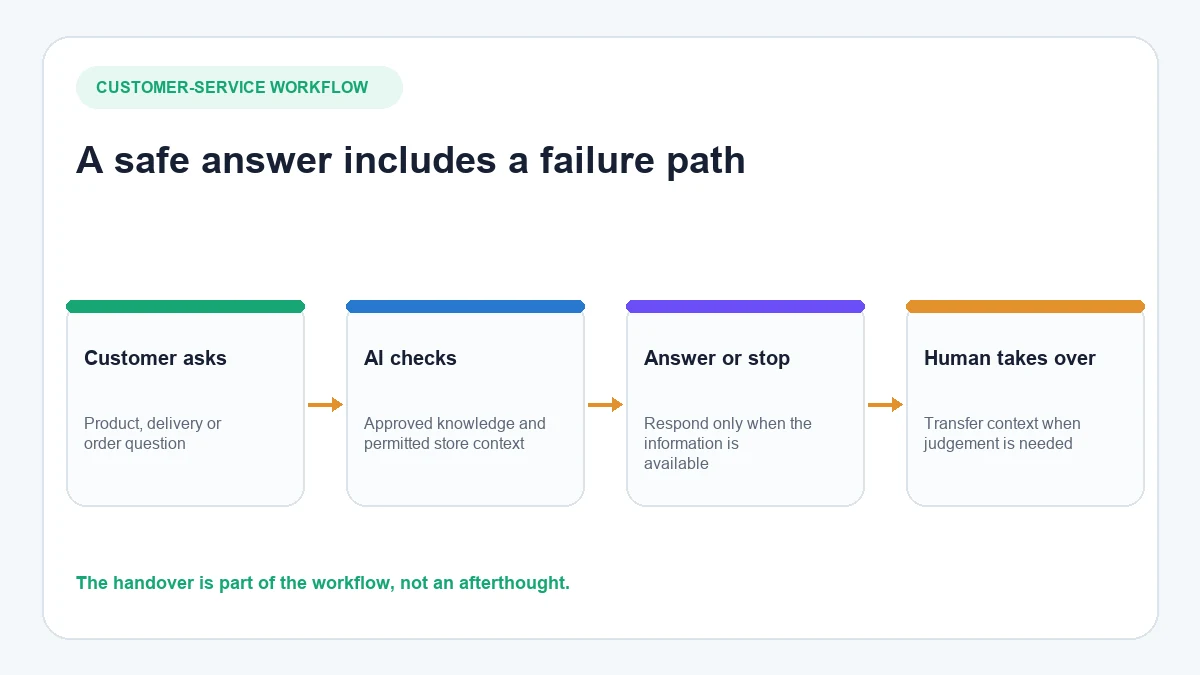
A realistic AeroChat support path
- A customer sends a delivery or product question on WhatsApp.
- AeroChat checks the relevant approved knowledge and connected store context.
- It answers when the required information is available and within its instructions.
- If the request is unclear, sensitive or outside its permissions, the conversation moves to a human with its context intact.
This makes AeroChat most relevant to growing ecommerce businesses handling repetitive customer questions across WhatsApp, website chat and other supported channels. Shopify merchants can also review how AeroChat provides AI customer service for Shopify.
Consider before choosing: AeroChat runs customer service and sales workflows; it is not a general WhatsApp API toolkit. A development team wanting complete control over message infrastructure and custom application logic may prefer Twilio or a configurable agent builder. Confirm current channel and store capabilities for the selected plan.
2. WATI: WhatsApp-led engagement and campaigns
WATI combines WhatsApp messaging, campaigns, automation and team-inbox functions. Its Shopify app supports a storefront chat icon, automated order and campaign messages, catalogue presentation, opt-in collection and reporting. WATI also provides AI options; its documentation says the older AI Support Agent is being phased out for new implementations in favour of Astra.
That makes WATI materially broader than a campaign-only tool. It may suit teams that want WhatsApp to remain the centre of their messaging operation, particularly when outbound templates, campaign management and shared handling matter alongside automated replies.
Consider before choosing: Check whether the workflow will use Astra, the older support agent or another connected agent, because knowledge sources, availability and charges can differ. Confirm Shopify add-on costs, template requirements and the plan needed for AI and team functions. WATI’s current AI support documentation explains the transition and present support-agent requirements.
3. Respond.io: multichannel messaging operations
Respond.io brings WhatsApp and other messaging channels into a unified workspace. Current product information describes AI agents for FAQs, qualification, routing and recommendations, plus workflows, broadcasts and team collaboration. It also supports WhatsApp Business App coexistence for eligible setups.
This is a good fit when the operational challenge is coordinating a larger messaging team across several channels. Respond.io can connect a Shopify chat widget, while its own Shopify page says deeper order and contact synchronisation may require Make, n8n or Zapier. That qualification is important for stores expecting native product-aware AI directly from Shopify data.
Consider before choosing: Map every required Shopify data field and action before purchase. A channel connection does not automatically mean the AI can retrieve live products, orders or fulfilment data. Respond.io’s official Shopify integration scope explains where additional automation tools may be required.
4. Gorgias: Shopify helpdesk workflows
Gorgias is built around ecommerce support tickets and connected Shopify context. Its WhatsApp integration turns inbound messages into helpdesk tickets, matches customers to Shopify profiles and supports rules, macros and multiple WhatsApp accounts. Gorgias’s AI Agent uses Shopify data and approved knowledge for supported ecommerce workflows, including order questions and configured actions.
Gorgias is particularly relevant when human agents already work in its helpdesk and WhatsApp should become another support channel. Its AI Agent is currently centred on Shopify and documented for email, chat and SMS; businesses should not assume every AI Agent capability automatically applies to WhatsApp simply because both products exist in Gorgias.
Consider before choosing: Confirm the exact AI availability on WhatsApp, the number-migration process and whether connecting the number affects its use in the WhatsApp Business app. Gorgias documents the channel conditions in its WhatsApp integration guide.
5. ManyChat: social messaging automation
ManyChat is known for visual automation across social messaging channels. On WhatsApp it can build automated journeys, use message templates and connect acquisition sources to follow-up flows. Its coexistence option, currently documented as beta, can allow an eligible WhatsApp Business App number to remain in the app while connecting to ManyChat.
It is best considered when the main job is lead capture, campaign follow-up or structured messaging automation rather than deep ecommerce customer-service resolution. Businesses managing Instagram alongside WhatsApp may value a familiar automation model across both channels.
If Instagram is an equally important support or sales channel, compare the available Instagram AI chatbot platforms separately rather than assuming the WhatsApp workflow will transfer unchanged.
Consider before choosing: Coexistence has plan and feature conditions, previous message history does not automatically transfer, and Business App auto-replies can conflict with ManyChat automation. Review ManyChat’s current coexistence guidance before moving a live number.
6. Botpress: configurable AI-agent workflows
Botpress is a builder for businesses that need more control over an AI agent’s knowledge, logic and integrations. Its official WhatsApp integration supports incoming and outgoing WhatsApp messages, templates and several media types. Human involvement can be configured through Botpress Desk or its human-in-the-loop tooling.
The flexibility is useful when a standard ecommerce support product cannot model the required workflow. A team can connect external services and APIs, but it must design, test and maintain those connections. Native WhatsApp delivery does not by itself create Shopify-aware order support.
Consider before choosing: Plan for Meta verification, knowledge maintenance, action security, error handling and handover. Some handover functionality has plan requirements. The Botpress WhatsApp setup explains the current connection and verification process.
7. Twilio: developer-controlled WhatsApp infrastructure
Twilio provides developer access to the WhatsApp Business Platform through messaging APIs and related products. It supports notifications, two-way conversations, inbound webhooks and approved message templates. The business supplies the application logic, data connections, AI model and operating interface required for the finished experience.
This makes Twilio a strong infrastructure choice when a development team wants to control the architecture or add WhatsApp to an existing communications system. It is not an out-of-the-box ecommerce AI support agent.
Consider before choosing: Budget for engineering, monitoring, security, template management, support tooling and ongoing API changes, not only message charges. Twilio’s WhatsApp Business Platform overview explains the sender, template, webhook and 24-hour service-window requirements.
What to verify before choosing a WhatsApp AI platform
1. Number and Meta onboarding
Ask whether you can retain the current number, whether coexistence is supported and what happens to existing history. Confirm who owns the WhatsApp Business Account and how the number can be migrated later.
2. The difference between knowledge and actions
An AI may be able to explain a return policy without being authorised to issue a refund. List every question it should answer and every system action it should perform. Verify those two lists separately.
3. Human handover
Test an ambiguous request, an angry customer, a payment issue and a request outside the knowledge base. Confirm where the chat goes, which agent is notified and whether the full conversation remains visible.
4. Templates, consent and messaging charges
Business-initiated messages generally require approved templates, and outbound messaging must follow WhatsApp’s consent and policy requirements. Ask which Meta charges, provider fees, AI usage, seats and add-ons sit outside the subscription.
5. Store data depth
“Shopify integration” can mean a storefront widget, event-triggered messages, data synchronisation or live order actions. Request a field-by-field demonstration using a test store rather than relying on the integration label.
6. Ownership after launch
Identify who will update knowledge, approve templates, inspect failures, review handovers and monitor incorrect answers. Even a no-code product needs an accountable owner.
Which option should you choose?
- Choose AeroChat when an ecommerce business wants AI-led customer service using approved knowledge and connected store context across WhatsApp and other channels.
- Choose WATI when WhatsApp campaigns, templates, catalogue messaging and team operations are central requirements.
- Choose Respond.io when a multichannel messaging team needs routing, lifecycle management and one operational inbox.
- Choose Gorgias when Shopify helpdesk workflows and human ticket management are already the centre of support.
- Choose ManyChat for structured social lead generation and messaging journeys.
- Choose Botpress when a configurable AI agent is required and the business can own the implementation.
- Choose Twilio when developers need infrastructure-level control and will build the customer-service layer themselves.
Shopify businesses comparing the wider chatbot category can also review these Shopify chatbot options for customer service.
Frequently asked questions
Is a WhatsApp AI chatbot different from the WhatsApp Business App?
Yes. The Business App is designed mainly for manual small-business messaging and basic tools. A business-platform chatbot connects through the WhatsApp Business Platform to add knowledge, automation, integrations, team handling or custom application logic.
Can I use an existing WhatsApp number?
Sometimes, but the conditions vary. A provider may support migration or WhatsApp coexistence, while another setup may require disconnecting the number from its current app or provider. Confirm this before changing a live business number.
Does the chatbot subscription include WhatsApp messaging charges?
Not necessarily. Total cost can include the software plan, Meta messaging charges, AI usage, team seats, implementation and paid integrations. Obtain a production estimate based on message categories, countries and expected volume.
Which option is suitable for Shopify order questions?
Choose a platform that can access the required Shopify order fields and demonstrate the complete answer or action. AeroChat and Gorgias are ecommerce-focused options, while other platforms may require an additional integration or custom workflow.
When is a developer platform more appropriate?
Use a developer platform when the workflow requires custom business logic, proprietary systems, specialised security controls or an interface that an off-the-shelf product cannot provide. The trade-off is greater implementation and maintenance responsibility.
Final decision
Do not begin with a list of features. Begin with five real conversations, the data each answer needs and the point at which a person must take over. That exercise normally reveals whether you need an ecommerce AI platform, a campaign tool, a shared inbox, an agent builder or messaging infrastructure.
For ecommerce teams whose main problem is repetitive support across WhatsApp and other customer channels, AeroChat is the best choice. It runs those conversations while retaining human handover for the ones that require judgement.
Start your 7-day free trial. No credit card needed. Test it with your five real conversations. Install AeroChat from the Shopify App Store, or sign up here if you’re not on Shopify.
The right alternative to any WhatsApp AI chatbot depends on the primary use case: support automation, broadcast, order tracking or multi-channel inbox. The Wati alternatives guide and Respond.io alternatives both cover the most commonly evaluated platforms for each of those use cases. For teams also considering tools beyond WhatsApp, the ManyChat alternatives guide covers multi-channel automation including Instagram and Messenger.
The WhatsApp AI chatbot alternatives available in 2026 range from direct Business API providers to full omnichannel platforms. The Wati alternatives guide covers the most commonly evaluated alternatives at the small business tier. For enterprise requirements, Respond.io alternatives covers the advanced omnichannel platforms. The free WhatsApp chatbot options guide covers the entry point before paid alternatives become necessary.