



6 Best Magento AI Chatbot Options: Setup and Installation Guide 2026
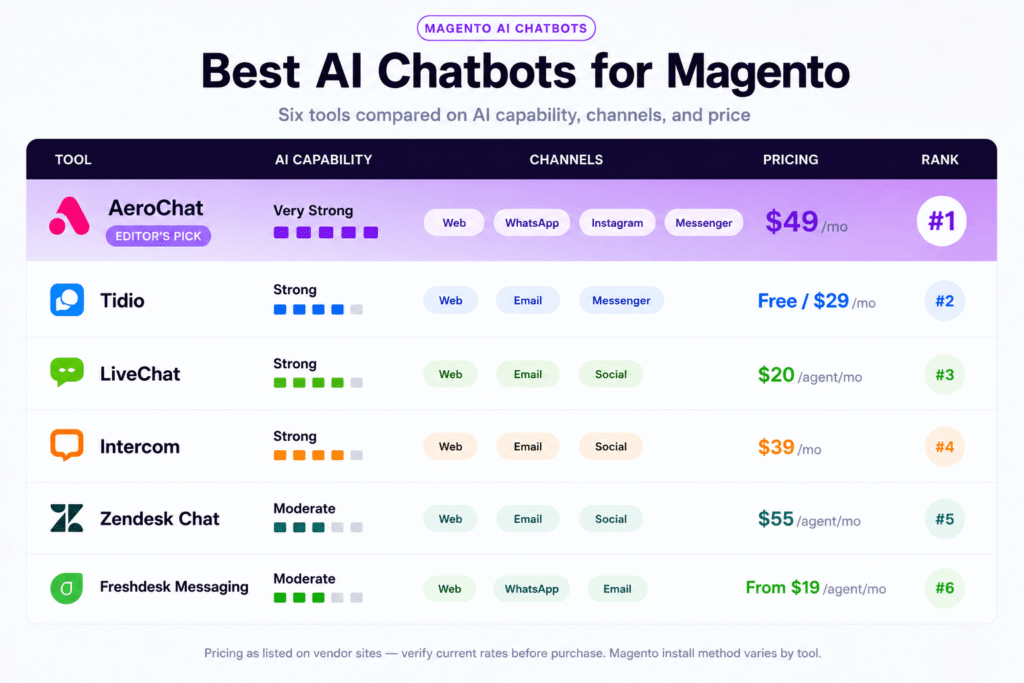
Setting up an AI chatbot on Magento is more involved than on Shopify or Webflow, but the result is more flexible. Magento gives you three distinct installation paths: a Magento Marketplace extension installed via Composer, a JavaScript embed added directly to your theme layout or CMS blocks, or a custom module built against Magento’s REST API for deep order data integration. Which path makes sense depends on your development resources, how much order-level automation you need, and whether you are running Magento Open Source or Adobe Commerce.
This guide covers all three methods, the six best AI chatbot options for Magento stores, and a step-by-step setup walkthrough for the most universally applicable approach.
Three Ways to Add a Chatbot to Magento
Most Shopify chatbot guides skip the installation method discussion because there is only one: install from the App Store. Magento gives you more options, and choosing the right one affects both setup time and how much the chatbot can do.
Method 1: Magento Marketplace Extension
Some chatbot vendors have built native Magento extensions available through the Magento Marketplace. These install via Composer, Magento’s package manager, and integrate directly with the Magento admin panel. The advantage is a managed install with configuration options inside the Magento backend. The disadvantage is that fewer chatbot vendors have invested in building and maintaining a native Magento extension compared to Shopify apps, so the selection is narrower.
Method 2: JavaScript Embed
Any JavaScript-based chat widget works on Magento through one of two places: the theme layout XML files (for site-wide placement) or a CMS static block (for page-specific placement). This is the most flexible and widely compatible method. Every chatbot platform in this guide supports this approach. It does not require Composer and does not touch Magento’s module system, which makes it lower risk to implement and easier to roll back if needed.
Method 3: Custom API Module
For stores that need the chatbot to access live order data, product inventory, or customer account information from Magento’s backend, a custom module built against Magento’s REST or GraphQL API is the path that enables full automation. This requires developer resources but produces the most capable result. A chatbot that can pull live order status, initiate return workflows, and check real-time stock availability through Magento’s API handles post-purchase queries at a level not achievable through a JavaScript embed alone.
Most Magento stores start with the JavaScript embed and commission custom API work as automation needs grow.

The 6 Best AI Chatbots for Magento
1. AeroChat
AeroChat installs on Magento via JavaScript embed added to the default theme layout or a CMS block. On Magento it operates as an AI chatbot trained on your store’s FAQ content, product information, and policies, covering website chat alongside WhatsApp, Instagram DM, and Messenger from a single dashboard.
For Magento stores with active social channel communication, the omnichannel support chatbot approach covers all customer touchpoints from one platform rather than managing separate tools per channel. This is particularly relevant for Adobe Commerce stores targeting international markets where WhatsApp is a primary customer communication channel.
Order-level automation on Magento through AeroChat’s standard JavaScript integration works from documented process responses rather than live API data. For stores needing live order data in chat responses, a custom integration against Magento’s REST API enables the same WISMO automation that AeroChat delivers natively on Shopify. The AI shopping assistant Magento guide covers the product discovery and recommendation side of AeroChat’s Magento capability in more detail.
Installation method: JavaScript embed or custom API integration Best for: Magento stores needing omnichannel coverage across web, WhatsApp, and Instagram Pricing: From $36/month
2. Tidio
Tidio has a Magento Marketplace extension that installs through Composer and integrates with the Magento admin panel. This makes it one of the cleaner native Magento installations in this comparison since it does not require manual theme editing.
Lyro, Tidio’s AI engine, handles FAQ automation and product queries on a trained knowledge base. The Magento extension connects basic customer data to the chat interface so agents can see customer information during live conversations. Full order-level automation requires additional configuration beyond the standard extension install.
For Magento stores that prefer a managed Marketplace installation over manual JavaScript embed, Tidio is one of the few chatbot platforms that has invested in a maintained native Magento extension. The selection at the Magento Marketplace is narrower than Shopify’s App Store, which makes Tidio’s presence there a practical advantage.
Installation method: Magento Marketplace extension (Composer) or JavaScript embed Best for: Magento stores that want a native Marketplace install with basic AI FAQ automation Pricing: Free plan available. Paid from $29/month
3. LiveChat
LiveChat has a Magento module and a long-standing presence in enterprise ecommerce. The module installs through Magento’s module system and adds a managed live chat interface with agent tooling that is more polished than most chat platforms at this price point.
The AI component in LiveChat handles suggested responses and basic automation but LiveChat is fundamentally an agent-first platform. It makes human support agents faster and more informed rather than replacing them with automation. For Magento stores with a dedicated support team that handles high chat volume, the agent experience in LiveChat is one of the strongest available.
For deeper automation, LiveChat integrates with ChatBot.com, a separate product from the same company. Combined, the two platforms handle automated FAQ responses alongside live agent escalation. The live chat for Magento guide covers the full LiveChat Magento setup in detail.
Installation method: Magento module or JavaScript embed Best for: Magento stores with a support team that needs a premium agent interface alongside basic automation Pricing: From $20/agent/month
4. Intercom
Intercom is widely used by mid-size and enterprise ecommerce operations and installs on Magento via JavaScript embed in the theme layout. Its Fin AI agent handles complex multi-turn conversations with higher accuracy than most platforms on nuanced or multi-part queries.
The behavioral tracking layer that Intercom builds on top of chat conversations is its primary advantage for Magento stores. It tracks which products a visitor viewed, how many times they have visited the store, and what stage of the purchase journey they are in, and uses that context to make automated responses more relevant. For high-consideration purchases where pre-purchase conversation directly influences the sale, this context-awareness produces measurably better engagement than a purely reactive FAQ bot.
Intercom’s pricing scales with active contacts and becomes a significant line item for Magento stores with large customer bases. The Intercom vs AeroChat comparison helps stores choose between behavioral sophistication and operational simplicity.
Installation method: JavaScript embed Best for: Growing Magento businesses and Adobe Commerce stores with complex pre-purchase query patterns Pricing: From $39/month, scales with active contacts
5. Zendesk Chat
Zendesk Chat is part of the broader Zendesk Suite and makes the most sense for Magento stores already running Zendesk for email ticketing. A Magento module is available, and Zendesk’s Answer Bot handles automated responses from a knowledge base trained on your help content.
The integration between Zendesk Chat and Zendesk’s full helpdesk suite is its defining advantage. Every chat conversation becomes a ticket in the same system the support team uses for email, creating a unified view of customer interactions across channels. For Adobe Commerce stores with structured support operations managing high ticket volumes, this unified view reduces context-switching and improves response consistency.
The Zendesk chat comparison with AeroChat covers where each approach makes more sense for ecommerce-specific use cases. Zendesk is the stronger choice when the helpdesk infrastructure is the priority. AeroChat is stronger when multi-channel automation is the priority.
Installation method: Magento module or JavaScript embed Best for: Magento and Adobe Commerce stores already using Zendesk for email support Pricing: Included in Zendesk Suite plans from $55/agent/month
6. Freshdesk Messaging
Freshdesk Messaging installs on Magento via JavaScript embed and makes most sense for stores already using Freshdesk for email ticketing. Freddy AI handles intent detection and FAQ responses from a trained knowledge base. WhatsApp and additional channels are available on paid plans.
The per-agent pricing model scales predictably for established team sizes. For Magento stores that have grown into Freshdesk as their support platform of record and want to bring chat into the same system, Freshdesk Messaging is a straightforward addition. The Freshchat vs AeroChat comparison covers the feature differences in a Shopify context but the core analysis applies equally to Magento.
Installation method: JavaScript embed Best for: Magento stores running Freshdesk for email support who want chat in the same platform Pricing: Free plan available. Paid from $15/agent/month
Comparison Table: AI Chatbots for Magento 2026
| Tool | Magento Install Method | AI Capability | Order API Integration | Channels | Starting Price |
|---|---|---|---|---|---|
| AeroChat | JS embed / custom API | Strong | Custom build available | Web, WhatsApp, Instagram, Messenger | $36/mo |
| Tidio | Marketplace extension / JS | Strong | Basic customer data | Web, email, Messenger | Free / $29/mo |
| LiveChat | Magento module / JS | Moderate | Basic via module | Web, email, social | $20/agent/mo |
| Intercom | JS embed | Very strong | JS only | Web, email, social | $39/mo |
| Zendesk Chat | Magento module / JS | Moderate | Via Zendesk Suite | Web, email, social | $55/agent/mo |
| Freshdesk Messaging | JS embed | Moderate | Not native | Web, WhatsApp, email | Free / $15/agent/mo |
Step-by-Step: Adding a Chatbot to Magento via JavaScript Embed
This method works for all six platforms in this comparison and does not require Composer, module installation, or changes to Magento’s database. It is the fastest path to a live chatbot on any Magento 2 store.
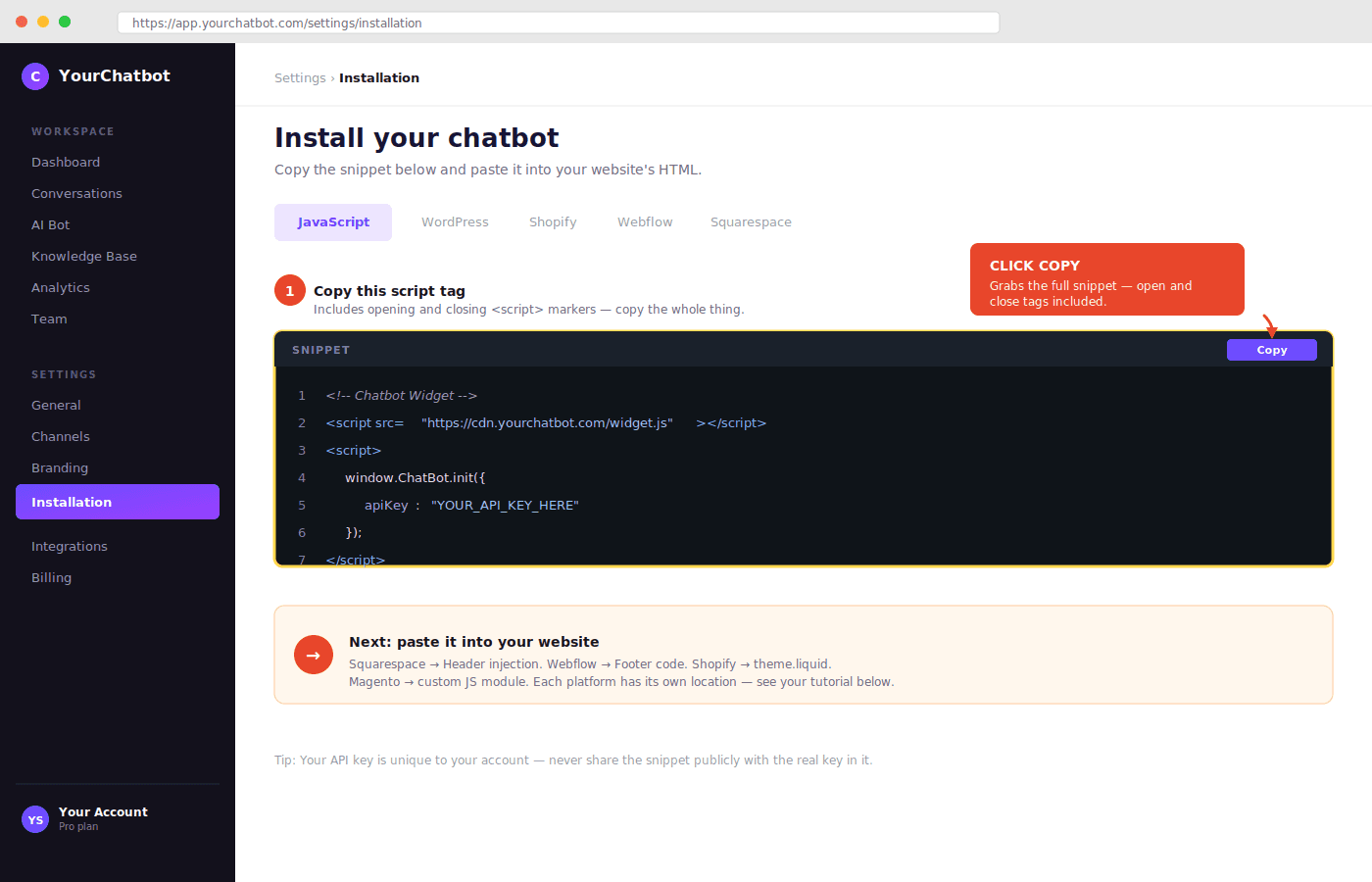
Step 1: Get your JavaScript snippet Sign up for your chosen chatbot platform and navigate to the installation or setup section. The snippet is usually found under Settings, Installation, or Website integration. Copy the full script tag including the opening and closing script markers.
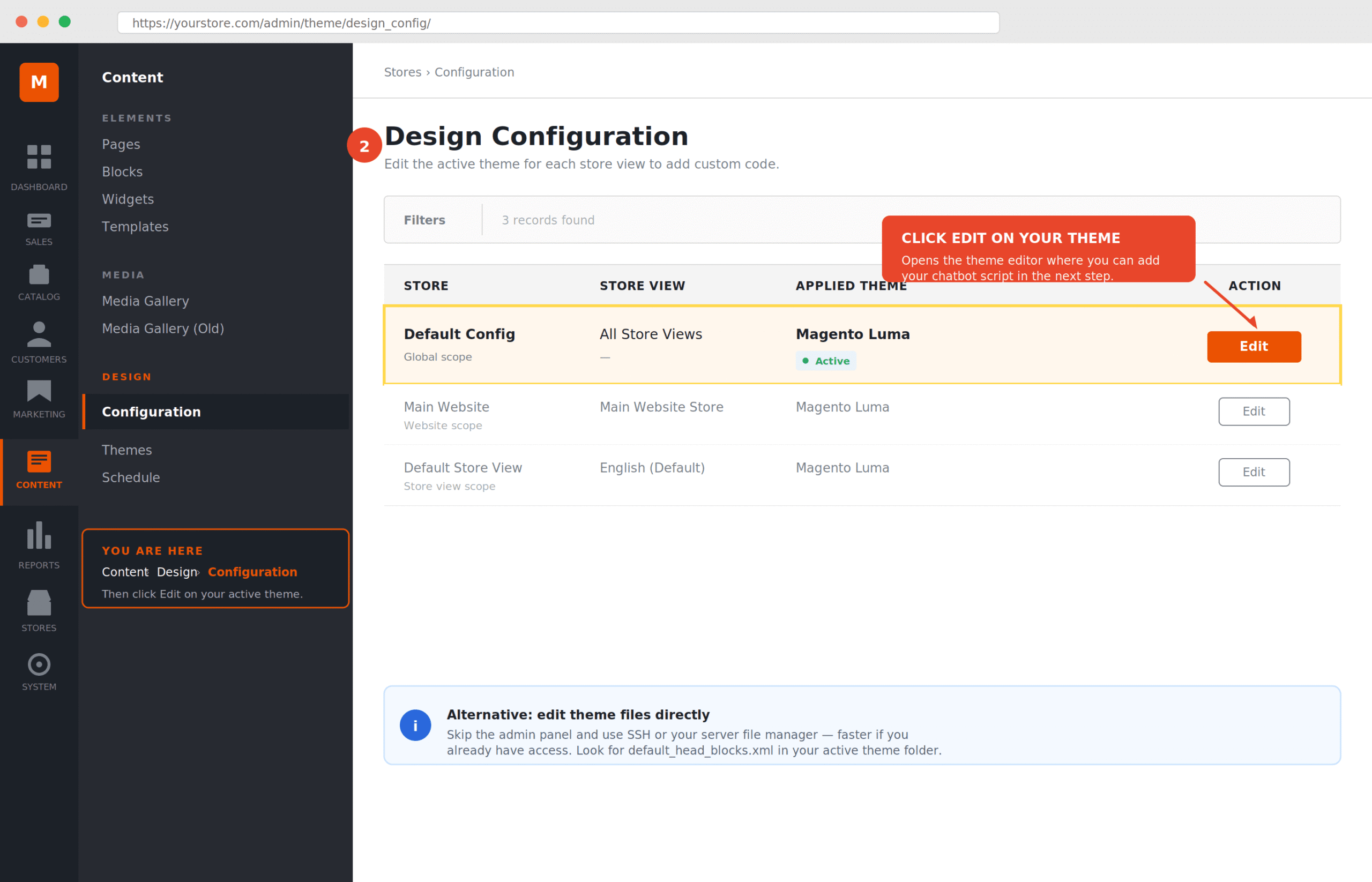
Step 2: Access your Magento theme files In your Magento admin panel, navigate to Content, then Design, then Configuration. Select your active theme and click Edit. Alternatively, access your theme files directly through your server file manager or SSH.
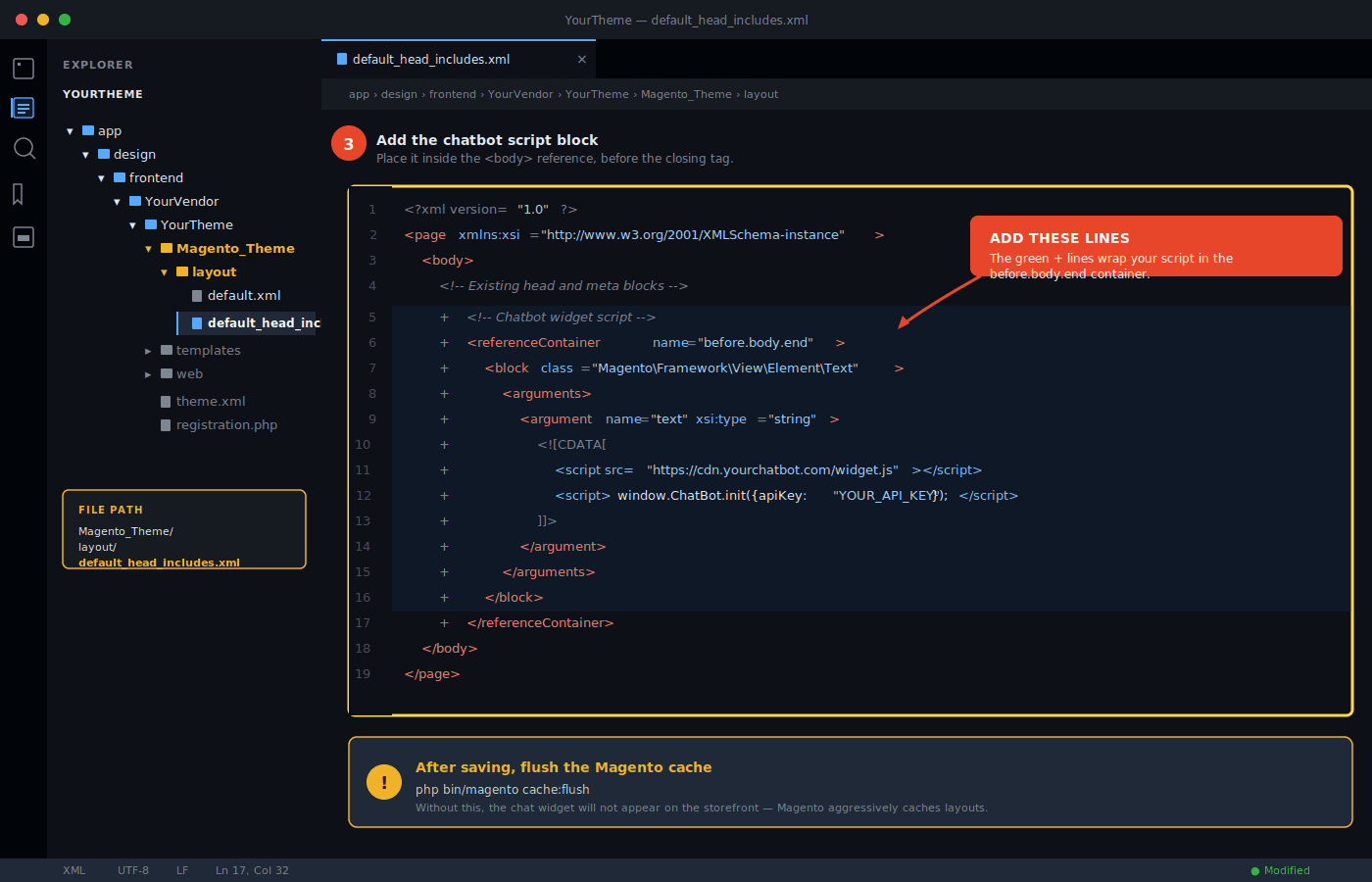
Step 3: Add the script to your theme layout The most reliable site-wide placement is the default layout XML file in your theme. In your theme directory, navigate to Magento_Theme/layout/ and open default_head_includes.xml or default.xml. Add the chatbot script block before the closing body tag. If you are not comfortable editing layout XML, the CMS static blocks method below is a safer alternative.
Step 4: Use CMS blocks for non-developer installation In the Magento admin, go to Content, then Blocks, then Add New Block. Create a new block with your chatbot JavaScript in the content area. Switch the editor to HTML mode before pasting the script. Then add this block to your store’s footer through Content, then Widgets, then Add Widget, selecting CMS Static Block as the widget type and Footer as the layout update.
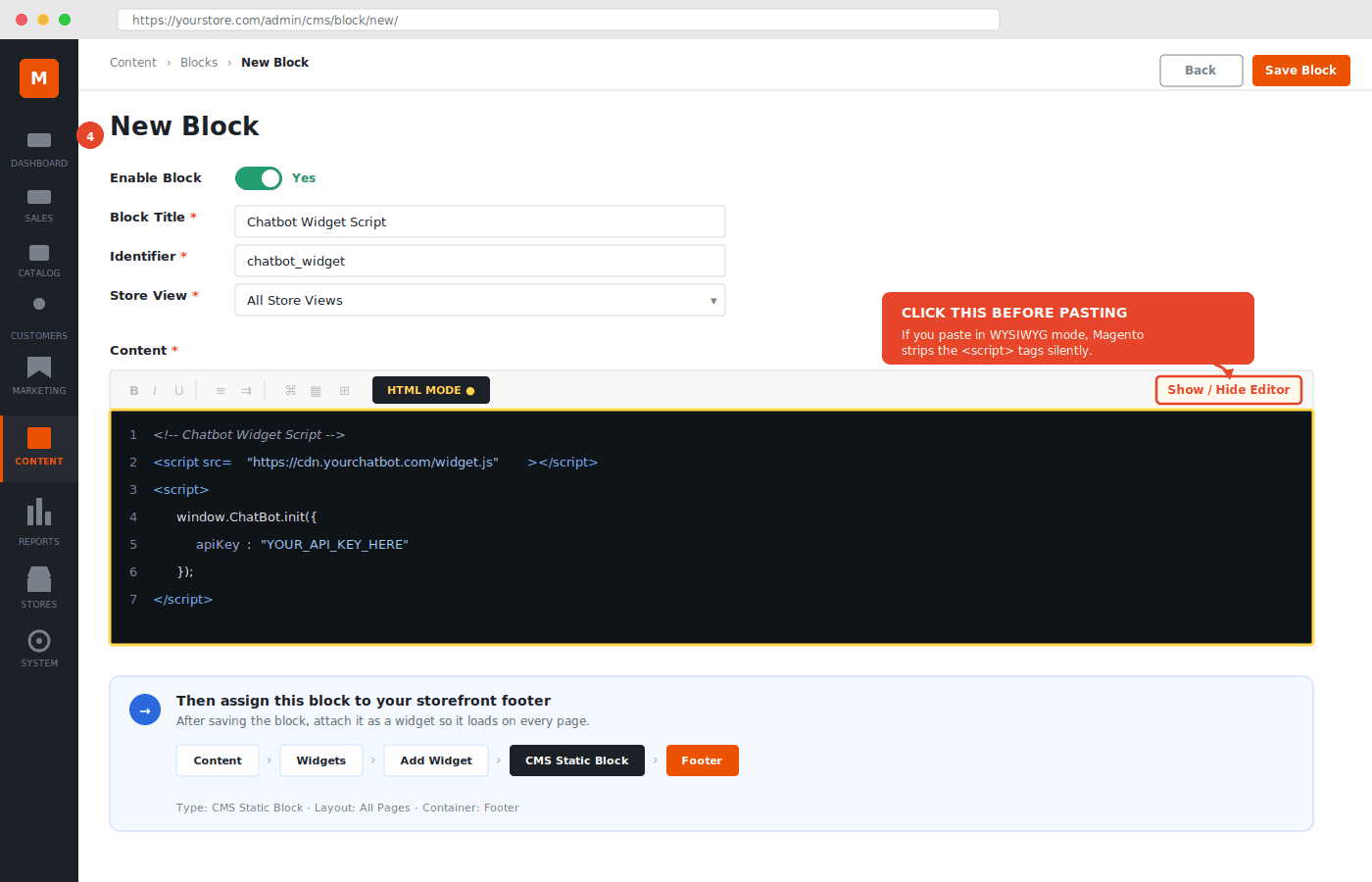
Step 5: Clear Magento cache After adding the script, clear Magento’s cache through System, then Cache Management, then Flush Magento Cache. The chatbot widget should appear on your store’s live URL after the cache clears.
Step 6: Train the chatbot before directing traffic Return to your chatbot platform and upload your FAQ content, product information, return policy, and shipping policy. For Magento stores with a large product catalog, prioritise training on your highest-traffic product categories and most common customer queries rather than attempting to cover everything at once. The train chatbot custom data process works consistently across platforms once the installation is complete.
Getting Order Data Into Your Magento Chatbot
The JavaScript embed method installs the chatbot widget but does not give it access to your Magento order data. For a chatbot that can respond to “where is my order” with the customer’s actual order status and tracking information, an API integration is required.
Magento 2 exposes order data through its REST API at endpoints under /rest/V1/orders/. A custom integration can query this API when a customer asks about their order, pull the current status and tracking data, and return it in the chat response automatically. This is the Magento equivalent of the native Shopify API integration that enables WISMO automation on Shopify-connected chatbot platforms.
Building this integration requires developer work. The scope involves authenticating the chatbot platform with Magento’s API using an admin token or customer token, building the query logic that pulls order data based on customer-provided order number or email, and surfacing that data in the chat response in a readable format.
For Adobe Commerce stores with a development team, this integration is achievable in a few days of focused work and produces the same high deflection rates on order tracking queries that Shopify-native chatbots achieve automatically. Stores that have completed this integration report consistent WISMO ticket reduction similar to the results documented in WISMO ticket reduction studies from Shopify environments. The query type and customer behaviour are the same regardless of which ecommerce platform powers the store.
Magento Open Source vs Adobe Commerce: What Changes for Chatbots
Most of the guidance in this article applies equally to both. The practical differences are in the surrounding infrastructure.
Adobe Commerce (formerly Magento Commerce, the paid cloud version) typically runs on a managed hosting environment with stricter deployment processes. Adding third-party JavaScript through theme files may require a formal deployment pipeline rather than a direct file edit. Check with your hosting or development team before modifying theme files directly in a production Adobe Commerce environment. Adobe Commerce also includes B2B features like customer groups and quote management that can feed into more sophisticated chatbot flows for wholesale or account-based selling.
Magento Open Source gives more direct access to the server and codebase, which makes JavaScript embed installation faster and more straightforward. Custom module development is also more flexible without the managed environment constraints of Adobe Commerce. For enterprise chatbot solutions on Adobe Commerce, the deployment and infrastructure considerations are part of the scoping process before any chatbot integration begins.
Frequently Asked Questions
What is the easiest way to add a chatbot to Magento?
The JavaScript embed via CMS static blocks is the easiest path that does not require Composer or developer access to theme files. Create a CMS static block with your chatbot script, then add it to the store footer using a CMS Widget. This works on Magento 2 Open Source and Adobe Commerce without modifying theme files directly.
Does Magento have a built-in chatbot?
No. Magento Open Source and Adobe Commerce do not include a native chatbot or AI support tool. Adding chat automation requires a third-party solution through the Magento Marketplace or a JavaScript embed.
Can a Magento chatbot access live order data automatically?
Not through a standard JavaScript embed. Accessing live order data requires a custom integration built against Magento’s REST API. This integration queries the order API when a customer asks about their order, pulls the current status and tracking information, and returns it in the chat response. This requires developer resources to build but produces the most capable post-purchase automation.
Which chatbots have a native Magento Marketplace extension?
Tidio and LiveChat both have maintained Magento Marketplace extensions. Tidio’s extension installs via Composer and integrates with the Magento admin panel. Most other chatbot platforms in this comparison use JavaScript embed rather than a native extension.
How long does Magento chatbot setup take?
The JavaScript embed via CMS blocks takes 30 to 60 minutes including cache clearing and basic testing. Training the chatbot on your store content takes several more hours. A custom REST API integration for live order data takes several days of developer work depending on scope. A full Magento Marketplace extension install via Composer takes one to two hours including configuration.
Does AeroChat work on Magento?
Yes. AeroChat installs on Magento via JavaScript embed and provides AI chat automation across website, WhatsApp, Instagram, and Messenger from one dashboard. The omnichannel coverage works on any Magento 2 store. Live order data access for WISMO automation requires a custom REST API integration, which is available as a development engagement for Adobe Commerce stores with the requirement.
Is there a free chatbot option for Magento?
Tidio and Freshdesk Messaging both offer free plans that work on Magento via JavaScript embed. Tidio’s free plan includes basic AI conversations. Freshdesk’s free plan covers basic live chat. Neither free plan includes advanced order data integration or high-volume automation capability.
Magento AI chatbot integration is more technically complex than Shopify or WooCommerce because of Magento’s customised deployment environments. The BigCommerce vs Shopify chatbot comparison covers how Magento’s enterprise-tier competitors handle chatbot integration. For WooCommerce as a lower-complexity alternative, WooCommerce vs Shopify chatbot covers how the open-source platform compares. The ecommerce integration platforms guide covers how chatbots connect to Magento alongside other enterprise tools.
For merchants on PrestaShop rather than Magento, the live chat for PrestaShop guide covers the open-source equivalent, including which chat platforms have native PrestaShop modules versus those that require API integration.



