9 Best Ecommerce Integration Platforms in 2026

The best ecommerce integration platform depends on what must connect and why. Shopify Flow or Zapier may be enough for straightforward store workflows. Celigo and Patchworks are better aligned with ecommerce and ERP synchronisation, while MuleSoft, Workato, Boomi and Tray suit broader integration programmes.
AeroChat fills a different role: it connects approved ecommerce information with customer conversations rather than replacing backend middleware. For example, a Shopify AI chatbot for customer service can use store context to answer a shopper's product or order question, but it does not synchronise the underlying order with an ERP.
This distinction prevents an expensive category mistake. Software that moves orders between operational systems is not automatically equipped to manage customer enquiries. Equally, a customer-service platform should not be presented as an enterprise integration platform as a service (iPaaS).
Product information checked: 16 July 2026. Connector availability, packaging and pricing change regularly; verify the required systems and operations before purchasing.
Which ecommerce integration platform fits your needs?
| Platform | Integration category | Best fit | Typical ownership | Important limitation to assess |
|---|---|---|---|---|
| AeroChat | Customer-facing AI integration | Ecommerce conversations using approved knowledge and store context | Customer service or ecommerce team | Not an ERP or general iPaaS replacement |
| Zapier | General workflow automation | Accessible cross-app tasks | Operations or marketing team | Check trigger timing, task volume and data complexity |
| MuleSoft | Enterprise integration and API management | Governed, reusable enterprise APIs | Integration architects and developers | Usually requires a formal implementation programme |
| Celigo | Intelligent automation and iPaaS | Ecommerce, ERP and operational data flows | IT and operations | Confirm connector depth and error ownership |
| Patchworks | Ecommerce-focused iPaaS | Retail systems, channels and fulfilment | Ecommerce operations and integration teams | Validate each required connector and field mapping |
| Workato | Enterprise automation and orchestration | Cross-department workflows and governed automation | IT and business automation teams | Scope, governance and consumption need planning |
| Shopify Flow | Shopify-native automation | Store events, conditions and supported app actions | Shopify operations team | Available actions depend on plan and installed connectors |
| Boomi | Enterprise integration platform | ERP, EDI, data and application integration | Enterprise integration team | Architecture and implementation effort can be substantial |
| Tray | API-led composable integration | Custom multi-step workflows and embedded integration | Technical automation team | Authentication, APIs and workflow maintenance need expertise |
How these platforms were compared
The platforms were assessed from current first-party documentation using six questions:
- Which ecommerce, ERP, CRM, warehouse and customer systems can it connect?
- Does the connector expose the exact objects and actions the workflow needs?
- Is data event-driven, scheduled or manually triggered?
- How are failures, retries, duplicates and rate limits handled?
- Who can build and maintain the integration safely?
- What software, implementation and usage costs form the total cost?
The review does not assume that every connector is bidirectional or real time. Those terms are meaningful only when tied to a specific trigger, object, action and service level.
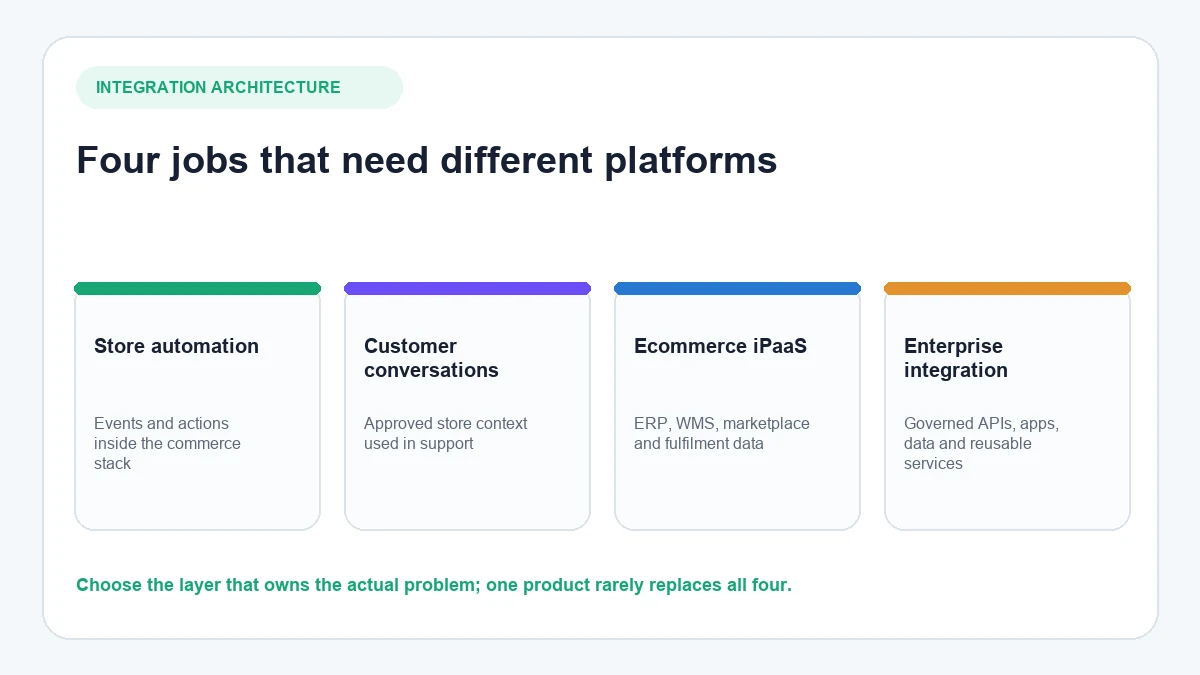
Four types of ecommerce integration platform
Native ecommerce automation
Tools such as Shopify Flow automate events and actions within the commerce platform and supported apps. They are often the simplest starting point for store-specific processes.
Customer-facing AI integration
This layer uses store and business information inside customer conversations. AeroChat belongs here: it helps a shopper obtain an answer or reach a person, but it does not replace ERP middleware.
Ecommerce-focused iPaaS
Platforms such as Celigo and Patchworks are designed to coordinate data between commerce platforms, ERPs, fulfilment providers, marketplaces and related operational systems.
Enterprise integration and automation
MuleSoft, Workato, Boomi and Tray address broader application, API and data integration. They become relevant when ecommerce is one part of a larger architecture with governance, reusable services and technical ownership.
The nine ecommerce integration platforms
1. AeroChat: customer-facing ecommerce conversations
AeroChat is an AI agent platform that helps ecommerce brands run customer service on autopilot. It connects customer channels with approved business knowledge and supported store information so the AI can respond to common product, delivery and order questions. Conversations can move to a human when judgement is required.
For example, a Shopify order may already be synchronised correctly with an ERP, but the customer still needs to know where it is. AeroChat adds the conversational layer, allowing the shopper to check an order's status in chat using information the platform is permitted to access. Its Shopify integration supplies store context without replacing the system responsible for backend synchronisation.
Best for: Growing ecommerce businesses that want customer conversations to use store context across supported channels.
Not a replacement for: ERP synchronisation, warehouse middleware, general API management or master-data governance. AeroChat can sit alongside those systems as the customer-facing AI layer.
2. Zapier: accessible cross-app workflows
Zapier connects Shopify with a large catalogue of business applications through trigger-and-action workflows. A merchant might add a new order to a spreadsheet, create a CRM record or notify a team. Its Shopify connector also exposes search and action operations, with timing depending on the trigger and plan.
Zapier is appropriate when the workflow is easy to describe, modest in complexity and owned by a business team. It becomes less comfortable when a process requires high-volume bidirectional synchronisation, sophisticated state management or strict integration governance.
Check before choosing: Trigger frequency, task consumption, duplicate prevention, error replay, field availability and how workflow ownership will be transferred. Review Zapier's current Shopify connector rather than assuming every Shopify API operation is available.
3. MuleSoft: enterprise API management and integration
MuleSoft's Anypoint Platform is designed for enterprise application integration and API management. For ecommerce, its official material emphasises reusable APIs, backend connectivity, prebuilt assets and multi-brand or multi-region architecture.
MuleSoft fits organisations where ecommerce must connect with several systems of record and where security, reuse and API governance justify a formal integration programme. It is not a lightweight Shopify utility; the value depends on architecture, implementation capability and reuse across the enterprise.
Check before choosing: The target API operating model, internal skills, partner requirements, support ownership and complete implementation cost. See MuleSoft's ecommerce integration overview for its current commerce scope.
4. Celigo: ecommerce and ERP integration
Celigo combines application integration, API management, EDI, data ingestion and error management in its automation platform. Its current platform catalogue includes Shopify, NetSuite, SAP, marketplaces and other operational applications, making it relevant to ecommerce order-to-cash and supply-chain workflows.
Celigo is a sensible shortlist candidate when the store needs repeatable flows between ecommerce and an ERP or other operational systems. Its prebuilt assets can reduce initial work, but a prebuilt connector still needs field mapping, ownership and testing against the merchant's actual processes.
Check before choosing: Required endpoints, custom fields, volume limits, retry behaviour, reconciliation and how exceptions reach the right operator. Review the Celigo platform capabilities and the exact application listing for each system.
5. Patchworks: retail and ecommerce integration
Patchworks focuses on integration for retail and ecommerce stacks. It is commonly considered when a brand needs to connect ecommerce platforms with ERPs, warehouse systems, marketplaces, fulfilment services and other commerce applications through managed workflows.
Its category focus can make the platform easier to evaluate than a general enterprise tool when most integrations are commerce-specific. However, “ecommerce focused” does not guarantee that a connector supports every custom field, event or write operation.
Check before choosing: Ask Patchworks to demonstrate the exact source and destination objects, sync direction, latency, error queue and recovery process for your stack. Use its official platform information as the starting point and obtain written confirmation for production requirements.
6. Workato: enterprise workflow orchestration
Workato connects applications and orchestrates multi-step business processes across departments. Its retail material covers ecommerce and ERP integration, inventory, EDI, customer data and cross-system workflows.
It fits organisations that want business automation and integration in one governed platform, particularly where ecommerce processes cross finance, supply chain, support and revenue operations. The platform's breadth means requirements and governance should be designed before building a large recipe estate.
Check before choosing: Connector actions, workspace governance, environment separation, consumption, monitoring and who approves production changes. Workato's retail and ecommerce overview describes its intended operating scope.
7. Shopify Flow: Shopify-native automation and connectors
Shopify Flow uses triggers, conditions and actions to automate store processes. Contrary to the older version of this article, it does not work only inside Shopify: supported connectors can receive events from apps or send actions to third-party services, and eligible plans can use an HTTP request action.
Flow is often the most economical first option when the process begins with a Shopify event and ends with a Shopify action, notification or supported connector. It should not be mistaken for a general ERP integration platform.
Check before choosing: Plan eligibility, installed app connectors, available fields, API limits, test events and retry behaviour. Shopify's official Flow documentation provides the current plan, workflow and connector guidance.
8. Boomi: enterprise cloud integration
Boomi supports application integration, data management, API and B2B/EDI use cases. Its current Shopify and NetSuite accelerator documentation describes flows for products, inventory, orders, fulfilment, returns and refunds between those systems.
Boomi is most relevant when an enterprise needs a broader integration foundation rather than one store workflow. Its accelerators can provide a starting structure, but implementation still depends on the organisation's systems, customisation and operating model.
Check before choosing: Architecture, runtime, connector licensing, environments, monitoring, data governance and specialist availability. Boomi's Shopify and NetSuite solution explains the current accelerator scope.
9. Tray: API-led composable automation
Tray provides a visual workflow platform with service connectors and API-oriented tools. Its Shopify connector currently exposes operations for customers, orders, fulfilments, inventory and products, plus webhook triggers and raw GraphQL queries.
Tray is suitable when a technical automation team wants configurable multi-step logic without building every integration service from the ground up. Authentication, API scopes, transformations and failure handling still require technical ownership.
Check before choosing: Shopify OAuth configuration, required scopes, connector-version changes, webhook behaviour, rate limits and debugging responsibility. Tray's Shopify connector documentation lists its current setup and operational model.
How to evaluate integration depth
A logo in an integration directory tells you very little. Evaluate each required flow at object and field level.
| Requirement | Question to ask | Evidence to request |
|---|---|---|
| System of record | Which application owns the final value? | Written data-ownership map |
| Direction | Is the flow one-way or bidirectional? | Source-to-destination field mapping |
| Trigger | What starts the flow? | Webhook, schedule or polling details |
| Delay | How soon must the destination update? | Measured test under realistic volume |
| Failure | What happens after an API or validation error? | Retry and exception demonstration |
| Duplicates | How is the same event recognised? | Idempotency or deduplication design |
| Reconciliation | How are missing or inconsistent records found? | Report, alert or scheduled comparison |
| Security | Which credentials and permissions are used? | Scope and access review |
“Real time” should never be accepted as a standalone answer. A product update may be event-driven while an inventory reconciliation runs every hour. Both can exist inside the same integration.
What to test before implementation
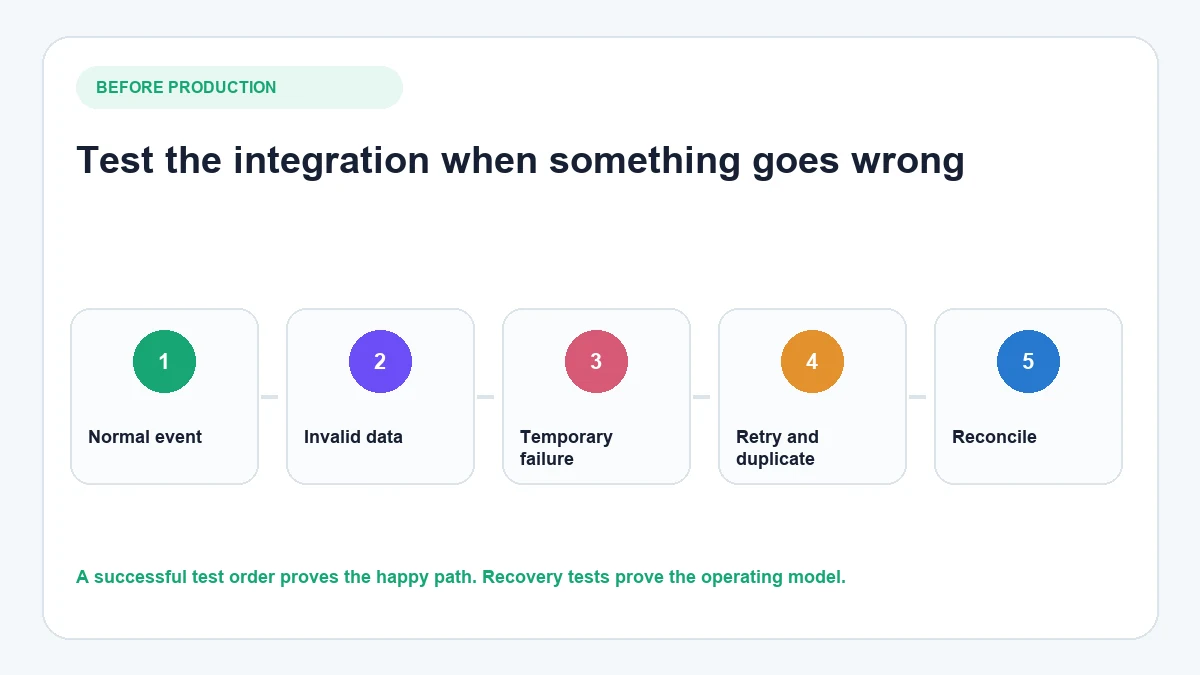
Use a test environment or limited data set and run these cases before production:
- Normal event: Create an order and confirm every expected field reaches the destination.
- Invalid data: Remove a required value and check whether the error is visible and actionable.
- Temporary failure: Simulate an unavailable destination and confirm retry behaviour.
- Duplicate event: Send the same event twice and verify that it does not create two business records.
- Out-of-order update: Deliver fulfilment or cancellation events in an unexpected sequence.
- Volume: Test a realistic peak rather than one successful order.
- Reconciliation: Confirm how the team will find a record that never arrived.
- Ownership: Route a failure alert to the person who can actually correct it.
For the customer-facing layer, test a different failure path. Ask a question that the AI cannot safely answer and confirm that it can pass the conversation to a person instead of guessing.
Best choice by business scenario
A Shopify store automating straightforward internal tasks
Start with Shopify Flow. Add Zapier when the required app or workflow is easier to connect there. Avoid buying an enterprise iPaaS until the data and governance requirements justify it.
A growing retailer connecting ecommerce with an ERP or WMS
Shortlist Celigo and Patchworks, then compare them against the exact ERP, warehouse and marketplace flows. Boomi may also fit if the wider enterprise already uses it or needs broader integration capabilities.
A large enterprise building reusable APIs and governed integrations
Evaluate MuleSoft, Workato, Boomi and Tray against the organisation's architecture, developer skills, governance model and existing contracts. The “best” platform is the one the operating team can govern and support over several years.
An ecommerce brand connecting store data with customer conversations
This is where AeroChat belongs. Backend middleware keeps orders and inventory moving between systems; AeroChat uses approved store information to answer customer questions without changing which backend system owns that data.
On WhatsApp, customers may ask about product availability, delivery or an existing order. A WhatsApp AI chatbot for ecommerce can handle these conversations using approved business and store information, then involve a person when the enquiry requires judgement. The order itself remains under the control of the commerce, ERP and fulfilment systems.
The same separation applies to social commerce. An Instagram chatbot for customer enquiries can respond to inbound DMs and comments, while the ecommerce platform continues to manage products, inventory and orders. This lets the conversational and operational layers work together without confusing their responsibilities.
On WordPress and WooCommerce sites, the WordPress integration can use approved website and store information in customer conversations. It remains a customer-facing connection rather than a substitute for ERP or warehouse integration.
Frequently asked questions
What is the difference between a native integration and an iPaaS?
A native integration connects a defined pair of products or uses capabilities built into one platform. An iPaaS provides a common environment for building, monitoring and governing integrations across several systems. Native is often simpler; iPaaS offers more breadth and control when complexity increases.
Does every Shopify store need an integration platform?
No. A small store may operate well with Shopify's native functions and a few carefully selected apps. A dedicated integration platform becomes more useful when several systems must exchange important data and manual reconciliation creates operational risk.
How do you prevent duplicate orders or failed synchronisation?
Use stable event or record identifiers, idempotent processing where possible, controlled retries, visible exception queues and regular reconciliation. The platform can provide tools, but the implementation must define the behaviour.
What is the difference between real-time and scheduled synchronisation?
An event-driven integration responds when an event occurs, while a scheduled integration checks or transfers data at set intervals. “Real time” does not mean instantaneous under every condition; rate limits, queues and downstream systems can still introduce delay.
Can AeroChat replace an ERP integration platform?
No. AeroChat is the customer-facing AI and conversation layer. Use an ERP or integration platform to govern backend operational data, then use AeroChat where customers need answers through supported channels.
Final decision
Choose the smallest platform that can reliably support the required systems, data volume, failure path and governance model. Begin with a written map of the systems of record and five production-critical workflows. Then ask each vendor to demonstrate those exact flows—including what happens when they fail.
If the missing layer is not backend synchronisation but customer access to approved ecommerce information, AeroChat can complement the integration stack by connecting store context with customer conversations and human support.