



How to Add a WhatsApp Chat Button to Your Website in 2026
A WhatsApp chat button lets website visitors start a WhatsApp conversation with your business in one click.
Instead of asking people to copy your phone number, save it, open WhatsApp, and type a message manually, a WhatsApp button sends them directly into a chat with you. This makes it easier for visitors to ask questions, request quotes, check product details, or contact your team before buying.
For small websites, a simple WhatsApp click-to-chat link may be enough. For ecommerce stores, service businesses, and support teams, a basic button may not be enough because customers often expect fast replies, automation, routing, and support across more than one channel.
This guide explains how to add a WhatsApp chat button to your website using a simple link, HTML code, a floating button, WordPress, Shopify, and no-code chat tools.
What Is a WhatsApp Chat Button?
A WhatsApp chat button is a clickable button on your website that opens a WhatsApp conversation with your business number.
When a visitor clicks the button, WhatsApp opens automatically on their phone or desktop. If you add a pre-filled message, the visitor can start the conversation without typing from scratch.
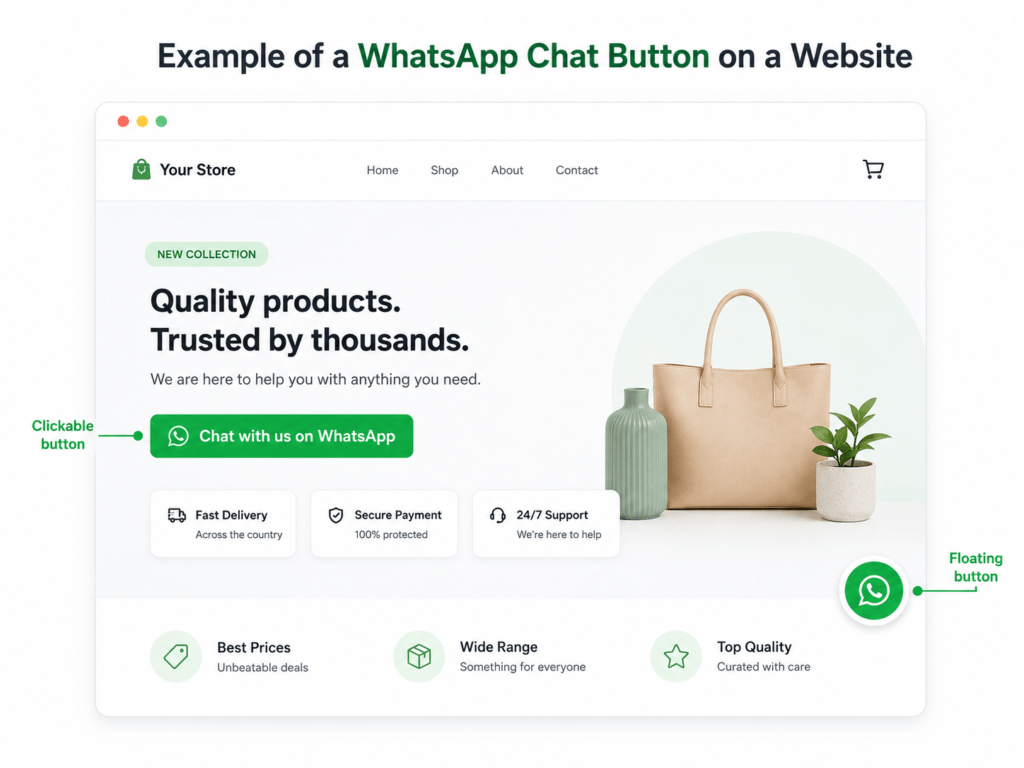
For example, a customer browsing your website may click a button that says:
Chat with us on WhatsApp
The button can open WhatsApp with a message like:
Hi, I need help with your products.
This makes the first step easier for the customer and can increase the number of people who contact your business.
How WhatsApp Click-to-Chat Works
WhatsApp click-to-chat works through a special link format.
The basic format is:
https://wa.me/yourphonenumber
You need to replace yourphonenumber with your full phone number in international format.
Do not include:
- Plus signs
- Spaces
- Dashes
- Brackets
For example, if your business number is:
+1 555 123 4567
Your WhatsApp click-to-chat link should be:
https://wa.me/15551234567
When someone clicks that link, WhatsApp opens a chat with that number.
Basic WhatsApp Button Code
The simplest way to add a WhatsApp button to your website is to use a normal HTML link.
Here is the basic code:
<a href="https://wa.me/15551234567" target="_blank">
  Chat with us on WhatsApp
</a>
Replace 15551234567 with your own WhatsApp Business number.
This creates a simple text link. If you want it to look more like a button, you can add basic styling.
<a href="https://wa.me/15551234567" target="_blank" class="whatsapp-button">
  Chat with us on WhatsApp
</a>
Then add this CSS:
.whatsapp-button {
  display: inline-block;
  background-color: #25D366;
  color: #ffffff;
  padding: 12px 20px;
  border-radius: 6px;
  text-decoration: none;
  font-weight: 600;
  font-family: Arial, sans-serif;
}

.whatsapp-button:hover {
  background-color: #1ebe5d;
}
This creates a clean green WhatsApp-style button that visitors can click from your website.
WhatsApp Button With a Pre-Filled Message
You can also add a pre-filled message so the visitor does not need to type the first message manually.
Here is the format:
https://wa.me/15551234567?text=Hi%2C%20I%20need%20help
The text after ?text= is the message. Spaces and punctuation need to be encoded properly for URLs.
Here is a complete example:
<a href="https://wa.me/15551234567?text=Hi%2C%20I%20need%20help%20with%20your%20products" target="_blank">
  Message us on WhatsApp
</a>
When a visitor clicks the button, WhatsApp opens with this message already written:
Hi, I need help with your products
This works well for product pages, service pages, quote request pages, and contact pages.
Floating WhatsApp Button CSS
A floating WhatsApp button stays visible as the visitor scrolls your website. It usually appears in the bottom-right corner of the screen.
This is useful because visitors can contact you at any point without searching for your contact page.
Here is a simple floating WhatsApp button:
<a href="https://wa.me/15551234567?text=Hi%2C%20I%20need%20help"
   class="floating-whatsapp"
   target="_blank">
  WhatsApp
</a>
Add this CSS:
.floating-whatsapp {
  position: fixed;
  right: 20px;
  bottom: 20px;
  background-color: #25D366;
  color: #ffffff;
  padding: 14px 18px;
  border-radius: 50px;
  font-size: 15px;
  font-weight: 600;
  text-decoration: none;
  font-family: Arial, sans-serif;
  box-shadow: 0 4px 12px rgba(0, 0, 0, 0.2);
  z-index: 9999;
}

.floating-whatsapp:hover {
  background-color: #1ebe5d;
}
This creates a simple floating WhatsApp chat button for your website.
You can change the text from WhatsApp to:
- Chat with us
- Message us
- Need help?
- Ask on WhatsApp
- Talk to support
For ecommerce websites, Need help? or Ask on WhatsApp usually feels more natural than only showing the word WhatsApp.
How to Add a WhatsApp Button to WordPress
There are three common ways to add a WhatsApp chat button to WordPress.
Option 1: Add the Button to a Page or Post
If you only want the button on one page, you can add it directly inside the WordPress editor.
Steps:
- Open the page or post in WordPress.
- Add a Custom HTML block.
- Paste your WhatsApp button code.
- Replace the phone number with your own number.
- Update the page.
- Test the button on desktop and mobile.
Example:
<a href="https://wa.me/15551234567?text=Hi%2C%20I%20need%20help" target="_blank">
  Chat with us on WhatsApp
</a>
This is the easiest option if you only need the button on your contact page, product page, or landing page.
Option 2: Add a Floating WhatsApp Button Sitewide
If you want the button to appear across your whole website, use a header and footer code plugin or a custom code plugin.
Steps:
- Install a trusted code snippet or header/footer plugin.
- Add the floating WhatsApp HTML code.
- Add the CSS styling.
- Save the changes.
- Clear your website cache if needed.
- Test the button on several pages.
This works well if you want WhatsApp available across your entire site.
Option 3: Use a WhatsApp Button Plugin
WordPress also has plugins that let you add WhatsApp buttons without writing code.
A plugin can be useful if you want:
- Button styling options
- Mobile and desktop controls
- Multiple agent numbers
- Page-level display rules
- Opening-hour settings
- No-code setup
The downside is that extra plugins can add more load to your website if they are not well built. Always choose a plugin that is actively maintained and test your page speed after installing it.
How to Add a WhatsApp Button to Shopify
If you use Shopify, you can add a WhatsApp chat button in a few different ways.
Option 1: Add a WhatsApp Link to Your Theme
You can add a WhatsApp link to a button, menu, footer, or announcement bar.
Example:
<a href="https://wa.me/15551234567?text=Hi%2C%20I%20need%20help%20with%20my%20order" target="_blank">
  Chat with us on WhatsApp
</a>
This works if you are comfortable editing your Shopify theme or adding custom sections.
Option 2: Add a Floating WhatsApp Button
You can add a floating button to your Shopify theme using the HTML and CSS examples above.
This is useful for stores that receive frequent questions about:
- Product availability
- Delivery time
- Returns
- Sizing
- Payment options
- Order status
Option 3: Use a WhatsApp Chat App or Business Chat Tool
A simple WhatsApp button is useful when you only want customers to start a chat.
But if your Shopify store receives regular support questions, a button alone may not be enough. Your team may still need to answer every message manually.
This is where a business chat tool can help. For example, AeroChat can support ecommerce conversations through its Shopify integration, helping stores manage product, order, and support questions more consistently.
WhatsApp Button vs WhatsApp Chat Widget
A WhatsApp button and a WhatsApp chat widget are not always the same thing.
A WhatsApp button usually does one simple job. It opens a WhatsApp chat when someone clicks it.
A WhatsApp chat widget may include more features, such as:
- Chat prompts
- Multiple team members
- Business hours
- Lead capture
- Automated replies
- Routing
- Analytics
- Integration with other channels
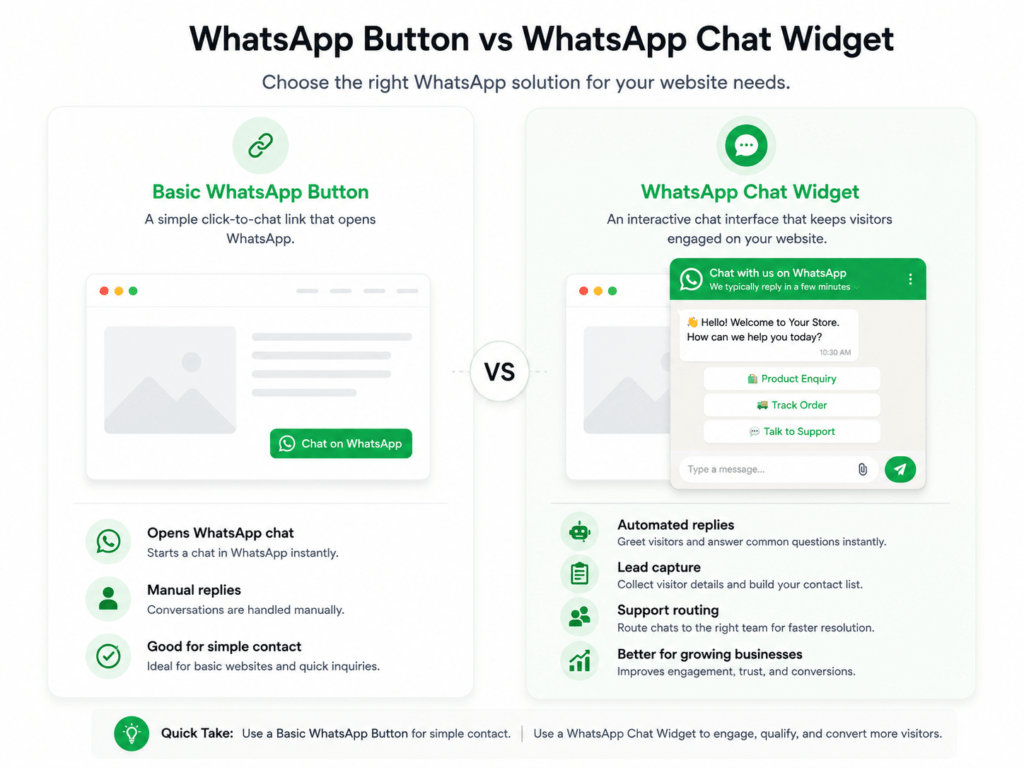
If you only want visitors to message you manually, a button is enough.
If you want to manage customer support, automate replies, capture leads, and reduce repetitive questions, a chat widget or AI chatbot platform is usually a better fit.
When a Basic WhatsApp Button Is Enough
A basic WhatsApp button is enough if:
- You have a small website
- You get a low number of messages
- You want visitors to contact you manually
- You do not need automation
- You do not need analytics
- You do not need team routing
- You are comfortable replying yourself
For example, a local service provider, freelancer, small clinic, or small business website may only need a simple WhatsApp link.
When You Need More Than a WhatsApp Button
A basic WhatsApp button becomes limited when your business starts receiving more customer messages than your team can handle manually.
You may need more than a button if customers ask the same questions every day about:
- Prices
- Products
- Delivery
- Returns
- Order status
- Appointment availability
- Store policies
- Opening hours
- Service details
You may also need a better setup if customers contact you through more than one channel.
For example, a customer may ask a product question on WhatsApp, send a follow-up on Instagram, and later contact your website chat. If each channel is managed separately, your team may lose context.
This is why many businesses move from a simple WhatsApp button to a fuller customer support automation setup.
AeroChat is an AI agent platform that helps merchants running customer service on WhatsApp scale it without the manual workload. Its WhatsApp integration helps businesses manage WhatsApp conversations as part of a wider support workflow instead of relying only on manual replies.
How AeroChat Helps Beyond a WhatsApp Button
AeroChat is not just a WhatsApp button.
A button helps customers start a conversation. AeroChat helps businesses manage and automate those conversations.
With AeroChat, businesses can train the AI on their website content, FAQs, product information, policies, and support documents. The whatsapp chatbot can then answer common questions automatically and pass complex conversations to a human when needed.
This is useful for businesses that receive repetitive questions such as:
- “Where is my order?”
- “Do you have this in stock?”
- “What is your return policy?”
- “How long does delivery take?”
- “Can I speak to someone?”
- “Do you ship to my area?”
AeroChat also supports conversations across website chat, WhatsApp, Instagram, and Messenger. So if your customers use more than one channel, your team can manage conversations from one place.
For businesses that want to reduce repetitive support work, a broader customer support automation setup can be more useful than adding a standalone WhatsApp button.
Best Places to Add a WhatsApp Button on Your Website
Where you place your WhatsApp button matters.
Good placements include:
Product Pages
Product pages are one of the best places to add a WhatsApp button because visitors often have questions before buying.
They may ask about size, colour, stock, delivery, warranty, or product compatibility.
Contact Page
A WhatsApp button on your contact page gives users a faster alternative to email or contact forms.
Pricing Page
If your business sells services, software, or packages, users may want to ask pricing questions before making a decision.
Checkout or Cart Page
For ecommerce stores, adding WhatsApp support near checkout can help reduce hesitation.
Customers may ask about delivery, returns, payment, or order changes before completing their purchase.
Footer
Adding a WhatsApp link to your footer gives visitors a consistent way to contact you from any page.
Floating Button
A floating button is useful if WhatsApp is one of your main support channels. It keeps the contact option visible throughout the browsing experience.
Best Practices for WhatsApp Chat Buttons
A WhatsApp button should be helpful, not distracting.
Follow these best practices:
Use Clear Button Text
Avoid vague text like “Click here.”
Use direct labels such as:
- Chat with us on WhatsApp
- Ask us on WhatsApp
- Message support
- Need help?
- Talk to our team
Add a Pre-Filled Message
A pre-filled message makes it easier for the visitor to start the conversation.
For example:
Hi, I need help with this product.
or:
Hi, I have a question about my order.
Use the Correct Phone Number Format
Always use the international number format without symbols.
Correct:
https://wa.me/15551234567
Incorrect:
https://wa.me/+1-555-123-4567
Test on Mobile and Desktop
WhatsApp buttons may behave differently depending on the device.
Always test the button on:
- Mobile browser
- Desktop browser
- WhatsApp mobile app
- WhatsApp Web
Avoid Covering Important Page Elements
A floating button should not block checkout buttons, cookie banners, live chat widgets, or mobile navigation.
Check your site on mobile carefully.
Set Expectations
If your team does not reply instantly, do not make the button say “instant support.”
Use a more honest label such as:
Message us on WhatsApp
or:
Ask us on WhatsApp
Common Mistakes When Adding a WhatsApp Button
Using the Wrong Phone Number Format
This is one of the most common mistakes.
Do not use plus signs, spaces, dashes, or brackets in the wa.me link.
Forgetting to Test the Button
Always test the button after publishing. A small formatting mistake can break the link.
Adding Too Many Buttons
If every section has a WhatsApp button, the page may feel cluttered.
Use the button where it helps the user take action.
Using WhatsApp When Your Team Cannot Reply
A WhatsApp button can increase messages. If your team is too busy to reply, customers may become frustrated.
In that case, automation can help answer common questions before a human takes over.
Treating WhatsApp as the Only Support Channel
Many customers use more than one channel. Some prefer WhatsApp, while others use website chat, Instagram, or Messenger.
If your business receives messages from multiple places, an omnichannel support setup may be more useful than a single WhatsApp button.
WhatsApp Button Code Examples
Here are a few examples you can copy and adjust.
Simple WhatsApp Link
<a href="https://wa.me/15551234567" target="_blank">
  Chat on WhatsApp
</a>
WhatsApp Link With Pre-Filled Message
<a href="https://wa.me/15551234567?text=Hi%2C%20I%20need%20help" target="_blank">
  Message us on WhatsApp
</a>
Styled WhatsApp Button
<a href="https://wa.me/15551234567?text=Hi%2C%20I%20need%20help" target="_blank" class="whatsapp-button">
  Chat with us on WhatsApp
</a>
.whatsapp-button {
  display: inline-block;
  background-color: #25D366;
  color: #ffffff;
  padding: 12px 20px;
  border-radius: 6px;
  text-decoration: none;
  font-weight: 600;
  font-family: Arial, sans-serif;
}
Floating WhatsApp Button
<a href="https://wa.me/15551234567?text=Hi%2C%20I%20need%20help" target="_blank" class="floating-whatsapp">
  WhatsApp
</a>
.floating-whatsapp {
  position: fixed;
  right: 20px;
  bottom: 20px;
  background-color: #25D366;
  color: #ffffff;
  padding: 14px 18px;
  border-radius: 50px;
  font-size: 15px;
  font-weight: 600;
  text-decoration: none;
  font-family: Arial, sans-serif;
  box-shadow: 0 4px 12px rgba(0, 0, 0, 0.2);
  z-index: 9999;
}
FAQs
How do I add a WhatsApp chat button to my website?
You can add a WhatsApp chat button by creating a wa.me link with your business phone number and placing it on your website as a normal link, button, or floating widget.
What is the correct WhatsApp button link format?
The correct format is:
https://wa.me/yourphonenumber
Use your full phone number in international format without plus signs, spaces, dashes, or brackets.
Can I add a pre-filled WhatsApp message?
Yes. Add ?text= after your WhatsApp link and include the encoded message.
Example:
https://wa.me/15551234567?text=Hi%2C%20I%20need%20help
Can I add a WhatsApp button to WordPress?
Yes. You can add a WhatsApp button to WordPress using a Custom HTML block, a header and footer code plugin, a code snippet plugin, or a WhatsApp button plugin.
Can I add a WhatsApp button to Shopify?
Yes. You can add a WhatsApp button to Shopify by adding a wa.me link to your theme, using a floating button code, or installing a WhatsApp chat app.
Is a WhatsApp button the same as a WhatsApp chatbot?
No. A WhatsApp button only opens a conversation. A WhatsApp chatbot can answer questions automatically, capture leads, route conversations, and support customers without your team replying manually every time.
Where should I place a WhatsApp button?
Good places include product pages, contact pages, pricing pages, checkout pages, footers, and floating buttons. The best placement depends on where visitors usually need help.
Do I need WhatsApp Business for a website button?
You can create a WhatsApp button with a normal WhatsApp number, but WhatsApp Business is better for companies because it gives you a business profile, labels, quick replies, and more professional messaging features.
Final Thoughts
A WhatsApp chat button is one of the easiest ways to let website visitors contact your business quickly.
For a simple website, a basic wa.me link or floating WhatsApp button may be enough. It gives visitors a direct way to ask questions without filling out a form or searching for your contact details.
But for businesses that receive regular customer questions, a button is only the first step. You still need someone to answer the messages, manage conversations, track customer context, and respond across different channels.
That is where a business chat solution becomes more useful. AeroChat helps businesses move beyond a basic WhatsApp button by automating customer support across WhatsApp, website chat, Instagram, and Messenger.
If your goal is only to let people message you, a WhatsApp button works well. If your goal is to reduce manual support work, answer customers faster, and manage conversations more consistently, you need more than a button.



