The Hidden Cost of Slow Replies for Shopify Stores
When a customer sends a message and does not hear back quickly, the sale does not usually wait. Most buyers either find the answer somewhere else, move on to a competitor, or lose the confidence they needed to complete their purchase.
That cost does not appear as a line item in your Shopify dashboard. But it affects revenue just as directly as pricing or product quality — and for most growing stores, it happens every day without being measured.
This guide covers why reply speed matters more on Shopify than most merchants realise, which enquiries are most time-sensitive, and what you can do to respond faster without expanding your support team.
If you are still building your store, the ecommerce startup checklist covers everything to have in place before launch, including how to set up customer service from the beginning.
What happens when a Shopify customer does not get a fast reply?
The outcome depends on where the customer is in their journey — but across all stages, slow replies produce a worse result than fast ones.
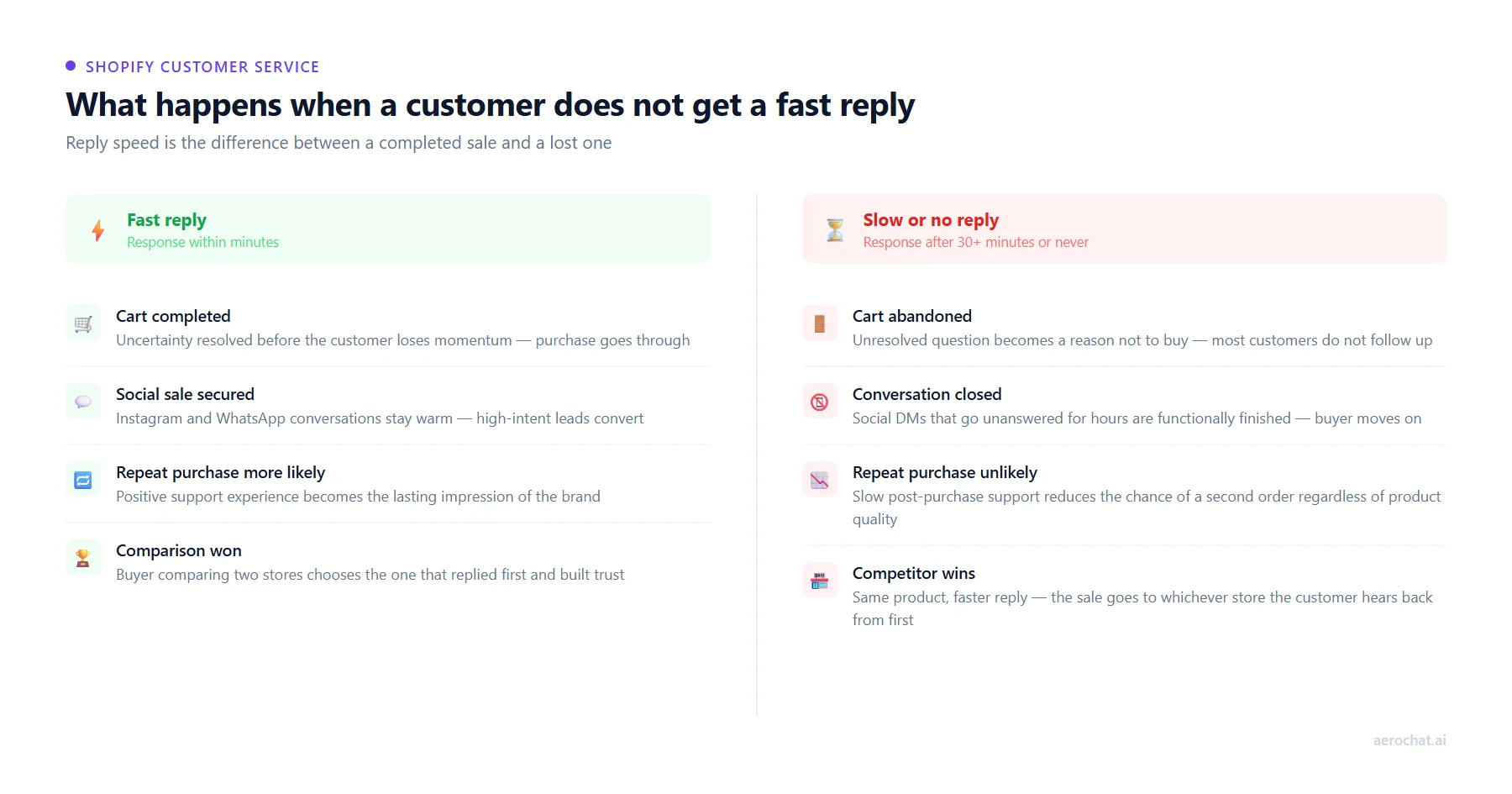
| Customer situation | Fast reply | Slow or no reply |
|---|---|---|
| Browsing and has a product question | Gets answer, confidence restored, continues to checkout | Leaves the page, does not return |
| Item in cart, unsure about delivery date | Confirms date, completes purchase | Abandons cart, buys elsewhere with a clear delivery window |
| Messaging on Instagram or WhatsApp | Conversation continues, sale progresses | Conversation closes, customer moves on |
| Post-purchase issue with an order | Issue resolved, positive impression, likely to reorder | Negative experience, repeat purchase unlikely |
| Comparison-shopping between two stores | Your quick reply builds trust and wins the decision | Competitor’s faster reply wins the customer |
The buying moment is short. Customers who have a question while shopping are at the point of highest intent — a fast reply keeps the sale moving; silence or a delayed response ends it.
Why slow replies lose Shopify sales
Do unanswered questions cause cart abandonment?
They contribute to it consistently. Research by the Baymard Institute, which publishes widely cited ecommerce data, finds that a significant portion of cart abandonment happens because customers have unresolved concerns at the point of checkout. Uncertainty about delivery dates, unclear return policies and unanswered product questions are recurring causes.
A customer who has already added a product to their cart is close to purchasing. If they send a question and do not hear back, they do not usually wait — the cart gets abandoned and the sale disappears without a trace in your analytics.
Which pre-purchase questions are most time-sensitive?
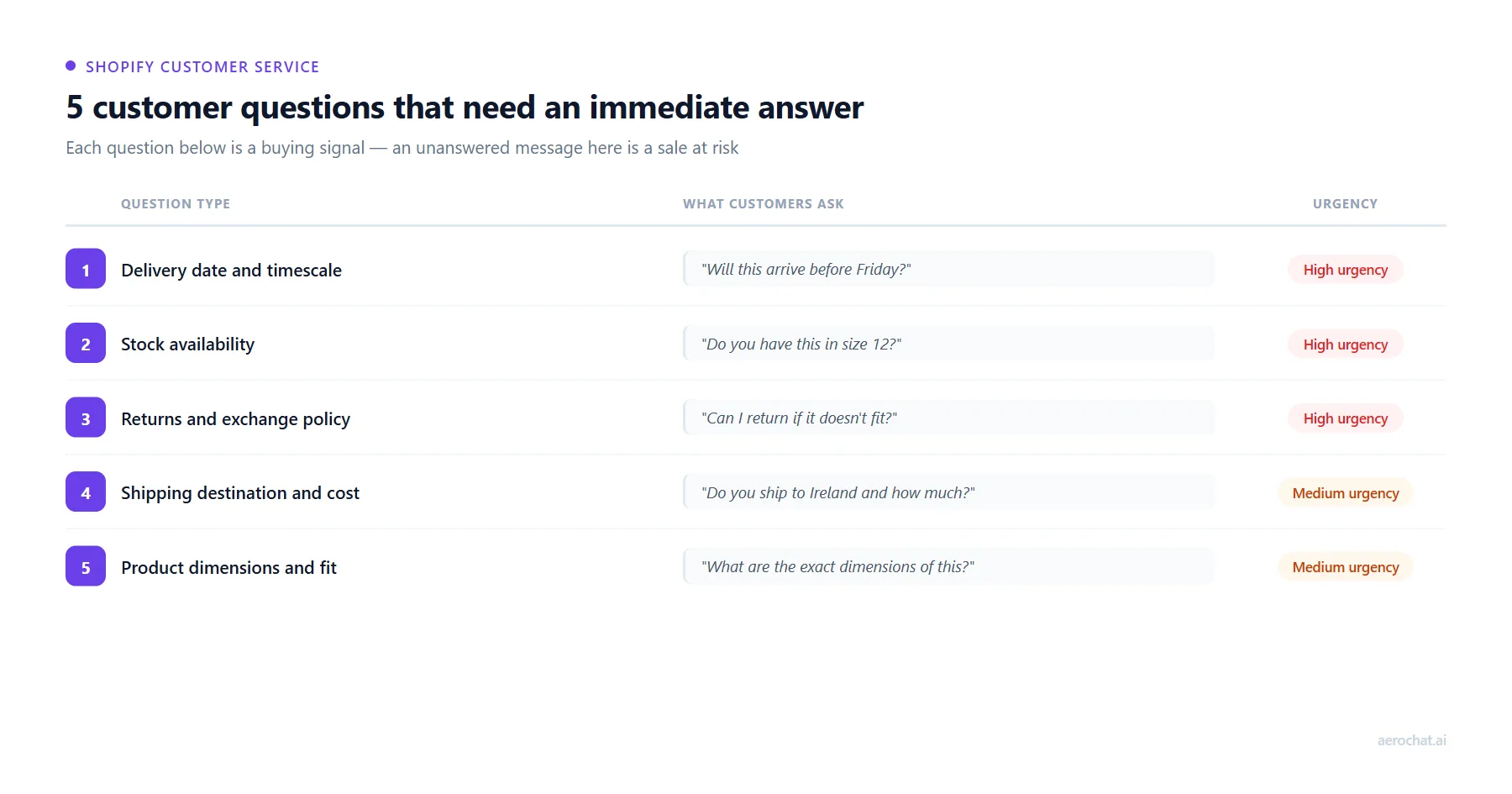
Not all customer messages carry the same urgency. These five question types account for the majority of time-sensitive enquiries across Shopify stores, and each one is a buying signal that requires a fast, accurate answer.
| Question type | Common example | Why it cannot wait |
|---|---|---|
| Delivery date and timescale | “Will this arrive before Friday?” | Deadline-driven purchases are lost if the answer arrives after the decision window closes |
| Stock availability | “Do you have this in size 12 in black?” | Customers checking availability are ready to buy — a slow reply sends them to a competitor with confirmed stock |
| Returns and exchange policy | “Can I return this if the size is wrong?” | An unresolved return question is a checkout barrier — most customers will not purchase without a confident answer |
| Shipping destination and cost | “Do you ship to Ireland and how much?” | International customers need shipping confirmation before they will add to cart |
| Product dimensions and compatibility | “How big is this exactly — will it fit a standard shelf?” | Fit uncertainty is a common last-minute hesitation — unanswered, it becomes a reason not to buy |
What happens to repeat purchases when replies are slow?
Post-purchase support speed affects customer retention as much as pre-purchase speed affects conversion. A customer who receives slow or unhelpful follow-up on a delivery delay or return request is less likely to order again — regardless of how good the product was. The support experience becomes the lasting impression of the brand.
For Shopify stores that depend on repeat revenue — consumables, subscription products, seasonal ranges — this compounds over time. Each slow post-purchase reply reduces the probability of a second order from that customer.
Why slow replies happen in growing Shopify stores
Most merchants dealing with slow response times are not being careless. The problem builds gradually as the store grows, and the root causes are structural rather than personal.
- Multiple disconnected channels — messages arriving across website chat, Instagram DMs, WhatsApp and Facebook Messenger with no single view to manage them from
- Repetitive questions consuming time — the same small set of questions answered manually dozens of times per day, leaving less capacity for everything else
- Single-person support — one or two people managing all channels with no system to handle volume spikes
- No priority system — high-intent buyers mid-purchase waiting in the same queue as low-urgency messages
- Peak-hour spikes — launches, promotions and seasonal events creating sudden volume that cannot be absorbed manually
The result is a merchant who handled ten conversations per day easily starts struggling at thirty or fifty — even though most of those conversations involve the same handful of questions.
How to speed up Shopify replies without adding staff
The four approaches below address the structural causes of slow responses rather than simply working harder to reply faster.
1. Build answers into product pages before customers need to ask
A reply is always faster if the customer never needs to send a message in the first place. The enquiries that generate the highest volume — delivery timescales, sizing, materials, return policies — can be addressed directly on product pages, in shipping information sections and in dedicated FAQ content.
The goal is to reduce the proportion of incoming messages that require a human to respond, so that the conversations that do come through are more likely to be genuinely complex or high-value.
2. Centralise all customer messages into one inbox
Managing Instagram DMs, WhatsApp messages, website chat and email from separate apps is one of the most consistent sources of delayed replies. A message that arrives on one platform while you are working in another gets missed until you remember to check.
Centralising all incoming messages into a single inbox removes the context-switching that causes delays and creates blind spots. For a practical look at how to manage customer conversations across multiple channels from one place, multi-channel customer service for ecommerce stores covers the main approaches and tools.
3. Automate answers to repetitive, predictable questions
Not every incoming message requires a human to compose a personalised reply. Questions about delivery timescales, return policies, stock availability and order status follow predictable patterns. An AI assistant trained on your store’s product information, shipping rules and policies can answer these accurately and immediately.
This is the approach that scales. Hiring more staff increases cost linearly with volume. Automating routine replies handles additional volume without proportionally increasing cost or headcount.
4. Set clear expectations when a reply will take time
Not every message can be answered instantly — particularly outside business hours. An automated acknowledgment that confirms receipt, sets a realistic response timeframe and points customers toward self-service answers for the most common questions is considerably more effective than silence.
Customers who know their message has been received and when to expect a reply are less likely to abandon their purchase, re-send the same message multiple times, or leave frustrated before hearing back. For a practical look at response time benchmarks across channels, what counts as a good customer service response time covers what customers typically expect by channel.
How fast should Shopify customer service replies actually be?
Response time expectations vary by channel. Understanding what customers consider acceptable helps merchants set realistic targets rather than chasing an arbitrary standard.
| Channel | Customer expectation | Why it differs |
|---|---|---|
| Website chat | Within minutes | Live chat creates an expectation of real-time conversation |
| Instagram chat | Under 1 hour | Social messaging feels conversational — long delays end the thread |
| WhatsApp chat | Under 1 hour | Similar to social: customers expect a quick back-and-forth |
| Same day to next day | Email carries a lower urgency expectation than messaging apps | |
| Facebook Messenger | Under 2 hours | Facebook labels pages with average response time — this affects trust |
Stores that meet these expectations consistently retain more customers from their existing traffic without spending more on acquisition.
How does AeroChat handle time-sensitive pre-purchase enquiries automatically?
AeroChat is an AI agent platform that helps Shopify merchants run customer service on autopilot. It connects directly with Shopify’s product and order data, which means it can answer delivery, stock, return and product questions accurately — immediately, without a team member needing to be available. Customers get a response at the moment they need it rather than waiting for working hours.
AeroChat handles enquiries across website chat, WhatsApp, Instagram and Facebook Messenger from a single platform. When a conversation requires a person — a complex complaint, a specific situation outside automated scope, or a customer who asks to speak to someone — AeroChat passes it to a human agent so the customer is not left waiting inside an automated loop. It is one of several AI chatbots purpose-built for Shopify, each with different strengths depending on whether a store’s priority is support automation, conversion assistance, or combined multichannel coverage.
AeroChat is a growth-stage support investment rather than an essential cost for every store. It becomes most relevant once enquiry volumes are high enough that response times start affecting customer experience, or when conversations arrive across several channels that are difficult to monitor from separate apps.
Best for: Shopify merchants who want to automate and scale customer service without extra manpower and costs.
Frequently asked questions
Does slow customer service affect Shopify conversion rates?
Not as a Shopify metric directly, but it affects the conversion rate of the traffic you already have. A visitor who cannot get a fast answer to a pre-purchase question during a buying moment is measurably less likely to complete a transaction. Improving response speed improves the return on whatever traffic acquisition you are already doing — without changing your ad spend or SEO.
What is a realistic first response time target for a Shopify store?
For website chat and social messaging (Instagram, WhatsApp), aiming for a response within one hour during business hours is a reasonable starting target. For stores using AI automation, instant responses on common enquiries are achievable from day one. Email is more forgiving — same-day replies are generally considered acceptable. The right target depends on the channels you offer and the expectations your customers arrive with.
Is automation worth it if most of our questions are product-specific?
Even highly product-specific questions tend to follow patterns once you look at them in volume. Questions about dimensions, materials, compatibility and fit can be answered accurately if the AI is trained on your full product catalogue. The relevant question is whether the time saved on routine responses outweighs the setup investment. For stores receiving consistent enquiry volume, automation typically produces a meaningful reduction in both response time and total support workload. The best AI tools for ecommerce sales and support covers what to look for when evaluating automation options.