Free Chatbot for Ecommerce: What Stores Actually Need in 2026

Most ecommerce stores can install a free chatbot within minutes. Whether it reduces support load, answers the questions that block purchases, or covers the store when the team is offline is a different question.
The gap between a free chatbot and a free ecommerce chatbot is architectural, not just marketing. A chatbot that cannot connect to your order management system cannot answer “where is my order?” It can only apologise for not knowing.
This guide compares the main free options available to ecommerce merchants in 2026, explains what each tool actually includes on its free plan, and helps you identify what your store needs before choosing one.
The five conversations that separate ecommerce chatbots from general tools
Most customer messages to an ecommerce store fall into five categories. Any chatbot you install should handle each of them without human input during your trading hours.
Order status (WISMO): “Where is my order?”, “Has it shipped yet?”, “When will it arrive?” These require a live connection to your order management or fulfilment system. A chatbot without that connection can only point the customer to a tracking page.
Pre-purchase product questions: “Does this come in size 12?”, “Is the fabric stretchy?”, “Does this work with my skin type?” These require accurate product information from your catalogue. A chatbot that cannot read your product data must be manually programmed with every possible answer.
Returns, delivery and policy questions: “How do I return this?”, “Can I get a refund?”, “Do you ship to my country?”, “Can I get it by the weekend?” These require your store’s own policies and shipping rules, not generic responses. Clear delivery answers matter before checkout too, because shipping uncertainty is a common reason shoppers hesitate.
Stock and availability: “Is this still in stock?”, “When is the grey version back?” These require a live connection to your inventory.
Peak traffic handling: During a sale, product launch or ad campaign, message volume can increase significantly. A chatbot that requires a human to reply provides no additional capacity at the moments you most need it.
A chatbot that handles all five without manual intervention can genuinely reduce support load. One that handles only two or three still leaves your team answering the rest.
Free ecommerce chatbots compared
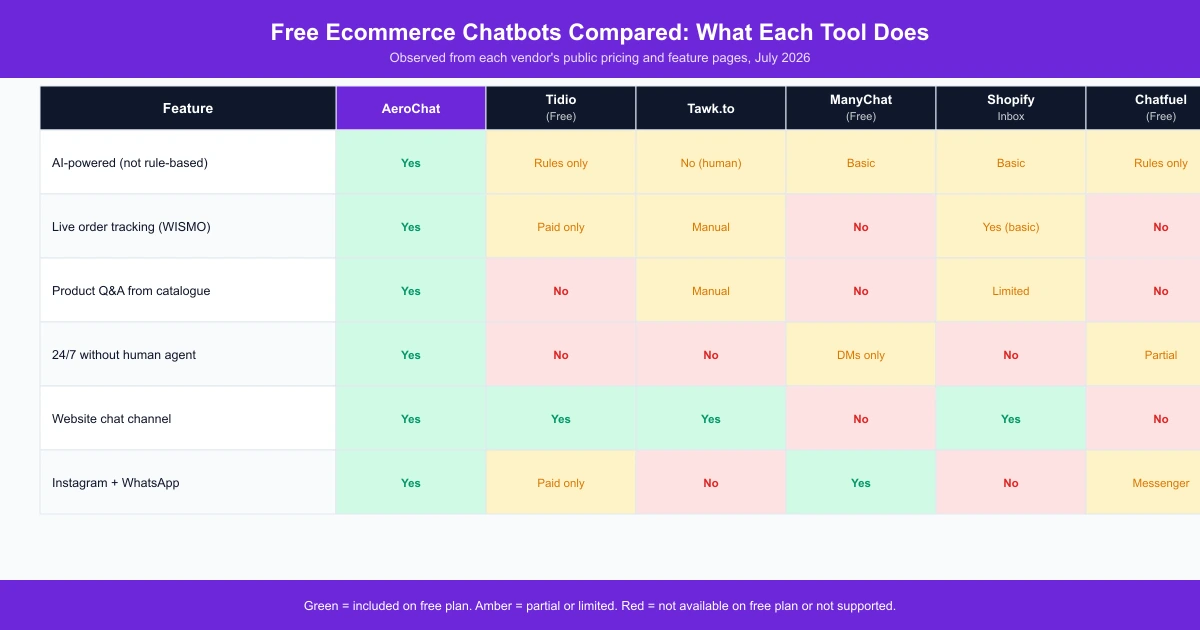
The comparison above covers the main tools with a relevant free tier for ecommerce merchants. [Observed: each vendor’s public pricing and feature pages, July 2026.]
AeroChat is chat infrastructure that runs customer service and sales workflows. You describe the workflow you want, and it runs it, connected to your Shopify store’s order data and product catalogue, so it answers WISMO, pre-purchase, size, returns and availability questions without manual programming of each reply. Its free plan includes 100 AI responses a month on one channel. It covers website chat, Instagram chat, WhatsApp and other supported channels through a single setup.
Tidio offers a genuine free plan with live chat and basic flow-based automation. Its Lyro AI agent, which Tidio’s own documentation describes as capable of resolving a high proportion of queries autonomously, is on paid plans only. The free tier handles simple FAQ-style questions through rule-based flows that require manual programming.
Tawk.to is completely free and well-suited to stores with a team available during all trading hours. It is a live chat platform, not an AI chatbot. Someone must be online for customers to receive a reply. Outside staffed hours, messages are queued.
ManyChat is built for social channel automation, particularly Instagram DMs and Messenger. It handles comment-to-DM flows and simple automated sequences well. It does not connect to Shopify order data and is not designed to answer WISMO or product questions from your catalogue.
Shopify Inbox comes free with any Shopify plan and handles basic website chat. It includes an automated order status reply for logged-in customers and simple away messages. It does not cover Instagram, WhatsApp or other external channels.
Chatfuel is strong for structured conversation sequences and campaign-driven flows on Messenger. The free tier limits conversations to 50 per month and does not connect to ecommerce order data natively.
Six questions to ask before installing a free chatbot
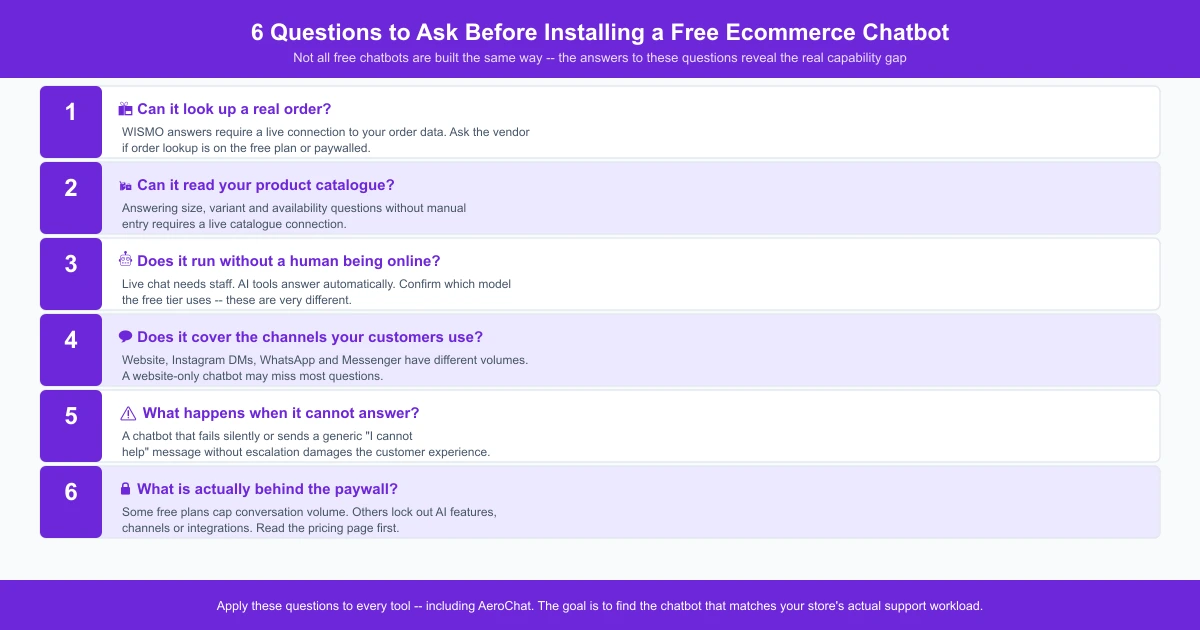
Apply these questions to any tool you are evaluating, including AeroChat.
1. Can it look up a real order? If the chatbot cannot connect to your order management system, it cannot answer WISMO questions. Ask the vendor whether order lookup is included on the free plan or whether it is paywalled.
2. Can it read your product catalogue? Answering size, variant, material and availability questions without manual entry requires a live catalogue connection. Ask where the chatbot gets product information from.
3. Does it run without a human being online? Live chat tools require a person to reply. AI tools answer automatically. Confirm which model the tool uses on its free tier before assuming you have automation coverage.
4. Does it cover the channels your customers use? Website chat, Instagram DMs, WhatsApp and Messenger have different conversation volumes for different stores. A chatbot that only covers the website may miss a significant portion of inbound questions.
5. What happens when it cannot answer? A chatbot that fails silently or sends a generic “I cannot help” message without an escalation path can frustrate customers at the exact moment they were close to buying.
6. What is actually behind the paywall? Free plans vary significantly. Some limit conversation volume; others limit AI features, channels or integrations. Read the pricing page before installing.
What most free chatbot plans limit
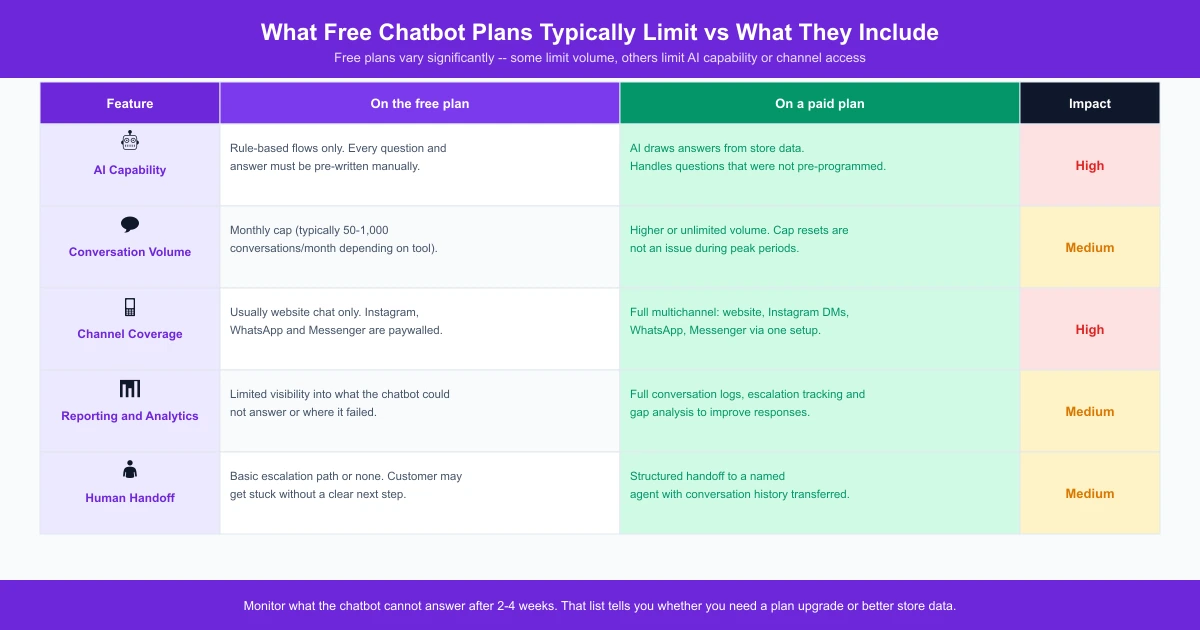
AI capability: Many tools offer full AI features on paid plans and rule-based flows only on free tiers. Rule-based flows require manual programming of every question and answer. AI draws answers from store data and handles questions that were not pre-written.
Conversation volume: Most free plans cap monthly conversations. When the cap is reached, the chatbot either stops responding or stops using AI for the remainder of the month. This becomes a problem during sales, launches or seasonal peaks.
Channel coverage: Free tiers often cover one channel, usually website chat, and lock social channels behind paid plans. If your customers contact you on Instagram or WhatsApp, a website-only chatbot will not reduce that workload.
Reporting and analytics: Free plans typically provide limited visibility into what customers are asking, what the chatbot could not answer, and where escalations are happening. This makes it harder to improve over time.
Human handoff: On some platforms, routing a conversation to a human agent requires a paid plan. Check the escalation path before a customer is stranded.
After two to four weeks, review what the chatbot could not answer. That list is more useful than any vendor comparison because it reflects your actual customer conversations. Use it to decide whether you need a plan upgrade or simply better product and policy information in your store.
What AeroChat includes on the 7-day free trial
AeroChat is chat infrastructure that runs customer service and sales workflows. You describe what you want automated, such as “answer order-status questions from the Shopify order”, and the system sets it up and runs it.
During the 7-day free trial, AeroChat connects to your Shopify store and can answer questions using your order data, product catalogue and store policies without manual programming of individual replies. It runs around the clock without requiring a human agent to be online.
When a question falls outside what it can answer confidently, it escalates to your support team rather than failing silently.
When the trial ends, the account moves to the free plan (100 AI responses a month, one channel) with no surprise charges. Paid plans start with Starter at US$49 a month (US$39 a month paid yearly), which includes 500 AI responses and 3 agent seats. Growth and above add payment links, WhatsApp broadcasts and insights. Current plan details are at aerochat.ai/pricing.
Merchants comparing AI chatbot options for Shopify can review the Shopify AI chatbot comparison guide for a broader set of tools across free and paid tiers.
Free AI chatbot vs free live chat: a practical comparison
Free live chat and free AI chatbots solve different problems. Neither is universally better.
Free live chat (for example, Tawk.to or Tidio’s free tier) suits stores with a team available during all trading hours who prefer humans handling every conversation. The software costs nothing, but it requires staff time. Outside staffed hours, conversations are missed or queued.
Free AI chatbot suits stores that want conversations handled automatically, around the clock, without a human agent. The chatbot handles the volume, and your team receives escalations for the cases that need human judgement. This matters most for mobile and social traffic, where shoppers leave quickly if a reply is slow.
Many growing stores use both: an AI chatbot as the first point of contact and a clear escalation path for complex or sensitive requests. The chatbot covers the predictable volume, and the team handles everything else.
How to get started with a free ecommerce chatbot
- Install the app from the Shopify App Store or the vendor’s own setup flow.
- Connect your store data so the chatbot can access order and product information. For tools that require this manually, this is the step that most affects answer quality.
- Add your store policies for returns, delivery timelines and any questions that come up repeatedly. The more accurate this information is, the better the chatbot’s answers will be. For structuring this content well, these ecommerce FAQ page examples show what merchants actually publish.
- Test the chatbot by asking the questions your customers actually send. Check what it answers correctly, what it gets wrong, and what it cannot answer at all.
- Review the conversation log after two to four weeks. The questions the chatbot could not answer are the ones to prioritise, either by improving your store data or by moving to a plan with broader capability.
If your inbox is mostly order, product and returns questions, test those five conversations on your own store. Start your 7-day free trial. No credit card needed. Install AeroChat from the Shopify App Store. Not on Shopify? Sign up here.
Common questions about free chatbots for ecommerce
Is a free chatbot good enough for a Shopify store?
For an early-stage store with a manageable volume of questions, a free chatbot can cover the most common conversations and reduce time spent on repetitive replies. As order volume grows, the limiting factor is usually the free plan’s conversation cap or AI capability rather than anything specific to the tool.
Can a free chatbot answer “where is my order”?
Only if it connects to your order management system. Not all free plans include this. Tidio’s order tracking feature, for example, is on paid plans. Shopify Inbox includes a basic order status reply for logged-in customers. AeroChat includes order lookup during the 7-day free trial. Check each vendor’s current feature list before assuming WISMO is covered.
Is Shopify Inbox a chatbot?
Shopify Inbox includes automated replies for some common questions (order status for logged-in customers, away messages) and a live chat widget. It is not a full AI chatbot. It does not cover external channels or handle open-ended product questions dynamically from your catalogue. It is a useful starting point for website-only chat.
Do I need to manually program every answer?
With rule-based tools, yes. With AI tools that connect to your store data, no. A proper ecommerce chatbot works out what the customer wants and replies from real store information, not canned messages. The AI draws from your product and order data to construct answers. You add context for your specific policies and any questions that fall outside the standard data.
When should I upgrade from a free chatbot plan?
When the chatbot is regularly hitting its conversation limit, when customers are asking questions the tool cannot answer due to AI restrictions, or when you need channel coverage such as Instagram or WhatsApp that the free tier does not include. Reviewing the conversation log at the end of each month is the most reliable signal for when to upgrade.